



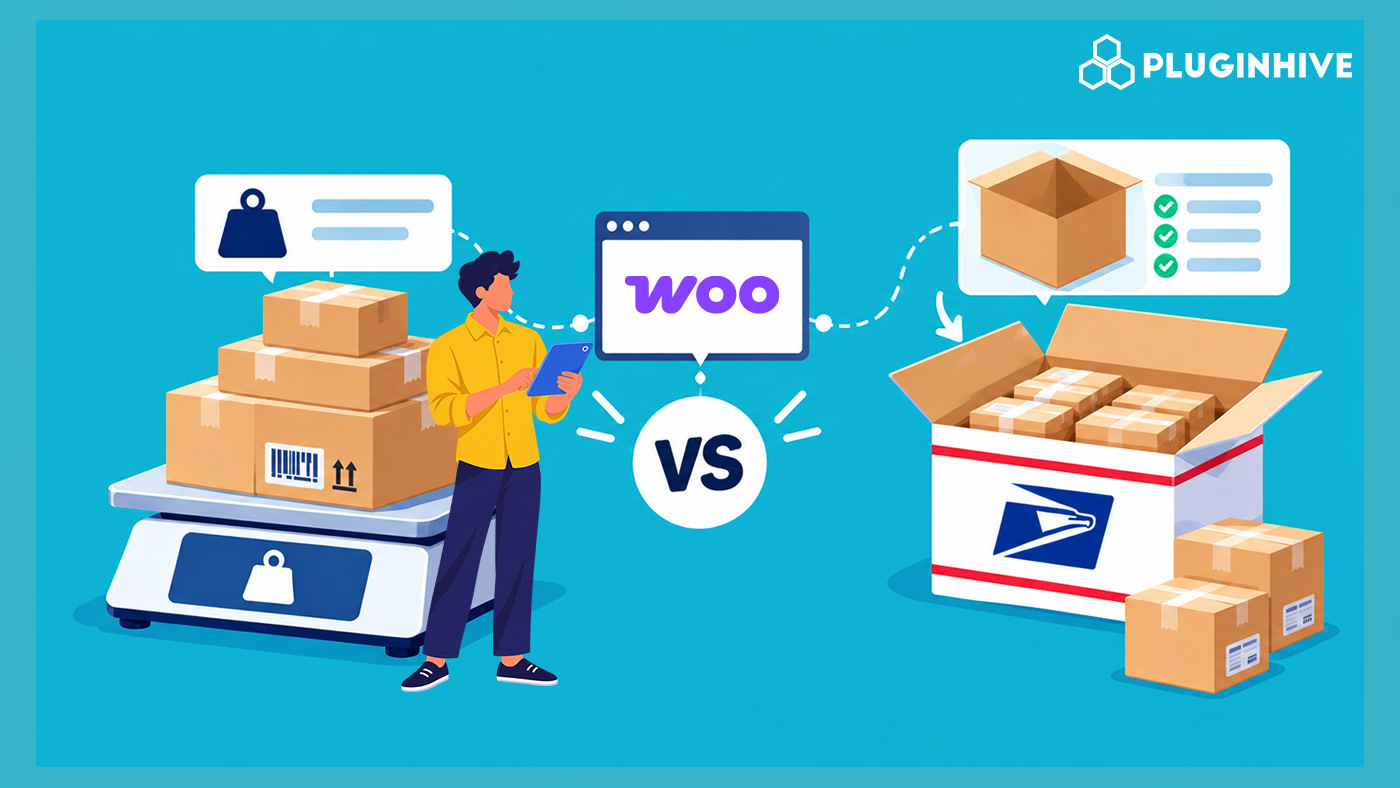
USPS bills a shipment at whichever is greater: its actual weight or its dimensional weight, what USPS calls Shape-Based Postage Pricing, calculated as (length × width × height) ÷ 166. It applies to Priority Mail, Priority Mail Express, Parcel Select, and Ground Advantage packages over one cubic foot. How a WooCommerce store packs its parcels for rate calculation, by weight alone or by actual box dimensions, determines whether checkout quotes match what USPS actually bills.
This guide explains how Weight-Based Packing and Box Packing work for USPS shipments in WooCommerce.
On This Page
- Why Packing Method Affects Your USPS Shipping Rates
- How Weight-Based Packing Works for USPS
- How Box Packing Works for USPS
- Weight-Based vs Box Packing: Which Fits Your Store
- How to Configure USPS Packing Methods in WooCommerce
- Real-World WooCommerce Use Case
- Conclusion
- FAQs
Why Packing Method Affects Your USPS Shipping Rates in WooCommerce
Dimensional weight exists so carriers can charge for the space a package takes up, not just what it weighs. A large, lightly packed box costs USPS roughly the same to move as a dense one of the same size. For applicable services, USPS compares that calculated dimensional weight against the actual weight and bills whichever is higher. USPS Flat Rate boxes and envelopes are the exception: they’re priced by the box itself, regardless of weight or dimensions.
A WooCommerce store that calculates rates purely by weight can underquote a lightweight, bulky order at checkout, then charge more when the label is purchased. Alternatively, it can overquote a dense, compact order and lose a sale to a competitor showing a cheaper number for the same product.
How Weight-Based Packing Works for USPS
Weight-Based Packing groups items by total weight without factoring in dimensions. You set a maximum weight per box, and the plugin estimates how many boxes an order needs by dividing the total order weight by that limit. It doesn’t submit real box dimensions to USPS as part of the rate request.
This is the simpler method to configure, since it skips creating individual box profiles, and it works fine for products that are naturally dense or uniformly sized, where dimensional weight rarely exceeds actual weight. The catch is that for bulky-but-light items, a rate calculated on weight alone can diverge meaningfully from what USPS actually bills once a package crosses the one-cubic-foot dimensional weight threshold.
How Box Packing Works for USPS
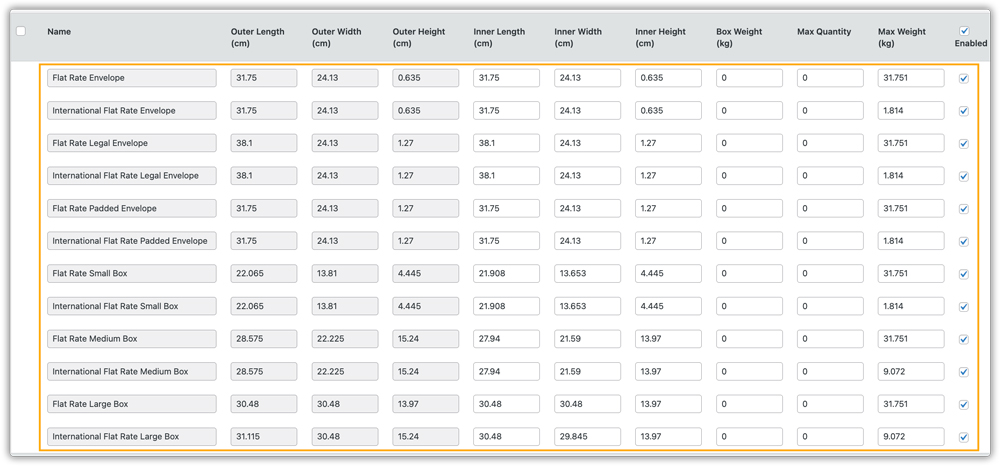
Box Packing is based on box volume, dimensions, and weight together. You create box profiles matching your actual shipping cartons, including inner and outer dimensions, box weight, and maximum weight. The plugin fits order items into those boxes by volume, filling each one until it’s full or only a small amount of space is left before starting a new box.
Because Box Packing submits real dimensions as part of the rate request, USPS can calculate dimensional weight accurately at checkout, so the quoted rate reflects what you’ll actually be billed rather than an estimate based on weight alone.
Weight-Based vs Box Packing: Which Fits Your WooCommerce Store
| Feature | Weight-Based Packing | Box Packing |
|---|---|---|
| Setup Effort | Minimal; just set a maximum weight per box. | Requires box profiles with actual dimensions and weight. |
| Rate Accuracy on Bulky/Light Items | Can diverge from the actual USPS bill once dimensional weight applies. | Matches USPS’s dimensional weight calculation more closely. |
| Best Fit | Dense, uniformly sized products. | Mixed, bulky, or irregularly sized catalogs. |
| Effect on Flat Rate Boxes | None; Flat Rate pricing ignores weight and dimensions either way. | None; same as Weight-Based Packing for Flat Rate packaging. |
How to Configure USPS Packing Methods in WooCommerce
To configure how your WooCommerce store packs USPS shipments for rate calculation, you can use the PH USPS Shipping Plugin for WooCommerce with Print Label.
In the plugin settings, you can select Weight-Based Packing, Box Packing, or Individual Packaging, depending on your products and shipping requirements.
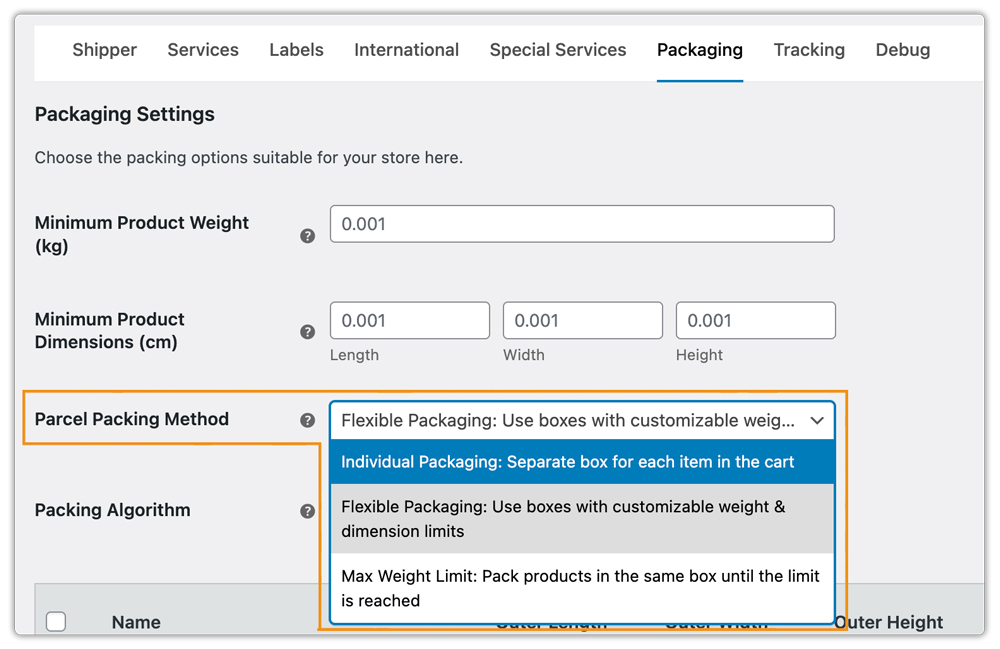
Choose Weight-Based Packing for dense, uniformly sized products where weight is the main consideration. Box Packing is better for bulky or irregularly sized products because it accounts for package dimensions during rate calculation. Individual Packaging works well when each item needs to ship in its own package.
The plugin also supports USPS Flat Rate boxes and envelopes, along with discounts on shipping rates.
Real-World WooCommerce Use Case
A WooCommerce store selling lightweight but bulky products, such as inflatable travel accessories, frequently faced differences between checkout shipping quotes and actual USPS label costs. Its weight-based packing setup did not account for package dimensions, resulting in lower quotes for shipments subject to dimensional weight pricing.
How the Store Solved It
The store installed the PH USPS Shipping Plugin for WooCommerce with Print Label and configured its packing settings to better match its shipping process. It selected Box Packing for bulky products and added box profiles matching its actual shipping cartons. For dense, compact products, it continued using Weight-Based Packing. This allowed the store to submit package dimensions when requesting USPS rates for applicable shipments.
The Result
- More accurate shipping quotes: Package dimensions were considered when calculating rates for bulky products.
- Better shipping cost management: The store reduced the gap between checkout quotes and actual label costs.
- Flexible packing options: The store could use different packing methods to suit different product types and packaging needs.
Conclusion
Accurate USPS shipping rates depend on how your WooCommerce store calculates package weight and dimensions. Understanding the available packing methods helps you configure shipping settings that reflect your packaging process and shipping requirements. Regularly reviewing your product details and packing configurations can also help minimize discrepancies between checkout estimates and actual shipping costs.
Need help with USPS shipping configuration in your WooCommerce store? Contact our support team for assistance.
FAQs
Q. Does USPS dimensional weight apply to every shipment?
No. It applies to Priority Mail, Priority Mail Express, Parcel Select, and Ground Advantage packages over one cubic foot. USPS flat-rate boxes and envelopes are priced by the box itself, regardless of weight or dimensions.
Q. Which packing method should I use for lightweight but bulky products?
Box Packing, since it submits your actual box dimensions as part of the rate request, letting USPS calculate dimensional weight more accurately at checkout instead of estimating from weight alone.
Q. Do USPS Flat Rate Boxes need either packing method?
No. Flat Rate boxes and envelopes are a separate, selectable service priced only by the box itself, so dimensional weight calculations don’t apply regardless of which packing method is active.
Q. Will switching to Box Packing change my negotiated USPS rates?
No. It changes how accurately dimensions are submitted for the rate request, not the underlying negotiated or account pricing your USPS account already has.
Q. What if I don’t want certain USPS services to appear for specific products?
The PH Hide Shipping Methods & Rate Adjustment for WooCommerce plugin lets you conditionally hide specific USPS services based on products, categories, or cart value, independent of your packing method setup.
