


The demand for virtual corporate training is skyrocketing, with businesses seeking efficient ways to deliver professional development online. For WooCommerce store owners offering training programs, the biggest challenge is often manual scheduling, coordinating sessions, sending Zoom links, and tracking participants, which can quickly become a time-consuming task. These repetitive activities consume valuable time and make it more challenging to provide a smooth and organized training process.
That’s where WooCommerce Zoom Integration comes in. With PluginHive’s WooCommerce Bookings & Appointments plugin and the Zoom Add-on, training providers can automate session creation, connect their WooCommerce store directly to Zoom, and manage programs with far less effort. This guide explains how the integration works and how it helps you deliver corporate training in an efficient and organized way.
Table of Contents
- Benefits of Integrating Zoom with WooCommerce for Online Corporate Training
- Integrating Zoom with WooCommerce for Corporate Training Sessions
- Real World Example
- Tips for Running Smooth Corporate Training via WooCommerce
- Conclusion
- FAQs
Benefits of Integrating Zoom with WooCommerce for Online Corporate Training
Integrating Zoom with WooCommerce transforms how training businesses handle virtual corporate programs. This connection reduces administrative tasks, improves participant experience, and allows scalable, professional training programs. Key benefits include:
- Automated Session Creation: Each confirmed booking automatically generates a Zoom meeting, eliminating manual scheduling and ensuring every client receives their session link instantly.
- Centralized Participant Management: Sync registrations and session details between WooCommerce and Zoom to keep all information in one place for easier tracking.
- Enhanced Learner Experience: Clients receive automated session links, reminders, and updates, ensuring a seamless, professional experience.
- Efficient Workflow for Trainers: Automate meeting setup and link sharing so trainers can focus entirely on delivering their sessions instead of handling repetitive administrative tasks.
With PluginHive’s WooCommerce Zoom Integration, training providers can save time, scale programs efficiently, and maintain a high-quality training experience. Next, we’ll look at how this integration can be leveraged for smooth session management.
Integrating Zoom with WooCommerce for Corporate Training Sessions
Running online corporate training becomes much easier when you integrate Zoom with WooCommerce.
Requirements for Hosting Online Corporate Training:
- WooCommerce Store Setup: Set up a fully functioning WooCommerce store, list all training products, and configure payment methods to accept bookings and payments from corporate clients.
- WooCommerce Bookings and Appointments Plugin: This plugin allows you to create bookable services with flexible time slots for groups or teams, ensuring precise scheduling for corporate sessions.
- Zoom Account: Use a Zoom Business or Enterprise account, especially when hosting large group training sessions or webinars.
- Zoom for WooCommerce Plugin: This add-on automatically creates Zoom meetings for each booked session, eliminating manual setup and ensuring a smooth workflow.
Note: For detailed guidance on setting up the WooCommerce Bookings Plugin or the Zoom Add-on, refer to WooCommerce Booking & Appointments Setup and Zoom Integration Guide.
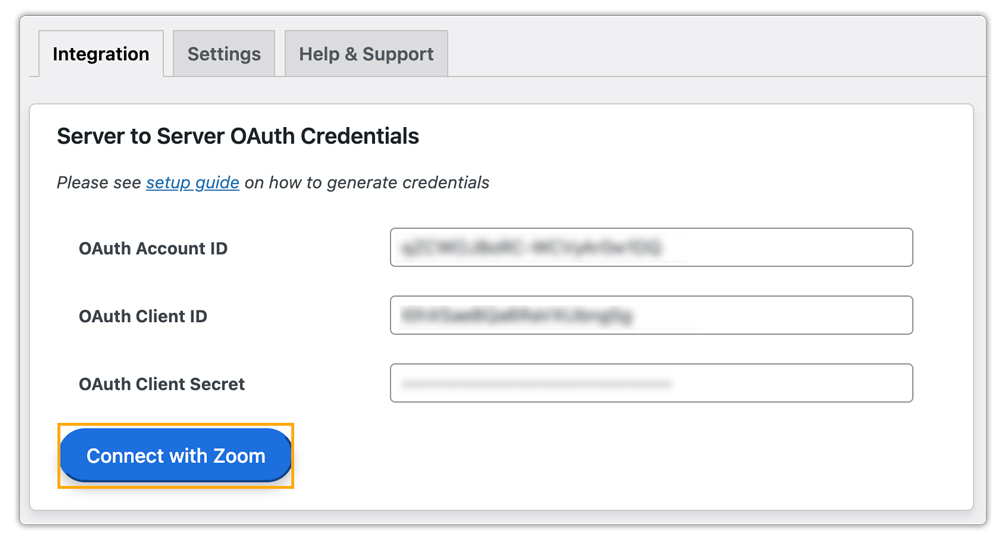
- Connecting Zoom with WooCommerce
Once the plugins are installed and activated, linking your Zoom account with WooCommerce is straightforward. The system automatically creates a Zoom meeting for every booking made by your client, sending all necessary links and details via email.
- Managing Your Training
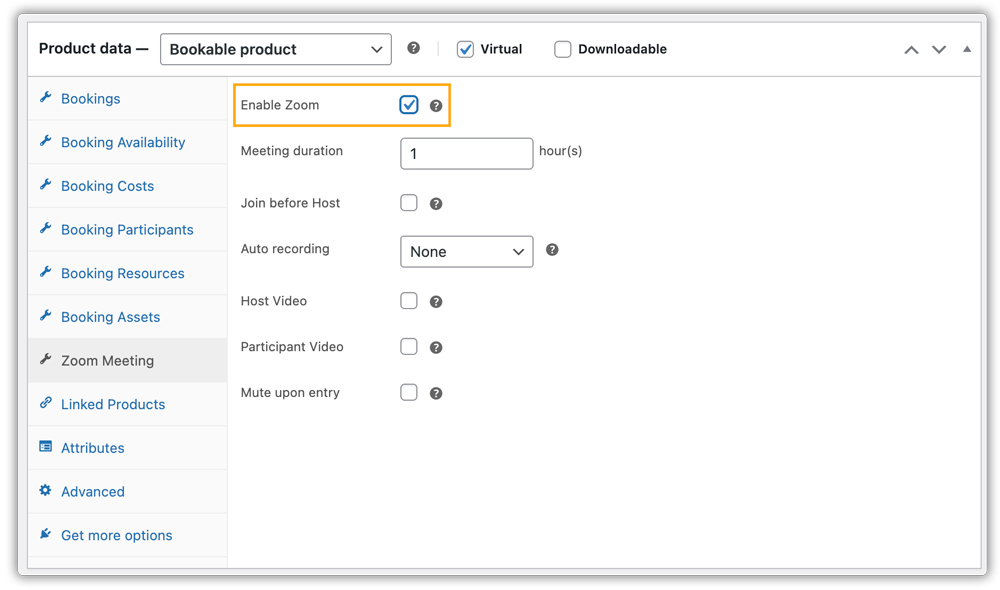
The integration gives full control over your sessions, including host assignment, duration, early access, recording options, and audio/video settings. For example, a large multi-day Certification Workshop can be scheduled with multiple sessions and recordings enabled for later review, while a smaller, high-security Executive Coaching Session can have restricted access and disabled recording for confidentiality. This flexibility allows trainers to tailor each session to meet corporate client needs.

These settings can be applied globally for all training programs or customized for specific sessions. This flexibility ensures each corporate session is delivered exactly as required.
- How Clients Book and Join Training
Clients enjoy a simple, user-friendly booking experience: they select the training service, choose available dates and time slots, complete payment, and receive an automated Zoom link via email.

This workflow eliminates back-and-forth communication and reduces scheduling errors. It also simplifies corporate enrollment, ensuring that teams can join sessions smoothly and on time.
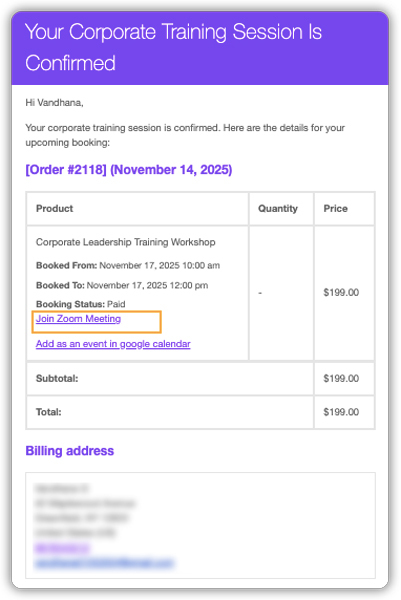
By automating session creation and communication, businesses can focus on delivering high-value training. WooCommerce and Zoom handle the operational work in the background.
Real-World Example: Streamlining Corporate Training with Zoom and WooCommerce
Let’s say you run a WooCommerce store that sells high-value services such as Leadership Development Workshops, B2B Certifications, and Group Compliance Training. Each corporate client may enroll dozens of employees in a single order. Managing sessions, assigning instructors, and handling participant communication can become overwhelming without the right tools.
The Challenges in Managing Corporate Training:
- Manually enrolling large employee groups: Coordinating bookings for 20+ attendees from a single corporate order takes significant administrative effort.
- Sharing Zoom links with participants: Companies need a reliable way to distribute session access to all employees attending the training.
- Assigning the correct instructor: Without automation, assigning the right host to specific modules or sessions can become confusing.
- Managing session security and access: Protecting corporate-only sessions from unauthorized access adds complexity.
How WooCommerce Zoom Integration Solves These Issues:
- Single booking, simple access: When a corporate client books a session, generate a single Zoom link that the company can share with all participants.
- Simplified instructor management: Automatically assign hosts to sessions to ensure smooth delivery.
- Centralized oversight: Session data and client information are all accessible from the WooCommerce dashboard, providing a single point of control.
By leveraging WooCommerce Bookings along with the PluginHive Zoom Integration, businesses can scale their professional corporate training delivery effortlessly. This setup removes logistical friction, streamlines session management, and ensures a polished, consistently reliable experience for both trainers and corporate clients.
Tips for Running Smooth Corporate Training via WooCommerce
Delivering corporate training online requires more than scheduling sessions; it requires a smooth, organized workflow for both your business and your clients. With WooCommerce, Zoom integration, and a few strategic add-ons, you can simplify operations and create a polished training experience. Here are practical tips to help you manage training efficiently:
- Offer Flexible Payment Options: Corporate training packages are often high-value. Using the PH WooCommerce Deposits plugin, you can allow companies to pay a partial amount upfront to reserve their training slot. This makes your services more accessible and increases the chances of confirmed bookings.
- Collect Additional Requirements: Use the PH Product Add-Ons plugin to gather extra details, such as training goals, required customization, preferred learning format, or any documents the team needs you to review. This helps you personalize the session without relying on follow-up emails.
- Set Clear Participant Guidelines: Include concise joining instructions, pre-session requirements, and behavioural expectations on the product page and in confirmation emails. This ensures every participant is prepared. It also helps sessions run smoothly with minimal interruptions.
- Use Zoom’s Security Features for Private Corporate Sessions: Corporate training often involves confidential topics. Enable Zoom settings like password protection, the Waiting Room, or limited access. These features ensure that only authorized participants from the client’s company can enter the meeting. This helps maintain privacy and professionalism.
By combining WooCommerce, Zoom integration, and these supporting tools, you can deliver organized, secure, and professional corporate training sessions while reducing manual work and improving client satisfaction.
Conclusion
WooCommerce Zoom Integration makes running corporate training online far more efficient. It eliminates repetitive tasks, automates Zoom session creation, centralizes management, and ensures clients receive timely access to their sessions. Whether you conduct leadership development programs, certification courses, or internal corporate workshops, this setup helps you deliver organized and dependable training every time.
If you need help configuring the integration, PluginHive Support is always available for guidance.
FAQs
Q1: What do I need to use Zoom for corporate training with my WooCommerce store?
You’ll need 3 things to run corporate training on Zoom through WooCommerce: a Zoom account (free or paid), PluginHive’s WooCommerce Bookings & Appointments plugin, and the Zoom for WooCommerce add-on. These work together to link bookings to Zoom and automatically generate a meeting link for every confirmed session.
Q2: Can I integrate Zoom in group training sessions using WooCommerce Bookings?
Yes. The PluginHive’s Zoom add-on supports both one-on-one and group bookings. When a corporate client books a session, a Zoom meeting is created automatically for that booking.
Q3: How are hosts (instructors) managed for each Zoom session through WooCommerce?
When you set up your booking product, you can assign staff (instructors) to it. The WooCommerce Zoom Integration plugin automatically assigns the booked staff as the host or alternate host on Zoom.
Q4: Do I need a paid Zoom plan to use this integration with WooCommerce?
Not necessarily, depends on your training needs. For larger corporate sessions (many participants or long-duration meetings), a paid Zoom account is recommended.
