



Online fitness training is booming, and WooCommerce has become the go-to platform for managing class bookings and payments. Yet, many trainers still handle everything manually, scheduling clients, collecting payments, and sending Zoom links one by one. This constant admin work creates friction, wastes time, and takes focus away from what truly matters: training your clients.
The WooCommerce Zoom Integration solves this problem effortlessly. By combining the WooCommerce Bookings and Appointments plugin with Zoom for WooCommerce, you can automate bookings, payments, and meeting link creation in one place. No more manual coordination or missed sessions, just a smooth, professional experience for both you and your clients. This article will show you how to simplify your workflow and run online fitness sessions with ease.
Table of Contents
- Why Online Fitness Trainers Should Integrate Zoom with WooCommerce
- Streamline Your Online Fitness Classes with WooCommerce Bookings and Zoom
- Real World Example
- Tips to Improve Client Experience and Increase Bookings on WooCommerce
- Conclusion
- FAQs
Why Online Fitness Trainers Should Integrate Zoom with WooCommerce
Running fitness sessions through WooCommerce shouldn’t feel like managing a dozen tools at once. Integrating Zoom with your store transforms that manual chaos into a smooth, automated system that saves hours every week.
Here’s how this integration makes a difference:
- Automated Zoom Links: Each booking automatically generates and shares a unique Zoom link, no manual setup or copy-paste required.
- Fewer No-Shows: Clients receive automatic confirmations and reminders, so they always know when and where to join.
- Simplified Workflow: Handle bookings, payments, and Zoom meetings directly from your WooCommerce dashboard. Everything stays organized in one place.
- Effortless Scalability: As your client base grows, automation keeps your system running smoothly, whether you add new trainers, classes, or programs.
By connecting WooCommerce and Zoom, you can focus on what truly matters: training clients and growing your fitness business, not managing endless admin tasks.
Streamline Your Online Fitness Classes with WooCommerce Bookings and Zoom
Combining WooCommerce with Zoom makes running your online fitness sessions effortless. From class bookings and payments to generating Zoom meeting links automatically, everything happens within one system. This integration removes the manual setup so you can focus on coaching and client engagement rather than admin work.
Requirements for Managing Online Fitness Classes
Before you begin, make sure you have the following in place:
- WooCommerce Store Setup: List your fitness classes or personal training sessions as products. Set up payment options so clients can easily register and pay in advance.
- WooCommerce Bookings and Appointments Plugin: Use this plugin to create bookable class slots, manage trainer availability, and set group size limits for yoga, HIIT, or one-on-one sessions.
- Zoom Account: You’ll need a Zoom account to host your live sessions. A Pro plan is recommended if you conduct longer workouts or multiple group classes daily.
- Zoom for WooCommerce Plugin: This plugin from PluginHive automatically creates Zoom meetings for every booking and sends the meeting link directly to clients, ensuring a fully automated process.
Note: If you haven’t set up these plugins yet, you can check out PluginHive’s WooCommerce Bookings and Zoom setup guides for step-by-step instructions.
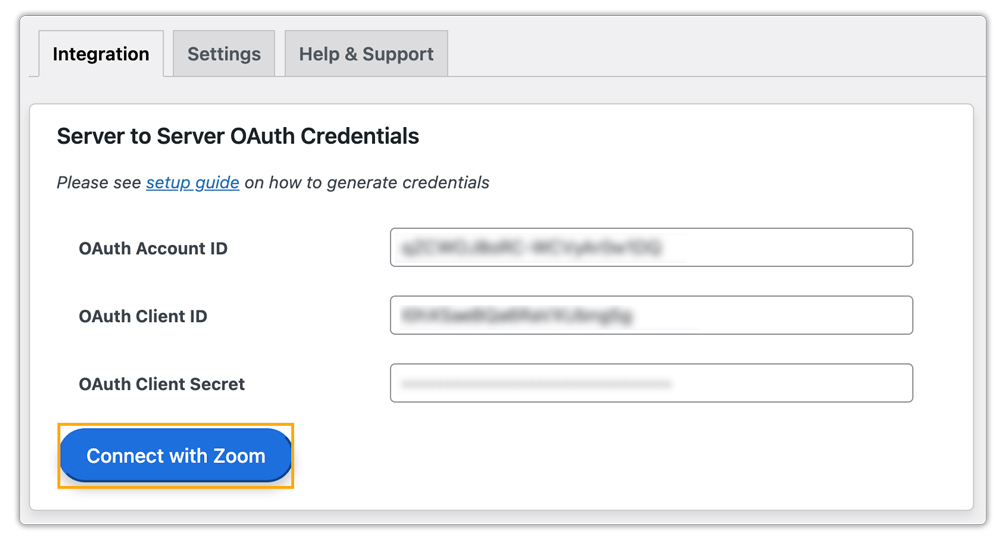
- Connecting Zoom with WooCommerce
After installing the Zoom integration, simply connect your Zoom account to WooCommerce. Once linked, the system automatically creates a Zoom meeting whenever a client books a class. The meeting link is sent instantly to the client, no manual scheduling or extra setup needed.
- Managing Your Fitness Classes and Sessions
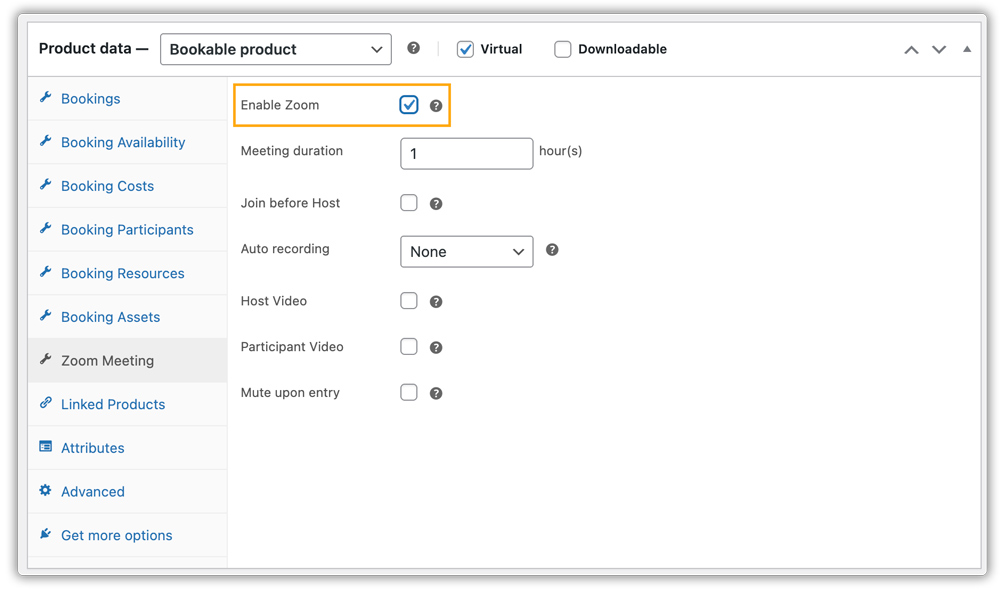
Managing your fitness classes is simple with this integration. You can assign trainers or co-trainers to each session, set class durations, and adjust schedules with ease. From your WordPress dashboard, you can also manage Zoom settings, enable recordings, mute participants on entry, or tweak audio and video options for a smooth, professional class experience.
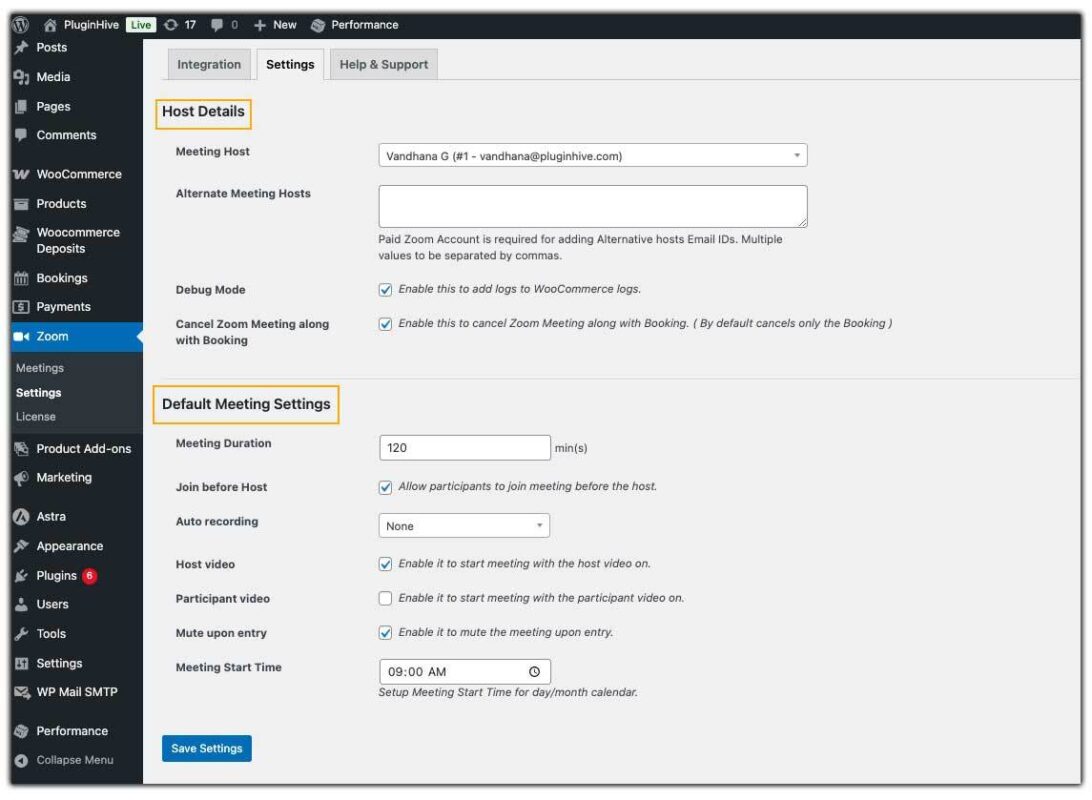
- These preferences can be applied to all sessions or customized for specific classes as needed.
- How Clients Book and Join Fitness Classes
The client booking journey is smooth and simple:
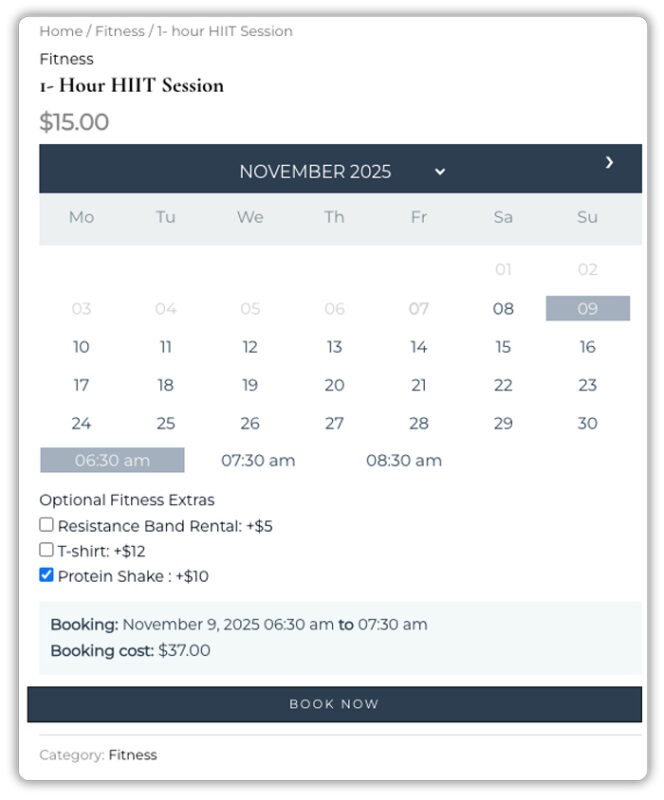
- Book and Pay: The client visits your WooCommerce store, selects the fitness class they want to join, picks a convenient time, and completes the payment.
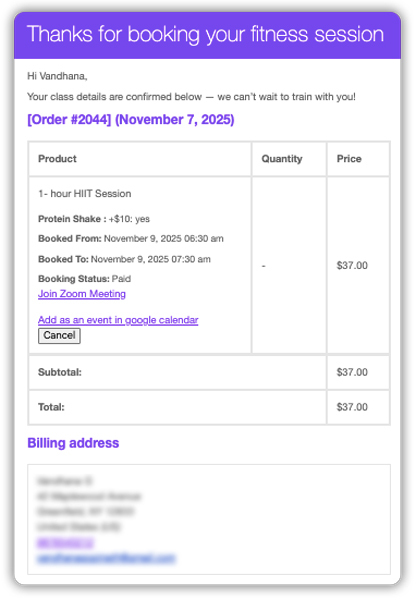
- Automatic Link & Easy Access: Once the booking is confirmed, a Zoom meeting is created instantly, and the client receives the session link via email. When it’s time for the class, they can join with a single click, no extra steps or confusion.
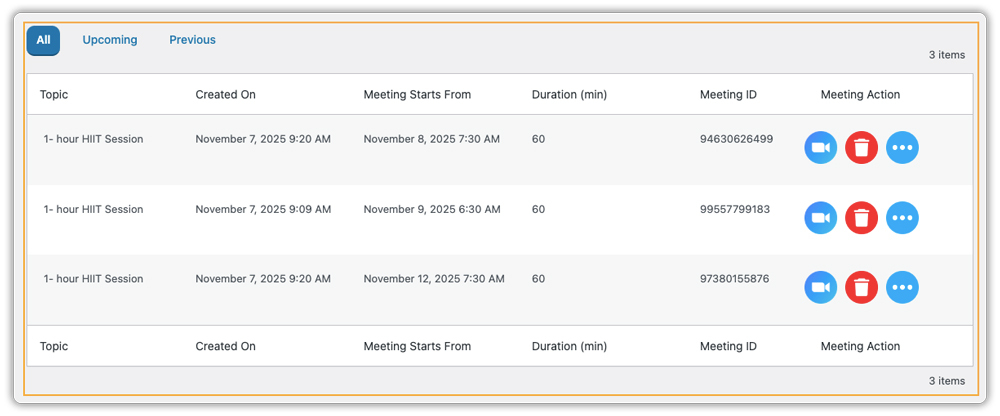
You can view all upcoming classes directly in your WooCommerce dashboard, check participant details, start sessions, and handle cancellations easily.
By integrating WooCommerce with Zoom, managing online fitness sessions becomes seamless and fully automated. You can focus on delivering engaging, high-quality workouts and growing your client base, while your system handles scheduling, Zoom setup, and communication automatically.
Real-World Example: How WooCommerce Zoom Integration Simplifies a Fitness Trainer’s Day
Let’s look at how this integration solves a typical operational day for you, a fitness trainer offering live classes through WooCommerce. You want a simple, professional system that allows clients to book, pay, and join your 1:1 or group sessions without the endless back-and-forth of emails and scheduling tools.
The Challenges Without Automation
Before automation, running Fitness classes can feel like an admin overload:
- Manual Zoom Links: You spend time creating and emailing new Zoom links for every session.
- Calendar Confusion: Managing multiple calendars often leads to double bookings or missed slots.
- Inconsistent Client Experience: Clients sometimes can’t find their session link or get it late, causing frustration and no-shows.
- Extra Work on Cancellations: When a client cancels, you need to manually update schedules and delete old meeting links.
The Solution ( WooCommerce Zoom Integration )
Once you connect WooCommerce Bookings with the Zoom integration, everything runs on autopilot:
- Instant Meeting Creation: Each booking automatically generates a Zoom link and sends it to the client instantly.
- Everything in One Dashboard: Track bookings, payments, and meetings directly in WooCommerce.
- Smooth Client Experience: Clients get confirmation emails and reminders automatically, reducing no-shows.
- Automatic Cancellations: When a session is cancelled, the linked Zoom meeting updates or deletes itself.
With automation in place, you save hours every week. No more juggling links or emails, your system handles the logistics while you focus on coaching, connecting with clients, and growing your business.
Tips to Improve Client Experience and Increase Bookings on WooCommerce
Once your fitness classes are set up with WooCommerce Bookings and Zoom Integration, small strategic tweaks can help you attract more clients, enhance professionalism, and increase repeat bookings.
- Offer Recurring or Package Bookings: Use the PH Recurring Booking Add-on to let clients book weekly or monthly classes easily. This helps maintain consistent attendance and steady income.
- Personalize the Booking Form: Add custom fields with the PH WooCommerce Product Addons plugin to ask about fitness goals or workout preferences. A personalized touch makes clients feel valued.
- Send Follow-Up Emails: Automate thank-you or feedback emails through the WooCommerce Bookings plugin. Sharing discounts for future sessions can encourage repeat bookings.
- Keep Class Details Clear: Clearly mention the trainer, session type, skill level, and what clients can expect. Adding short videos or testimonials can boost trust and credibility.
By combining these strategies, you’ll create a smooth, personalized, and professional booking experience that keeps clients coming back while WooCommerce and its extensions handle the heavy lifting behind the scenes.
Conclusion
Managing online fitness sessions shouldn’t feel like a full-time admin job. With the WooCommerce Bookings and Appointments plugin working alongside the WooCommerce Zoom integration, you can fully streamline how you run your classes. From automated scheduling and instant meeting creation to seamless payments and reminders, everything happens within your WooCommerce store. The result is a smoother experience for your clients and more time for you to focus on what truly matters: delivering impactful training sessions.
If you’re ready to simplify your workflow and provide a professional online training experience, this integration is the perfect place to start. And if you need help setting it up or customizing it for your WooCommerce store, the PluginHive support team is ready to help.
FAQs
1. Can I host group fitness classes with WooCommerce and Zoom?
Yes. With the WooCommerce Bookings and Appointments plugin and the Zoom Add-on, you can host group fitness classes. When clients book, unique Zoom links are sent automatically; no manual setup is needed.
2. Do I need a paid Zoom account to use WooCommerce Zoom integration?
You can start with a free Zoom account. However, for longer or larger group sessions, a Zoom Pro plan is recommended to avoid time limits and ensure smooth classes.
3. Can I sell recurring or package-based fitness sessions through WooCommerce?
Yes. Use the WooCommerce Bookings and Appointments plugin and the Zoom Add-on with the PH Recurring booking Add-on to offer weekly, monthly, or multi-session packages directly from your store.
4. Is it hard to set up WooCommerce Zoom integration for my fitness business?
Not at all. You just need WooCommerce, the Bookings and Appointments plugin, and the Zoom for WooCommerce plugin. Once connected, everything runs automatically. The PluginHive team can help if you need guidance.
