


Running online language classes goes beyond teaching; it’s about managing schedules, coordinating students, and ensuring every session runs smoothly. For many tutors, the administrative side quickly becomes a challenge, from tracking bookings to sending Zoom links and handling payments. Without a clear system, the process can feel chaotic, leaving less time for what matters most: helping students learn and grow.
This article explores how PluginHive’s Zoom for WooCommerce and WooCommerce Bookings and Appointments plugin can transform the way you run your online language classes. You will discover how to manage class bookings, organise live sessions, and streamline operations, creating a professional and seamless experience for both tutors and students.
Table of Contents
- Benefits of Using WooCommerce Zoom Integration for Language Classes
- Run Live Language Classes Using WooCommerce Zoom Integration
- Real World Example
- Tips to Improve Online Language Classes Business on WooCommerce
- Conclusion
- FAQs
Benefits of Using WooCommerce Zoom for Language Classes
By connecting WooCommerce directly with Zoom, you move beyond simple video calls into a well-organised teaching hub. This isn’t just about software; it’s about giving yourself more breathing room and making lessons smoother for your students.
- Organised First Impressions: Students get clear confirmations with the time, Zoom link, and a welcome note. It helps them start class confident and ready.
- Centralised Daily Dashboard: All classes, student names, and Zoom links appear in one place. You can see at a glance who you’re teaching and when.
- Easy Lesson Material Sharing: Include links to worksheets, guides, or shared folders in booking confirmations or reminders. Students can access resources easily, keeping lessons flowing.
- Flexible Class Management: Switch between one-on-one lessons, groups, or intensive sessions without extra work. The system handles it automatically.
- Clear, Searchable Records: Each booking creates a log. Track past lessons, attendance, and follow-ups easily. Your site becomes a simple record-keeper for student progress.
These benefits make teaching easier and more enjoyable. With logistics handled automatically, tutors can focus on students. Next, we’ll see how this setup makes running live Zoom sessions simple.
Run Live Language Classes Using WooCommerce Zoom Integration
Running live language classes becomes much easier when your website and your teaching tool work together. Instead of switching between multiple apps to schedule lessons, collect payments, and host sessions, you can manage everything from your WordPress dashboard. This setup reduces manual effort and keeps all class-related details organised in one place.
Requirements for Running Online Language Classes
Before running live language classes, a few basics need to be in place.
- WooCommerce store: Your website should use WooCommerce to list language classes so students can book and pay online.
- WooCommerce Bookings and Appointments plugin: This is used to set available time slots, lesson duration, and how many students can join a class.
To run online language classes on WooCommerce using this plugin, refer to this guide for a complete walkthrough. - A Zoom Account: A Pro or Business account is recommended so you can host sessions longer than 40 minutes.
- Zoom for WooCommerce plugin: This connects Zoom with your bookings, so meetings are created automatically when a class is booked.
If you haven’t set up your WooCommerce Bookings plugin yet, you can check out this setup guide. For setting up the Zoom Integration Addon, refer to this Zoom setup guide.
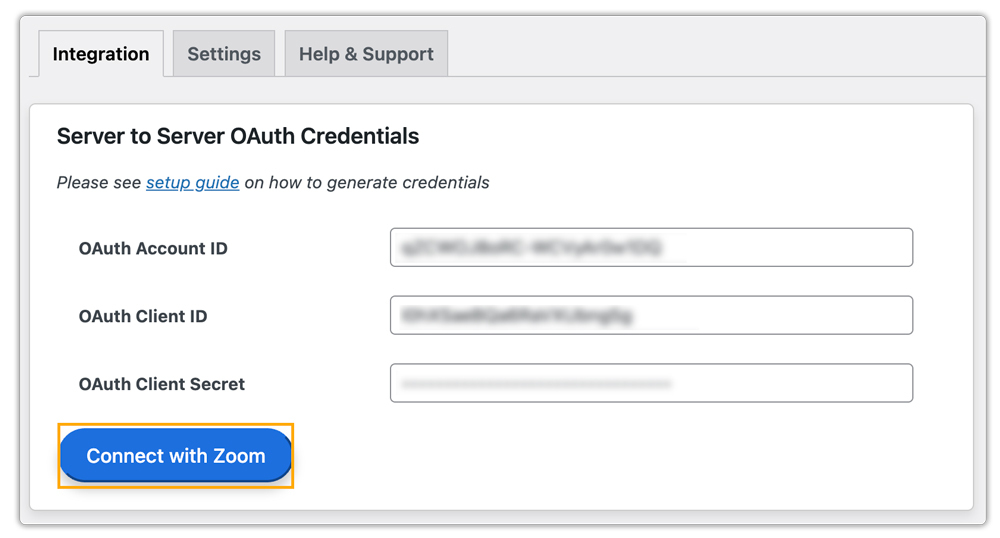
Connecting Zoom with WooCommerce
Once Zoom is connected to your WooCommerce store, the system handles meeting creation on its own. Every time a student books a class, a Zoom meeting is created in the background. Tutors do not need to schedule meetings manually or send links separately, as the booking and the Zoom session stay linked.
Managing Language Classes and Sessions
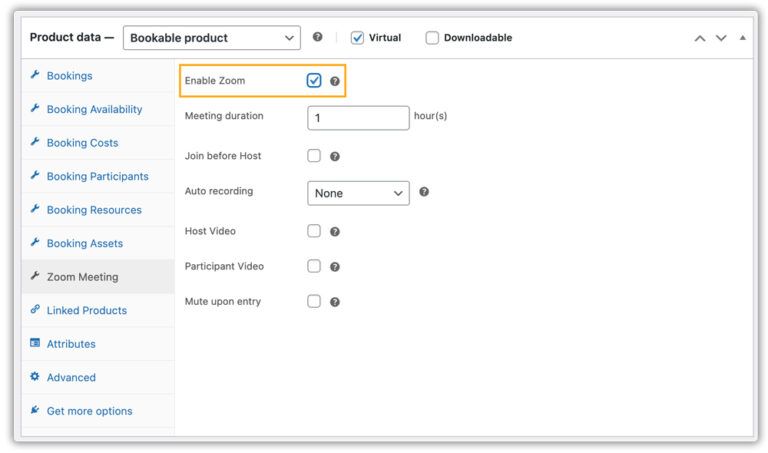
Managing your language classes stays simple once WooCommerce and Zoom are connected. You can set lesson duration, choose available time slots, and decide whether a class is private or for a group of students. Adjusting schedules or availability can be done easily as your routine changes.
From your WordPress dashboard, you can also control basic Zoom settings for your classes, such as enabling recordings or managing how students join the session.
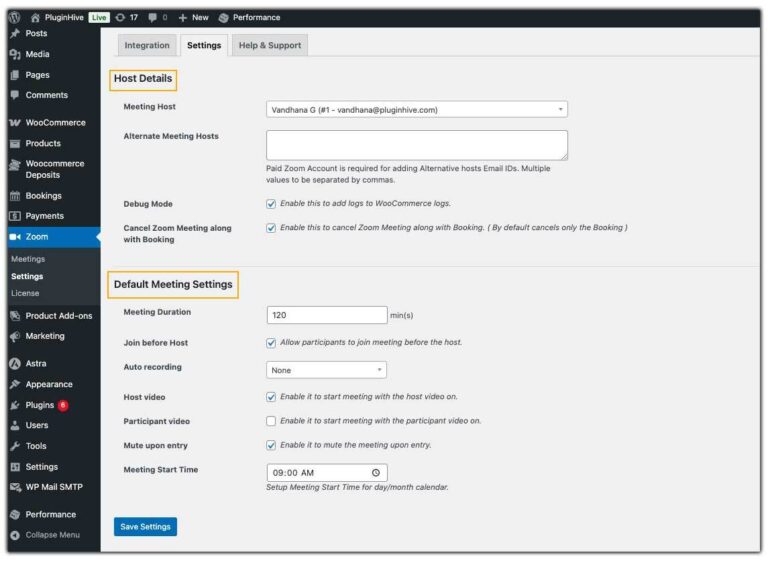
You can apply the settings to all classes or adjust for specific lessons when needed.
How Students Book and Join Language Classes
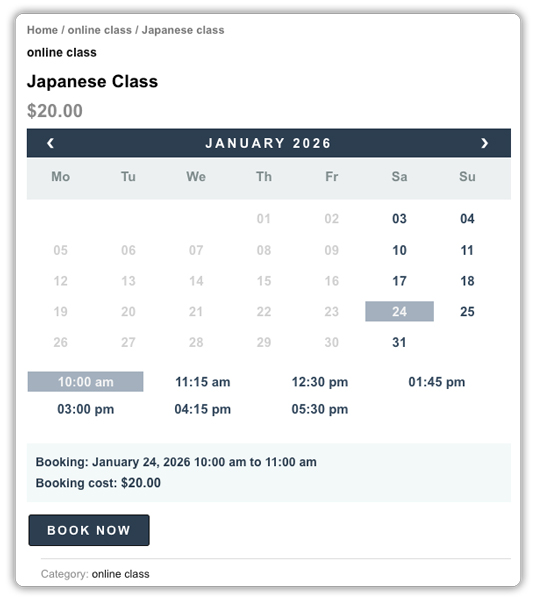
For students, the process is simple. They choose a class, select a date and time, and complete payment through WooCommerce.
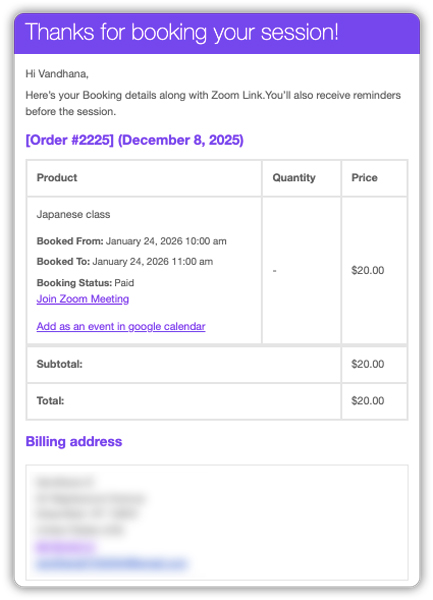
After booking, the Zoom link is sent automatically. At class time, students join the session with a single click, without needing extra instructions.
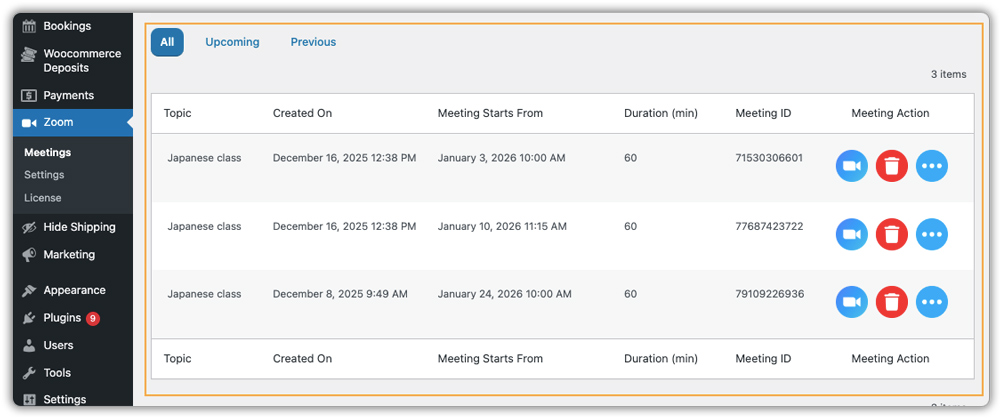
You can view all upcoming Language classes directly in your WooCommerce dashboard, check participant details, start sessions, and handle cancellations easily.
Using WooCommerce with Zoom keeps class management clear and organised. Tutors spend less time handling details and more time teaching. Students benefit from an easy booking and joining process, which helps classes run on time and without confusion.
A Real-World Example of an Online Language Tutor Using WooCommerce and Zoom
Let’s look at a typical day in the life of an independent language tutor, say, a Spanish instructor offering both private and group lessons.
Before Integration: The Manual Struggle
The process often starts with a message or email from a student asking about availability. You go back and forth to agree on a time, then share payment details and wait for confirmation. Once the payment arrives, you manually create a Zoom meeting, send the link in another email, and block the time in your personal calendar.
This workflow quickly becomes exhausting. It’s easy to forget a step, double-book a session, or send a Zoom link late. Students may miss reminders, and you end up spending several hours each week on admin tasks instead of lesson planning and teaching.
After Integration: A Streamlined, Automated Workflow
Now, let’s say you set up your website with WooCommerce Bookings and integrate Zoom. Here’s how it changes:
- You list your lessons as bookable products, private sessions, group classes, or exam preparation with clear descriptions and pricing.
- You can see the real-time availability on your website, allowing students to see exactly when you’re free.
- Students book a class by selecting a time slot and paying securely upfront, no back-and-forth emails or payment follow-ups.
- The plugin creates a Zoom meeting automatically for each booking, and the customer will receive the meeting link instantly in the confirmation email.
- You get a centralised dashboard displaying all upcoming classes, with Zoom links ready to start each session.
The Result
You reclaim hours each week. The plugin handles the administrative tasks, scheduling, payment tracking, and sending links automatically. Your students enjoy a seamless booking experience that feels professional and reliable. They receive everything they need upfront, and you can focus entirely on delivering great lessons.
This streamlined approach not only saves time but also builds trust and credibility, making your WooCommerce tutoring business more efficient and enjoyable to run.
Tips to Improve Your Online Language Class Business on WooCommerce
Getting your classes online is a great first step. After that, a few small changes can make teaching easier and help students have a better experience.
- Sell simple digital learning resources: Your students often need something to practice between lessons. You can reuse what you already teach and turn it into simple PDFs, flashcards, or grammar notes. These can be offered as digital products in WooCommerce, giving you another way to earn from the material you already teach.
- Use small, focused promotions: Instead of running large discounts, try simple offers. For example, a coupon for a first lesson or a small discount when students book a group class together. These feel more personal and often help encourage bookings.
- Offer class recordings as an optional add-on: Some students like to replay lessons for revision. Using PH WooCommerce Product Add-Ons, you can offer recordings as an optional checkbox during booking.
- Keep your schedule in sync automatically: Managing bookings manually can lead to mistakes. Using the WooCommerce Bookings plugin’s Google Calendar sync helps keep everything aligned. When a student books a class, the time slot is automatically added to your calendar, reducing the risk of double bookings.
- Leave short breaks between classes: Teaching sessions back-to-back can be tiring. Small gaps between classes give you time to reset, prepare, or rest. They also help classes start on time and feel less rushed.
If you’d like to set this up, you can refer to this guide on adding buffer time in WooCommerce Bookings.
You don’t need to change everything at once. Even one or two of these ideas can make your day calmer and your classes easier to manage. Over time, small improvements like these help you build a steady and enjoyable teaching routine.
Conclusion
In the end, a well-integrated system does more than just organise your language classes. By connecting WooCommerce Bookings with Zoom, you build a reliable foundation for your teaching business. This approach supports long-term sustainability, giving you the consistency to plan and the confidence to grow your online language classes.
If you’re planning to set up or improve online language classes on your WooCommerce site and need some guidance along the way, you can reach out to the PluginHive support team.
FAQs
Q. How does Zoom work with WooCommerce Bookings for online language classes?
When you have connected WooCommerce Booking with Zoom via the Integration plugin, a Zoom meeting is created automatically for each class booking. The meeting stays linked to the booking, so tutors and students know exactly which session belongs to which class.
Q. Are Zoom meeting links sent automatically after a WooCommerce booking?
Yes. After a student completes a booking and payment, the He/She will receive a Zoom meeting link automatically through WooCommerce booking emails. There’s no need to create meetings or send links manually.
Q. Can I use WooCommerce Zoom integration for both private and group language classes?
Yes. You can use the same setup for one-on-one lessons and group classes. WooCommerce Bookings lets you set student limits, and all booked students receive the Zoom link.
Q. What happens if a Language class is cancelled in WooCommerce?
When a booking is cancelled, the linked Zoom meeting is updated as well. This helps keep class details accurate and avoids confusion for students.
