



When store owners search for a delivery date plugins for WooCommerce, they often come across two very different types of tools. The YITH WooCommerce Delivery Date and the PluginHive Estimated Delivery Date Plugin for WooCommerce are a clear example of that divide, and choosing the wrong one means either overwhelming customers with unnecessary steps or leaving them without the transparency they expect.
On This Page
- Two Different Approaches to WooCommerce Delivery Dates
- Overview of Both WooCommerce Estimated Delivery Date Plugins
- Feature Comparison: PluginHive vs YITH WooCommerce Delivery Date
- Ease of Setup & Configuration
- Pricing: PluginHive vs YITH WooCommerce Delivery Date
- Which WooCommerce Store Type Needs Which Plugin?
- Final Verdict
Two Different Approaches to WooCommerce Delivery Dates
Before comparing features, the core distinction needs to be clear:
- The Estimated Delivery Date Plugin for WooCommerce automatically calculates and displays estimated dates across the product page, shop page, cart, checkout, order emails, the Thank You page, and My Account — without any customer interaction.
- The YITH WooCommerce Delivery Date plugin places a calendar date-picker at checkout and asks customers to choose when they want their delivery. It is a scheduling tool, not an estimation tool.
Most WooCommerce store owners are trying to answer: “How do I show customers when their order will arrive?” That is exactly what the PluginHive Estimated Delivery Date Plugin for WooCommerce solves. YITH answers a different question: “How do I let customers book a specific delivery slot?” — relevant only to a narrow category of businesses like flower shops or perishables stores.
Overview of Both Estimated Delivery Date Plugins for WooCommerce
PluginHive Estimated Delivery Date Plugin for WooCommerce
The Estimated Delivery Date Plugin for WooCommerce automatically calculates and displays delivery estimates throughout the store. It displays the estimated delivery dates on the Shop page, Product page, Cart, Checkout (per product and per order), Order Emails, Thank You page, My Account page, and the WooCommerce Admin Orders listing — all without any customer input.
YITH WooCommerce Delivery Date Plugin
The YITH WooCommerce Delivery Date plugin inserts a calendar-based date and time slot picker into the WooCommerce checkout page. Admins configure carriers, time slots, lockout limits, and holidays via a built-in delivery calendar. It is a scheduling tool, not a passive estimated delivery date display plugin.
Feature Comparison: PluginHive Estimated Delivery Date Plugin vs YITH WooCommerce Delivery Date
| Feature | PluginHive Estimated Delivery Date Plugin for WooCommerce | YITH WooCommerce Delivery Date Plugin |
|---|---|---|
| Automatic WooCommerce estimated delivery date display | Yes. No customer input needed | No. The customer must pick a date |
| WooCommerce Product Page display | Yes | Dynamic message only — requires carrier configuration; not automatic |
| WooCommerce Shop Page display | Yes | No |
| WooCommerce Cart Page display | Yes | No |
| WooCommerce Checkout Page display | Yes. Per product and per order | Yes. Calendar date-picker only |
| WooCommerce Order Emails display | Yes, automatic | Yes, manual trigger per order |
| WooCommerce Thank You Page display | Yes | No |
| WooCommerce My Account Page display | Yes | No |
| WooCommerce Admin Orders listing view | Yes | No |
| WooCommerce Shipping Class-based estimates | Yes | No |
| Per-line-item delivery estimates at Cart & Checkout | Yes | No |
| Store and carrier holiday exclusions | Yes, separately configurable | Yes |
| Cut-off times per zone, class & method | Yes, granular | Yes, per carrier |
| WPML multilingual support | Yes | Yes |
| Customer-selectable delivery time slots | No (estimates only) | Yes, core feature |
| 30-day money-back guarantee | Yes | Yes |
Ease of Setup & Configuration in Your WooCommerce Store
PluginHive Estimated Delivery Date Plugin for WooCommerce
The Estimated Delivery Date Plugin for WooCommerce has a tab-based configuration inside WooCommerce settings — General Settings, Holidays, Shipping Classes, Shipping Zones, and Shipping Methods.
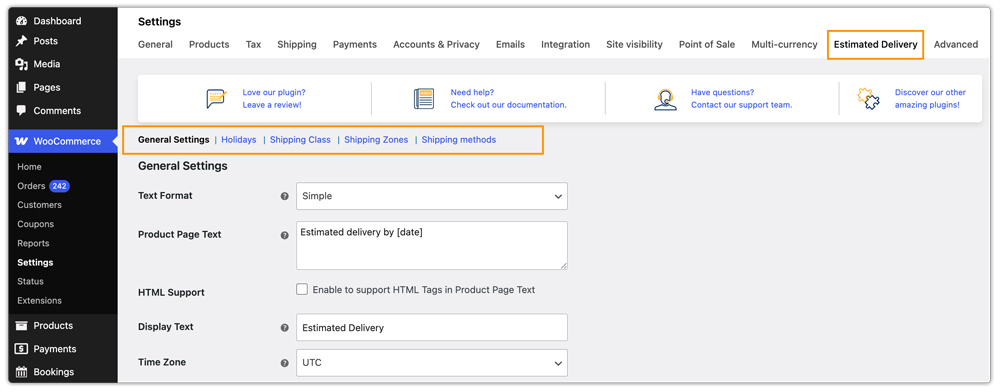
Once configured, the plugin automatically displays estimated delivery dates across all supported WooCommerce pages, including:
The WooCommerce Shop Page

WooCommerce Product Page

WooCommerce Cart/ Checkout Page

Order Confirmation Page

For most WooCommerce stores, the setup process takes only a few minutes. You can check the Estimated delivery date setup guide for easy configuration.
If your store requires customers to choose a preferred delivery date during checkout, you can also use WooCommerce Order Delivery Date Customization Solutions to enable delivery date selection with the Estimated delivery date plugin.
YITH WooCommerce Delivery Date Plugin Setup
The YITH WooCommerce Delivery Date Plugin follows a more complex setup workflow. The configuration process involves selecting a working mode, creating processing methods, manually adding carriers, assigning carriers to WooCommerce shipping zones and methods, configuring delivery time slots, setting lockout limits, and managing holidays through a separate calendar panel.
For WooCommerce stores that specifically need delivery slot booking and advanced scheduling workflows, this setup can be useful. However, for stores that simply want to display estimated delivery dates in WooCommerce, the configuration process can feel unnecessarily complex for a feature primarily shown at checkout.
Pricing: PluginHive vs YITH WooCommerce Delivery Date
| Plugin | Annual Price (Single Site) | Support & Updates | Money-Back |
|---|---|---|---|
| PluginHive Estimated Delivery Date Plugin for WooCommerce | $69/year | 1 year + dedicated support + zoom call assistance | 30 days |
| YITH WooCommerce Delivery Date Plugin | $109.99/year | 1 year + YITH support | 30 days |
The PluginHive WooCommerce estimated delivery date plugin is $40.99 cheaper per year, covers far more display locations, and is backed by dedicated shipping support — making it the stronger value for standard WooCommerce stores.
Which WooCommerce Store Type Needs Which Delivery Date Plugin?
| Store Type | Recommended Plugin |
|---|---|
| Standard WooCommerce e-commerce store | PluginHive Estimated Delivery Date Plugin for WooCommerce |
| Multi-carrier WooCommerce store (FedEx, UPS, DHL, USPS) | PluginHive Estimated Delivery Date Plugin for WooCommerce |
| WooCommerce store with multiple shipping zones | PluginHive Estimated Delivery Date Plugin for WooCommerce |
| WooCommerce store with subscription or backordered products | PluginHive Estimated Delivery Date Plugin for WooCommerce |
| Local delivery service with bookable delivery slots | PluginHive Estimated Delivery Date Plugin + WooCommerce Order Delivery Date Addon (or) YITH WooCommerce Delivery Date |
| Flower or perishables store with time-critical deliveries | PluginHive Estimated Delivery Date Plugin + WooCommerce Order Delivery Date Addon (or) YITH WooCommerce Delivery Date |
Final Verdict
The PluginHive plugin is built for WooCommerce stores that want to display accurate delivery estimates automatically throughout the customer journey. From the Shop page to My Account, the plugin keeps customers informed without requiring any manual input from them. It fits both growing and large-scale WooCommerce businesses.
For most WooCommerce stores looking for a reliable estimated delivery date solution, the Estimated Delivery Date Plugin for WooCommerce is the recommended choice.
