


For many Shopify merchants, shipping starts becoming difficult long before order volume becomes truly large. What usually creates the first bottleneck is label generation. Creating labels manually inside carrier portals may work for a few daily orders, but once order numbers increase, it quickly becomes repetitive and difficult to manage.
That is why many merchants choose to automate Australia Post label printing as part of their fulfillment workflow. Instead of copying addresses, checking parcel details repeatedly, and switching between Shopify and Australia Post systems, labels can be created directly from Shopify orders in a much faster and more consistent way.
With the PluginHive Australia Post Ship app, Shopify merchants can connect their Australia Post account, generate labels in bulk, and automatically send tracking details back to customers after fulfillment.
In This Article:
- Australia Post Label Printing Challenges Faced by Shopify Sellers
- How to Solve Australia Post Label Printing Challenges on Shopify
- Why Shopify Merchants Choose to Automate Australia Post Label Printing
- How to Automate Australia Post Label Printing in Shopify for Faster Order Fulfillment
- Benefits of Automating Australia Post Label Printing for Shopify Stores
- What Shopify Sellers Get Wrong About Australia Post Label Automation
- Conclusion
- FAQ’s
Australia Post Label Printing Challenges Faced by Shopify Sellers
Australia Post label printing can create unexpected challenges for Shopify Shipping when managed manually. These issues often start small but become more noticeable as order volumes increase.
- Switching between Shopify and Australia Post portals slows down fulfillment and breaks workflow focus. Sellers waste time moving between systems to create a single label.
- Manual copy-paste errors in addresses and weights are common. Even minor mistakes can lead to incorrect labels, failed deliveries, returned parcels, or the need to re-ship orders.
- Delays during high-volume sale events become unavoidable. When dozens or hundreds of orders need to be processed, manual label creation makes same-day dispatch difficult to maintain.
Over time, these challenges directly impact delivery and the overall customer experience. Slower dispatch, missed delivery timelines, and increased “Where is my order?” support tickets can reduce customer trust and hurt repeat purchases, making manual Australia Post label printing a serious problem for scaling businesses.
How to Solve Australia Post Label Printing Challenges in Shopify
Solving Australia Post label printing issues starts with removing manual steps from your shipping workflow. Instead of switching between systems and handling orders one by one, automation allows Shopify sellers to manage everything from a single place.
The most effective way to do this is by connecting Shopify directly with Australia Post so that order information flows automatically and consistently. With an automation setup in place, sellers can:
- Generate Australia Post labels directly from Shopify orders, without re-entering customer details
- Avoid copy-paste errors by auto-syncing addresses, weights, and order data
- Print labels in bulk, making it easier to handle high daily order volumes
- Speed up dispatch during sale events, without adding extra manual effort
- Keep tracking and fulfillment updates in sync, improving delivery transparency
Tools like the PluginHive Australia Post Ship app help enable these workflows by integrating Australia Post services directly into Shopify. This allows label creation, tracking updates, and fulfillment to happen in one streamlined process.
Why Shopify Merchants Choose to Automate Australia Post Label Printing
Manual shipping processes usually feel manageable in the beginning, especially when stores are processing only a few orders each day. But as sales increase, even simple fulfillment tasks start taking more time than expected.
A common example is label creation. Merchants often move between Shopify and Australia Post systems, enter customer details manually, select services one order at a time, and repeat the same process throughout the day.
This is where automation becomes valuable. When merchants automate Australia Post label printing, order information already available in Shopify is used directly for label generation. This removes repeated manual work and makes dispatch easier to manage, especially during busy sales periods.
It also helps reduce small mistakes that often lead to delayed deliveries, such as incorrect suburb details, wrong parcel weights, or selecting the wrong service.
How to Automate Australia Post Label Printing in Shopify for Faster Order Fulfillment
Automating Australia Post label printing in Shopify helps remove manual work from your fulfillment process and keeps everything organized in one place. By using the PluginHive Australia Post Ship app, labels can be created directly from the Shopify order grid as soon as an order is placed.
With this setup, Shopify sellers can:
- Generate Australia Post labels directly from Shopify orders, without switching platforms
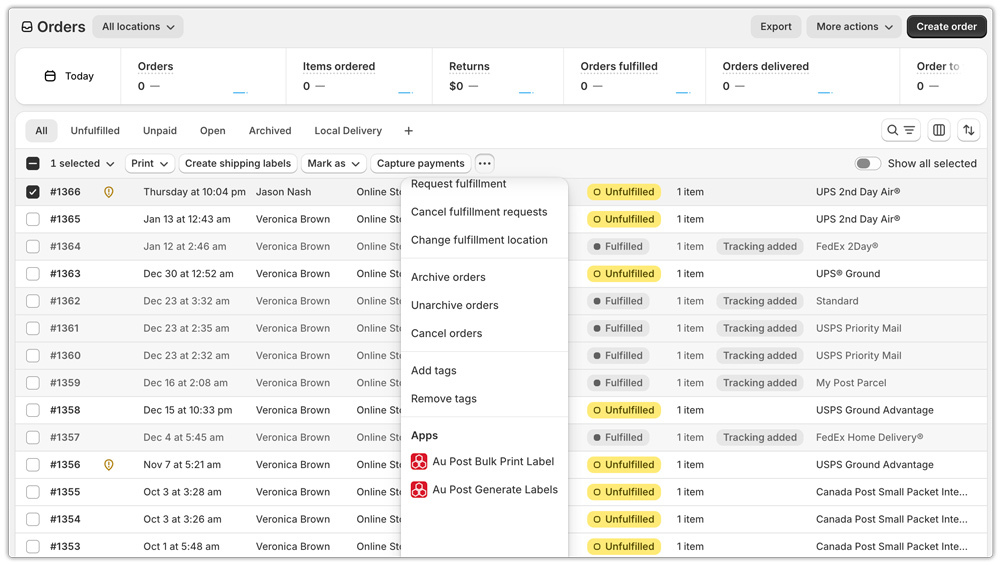
- Print labels instantly from the order grid, even for bulk orders, making daily dispatch faster and more efficient

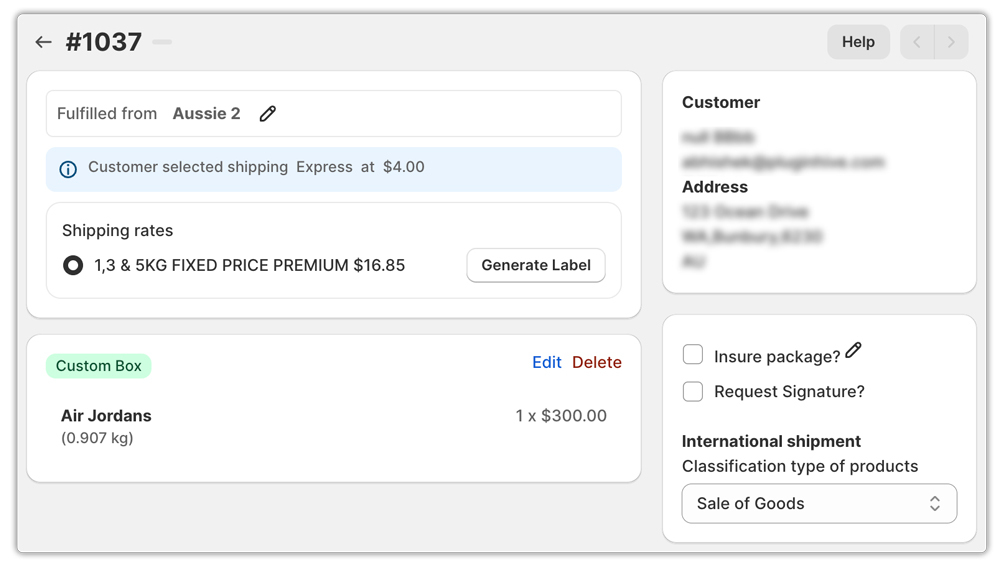
- Use manual label generation when needed, allowing you to add extra services or add-ons before printing, such as adding a signature on delivery or insurance on the shipment
- Automatically track shipments once labels are generated, with tracking details synced back to Shopify, after which an email is also sent to the customer
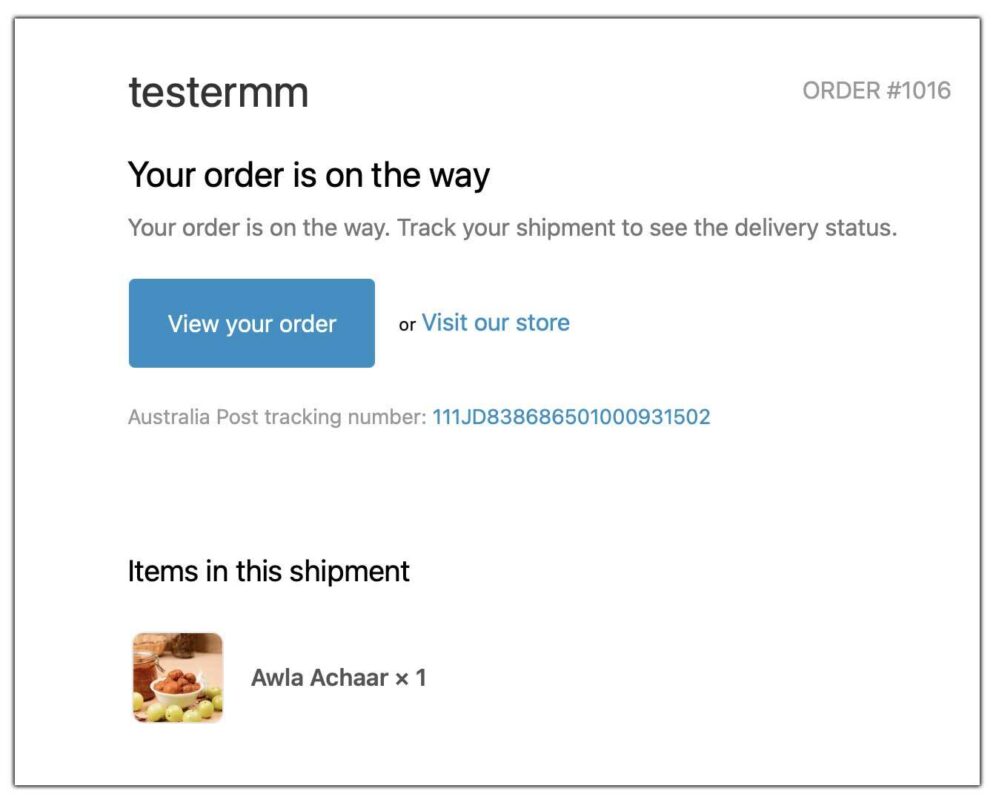
This approach keeps label printing, tracking, and fulfillment tightly connected, helping sellers reduce errors, speed up dispatch, and maintain full visibility over their Australia Post shipments.
Benefits of Automating Australia Post Label Printing for Shopify Stores
Once merchants automate label generation, fulfillment becomes much easier to control.
- Faster Daily Shipping: Labels can be created directly from Shopify without switching between systems.
- Fewer Manual Errors: Customer addresses, parcel details, and shipping services are pulled directly from order data.
- Better Tracking Visibility: Tracking numbers automatically sync back to Shopify once labels are generated.
- Easier High-Volume Fulfillment: During promotions or seasonal sales, merchants can process larger batches of orders without slowing down dispatch.
What Shopify Sellers Get Wrong About Australia Post Label Automation
One insight that consistently shows up across Shopify help guides, Australia Post documentation, and seller discussions is this: most fulfillment issues don’t come from the carrier; they come from setup mistakes. Even sellers who attempt to automate Australia Post label printing often run into problems because a few foundational steps are overlooked.
Based on common patterns seen online, Shopify sellers frequently struggle with:
- Incorrect product weights and dimensions, which lead to failed label generation or incorrect postage charges
- Mismatched shipping services, where the Shopify checkout option doesn’t align with the actual Australia Post service used for label printing
- No clear bulk-processing workflow, causing sellers to still handle orders one by one despite using automation tools
- Incomplete tracking workflows, where labels are created, but tracking isn’t properly synced back to Shopify
Research and best practices suggest that successful automation works best when sellers treat label printing as part of a complete fulfillment system, not a standalone task. This means ensuring product data is accurate, shipping services are mapped correctly, and order tracking updates flow automatically once labels are generated.
When these basics are in place, tools that integrate Australia Post directly into Shopify, such as the PluginHive Australia Post Ship app, can actually deliver on their promise of faster dispatch, fewer errors, and better delivery visibility.
Conclusion
For growing Shopify stores, shipping efficiency becomes just as important as product sales. Manual label creation may work early on, but it often becomes one of the first fulfillment tasks that starts slowing everything down.
When merchants automate Australia Post label printing, they reduce repeated manual work, improve shipping accuracy, and make daily dispatch easier to manage.
With proper setup and tools like the PluginHive Australia Post Ship app, label generation, tracking updates, and fulfillment can all happen within one connected workflow, helping stores stay efficient as order volume increases.
FAQ’s
Q. Can I automate Australia Post label printing directly in Shopify?
Shopify offers basic Australia Post support, but it’s limited and often depends on your Shopify plan and setup. For more flexibility, such as bulk label printing, advanced service selection, and better tracking, better to use the PluginHive Australia Post ship app.
Q. Do I need a MyPost Business or eParcel account to automate label printing?
Yes. To automate Australia Post label printing, you’ll need either a MyPost Business account, StarTrack, or an eParcel contract account. These accounts allow labels to be generated programmatically and enable discounted shipping rates.
Q. Can I print Australia Post labels in bulk for multiple Shopify orders?
Yes. With the right automation setup, using the PluginHive Australia Post Ship app, you can select multiple Shopify orders and print Australia Post labels in bulk. This is especially useful for daily dispatch and high-volume sales periods.
Q. Can Shopify merchants automate Australia Post label printing for bulk orders?
Yes. Merchants can generate multiple Australia Post labels at once by selecting bulk Shopify orders using the PluginHive Australia Post Ship app. This is especially useful for stores handling daily shipments.
Q. What is needed to automate Australia Post label printing in Shopify?
A valid Australia Post account such as MyPost Business, eParcel, or StarTrack is required, along with a Shopify shipping integration that supports label generation and tracking updates.
