


Shipping is an essential element of running a Shopify store, and an efficient shipping plan is essential for your business. For this, Shopify provides shipping tools so you can manage orders, calculate rates, and deliver, all in one location. Having the ability to print UPS shipping labels from Shopify makes it that much easier. When it comes time to ship your orders, you do not have to worry about entering information on another platform or jumping back and forth between different platforms to find the right information. You can simply generate a shipping label directly from your Shopify dashboard.
This will save you time, reduce shipping errors, and help you stay organized with shipping. When everything is in one place, you can quickly fulfill your orders while minimizing errors, and ultimately provide a better experience for your customers.
In This Article:
- Importance of UPS Integration with Shopify
- Setting Up UPS for Label Printing in Shopify
- How to Print UPS Shipping Labels in Shopify
- Automating UPS Label Printing in Shopify
- Cost and Rate Management
- Conclusion
- FAQ’s
Importance of UPS Integration with Shopify
- Linking Shopify directly to UPS makes it easy to generate labels and process shipments all within your store dashboard.
- Real-time UPS rates are calculated automatically based on weight, dimensions of the package, and destination, eliminating any guesswork and errors in pricing.
- Limits manual entry of information to eliminate mistakes like entering incorrect addresses, selecting the wrong services, or calculating shipping costs incorrectly.
- Allows batch fulfillment and labeling so you can mark multiple orders as fulfilled all at once, which is a time saver for high-volume stores.
Setting Up UPS for Label Printing in Shopify
Once you have successfully connected your store and UPS account, printing UPS labels directly from Shopify is easy. This includes being straightforward with a tool like the PH Multi-Carrier Shipping Label app. Here’s how to get started:

- Connect Your UPS Account: The first step is to connect your UPS account to your Shopify store by using the MCSL app. This allows your store to obtain real-time UPS shipping rates and produce shipping labels on Shopify without leaving the platform.
- Set up Shipping Zones and Rates: Next, you define the places you ship to and specify the UPS services you are going to offer for each shipping zone. This will allow your customers to see the correct shipping options and costs during checkout.
- Add Package Types & Weight Defaults: Enter your standard package sizes and weights, which will assist in shipping rate calculations and ensure that your labels are always correct.
Now that you have completed all these steps, your Shopify store is set up to produce UPS labels efficiently and with accuracy, improving your order fulfillment process and customer satisfaction.
How to Print UPS Shipping Labels in Shopify
Once your UPS account is integrated and an order is placed, printing labels is simple. The order will automatically appear in the PH Multi-Carrier Shipping Label app. From there, you just:
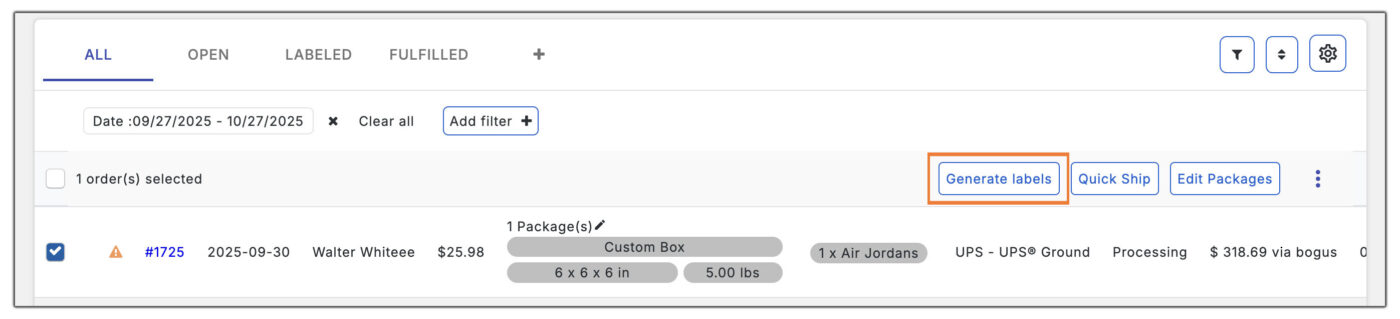
- Open the PH Multi-Carrier Shipping Label app in your Shopify dashboard.
- Select the order you want to ship.
- Click to generate the UPS shipping label.
- Print the label and attach it to your package.
For stores handling multiple orders at once, the MCSL app also supports batch printing. You can select multiple orders and generate labels in one go, saving time and reducing repetitive steps. This is especially useful during peak sales periods or for high-volume shops.
Below you can find a tutorial on how to print UPS labels in Shopify using the PH MultiCarrier shipping label app.
Automating UPS Label Printing in Shopify
With apps such as the PH Multi Carrier Shipping Label app, you can even take your shipping workflow to the next level by creating automation rules. This means that once an order is placed, the UPS shipping label will automatically generate without any manual clicks required.
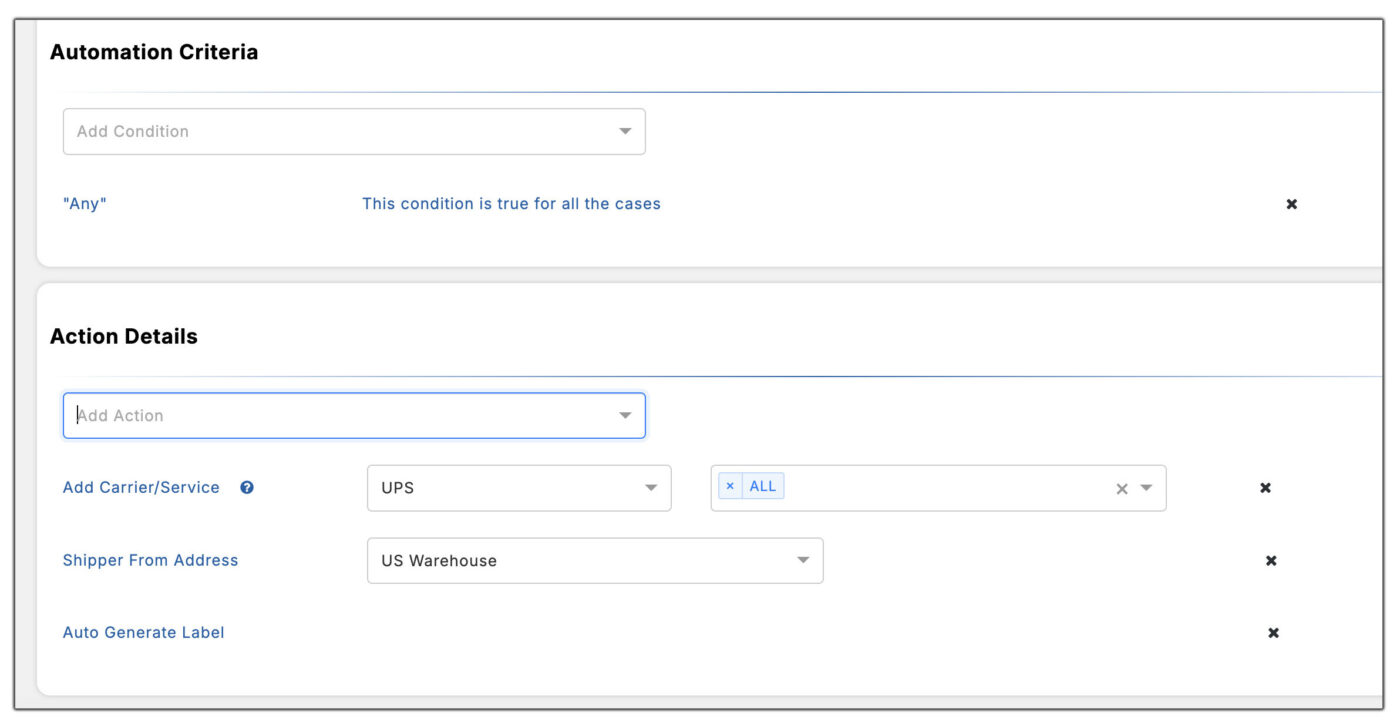
The advantages of automating your label printing are quite clear:
- Easy bulk printing: Generate labels for many orders at once without spending time entering for each order.
- Less manual work: Save yourself hours by simply letting the system do the heavy work of creating labels, while you focus more on packing, customer service, or even growing your store.
- Fewer mistakes: Automation will reduce mistakes from manual entry, and you can be sure that each label will be accurate.
As you can see, when you use automation, you will surely make your entire shipping process smoother, quicker, and stress-free when fulfilling orders.
Cost and Rate Management
Managing shipping costs effectively is just as important as printing labels. With the PH Multi-Carrier Shipping Label app, you can not only access real-time UPS rates but also adjust them to suit your business needs.

For example:
- Markup or Discount Rates: Increase or decrease shipping rates to cover handling costs or offer promotions without losing margin.
- Set Default Package Rates: Assign default shipping costs for different product sizes or weights to keep pricing consistent.
- Access Discounted UPS Rates: If you have a UPS contract account, you can integrate your discounted rates directly into Shopify for more cost-effective shipping.
- Compare Services for Best Pricing: Easily see the cost difference between UPS Ground, 2nd Day, or Express, and choose the most economical option for each order.
By managing rates strategically, you can control shipping expenses and maintain healthy profit margins. This approach also lets you offer competitive shipping options to your customers.
Conclusion
Being able to print UPS shipping labels directly from Shopify can be a huge asset for store owners. It helps improve the fulfillment process and saves valuable time. By using the PH Multi-Carrier Shipping Label app to connect your UPS account, you can manage all shipments from one dashboard. This makes your workflow smoother and keeps all your shipping information organized in one place.
From creating shipping zones and packing types to generating labels automatically, every task becomes easier and more reliable. You can also control your shipping costs with better accuracy. Whether you process a few orders daily or manage a busy store with high volume, this setup helps you ship faster and keep customers updated. It also supports better profit margins by reducing errors and delays.
In short, connecting UPS with Shopify is not just about making the process simple. It’s about creating a more efficient and reliable shipping experience for both your business and your customers.
FAQ’s
- Can I print shipping labels through Shopify?
Yes! You can print UPS, USPS, and other carrier labels directly from Shopify. Apps like PH Multi-Carrier Shipping Label also allow batch printing and automation for faster order fulfillment.
- How do I print all shipping labels at once on Shopify?
You can batch print shipping labels by using apps like PH Multi-Carrier Shipping Label. Simply select multiple orders in the app, and it will generate and print labels for all of them at once, saving time and effort.
- Is it possible to automate UPS label printing in Shopify?
Absolutely. Using automation rules in the PH Multi-Carrier Shipping Label app, labels can be generated automatically as soon as an order is placed. This reduces manual work, saves time, and minimizes errors.
