


Flexible delivery options can greatly improve the WooCommerce shopping experience. With FedEx Hold at Location(Access Points), customers can pick up packages from convenient FedEx locations instead of waiting at home. This benefits both merchants and customers.
Integrating FedEx Hold at Locations into WooCommerce checkout provides a seamless shipping experience, boosting customer satisfaction and reducing returns.
On This Page
- What Are FedEx Hold at Location/ Access Points?
- Benefits of Offering FedEx Hold at Location in WooCommerce
- Offer FedEx Hold at Location at WooCommerce Checkout
- Best Practices for Using FedEx Hold at Location
- Real-World Scenario
- Conclusion
- FAQs
What Are FedEx Hold at Location / Access Points?
FedEx Hold at Location (HAL) is a delivery service that allows customers to have their packages delivered to a secure FedEx location instead of their home address. This service is particularly beneficial for individuals who are not available to receive packages at home or prefer to pick up their shipments at a convenient time.
FedEx Hold at Location (HAL) includes:
- FedEx Office Locations: FedEx Office Print & Ship Centers and Ship Centers.
- FedEx OnSite Locations: Partnered retail locations such as Walgreens, Rite Aid, and select grocery stores.
- FedEx World Service Centers: Specialized facilities for international shipping.
Customers can select their preferred pickup location during the checkout process in WooCommerce. Once the package arrives at the chosen area, customers are notified via email, text, or phone call and can pick up their shipment at their convenience, typically within 5 business days.
This service offers an alternative to home delivery, providing greater flexibility and security for customers who may not be available to receive their packages at home.
Benefits of Offering FedEx Hold at Location in WooCommerce
Integrating FedEx Hold at Location into your WooCommerce store provides several advantages for both merchants and customers:
- Increased Delivery Success: Packages are delivered to secure locations, reducing missed deliveries and failed attempts at home addresses.
- Convenience for Customers: Shoppers can choose a pickup point near their home, office, or a location they visit regularly, making it easier to collect packages at a time that suits them.
- Enhanced Security: Packages are stored safely at FedEx Hold at Location, minimizing the risk of theft or damage.
- Improved Customer Satisfaction: Offering flexible delivery options demonstrates that your store values customer convenience, which can help build trust and loyalty.
- Cost Efficiency: Reducing repeated delivery attempts and returns can help lower shipping costs for merchants.
- Flexibility for High-Volume or Busy Areas: Customers in metropolitan or high-traffic areas benefit from multiple pickup options, ensuring packages are accessible even during busy schedules.
By offering FedEx Hold at Locations, WooCommerce stores can provide a more secure and customer-friendly shipping experience that enhances both convenience and reliability.
Offer FedEx Hold at Location at WooCommerce Checkout
To offer FedEx Hold at Location in your WooCommerce store, install and activate the FedEx Shipping Plugin for WooCommerce with Print Label.
For detailed setup instructions, visit the PluginHive WooCommerce FedEx Shipping Guide.
Before customers can select a Hold at Location, make sure the Hold at Location option is enabled in the plugin settings.
With the plugin, you can:
- Enable FedEx Hold at Location for eligible shipments.
- Choose which FedEx services (Express, Ground, etc.) display this option at checkout.
- Assign additional attributes for shipments, such as package type and handling instructions.

- Once enabled, customers can view and select available FedEx Hold at Location points directly on the WooCommerce checkout page.

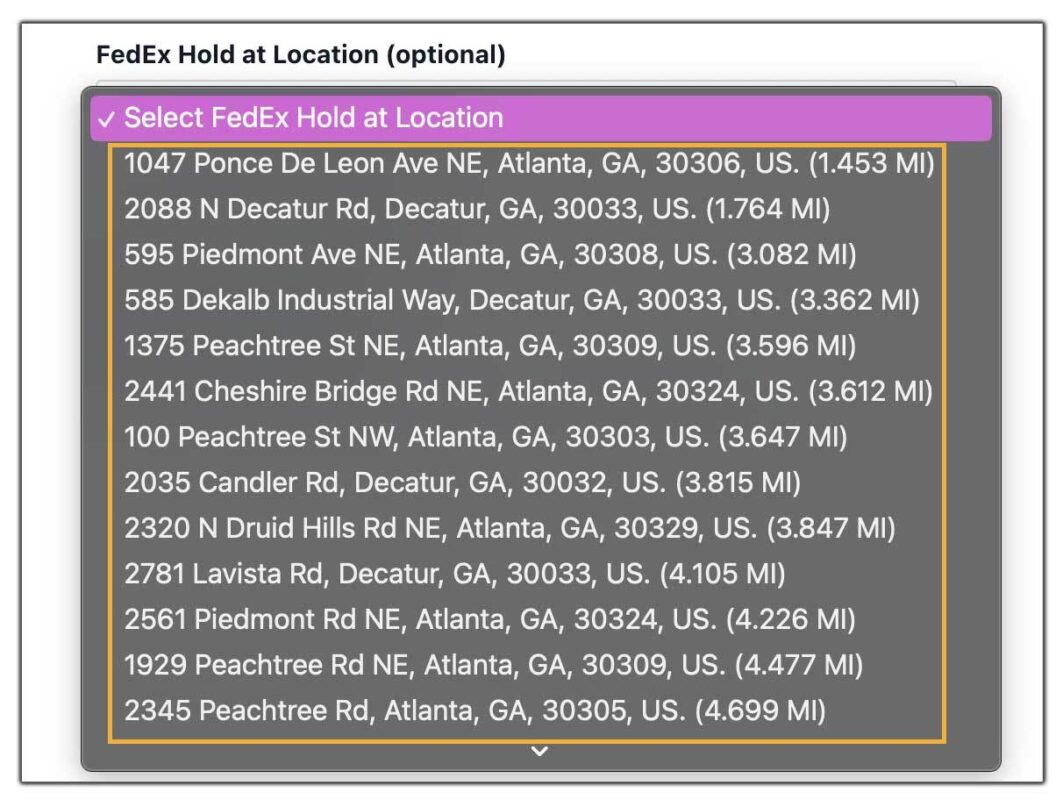
- The shipping address is automatically updated from the customer’s home address to the selected FedEx location.

- The chosen location details are reflected in the WooCommerce orders page, allowing store owners to track where each order will be picked up.

Store owners can generate and print FedEx labels directly from WooCommerce. For a detailed guide, check out How to Print FedEx Shipping Labels in WooCommerce.
Customers get real-time tracking updates and pickup notifications, then collect their package with a valid ID and tracking number.
Best Practices for Using FedEx Hold at Location
To get the most out of FedEx Hold at Location in your WooCommerce store, follow these best practices:
- Limit Location Options for Simplicity: Display only a reasonable number of nearby pickup locations (e.g., 5–10) to avoid overwhelming customers with too many choices.
- Highlight Customer Convenience: Clearly explain at checkout that customers can pick up their packages at FedEx locations, including FedEx Office, Walgreens, and other retail partners.
- Update Labels with Correct Pickup Address: Ensure shipping labels include the chosen FedEx Hold at Location address, not the customer’s home address, to prevent delivery errors.
- Communicate Pickup Instructions: Let customers know they need a valid ID and tracking number to collect their package, and mention that most locations hold shipments for up to 5 business days.
- Test Before Going Live: Place a few test orders to confirm that locations display correctly at checkout, labels generate with the right information, and tracking notifications include pickup details.
By following these best practices, your WooCommerce store can provide customers with a smooth, reliable, and flexible pickup option through FedEx Hold at Location.
Real-World Scenario
Imagine a WooCommerce store that sells high-end electronics. Many of their customers live in urban areas where packages left at the doorstep are at risk of theft. To solve this, the store enables FedEx Hold at Location through the FedEx Shipping Plugin for WooCommerce with Print Label.
At checkout, a customer buying a laptop selects a nearby Walgreens as the pickup location. Instead of worrying about being home for delivery, the customer receives tracking updates from FedEx and a notification when the package is ready. They simply visit Walgreens with their ID and tracking number to collect it at their convenience.
For the store owner, this means:
- No failed delivery attempts.
- Fewer returns due to missed deliveries.
- A satisfied customer who trusts the brand for offering a secure and flexible delivery option.
This real-world example shows how integrating FedEx Hold at Location not only prevents delivery issues but also improves customer satisfaction and loyalty.
Conclusion
Adding FedEx Hold at Location (Access Points) to your WooCommerce store makes shipping more flexible and reliable. Customers can pick up orders at convenient FedEx locations, reducing missed deliveries. For store owners, it means fewer returns, smoother order management, and happier customers.
With the FedEx Shipping Plugin, enabling this feature is quick and effective. To learn more or get support, visit PluginHive Support.
FAQs
- How long will FedEx hold my package at a Hold at Location?
Packages are usually held for up to 5 business days. Customers should pick them up within this period to avoid returns.
- Can customers pick up packages on weekends?
Many FedEx locations, including partner stores and lockers, are open on weekends. Hours may vary by location, so customers should check before selecting a pickup point.
- Are all FedEx shipments eligible for Hold at Location?
Hold at Location is available for most FedEx Express and FedEx Ground shipments. Some restrictions may apply depending on package type and service.
- Do customers need identification to pick up their package?
Yes. Customers must present a valid photo ID and the FedEx tracking number at the selected location.
- Can international shipments use FedEx Hold at Location?
Yes, in many countries where FedEx operates, but availability may vary depending on the region and local partner locations.
