



Providing excellent customer support is one of the cornerstones of building trust and loyalty in ecommerce. For Shopify store owners, offering fast, reliable, and personalized support can directly boost conversions, repeat purchases, and customer satisfaction. Luckily, Shopify offers a wide range of customer support apps that make it easier to connect with shoppers across live chat, email, WhatsApp, and social channels.
In this guide, we’ll explore some of the best Shopify customer support apps, highlight their features, compare their strengths, and share tips to help you pick the right one for your business.
This Article Contains
- Why Customer Support Apps Matter for Shopify Stores
- Features to Look for in a Shopify Customer Support App
- Recommended Shopify Customer Support (Help Desk) Apps
- Comparison Table
- Global Usage Insights – Choosing Apps That Fit Your Market
- How to Choose the Right Shopify Customer Support App
- Best Practices for Customer Support on Shopify
- Conclusion
- Frequently Asked Questions (FAQs)
Why Customer Support Apps Matter for Shopify Stores
In ecommerce, your website is your storefront, but unlike physical stores, online shoppers can’t ask a sales representative for immediate help unless you provide them with a support channel.
Key Benefits of Customer Support Apps:
- Boost Conversions & Sales
- Live chat and instant replies reduce bounce rates and abandoned carts.
- Shoppers are more likely to buy when their doubts are resolved quickly.
- Increase Customer Trust & Retention
- Proactive, 24/7 support shows reliability.
- Returning customers spend up to 67% more than new ones.
- Offer Multi-Channel Support
- Customers prefer different channels: WhatsApp, email, social media, or live chat.
- A good app ensures you’re available where your shoppers are.
- Reduce Support Costs with Automation
- Chatbots can answer repetitive questions instantly.
- Teams can focus on complex issues instead of FAQs.
- Improve Store Operations with Analytics
- Track response times, customer satisfaction, and conversion rates.
- Use insights to optimize marketing, product pages, and checkout flows.
Features to Look for in a Shopify Customer Support App
Before choosing an app, consider these must-have features:
- Live Chat Support – Engage visitors instantly while they’re shopping.
- Omnichannel Messaging – Manage conversations from WhatsApp, Messenger, Instagram, and email in one place.
- AI & Automation – Use bots to handle FAQs and repetitive tasks.
- Order Integration – Quickly fetch customer order details to resolve issues faster.
- Scalability – Ensure the app grows with your business.
- Ease of Use – Look for a simple setup and Shopify admin integration.
Recommended Shopify Customer Support (Help Desk) Apps
1. Tidio – Live Chat & AI Chatbots

Tidio is an all-in-one customer support and communication platform designed to help Shopify merchants deliver instant, personalized service to their customers. Combining live chat, AI chatbots, and helpdesk tools in one intuitive dashboard, Tidio helps online stores convert visitors into customers and retain them through proactive support. Moreover, it seamlessly integrates with Shopify to automatically sync your customer data and orders. This speeds up response time and boosts your sales in the long run.
Key Features
- Live chat widget: Provides real-time customer support and sales assistance.
- AI chatbot, Lyro: Automates responses to repetitive questions and offers 24/7 customer support.
- Unified inbox: Manage chat, email, WhatsApp, and social media messages all in one place.
- Customer profiles: Access detailed customer information and Shopify order history directly in chat.
- Customizable chat triggers: Set up automation workflows to boost engagement and conversions.
- Flows – Build automation with templates and a visual chatbot builder, without coding.
Pricing: Tidio offers a free plan with basic live chat and chatbot features. Paid plans start at $29/month, with higher tiers including advanced automation, Lyro AI chatbot access, analytics, and more agent seats.
Reviews & Ratings: Tidio holds a 4.6/5 rating from over 1,000+ Shopify reviews. Merchants love its user-friendly interface, quick setup, and responsive customer support.
Best For: Ideal for Shopify businesses of all sizes, from startups to scaling brands, looking to leverage AI, live chat, and automation to improve customer service and sales conversion.
2. DelightChat – Ecommerce Customer Service

DC WhatsApp Marketing + Helpdesk by DelightChat is a complete omnichannel CRM and support solution for Shopify merchants. It leverages the official WhatsApp Business API with green tick verification to automate marketing, recover abandoned carts, and streamline customer support. From managing chats to sending personalized broadcasts, DelightChat empowers businesses to engage customers effectively while increasing sales and operational efficiency.
Key Features
- Omnichannel Inbox – Centralize conversations from WhatsApp, Instagram, Facebook, Email, and Live Chat for faster response.
- Automated WhatsApp Marketing – Run personalized broadcasts, abandoned cart reminders, and COD verification flows.
- AI Assist & Chatbots – Automate replies, route tickets smartly, and enhance customer support efficiency.
- Product Showcase & Catalog – Sync Shopify products to WhatsApp, confirm orders, and convert COD to prepaid.
- Support Analytics & Workflow Automation – Track ROI, manage multiple stores, and create custom workflows with Shopify Flow.
Pricing: Plans start at $49/month with a 14-day free trial, scaling up to advanced features, AI assist, and multiple team members.
Reviews & Ratings: With a 4.9-star rating from 170+ reviews, merchants praise its seamless Shopify integration, easy setup, and powerful omnichannel automation for marketing and support.
Best For: Ideal for growing Shopify businesses looking to combine WhatsApp marketing, customer support, and AI automation in one centralized platform.
3. REVE Chat – Shopify Customer Support Solution

REVE Chat is a deeply integrated customer engagement platform tailored for Shopify merchants who want to deliver fast, personalized support while driving sales. It combines AI-powered tools, such as chatbots, live chat, Campaigns, and a built-in helpdesk, to handle everything from quick queries to complex issues, all from a single dashboard.
With deep Shopify integration, it pulls in product availability, order details, and customer data instantly, helping teams resolve order queries quickly, recommend products, and assist in checkouts during chats to boost conversions.
Key Features:
- Deep Shopify Store Integration: Track product information, customer details, past orders, and more for tailored recommendations, better order query responses, and increasing chances of sales straight from Live Chat.
- WhatsApp Catalog: Add products to your WhatsApp catalog, sync it with REVE Chat, and support mobile-front stores better and make sales easily.
- Unified Omnichannel Inbox: Manage chats from multiple channels, such as your Shopify store, WhatsApp, Facebook, and more, from one unified dashboard.
- Proactive Triggers & Campaigns: Engage visitors proactively with messages or send targeted campaigns via WhatsApp, Web Push, or SMS.
- Live Chat: Chat with customers in real-time with voice/video calls and screen sharing for better guidance.
- AI Chatbot: Automates responses to customer questions, order tracking, and support for 24/7 availability.
Pricing: Offers a 14-day free trial, with paid plans starting at $15/month for core Live Chat features and $50/month for core Chatbot features.
Reviews & Ratings: Highly praised on platforms like G2 and Capterra for its ease of use, reliable integrations, and strong customer support team.
Best For: Shopify stores of any size needing a versatile tool that blends automation with human touch to improve support, recover carts, and increase sales through their store and channels like WhatsApp.
4. Getgabs – Customer Support & WhatsApp Automation
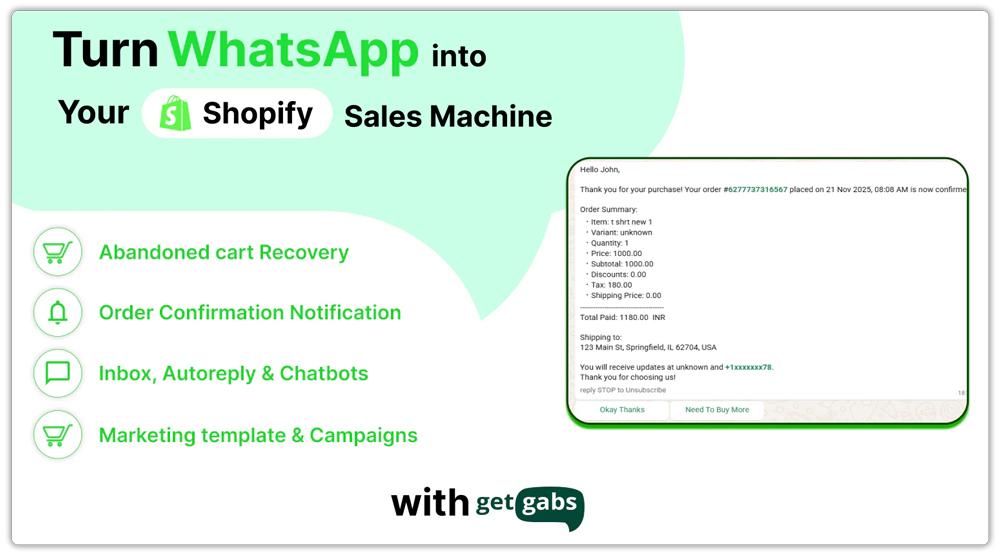
Getgabs is the best customer support app for Shopify stores looking to automate WhatsApp communication, recover abandoned carts, and deliver instant, personalized customer experiences. Built on the official WhatsApp Business API, Getgabs helps businesses streamline customer conversations, send automated notifications, and run high-converting campaigns, all from a single dashboard.
With seamless Shopify integration, Getgabs enables merchants to recover abandoned carts, manage customer queries via a shared inbox, and automate engagement using AI-powered chatbots. From order updates to promotional broadcasts, it ensures consistent and personalized communication throughout the customer journey.
Key Features
- Abandoned Cart Recovery: Automatically recover lost sales by sending personalized WhatsApp reminders and marketing templates.
- WhatsApp Chat Widget & Shared Inbox: Connect with website visitors in real time and manage all conversations with a unified team inbox and analytics dashboard.
- AI Chatbot & Automation: Set up AI-powered chatbots for 24/7 support with customizable workflows and automated responses.
- Order Notifications: Send order confirmations, shipping alerts, COD verifications, and product updates directly via WhatsApp.
- Broadcast Campaigns: Run large-scale WhatsApp campaigns to promote offers, new launches, and announcements.
- Shopify Catalog Sync: Sync your Shopify product catalog with WhatsApp for seamless in-chat browsing and shopping.
- Campaign Analytics: Track message delivery, engagement, and conversions with detailed performance insights.
Pricing: Getgabs offers flexible pricing starting at $5/month (Basic Plan), $11/month (Plus Plan), and $59/month (Pro Plan). The app is free to install with no setup or onboarding fees.
Reviews/Ratings: Rated 5/5 on the Shopify App Store. Merchants often praise the app’s seamless WhatsApp setup, abandoned cart recovery, and reliable automation as standout qualities.
Best For: Shopify stores that want abandoned cart recovery, AI-based WhatsApp automation, marketing campaigns, and AI-powered customer support on a single platform.
Comparison Table
| App / Feature | Live Chat Support | WhatsApp Support | AI Chatbot / Automation | Omnichannel Inbox |
|---|---|---|---|---|
| Tidio | Yes | Yes | Yes | Yes |
| Dondy | No | Yes | Limited | No |
| DelightChat | Yes | Yes | Limited | Yes |
Global Usage Insights – Choosing Apps That Fit Your Market
Different regions and customer segments have varying communication habits, and the right Shopify support app should align with how your audience prefers to connect.
- Messaging-Preferred Regions: Some customers rely heavily on messaging platforms like WhatsApp for daily communication. Providing support through their preferred messaging apps can increase engagement and satisfaction.
- Live Chat & Real-Time Support Regions: In markets where customers expect instant responses on websites, live chat and AI-powered chat solutions help resolve queries quickly and improve conversions.
- Multi-Channel Markets: For stores serving international audiences or multiple customer segments, offering support across several channels — including social media, email, and messaging apps — ensures consistent and seamless communication.
Key takeaway: Focus on where and how your customers prefer to communicate rather than on a specific region or tool. Choosing a solution that matches customer behavior ensures faster responses, higher satisfaction, and better overall support.
How to Choose the Right Shopify Customer Support App
When selecting a customer support app, consider the following factors:
- Customer Communication Preferences: Understand how your customers prefer to reach out — whether through messaging apps, live chat, social media, or email. Choose an app that supports the channels your audience uses most.
- Stage of Your Business: Small or new stores may benefit from apps with free plans or basic features. Growing businesses should look for solutions that can scale with increased support volume and team size.
- Automation Requirements: Determine whether you need AI-powered chatbots, automated replies, or workflow automation to handle repetitive queries efficiently.
- Team Collaboration Needs: If multiple agents will manage customer conversations, look for apps that offer shared inboxes, ticket assignment, and internal collaboration tools.
- Budget Considerations: Factor in your store’s budget and expected growth. Start with cost-effective solutions if needed, and consider premium options as your support requirements expand.
Best Practices for Customer Support on Shopify
- Respond Quickly: 53% of customers expect replies within 10 minutes.
- Personalize Replies: Use the customer’s name and order history.
- Be Omnichannel: Don’t restrict yourself to one platform; customers switch between chat, email, and social.
- Use Automations Wisely: Chatbots should answer FAQs but hand over to humans when needed.
- Track KPIs: Monitor average response time, resolution time, and customer satisfaction.
Conclusion
Customer support can make or break the success of your Shopify store. The right Shopify help Desk app not only helps resolve issues quickly but also builds stronger relationships, increases trust, and drives long-term loyalty.
While we’ve highlighted some of the best Shopify customer support apps available today, the landscape keeps evolving. New tools and features will continue to emerge, giving merchants even more options to deliver outstanding service. The key is to choose an app that matches your customers’ communication preferences and scales with your business.
Frequently Asked Questions (FAQs)
1. Do I really need a customer support app for my Shopify store?
Yes. While you can manage emails manually, customer support apps streamline communication, provide live chat or WhatsApp integration, and help you respond faster. This improves customer satisfaction, boosts conversions, and saves time.
2. Which is better: WhatsApp support or live chat?
It depends on your audience. In regions where WhatsApp is widely used (India, the Middle East, and Latin America), WhatsApp support works best. For global audiences, on-site live chat is effective. Many stores use a mix of both.
3. Are there free Shopify customer support apps available?
Yes. Many apps offer free plans with basic features like live chat or limited monthly conversations. Free versions are great for small stores, but growing businesses often upgrade to paid plans for advanced features and higher limits.
4. Will adding a support app slow down my Shopify store?
Most modern apps are optimized for speed, but chat widgets can slightly affect loading times. To avoid issues, choose lightweight apps, test performance, and enable features like “load on click” to minimize delays.
5. How do customer support apps integrate with Shopify?
These apps sync directly with your Shopify store, letting you view customer orders, shipping details, and profiles inside the support dashboard. This makes it easier to resolve issues quickly without switching between multiple tools.
