


The United States has ended the de minimis exemption, which previously allowed duty-free imports valued at $800 or less. Now, all international shipments to the U.S., regardless of value, must undergo full customs clearance and are subject to duties and taxes.
For WooCommerce merchants, this means higher costs, stricter documentation, and potential delivery delays. In this article, we’ll review the latest tariff updates, carrier updates, their impact on online stores, and how PluginHive’s shipping plugins can simplify compliance and ensure transparent costs at checkout.
In This Guide
- What Changed in U.S. Import Tariffs?
- Carrier-Specific Updates for U.S. Tariffs
- How U.S. Tariffs Impact WooCommerce Stores
- How PluginHive Shipping Plugins Help WooCommerce Merchants
- Best Practices for Merchants Shipping to the U.S.
- Final Thoughts
What Changed in U.S. Import Tariffs?
The U.S. government has made major changes to import rules in 2025, and these directly affect all international shipments:
End of the $800 De Minimis Exemption
- Since August 29, 2025, duty-free imports under $800 are no longer allowed.
- Every shipment, regardless of value, now requires full customs clearance and is subject to duties and taxes.
Earlier Restrictions Before the Final Ban
- May 2, 2025: The exemption was first removed for shipments from China and Hong Kong.
- August 12, 2025: U.S. Customs began counting all packages over $800 per importer per day together, meaning even multiple smaller packages could trigger duties.
Additional Tariff Layers
The end of the de minimis exemption comes on top of other tariff measures already in force:
- Reciprocal tariffs: Extra duties applied to imports from countries that charge higher tariffs on U.S. goods.
- Section 232 tariffs on metals: Now 50% on steel and aluminum, covering more than 400 product categories.
- Country-specific penalties: New or increased tariffs on goods from Canada, India, and the EU.
These changes add extra costs and complexity for importers. Shipping to the U.S. now involves higher duties and stricter documentation. For eCommerce sellers, including WooCommerce merchants, accurate customs compliance and clear duty calculation at checkout are more important than ever.
Carrier-Specific Updates for U.S. Tariffs
Major carriers such as FedEx, UPS, Australia Post, and Purolator have issued guidance and updates to help businesses navigate the new U.S. import tariffs. Understanding these updates can help WooCommerce merchants manage costs, avoid delays, and ensure accurate duties at checkout.
UPS
- UPS emphasizes using its Global Duty & Tax services to provide transparency on duties, taxes, and fees at checkout, helping merchants avoid unexpected expenses.
FedEx
- FedEx advises merchants to review all commercial invoices carefully and ensure proper product descriptions, HS codes, and declared values for U.S.-bound shipments.
- This is to prevent delays or additional charges due to the recent import tariff changes.
Australia Post
- Australia Post temporarily suspended business shipments to the U.S. and its territories from August 29, 2025, due to new tariff rules.
- Letters, documents, and gifts under USD $100 are exempt.
- All shipments must include country of origin, value, and HS codes, and duties must be paid via U.S. Customs through Zonos®.
- Services are expected to resume on or before September 25, 2025.
Canada Post
- Since August 29, 2025, Canada Post requires a prepaid Declaration ID for all U.S.-bound parcels, confirming duties are paid before mailing.
- Canada Post partners with Zonos® to facilitate duty payment and generate the Declaration ID.
- Goods under USMCA (CUSMA) are not exempt and remain subject to U.S. IEEPA tariffs.
Purolator
- Purolator also recommends ensuring accurate product classification and valuation, maintaining proper documentation, and leveraging Foreign Trade Zones to reduce or defer duties.
These strategies from major carriers provide merchants with the guidance and tools needed to navigate U.S. import tariffs effectively. Next, let’s look at how these tariff changes impact WooCommerce stores.
How U.S. Tariff Changes Impact WooCommerce Stores
The recent U.S. tariff changes have significant implications for WooCommerce merchants shipping internationally. Key impacts include:
- Higher Shipping Costs: Even low-value shipments are now subject to duties, taxes, and full customs clearance, increasing overall shipping expenses.
- Customs Compliance Requirements: Accurate product classification, declared values, and HS codes are required. Incomplete or incorrect documentation can lead to delays, returns, or penalties.
- Delivery Delays: Stricter customs checks and new documentation requirements may extend delivery times, affecting customer satisfaction.
- Checkout Complexity: Merchants must calculate and display duties and taxes at checkout to avoid surprise fees that can cause cart abandonment.
- Logistics Challenges: Managing shipments across multiple warehouses and carriers becomes more complex due to additional tariff layers.
These challenges can be effectively managed using PluginHive shipping plugins, which help merchants automate duty calculations, ensure compliance, and display transparent shipping costs at checkout.
How PluginHive Shipping Plugins Help WooCommerce Merchants
PluginHive offers a suite of WooCommerce shipping plugins to simplify international shipping, ensure tariff compliance, and provide accurate shipping costs at checkout.
Merchant Shipping with UPS and FedEx
Offering international shipping via UPS is simple and efficient with the WooCommerce UPS Shipping Plugin with Print Label.
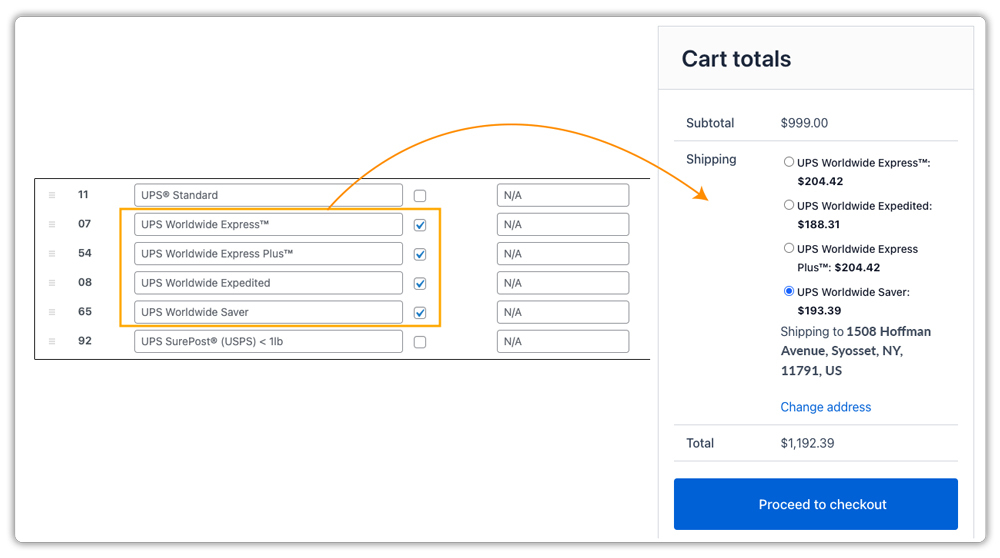
Merchants can select preferred UPS services in the plugin settings, and checkout rates are fetched directly via API, including all duties and taxes.
Merchants can print a Label and a Commercial Invoice, which are essential for customs clearance.
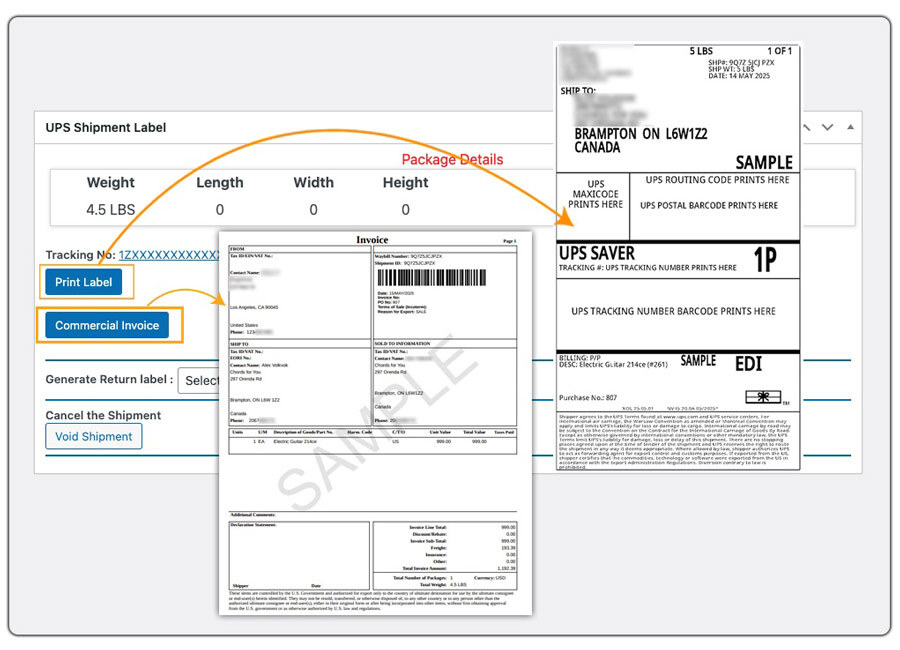
The plugin also supports ETD, EDI, EEI, and NAFTA Certificates, helping streamline compliance and reduce delays at U.S. Customs.
Similarly, international shipping can be offered via FedEx using the WooCommerce Shipping Plugin for FedEx with Print Label, ensuring accurate duties and full customs compliance.
Merchant Shipping with Other Carriers
- The WooCommerce Shipping Services plugin supports multiple carriers, including Australia Post, Purolator, USPS, DHL, and more.
- When shipping with Canada Post, merchants can use the WooCommerce Canada Post Shipping Plugin with Print Label.
- For PostNord, merchants can use the PH PostNord Shipping Plugin for WooCommerce with Print Label.
Best Practices for Merchants Shipping to the U.S.
With the stricter tariff rules, WooCommerce merchants must adapt their shipping strategy to remain compliant. Here are the best practices to follow:
- Provide Accurate Product Information: Always use correct HS codes, product descriptions, declared values, and country of origin details to avoid customs delays or penalties.
- Enable Duties & Taxes at Checkout: Displaying duties, taxes, and fees during checkout reduces abandoned carts.
- Leverage Technology for Compliance: Tools like Zonos® integrate with carriers and WooCommerce to calculate, collect, and remit duties and taxes in real time. In fact, Canada Post and Australia Post have already partnered with Zonos to manage duty payments and customs compliance for U.S.-bound shipments. This ensures customers see the total landed cost upfront, minimizing disputes or failed deliveries.
- Use Carrier Electronic Documentation: Enable ETD (Electronic Trade Documents), EDI, or EEI features available through plugins like PluginHive’s UPS and FedEx solutions. This reduces paperwork errors and speeds up customs clearance.
- Plan for Longer Delivery Timelines: Due to stricter customs checks, buffer your estimated delivery times.
- Stay Updated on Tariff Policies: U.S. trade rules are changing fast; keep up with carrier updates and government notices to stay compliant.
Using duty calculation, proper documentation, and PluginHive plugins with Zonos helps WooCommerce merchants stay compliant and ensure smooth cross-border shipping.
Final Thoughts
The end of the U.S. de minimis exemption has reshaped how WooCommerce merchants handle international shipping. With every shipment now subject to duties, taxes, and full customs clearance, compliance is more important than ever. By leveraging PluginHive’s shipping plugins, merchants can simplify compliance, avoid delays, and keep customers satisfied.
Need help with plugin setup? Contact PluginHive Support for expert assistance.
