


In today’s fast-paced eCommerce world, seamless shipping integration is crucial for delivering a smooth customer experience. For WooCommerce store owners, UPS has long been a trusted shipping partner. However, with UPS moving from its legacy APIs to the more modern REST API, merchants need to understand why this change matters.
This article will help you understand the UPS REST API and the risks of staying on legacy APIs. It will also guide you through the migration process so your WooCommerce store can continue offering accurate shipping rates, faster label generation, and reliable shipping operations without any disruptions.
Table of Contents
- Understanding the UPS REST API for WooCommerce
- Risks of Staying on Legacy UPS APIs
- Migration Process for WooCommerce Merchants
- Conclusion
- FAQs
Understanding the UPS REST API for WooCommerce
The UPS REST API is the modern way for WooCommerce stores to connect directly with UPS services. Unlike the older XML/SOAP APIs, REST is built on today’s web standards, making it faster, more secure, and easier to integrate.
Here’s how it helps your WooCommerce store:
- Show real-time UPS shipping rates: Display accurate UPS live rates at checkout, helping customers make informed decisions and reducing cart abandonment.
- Generate shipping labels automatically: Print UPS labels instantly, saving time and minimising manual errors.
- Provide live tracking updates: Keep customers informed with UPS tracking updates, improving transparency and building trust.
- Speed up checkout and fulfillment: Direct integration with UPS makes the shipping workflow faster and more efficient.
- Ensure stronger security: Modern authentication methods like OAuth 2.0 protect your store’s shipping data.
- Stay future-ready: Any new UPS features or updates will work seamlessly with REST, keeping your store up to date.
The UPS REST API simplifies shipping operations while improving the shopping experience for your customers. With it, WooCommerce merchants can offer reliable, automated, and hassle-free shipping, making both store management and order fulfillment easier than ever.
Risks of Staying on Legacy UPS APIs
Continuing to rely on UPS’s legacy XML/SOAP APIs can create several problems for your WooCommerce store. The longer you wait to migrate, the higher the risk of facing shipping disruptions and operational issues. Here’s what can go wrong:
- Service disruptions: Legacy APIs are being phased out. When they stop working, your store could face delays in generating shipping labels or calculating rates.
- Slower checkout and fulfillment: Older APIs are less efficient, which can slow down shipping calculations and label printing, frustrating customers.
- Limited access to new UPS features: Future UPS updates will only work with the REST API, so staying on legacy APIs means missing out.
- Security risks: Outdated authentication methods make your shipping data more vulnerable.
For WooCommerce merchants, these risks can translate into delayed shipments, unhappy customers, and lost trust. Migrating to the UPS REST API now ensures that your shipping operations remain smooth, secure, and future-proof.
Migration Process for WooCommerce Merchants
Migrating your WooCommerce store to the UPS REST API is straightforward when you follow the right steps. Using a reliable plugin like the WooCommerce UPS Shipping Plugin with Print Label makes the process even easier, with built-in support for REST API and clear guidance.
First, ensure you have the latest version of the WooCommerce UPS Shipping Plugin installed and activated on your WooCommerce store.
Step-by-Step Migration Guide
1. Create or Upgrade Your UPS Developer Account
Visit the UPS Developer Portal to create a new account or upgrade your existing one. This step gives you access to the UPS REST API, which is necessary for connecting your WooCommerce store with UPS services.
2. Connect Your UPS Account Using OAuth 2.0
From your WordPress dashboard, navigate to WooCommerce > Settings > Shipping > UPS and click the “Register with UPS Ready” button.

Log in to your existing UPS account and accept the terms and conditions.
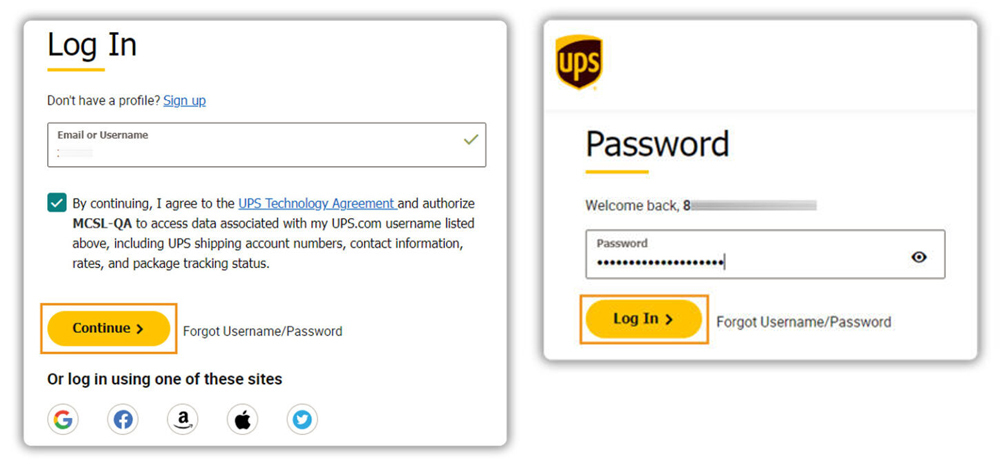
The plugin automatically completes the technical connection with UPS using OAuth 2.0, so you don’t have to manage credentials manually.

3. Configure Your Shipping Settings
After connecting your UPS account, you can configure the plugin to match your store’s shipping needs. Enter your “ship from” address to ensure accurate rate calculations.

Select the UPS services you want to offer at checkout, such as Ground, Next Day Air, or Worldwide Expedited.

Set your packaging options carefully to ensure correct shipping rates and proper label generation.

Make sure all products in your store have accurate weights and dimensions, as this information is crucial for calculating shipping rates and generating labels.
4. Verify Your Setup
Place a test order in your store to confirm that UPS shipping rates appear correctly at checkout and that labels can be generated properly. This ensures everything is functioning before you start processing real orders.
UPS Shipping Rates at Checkout: This is how the UPS shipping options are displayed to customers during checkout. Verifying this ensures your customers see accurate, real-time shipping rates before placing an order.

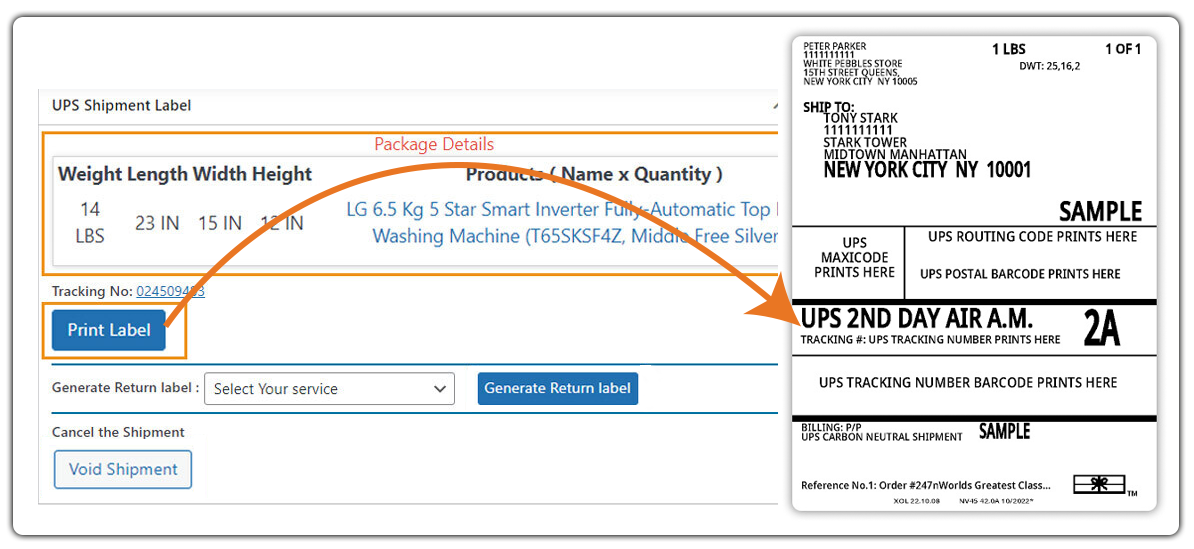
UPS Label Generation: Here, you can see the label successfully generated from the test order. This confirms that your store is correctly connected with the UPS REST API, and labels will be ready for fulfillment without delays.
For detailed, step-by-step instructions, please refer to this setup guide: Setting Up WooCommerce UPS Shipping Plugin
By using the UPS plugin, WooCommerce merchants can migrate quickly, avoid technical hurdles, and ensure accurate shipping rates, automated label generation, and smooth order fulfillment.
Conclusion
Migrating your WooCommerce store to the UPS REST API is more than a technical update. It ensures smooth, reliable, and secure shipping operations. Legacy APIs are being phased out, and staying on them can cause service disruptions, slower processing, and missed access to new UPS features. With the REST API, you get accurate shipping rates, faster label generation, and a seamless checkout experience that improves customer satisfaction.
Using the WooCommerce UPS Shipping Plugin with Print Label makes migration simple and hassle-free. The plugin simplifies connecting your UPS account via OAuth 2.0, eliminating the need to manually handle complex API credentials, while you can easily configure your shipping settings within WooCommerce. Need help setting it up? Contact PluginHive Support for guidance to make the migration simple and hassle-free.
FAQs
1. Can I still use the UPS Access Key after migrating?
No, UPS is phasing out the Access Key by June 2024. The REST API utilises OAuth 2.0 for authentication, so it’s crucial to migrate to ensure continued functionality.
2. What happens if I don’t migrate to the REST API?
Your WooCommerce store may face service disruptions, delayed shipments, and loss of access to new UPS features once the old APIs are retired.
3. Which WooCommerce plugin supports the UPS REST API?
The WooCommerce UPS Shipping Plugin with Print Label fully supports UPS REST APIs and makes the migration smooth and reliable.
4. Will migrating to the UPS REST API affect my existing UPS negotiated rates?
No, your negotiated rates stay the same. Just double-check your UPS account and plugin settings to make sure they are applied correctly.
