Wholesale and B2B buyers don’t browse; they buy with purpose. A procurement manager ordering 500 branded notebooks, a restaurant placing a weekly bulk order, a corporate client buying uniforms across departments, none of these fit a standard WooCommerce product page. Consequently, when your store cannot capture these requirements upfront, orders get delayed, emails pile up, and fulfilment slows down.
PH Product Add-ons for WooCommerce fixes this by letting you add custom fields like text inputs, file uploads, date pickers, and more directly on your product pages. As a result, your wholesale buyers submit complete orders from the first click. No follow-up emails, no missing details, no delays. This article walks you through exactly how to set it up for your WooCommerce wholesale or B2B store.
Table of Contents
- Why WooCommerce Wholesale and B2B Stores Need Product Add-ons
- Common WooCommerce B2B Use Cases
- How to Add Product Customization to Your WooCommerce Wholesale Store
- Real-World Example: WooCommerace Wholesale Office Supplies Store
- Best Practices for WooCommerce B2B Product Customization
- Conclusion
- FAQs
Why WooCommerce Wholesale and B2B Stores Need Product Add-ons
Standard WooCommerce variations handle size and color. However, B2B orders require more than fixed options
- WooCommerce variations are fixed and predefined; they therefore cannot capture buyer-specific input like custom text, uploaded artwork, or order-level instructions.
- B2B buyers place larger, more detailed orders, where missing information means delayed fulfillment
- In most cases, this information is collected over email, creating errors and extra admin work. Over time, this slows down your entire workflow.
- Wholesale buyers who cannot complete an order cleanly on your site will find a supplier who lets them
If you want to understand exactly where variations fall short for B2B scenarios, this comparison of WooCommerce Product Add-ons vs WooCommerce Variations explains the difference clearly.
The fix is simple: give your buyers the right input fields at the point of purchase. That is exactly what product add-ons are built to do.

Common WooCommerce B2B Use Cases
B2B stores span many industries. However, the core need remains the same: buyers must clearly specify their requirements upfront.
| Industry | What Buyers Need to Specify | Field Type Used |
|---|---|---|
| Branded Merchandise | Logo text, artwork files, print placement | Text Field, File Upload |
| Bulk Stationery & Packaging | Paper type, finishing style, custom dimensions | Dropdown, Text Input |
| Corporate Uniform Orders | Employee names, department codes, per-unit size breakdowns | Text Field, Multi-select |
| Wholesale Food & Beverage | Dietary requirements, packing preferences, recurring delivery notes | Textarea |
| Industrial & Manufacturing Supplies | Material grade, tolerance levels, technical dimensions | Text Field, Dropdown |
| B2B Service Add-ons | Installation, assembly, extended warranty, priority handling as paid extras | Checkbox, Radio Buttons |
Each of these scenarios maps directly to a specific field type inside PH Product Add-ons for WooCommerce. No guesswork, no workarounds. Once you map your most common buyer requests to the right field types, building out your product pages becomes fast, and your order quality improves immediately.
How to Add Product Customization to Your WooCommerce Wholesale Store
Your buyers need more than a standard product page. Here is how to build the right input fields for your wholesale store step by step.
Create an Add-on Group
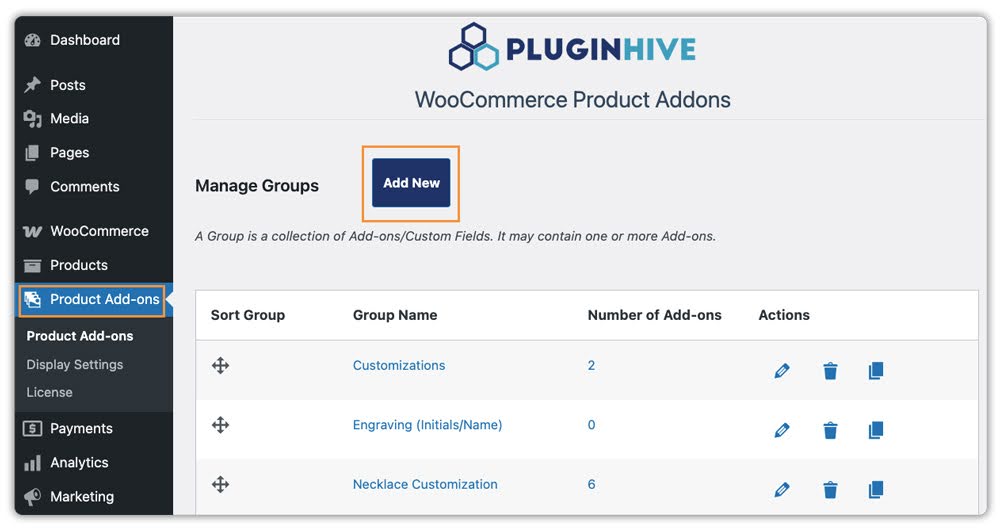
Go to Product Add-ons and click Add New. This group is the container for all the fields your buyer will see on the product page.
Name and Assign the Group
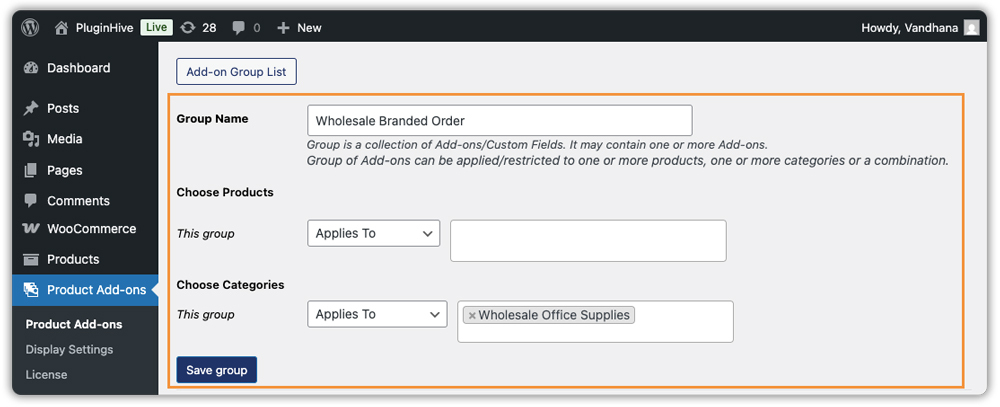
Next, give the group a clear, specific name that reflects the product type, “Wholesale Branded Order” or “Bulk Uniform Order” works well. Then use the Applies To option to select which products or categories this group applies to. By assigning it once at the category level, every product in that category automatically gets the same fields.
Create Your Add-on Fields
Now, add the individual fields your buyers need to fill in. Choose from field types including Text, Textarea, Dropdown, Checkbox, Radio Button, Color Options, File Upload, Date, Time, Telephone Number, Multi-Select Box, and Hidden. For each field, configure:
- Label – the text your buyer sees on the product page
- Required – toggle on if the field must be completed before adding to cart
- Display Price with Options – toggle on to show the add-on cost next to each option
- Description – a short instruction that guides the buyer on what to enter
- Pricing set a flat fee, a percentage of the product price, or a quantity-based cost for any field that carries an additional charge

Use Conditional Logic for Smarter Field Display
This step is particularly useful for wholesale stores with varied buyer needs. For instance, show a File Upload field only when the buyer selects “Custom Artwork” from a dropdown, or show a Text field only when they select “Custom Text.” As a result, buyers see only what is relevant to their selection, keeping the product page clean and reducing friction at checkout.

Save and Preview on the Product Page
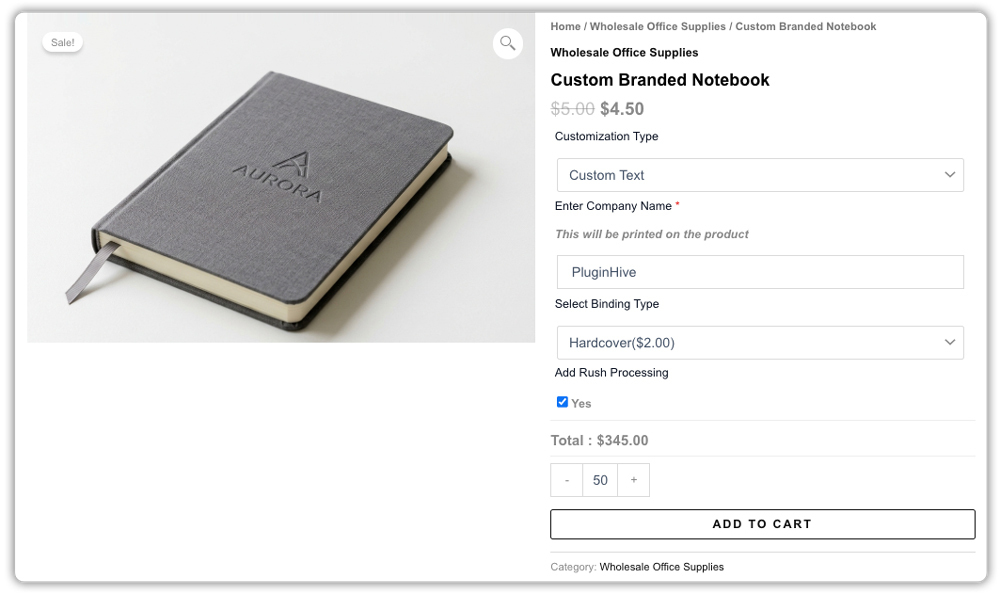
Finally, save the group and visit the product page on your storefront. For example, if you set up a group for a branded notebook order, the page should then show a Text field for the company name, a File Upload field for the logo, a Dropdown for finishing style, and a Checkbox for rush processing.
Once your first group is live and tested, replicating it for other product categories takes minutes. The structure stays the same, only the fields change.
Real-World Example: WooCommerce Wholesale Office Supplies Store
Let’s say you run a WooCommerce wholesale store selling branded stationery. In this case, your buyers need to provide detailed customization inputs with every order.
The Challenges You Will Face:
- To begin with, WooCommerce has no default way to collect branding details like company name, logo files, or finishing preferences at the point of purchase.
- Without a structured input on the product page, you end up collecting order details over email, creating delays and production errors
- Furthermore, managing custom specifications across large bulk orders becomes messy without a consistent, reliable format.
- As a result, buyers who cannot submit complete order details upfront lose confidence in your store.
How It Can Be Solved:
With PH Product Add-ons for WooCommerce, you can add all the fields your wholesale buyers need directly on the product page without creating separate products for every variation.
Using the plugin, your branded stationery product page can:
- Let buyers enter the exact company name to be printed using a Text field
- Allow buyers to upload their logo or artwork directly using a File Upload field
- Offer finishing style choices: matte, gloss, or embossed using a Dropdown field
- Include rush processing as an optional paid extra using a Checkbox field with a flat fee attached
All customization details entered by the buyer are then saved directly to the WooCommerce order. As a result, your team sees exactly what needs to be printed, packed, and shipped with no follow-up required.
This setup eliminates the back-and-forth. As a result, every bulk order arrives in your dashboard complete, clean, and ready for production.
Best Practices for WooCommerce B2B Product Customization
A few practical rules make the difference between a clean setup and a messy one. More importantly, these changes directly impact how easily buyers can place orders.
- Keep your product forms focused: Only ask for details that are required to process the order. Otherwise, too many fields slow down decision-making and increase cart abandonment.
- Collect a deposit for large custom orders: For high-value B2B orders with custom production requirements, asking for payment upfront protects your business. PH Deposits for WooCommerce lets you collect a fixed amount or percentage before production begins directly on the product page. Here is a detailed look at how WooCommerce Deposits help optimize product pages for exactly this scenario.
- Plan your shipping before orders scale: Wholesale and B2B orders are heavier, bulkier, and more frequent than retail. Connecting your store to a carrier like FedEx or UPS through PluginHive’s WooCommerce shipping plugins gives you real-time rates and label printing directly from your dashboard.
- If you offer installation or scheduled delivery, add booking support: B2B buyers ordering furniture, equipment, or industrial supplies often need a delivery or installation slot. In those cases, Bookings and Appointments for WooCommerce pair naturally with product add-ons.
Ultimately, the goal is simple: make it as easy as possible for your buyer to place a complete, accurate order in one go. Every extra step you remove from their process is one more reason they come back.
Conclusion
When your WooCommerce wholesale store lets buyers enter all required details up front, ordering becomes faster and more accurate. PH Product Add-ons for WooCommerce help you turn your product page into a structured order form, so your team can process orders without delays or follow-ups.
If you want to simplify how your B2B customers place orders, this is a practical place to start. If you need help setting up this in your WooCommerce store, the PluginHive support team is ready to assist you with configuration and guidance.
FAQs
1. What are WooCommerce product add-ons for wholesale stores?
WooCommerce product add-ons let you add custom input fields to product pages. As a result, wholesale buyers can submit branding details, bulk requirements, or special instructions during purchase.
2. Can I use product add-ons for B2B and bulk orders in WooCommerce?
Yes. PH Product Add-ons for WooCommerce works well for B2B and wholesale orders where buyers need to provide specific details along with large or customized purchases.
3. What field types can I add for WooCommerce B2B customization?
You can add text inputs, dropdowns, checkboxes, file uploads, and date pickers. Together, these help collect details like logos, product options, and order references.