


Shipping expensive products through WooCommerce comes with a different level of responsibility. Whether you sell electronics, custom goods, or premium merchandise, a single damaged or lost shipment can quickly turn into a costly refund or replacement. Many store owners focus on setting up shipping rates but overlook the importance of insurance, which plays a major role in protecting revenue and maintaining customer trust when high-value orders are involved.
Adding insurance directly into your shipping workflow helps you create a safer and more predictable fulfillment process. Instead of manually estimating coverage or absorbing unexpected losses, you can configure WooCommerce to include insurance value automatically in shipping calculations. In this guide, we’ll explore how Canada Post insurance works, when it matters most, and how you can include it as part of your regular shipping setup.
Table of Contents
- Why Insurance Matters for High-Value WooCommerce Orders
- Understanding Canada Post Insurance Coverage
- How to Add Insurance Value to Canada Post Shipping in WooCommerce
- Real-World Example: Adding Insurance Costs to High-Value WooCommerce Shipments
- Conclusion
- FAQs
Why Insurance Matters for High-Value WooCommerce Orders
Shipping without coverage is a financial gamble that simply isn’t worth it for high-value items. Here’s why store owners need to take this seriously:
- Default liability is limited. Without declared coverage, Canada Post’s liability for a lost or damaged package is minimal, nowhere near enough to compensate for products worth hundreds or thousands of dollars.
- Damage happens more than you think. Packages can be dropped, crushed, or exposed to moisture. High-value items are often irreplaceable, making damage especially costly.
- Disputes hurt your reputation. When a customer receives a damaged product or nothing at all, your store is the first point of contact, and the financial burden often falls on you.
- Insurance builds customer confidence. Knowing their order is protected gives customers peace of mind, which directly impacts repeat business and reviews.
- It’s a scalable risk. A $50 loss hurts. A $500 or $5,000 loss can be devastating for a small or mid-sized WooCommerce store.
The cost of adding Canada Post coverage to a shipment is a fraction of the potential loss, making it one of the easiest risk-management decisions you can make for your store.
Understanding Canada Post Insurance Coverage
Canada Post’s coverage option protects shipments against loss or damage during transit. The availability and limits of this coverage depend on the service selected, the destination country, and the nature of the items being shipped.
Shipping Without Insurance vs With Canada Post Insurance
| Factor | Without Coverage | With Canada Post Coverage |
|---|---|---|
| Default liability | Minimal/limited | Up to declared value |
| Domestic coverage limit | Not guaranteed | Up to CAD $5,000 |
| International coverage limit | Not guaranteed | Up to CAD $1,000 |
| Cost to enable | None (but no protection) | A small additional fee added to the shipping rate |
| Coverage shown to customers | No | Included in the displayed shipping rate |
| Financial risk of loss/damage | Absorbed by the store owner | Claimable through Canada Post |
Understanding these differences is what separates store owners who are protected from those who find out the hard way.
Canada Post’s coverage option protects shipments against loss or damage during transit. The service you select, the destination country, and the nature of the items determine the availability and limits of this coverage.
For complete details on Canada Post’s insurance policies, see their official insurance coverage guide.
How to Add Insurance Value to Canada Post Shipping in WooCommerce
Adding Canada Post coverage to your WooCommerce store using the Canada Post Shipping Plugin for WooCommerce with Print Label is a simple, one-time configuration. Follow these steps:
Before proceeding, make sure the Canada Post Shipping Plugin for WooCommerce is installed, activated, and configured. For step-by-step setup guidance, refer to this setup guide .
Start by going to WooCommerce > Settings > Shipping > Canada Post in your WordPress dashboard. Once you’re in the plugin settings, head over to the Rates and Services tab and look for the Additional Options section. This is where you’ll find the Coverage option – enable it, and from that point on, the insurance cost will be automatically included in the shipping rates displayed on your cart and checkout pages.
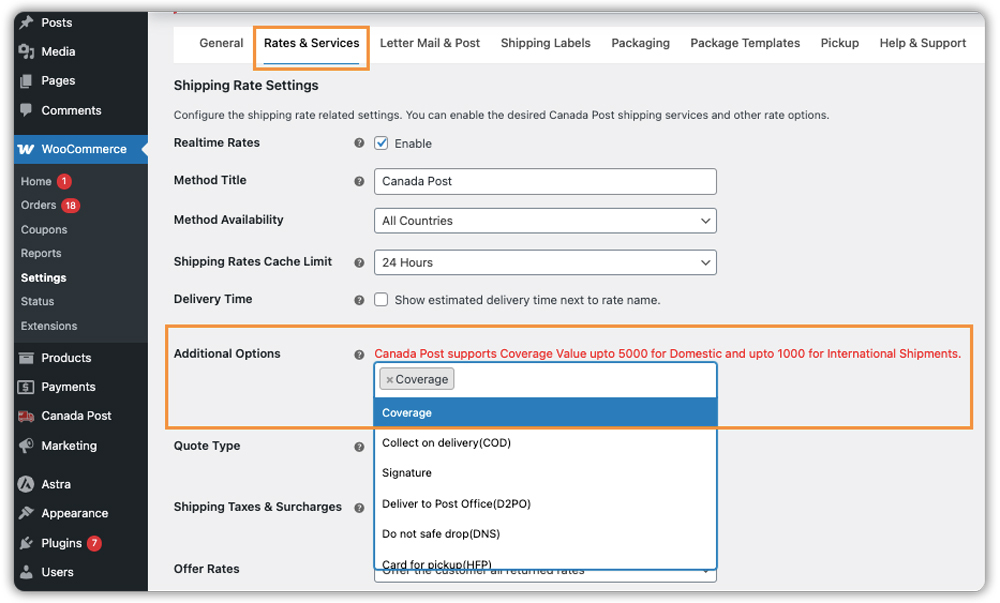
If you want to make sure the full shipping amount, including the coverage cost, is visible to customers at checkout, configure the Shipping Taxes & Surcharges section. This step is optional but recommended for transparency.

Once done, save your settings, add a product to the cart, and verify that the updated shipping rates reflect the coverage cost.

Coverage is a global setting – it applies across all shipments automatically. The plugin calculates the insurance amount based on the product price in the cart, so no manual entry is needed per order. To confirm everything is working correctly, enable debug mode and check the Canada Post debug response to verify that coverage is being applied to the package.

Real-World Example: WooCommerce Store Shipping High-Value Orders with Canada Post Insurance
Let’s say you run a WooCommerce store selling high-value products like jewelry, electronics, or premium merchandise, and you’re shipping through Canada Post without enabling coverage, here’s the reality of what you’re likely dealing with.
Challenges You’re Probably Facing
- High-value orders ship with no financial protection if something goes wrong in transit
- Any lost or damaged shipment comes out of your pocket as a refund or replacement
- Manual checks before shipping expensive orders slow down your fulfillment process
- No consistent way to handle high-value orders differently from regular ones
- Scaling during peak seasons becomes harder when every shipment carries unmanaged risk
How the Canada Post Shipping Plugin for WooCommerce Solves This
The Canada Post Shipping Plugin for WooCommerce lets you enable coverage directly from your store settings. Once turned on, the insurance cost is automatically included in the shipping rates your customers see at checkout, no manual work needed per order.
Results
- Every shipment goes out protected based on the product’s value in the cart
- Customers see real-time shipping rates that already include coverage
- Domestic orders are protected up to CAD $5,000, international up to CAD $1,000
- No more manual checks before shipping expensive items, the process runs itself
- If a shipment is lost or damaged, you have a claim to fall back on instead of absorbing the loss
Once coverage is enabled, protecting your high-value shipments stops being something you have to think about ,it just happens automatically with every order.
Conclusion
Protecting high-value WooCommerce shipments doesn’t have to be a complicated process. Canada Post insurance gives you a reliable way to cover your orders against loss or damage in transit, and when it’s set up correctly in your store, it runs automatically without any extra effort per order. For store owners selling premium products, this is one of those things that seems small to set up but makes a significant difference when something actually goes wrong.
The Canada Post Shipping Plugin for WooCommerce includes a built-in Coverage option that handles this for you. Enable it once in the plugin settings, and every shipment goes out protected with the insurance cost already reflected in the checkout rates. If you need help setting up this in your WooCommerce store, the PluginHive support team is ready to assist you with configuration and guidance.
FAQs
- Does Canada Post have package insurance?
Yes. If a package is lost or damaged during transit, the sender may be eligible to receive compensation for the insured value of the shipment and the cost of postage, subject to investigation and Canada Post’s policies. - What happens if Canada Post loses an order?
You can request Canada Post to open an investigation into the missing package. If the package is declared missing, the sender can claim compensation for the insured value of the shipment and the postage cost, in compliance with Canada Post’s policies. - What happens if Canada Post delivers a damaged package?
Ask your customer to inform you as soon as they receive a damaged package. As the sender, you may be eligible to claim compensation for the insured value of the shipment and the cost of postage, after investigation and in line with Canada Post’s policies. - How long does a Canada Post insurance claim take?
Most claims are resolved within a day, but it can take up to 10 business days for a final decision. Once you open an investigation, Canada Post provides an Expected Resolution Date. - What is the maximum insurance coverage for WooCommerce shipments through Canada Post ?For domestic shipments within Canada, coverage is available up to CAD $5,000. For US and international shipments, the limit is CAD $1,000.
