



Running a Shopify store means handling a lot of moving parts. Orders come in fast. Customers expect updates right away. And shipping is where things can easily slow down. That’s why so many store owners rely on FedEx. It’s dependable, fast, and covers both domestic and international deliveries without much hassle.
Now, imagine being able to handle all your FedEx shipping tasks right inside Shopify. You can achieve this using PH Ship Rate and Track for FedEx. It might sound like a small change, but it makes a huge difference. You save time, avoid manual errors, and keep your fulfillment process smooth and consistent. When every minute counts, that kind of efficiency adds up.
Many sellers still bounce between the Shopify order page and the FedEx website to print labels. That’s where problems start: typing mistakes, wrong addresses, and missing tracking info. It’s frustrating, and it wastes valuable time.
Printing FedEx labels directly in Shopify fixes all of that. It keeps everything connected and accurate. This article talks about how you can facilitate this right inside of Shopify.
In This Article
- Benefits of Printing FedEx Shipping Labels in Shopify
- How to Print FedEx Shipping Labels in Shopify
- Printing FedEx Return Labels in Shopify
- Conclusion
- FAQ’s
Benefits of Printing FedEx Shipping Labels in Shopify
Printing FedEx shipping labels directly in Shopify using the PH Ship, Rate & Track for FedEx app makes your shipping faster, simpler, and much more organized. Here’s why Shopify sellers love it:
- Automatic rate calculation and label creation
The app pulls live FedEx shipping rates based on the customer’s address, package weight, and chosen service. You just review the details and print the label. No more switching between Shopify and the FedEx website or manually calculating costs. - Access to discounted FedEx shipping rates
The app lets you use FedEx negotiated rates, which are often lower than what’s available publicly. This can save money on every order, especially for stores that ship regularly. - Bulk label printing
Print multiple labels at once. Whether it’s 10 orders or 100, the FedEx app makes batch printing simple and efficient. - Smoother shipping workflow
With Shopify and PH Ship, Rate & Track for FedEx, orders, labels, and tracking info all stay in one place. That means fewer mistakes, less time spent on fulfillment, and a more organized shipping process.
Using the PH Ship, Rate & Track app for FedEx isn’t just convenient; it makes your shipping workflow faster, smarter, and stress-free.
How to Print FedEx Shipping Labels in Shopify
Printing FedEx shipping labels in Shopify is simple when you’re using the PH Ship, Rate & Track for FedEx app. The setup only takes a few minutes, and once it’s ready, you can generate and print labels directly from your Shopify dashboard. Here’s how to do it.
Connect Your FedEx Account to Shopify
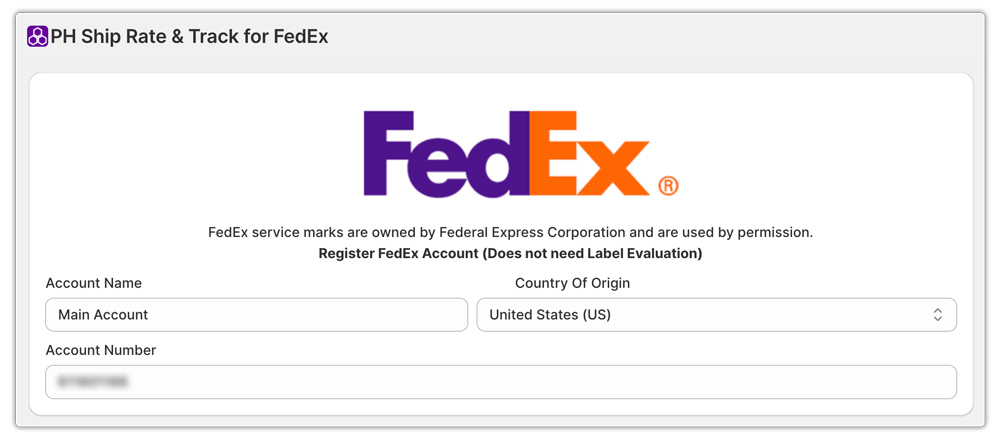
- Start by installing the PH Ship, Rate & Track for FedEx app from the Shopify App Store. Once it’s installed, open the app and connect your FedEx account using your credentials.
The app will verify your account automatically. Once that’s done, you’ll be ready to access your live FedEx shipping rates and start creating labels.
Configure FedEx Shipping Services
Next, customize your shipping preferences. In the app, you can enable the FedEx services you want to offer, like FedEx Ground or FedEx International Priority.

You can also define your default package sizes and weights, along with your sender address. Setting these details up front helps make label generation faster later on.
Print a FedEx Shipping Label
- Once an order comes in, go to your Shopify Orders page. From there, open the order you want to ship and click the “Auto Generate Label” option by the PH Ship, Rate & Track for FedEx panel.

- The app will automatically pull in the customer’s shipping details, calculate the rate, and create the label. You can download or print it right away.
Upload Custom Documentation
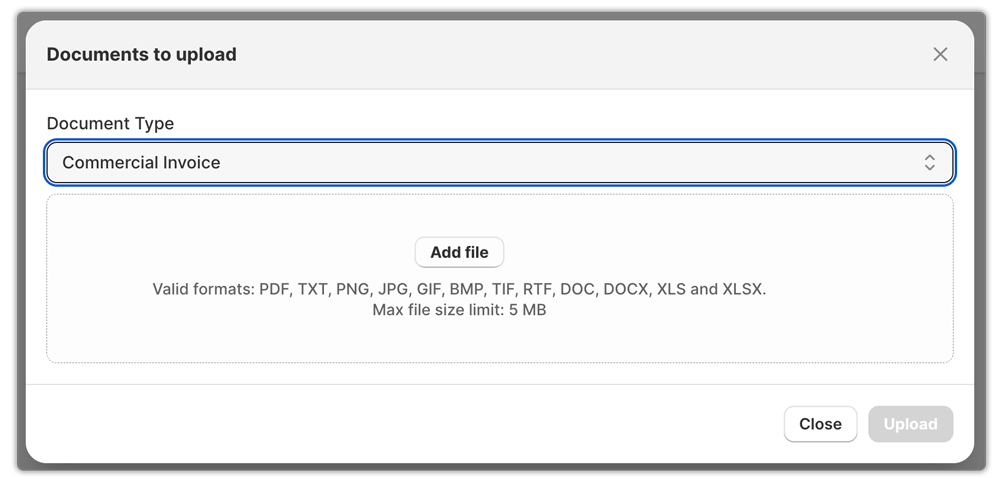
After your FedEx shipping label is generated, you can also upload any custom documents required for international shipments. This can include invoices, export declarations, or any paperwork needed for customs clearance.
Printing FedEx Return Labels in Shopify
Handling Shopify returns doesn’t have to be complicated. With the PH Ship, Rate & Track for FedEx app, you can create FedEx return labels right from your Shopify, no need to log into the FedEx website or manage extra steps.
Here’s how it works:
- Open the customer’s order. Go to the shipping page in the app and open the order that needs a return label.
- Click on the order and click on “More Actions.
- Choose “Return Label.” Select the “Return Label” option to start creating the label.
- Pick your preferred FedEx service. You can choose any FedEx service you like, whether it’s FedEx Ground for standard returns or FedEx Express for faster shipping.
- Generate and share the label. Once you confirm the details, the app instantly creates the FedEx return label. You can print it.
Using this method keeps your return process simple and stress-free. Everything stays within Shopify.

Conclusion
Shipping doesn’t have to be a headache, and with the PH Ship, Rate & Track for FedEx app, it really isn’t. Everything you need to manage your FedEx shipping is right inside Shopify. You can create labels, handle returns, upload customs documents, and track shipments without ever leaving your store dashboard.
It’s fast. It’s reliable. And it keeps your fulfillment process running smoothly from start to finish.
Whether you’re shipping locally or sending packages overseas, the Shopify FedEx app gives you complete control from live rate calculation to label printing and tracking. No more jumping between tabs or dealing with manual entry errors. Just a clean workflow that saves time and keeps your customers happy.
If you’re still managing FedEx shipments outside of Shopify, it might be time to switch things up. Try using PH Ship, Rate & Track for FedEx, and see how much easier your shipping can be.
FAQ’s
- How do I print a shipping label for FedEx in Shopify?
Install and connect the PH Ship, Rate & Track for FedEx app. Open the order in Shopify, click “Auto Generate Label”, confirm the details, and the label is ready to print or download all without leaving Shopify.
- How do I get FedEx API credentials?
To get FedEx API credentials, start by signing up or logging into the FedEx Developer Portal. Create a new project, and the system will generate your API credentials, including the API key. You can view and manage these credentials anytime from the project’s overview page.
- What is the FedEx Shipping API?
The FedEx Shipping API is what lets you integrate FedEx services directly into your website or app. It allows you to calculate shipping rates, create labels, track packages, and manage shipments automatically.
