


Running a coworking space business with WooCommerce should focus on growth, not managing double bookings, manual schedules, or complex payments. Standard WooCommerce treats your desks and meeting rooms like regular products, making it hard to manage dynamic rentals efficiently. These challenges cost time, frustrate customers, and limit your business growth.
The solution is automation. With the WooCommerce Booking and Appointments plugin, you can turn your spaces into bookable resources, let customers check real-time availability, choose flexible time slots, and pay instantly or with deposits. In this article, we’ll show how WooCommerce Bookings can simplify your coworking rentals, reduce errors, and create a seamless experience for both you and your customers.
Table of Contents
- Challenges in Managing Coworking Space Rentals
- Coworking Space Rental Automation with WooCommerce Bookings
- Real-World Example
- Best Practices for Managing Coworking Space Rentals
- Conclusion
- FAQ’s
Challenges in Managing Coworking Space Rentals
Managing a coworking space through your WooCommerce store can become complex as your business grows. Many store owners encounter recurring issues that drain time, affect customer satisfaction, and slow down overall progress. Here’s a closer look at the most common challenges:
- Double Bookings and Scheduling Conflicts: You’ve probably had two clients book the same desk or meeting room at the same time. It’s frustrating, leads to cancellations, and can upset your customers.
- Managing Multiple Spaces and Resources: Tracking availability for desks, private rooms, meeting halls, and other amenities manually is complex and error-prone, especially as your business grows.
- Handling Flexible Booking Durations: Customers may want hourly, half-day, or full-day bookings. Standard WooCommerce doesn’t support these variations, making it hard to offer flexible rental options.
- Manual Payment Processing and Deposits: Collecting full payments, partial payments, or deposits manually is time-consuming and increases the chances of errors. Keeping track of pending payments adds extra stress.
- Overwhelming Communication Tasks: Customers expect instant confirmations, reminders, and updates. Manually sending emails for each booking change is tedious and prone to mistakes.
These challenges show why a booking solution is essential. In the next section, we’ll see how the WooCommerce Bookings plugin by PluginHive can help you automate bookings and make managing your coworking space easier.
Coworking Space Rental Automation with WooCommerce Bookings
The WooCommerce Booking plugin streamlines your rental process from checking availability and selecting time slots to handling payments and confirmations, all within your WooCommerce store.
Note: Ensure the PluginHive’s Bookings plugin is installed, activated, and configured. Follow this quick setup guide to get started.
Here’s how the plugin helps automate key areas of your coworking space rental business:
- Offer Flexible Booking Durations
Set up bookings to match your clients’ needs: hourly slots for hot desks, half-day rentals for private rooms, full-day bookings for events, or monthly/long-term rentals for dedicated desks and offices. This flexibility attracts more clients and makes your space versatile.
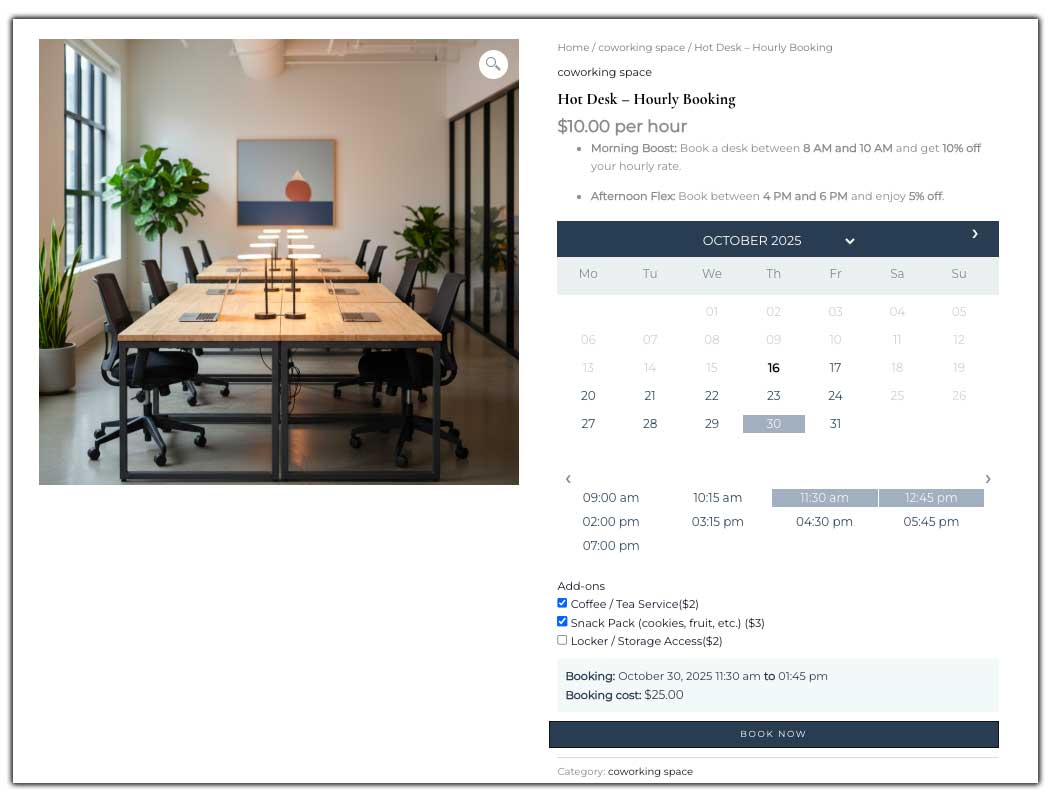
Let’s take an example: You offer a hot desk that can be rented on an hourly basis. A client looking for a short-term workspace can easily book the desk for a few hours directly through your WooCommerce store.

- Define Availability and Blackout Dates
Control which desks or rooms are bookable and block dates for maintenance, holidays, or private events. This ensures clients can only reserve what’s actually free.

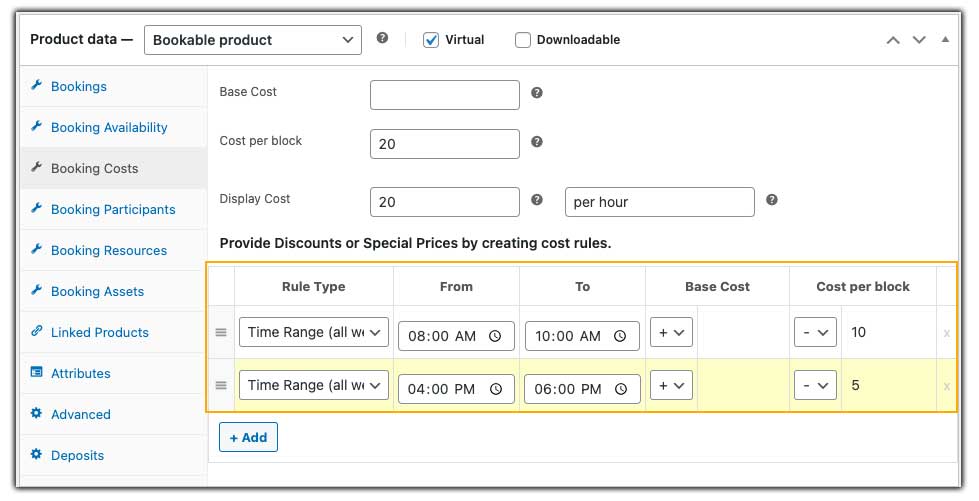
- Set Booking Costs and Pricing Rules
Charge hourly, half-day, full-day, or monthly rates. Add pricing rules for weekends, longer durations, or early bookings. Clients see live pricing updates on the product page.
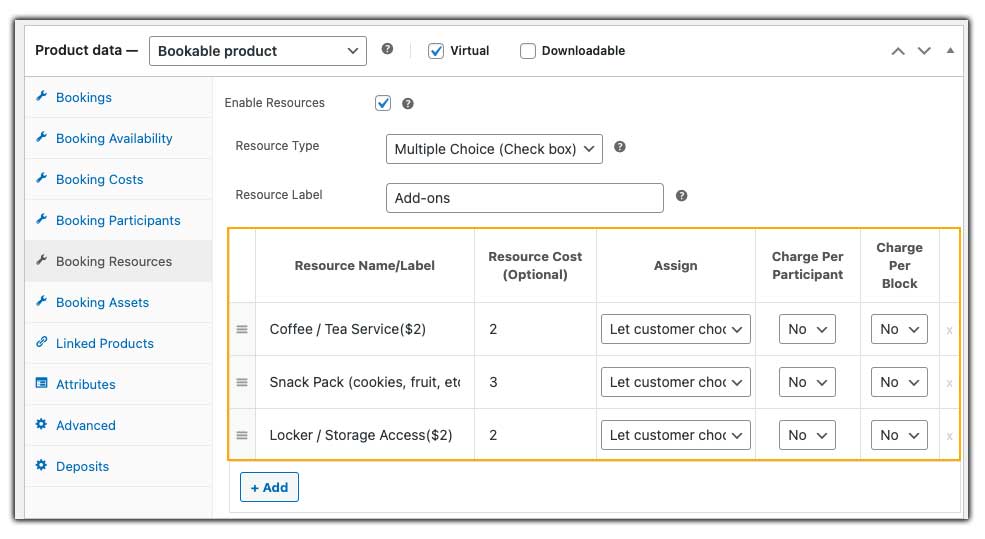
- Offer Add-Ons
Upsell extras like projectors, whiteboards, snacks, or printing services directly on the booking page. You can use Booking Resources or the PH Product Add-Ons for WooCommerce plugin.
Example: A client books a meeting room and adds a projector and coffee service in the same booking.
This is what the hot desk booking experience looks like for your customers.
- Accept Full Payments or Partial Deposits
Collect full payments upfront or accept deposits using the PH Deposits for WooCommerce plugin. This helps secure high-demand bookings and ensures predictable cash flow while giving clients flexibility in payment.

- Send Automated Confirmations and Reminders
Keep clients informed automatically. Send email confirmations, reminders, and follow-ups without manual effort.
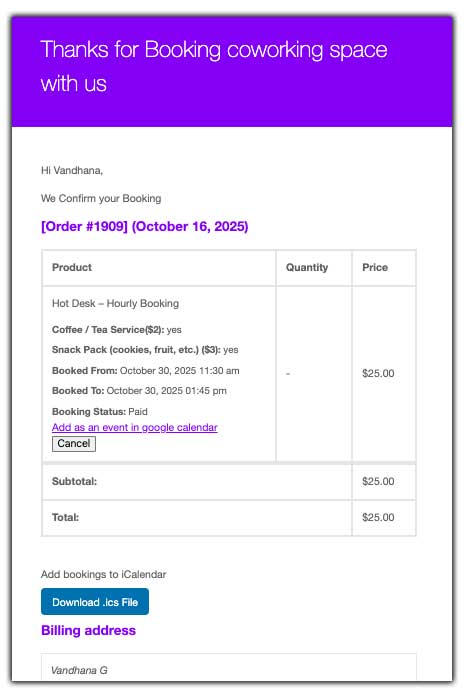
This setup ensures your coworking space runs smoothly, clients enjoy a seamless booking experience, and you can focus on growing your business instead of juggling schedules.
Real-World Example: Automating a Busy Coworking Space
Let’s say you run a coworking space with 15 hot desks, 5 private offices, and 2 meeting rooms. Your clients include freelancers, startups, and small companies. Some need a desk for a few hours, others book private offices for a full day, and long-term clients may reserve a dedicated desk for a month. Managing all these bookings manually can quickly become overwhelming.
The Challenges You Face
- Clients frequently complained about double bookings.
- Staff spent hours manually updating availability and sending confirmations.
- Handling deposits and full payments was messy and prone to errors.
- Managing additional resources like projectors, whiteboards, or extra chairs for each booking was complicated.
This manual approach caused frustration for both clients and staff and limited your space’s revenue potential.
How It Can Be Solved
With the WooCommerce Booking Plugin, here’s how your coworking space operations can be transformed:
- Flexible Booking Durations: Freelancers can book hot desks by the hour, startups can reserve private offices for a full day, and long-term clients can secure monthly desk rentals automatically.
- Buffer Time Between Bookings: Automatic buffer times can be added between bookings, ensuring rooms are always ready for the next client.
- Pricing Rules and Deposits: Hourly, daily, and monthly pricing is calculated automatically, and clients can pay either in full or via partial deposits online.
- Add-Ons and Extras: Clients can select projectors, whiteboards, or snacks while booking, increasing revenue without extra effort.
- Automated Confirmations and Reminders: Instant email confirmation after each booking ensures clients are always informed and reduces the chances of no-shows.
Automating your coworking space rental process saves staff hours every day, gives clients a seamless booking experience, and boosts revenue by maximizing space utilization and automatically selling add-ons.
Best Practices for Managing Coworking Space Rentals
After automating your coworking space rental system, focus on optimizing how you manage bookings, clients, and space usage. Follow these best practices to get the most out of your setup:
- Keep an Eye on Booking Patterns: Review which desks or rooms are booked most often and at what times. This helps you identify popular slots, adjust your pricing strategy, and plan offers for low-demand periods.
- Encourage Recurring or Long-Term Bookings: Building relationships with long-term clients ensures steady revenue. Offer incentives like discounts or free add-ons for customers who book monthly or for extended durations.
- Maintain Transparency in Policies: Clearly communicate your booking, cancellation, and refund policies on the booking page. It builds trust and avoids last-minute misunderstandings with clients.
- Focus on Customer Experience: Encourage feedback after each booking. Simple improvements like providing water, ensuring cleanliness, or having fast Wi-Fi can turn a one-time user into a repeat customer.
- Promote Your Space Online: Integrate social media or Google My Business to showcase your coworking space and highlight availability. This keeps your calendar filled and attracts new clients organically.
By following these best practices, you can make your coworking space run more efficiently, keep clients happy, and maintain steady growth. With the right setup and consistent improvements, managing your space becomes easier and more rewarding.
Conclusion
Managing coworking space rentals doesn’t have to be complicated. With the WooCommerce Booking and Appointments plugin by PluginHive, you can automate scheduling, manage multiple spaces, and handle payments effortlessly, all from your WooCommerce store.
By simplifying your booking process, you save time, avoid errors, and deliver a smooth experience for your clients. Ready to streamline your coworking space management? Reach out to the PluginHive support team for tailored assistance.
FAQs
Q. Can I allow clients to book coworking spaces monthly using WooCommerce Bookings?
Yes. WooCommerce Bookings lets you set up bookable products with flexible durations, including hourly, daily, or monthly rentals. You can configure monthly desk or private office rentals so clients can reserve a space for an extended period directly through your store.
Q. Is it possible to offer add-ons like projectors or snacks during the booking process?
Yes. Using WooCommerce Bookings’ Resources feature or with PH WooCommerce Product Add-Ons, you can let clients select extras. This enhances the booking experience and provides opportunities for upselling.
Q. How can I handle cancellations or no-shows for coworking space bookings?
WooCommerce Bookings provides options to set cancellation. You can define the cancellation window, helping to manage no-shows and maintain revenue.
Q. Is it possible to integrate WooCommerce Bookings with Google Calendar?
Yes, WooCommerce Bookings can be integrated with Google Calendar, allowing you to sync bookings and manage schedules effectively. This integration helps in keeping track of reservations and avoiding scheduling conflicts.
Q. How can I offer discounts for long-term bookings?
WooCommerce Bookings allows you to set pricing rules based on duration. By configuring pricing tiers, you can offer discounts for longer bookings, incentivizing customers to commit to extended periods.
