


WooCommerce merchants selling internationally face a common challenge: handling duties and taxes in a way that doesn’t frustrate customers. With Delivered Duty Unpaid (DDU/DAP), customers are hit with unexpected customs charges upon delivery, leading to delays, confusion, and sometimes abandoned orders.
Delivered Duty Paid (DDP) solves this problem by covering all duties and taxes upfront, letting customers see the full landed cost at checkout. In this article, we will see what UPS DDP shipping is, how to implement it in WooCommerce, and ways it can simplify cross-border shipping while providing a seamless experience for your international customers.
Table of Contents
- Understanding UPS Delivered Duty Paid (DDP)
- Integrating UPS DDP Shipping with WooCommerce
- Best practices for a seamless cross-border experience
- Conclusion
- FAQs
Understanding UPS Delivered Duty Paid (DDP)
UPS DDP shipping is an international service where the seller takes full responsibility for all costs and risks until the goods are delivered to the buyer’s destination. This includes shipping costs, customs clearance, and import duties and taxes, ensuring a smooth, predictable experience for the customer.
Requirements for DDP shipping via UPS:
- UPS payment account: Essential for selecting the DDP option; without it, shipments default to DDU (Delivered Duty Unpaid), where the buyer pays duties.
- Commercial Invoice: A detailed invoice is mandatory for all cross-border shipments. UPS’s online shipping tool can help generate it while building the label.
- Detailed product description: Specify the product accurately (e.g., “men’s 100% cotton sweatshirt” instead of just “clothing”) to allow customs to calculate duties correctly.
- HS code (optional but recommended): Providing the Harmonised Tariff System code helps ensure accuracy and avoid customs delays.
- UPS Paperless® Invoice: Instead of printing and attaching invoices manually, UPS Paperless® Invoice lets you transmit them electronically. This speeds up customs clearance and makes the process smoother.
DDP vs. DDU with UPS
The main difference between DDP and DDU lies in who is responsible for duties and taxes:
| Feature | Delivered Duty Paid (DDP) | Delivered Duty Unpaid (DDU) |
|---|---|---|
| Payer of duties and taxes | Seller | Receiver (buyer) |
| Customer experience | Seamless, no unexpected fees | Buyers may face extra charges, causing delays |
| Payment requirement | Requires a UPS payment account | Default option if using a credit card |
| Risk | Seller assumes maximum risk | Buyer assumes risk for costs and customs delays |
By choosing UPS DDP, WooCommerce merchants can provide a frictionless cross-border shopping experience, reduce abandoned carts, and enhance customer trust.
Integrating UPS DDP Shipping with WooCommerce
For WooCommerce merchants selling internationally, offering a smooth shipping experience is crucial. Using UPS DDP shipping ensures that all duties, taxes, and fees are handled upfront, letting your customers see the full cost at checkout. To make this process seamless, you can use the WooCommerce UPS Shipping Plugin with Print Label, which is built to manage international shipments efficiently.
To get started, first configure the UPS plugin for your store. Set up the UPS plugin for WooCommerce and enable international shipping options by following this guide: PluginHive UPS Shipping Guide for WooCommerce .
Here’s How the Plugin Can Help You with International Shipments
- Duties and Taxes: With UPS DDP enabled, all duties, taxes, and fees are handled upfront by the seller, so customers see the full cost at checkout without surprises.

- Customs-Ready Product Details: As mentioned earlier in Requirements for DDP shipping via UPS, you can set HS codes, detailed product descriptions, and country of manufacture using the plugin. These details help ensure smooth customs clearance and compliance with international regulations.

- Label Printing and Documentation Automation: The plugin lets you generate UPS shipping labels directly from your WooCommerce dashboard and automatically creates commercial invoices and other necessary customs documents for international shipments, streamlining your order fulfilment process.

- EEI and EDI Support: Enable Electronic Export Information (EEI) and Electronic Data Interchange (EDI) to speed up customs clearance with digital documentation instead of additional forms.

- Customizable Invoice Options: Include shipping charges, total insured value, declaration statements, terms of sale, and reason for export on your invoices to meet compliance requirements.
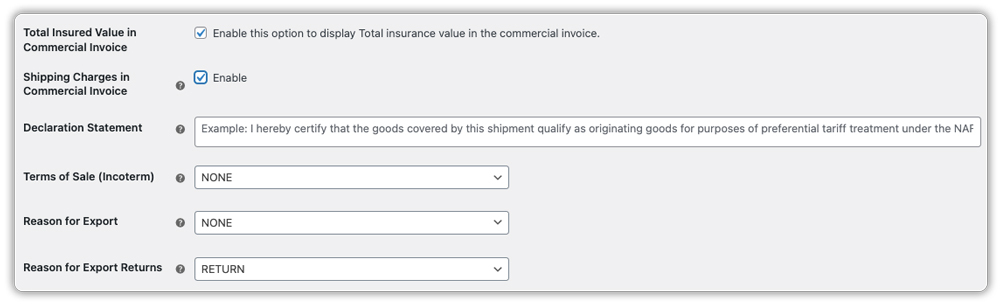
With these features, merchants can offer a seamless cross-border shopping experience, ensuring customers pay the full landed cost upfront without surprises, while saving time and avoiding the hassles of manual documentation.
Benefits of UPS DDP for Your WooCommerce Store
Using UPS DDP shipping in your WooCommerce store offers several advantages for both merchants and customers:
- Seamless Customer Experience: Customers see the full landed cost at checkout, eliminating surprises and unexpected fees at delivery.
- Reduced Cart Abandonment: When duties and taxes are clear upfront, buyers are more likely to complete their orders.
- Simplified Compliance: DDP ensures that all duties, taxes, and customs requirements are managed by the seller, reducing the risk of errors and delays.
- Time Savings: Automated label generation, invoices, and customs documentation reduce manual work for merchants.
- Enhanced Trust and Professionalism: Offering DDP demonstrates reliability and transparency, boosting customer confidence in your store.
By using UPS DDP, WooCommerce merchants can streamline international shipping while providing a professional, customer-friendly experience.
Best Practices for a Seamless Cross-Border Experience
To make the most of UPS DDP shipping, consider these best practices:
- Provide Accurate Product Details: Include HS codes, detailed descriptions, and country of manufacture for smooth customs clearance.
- Keep Documentation Updated: Ensure commercial invoices and export documents are accurate and complete.
- Offer Transparent Shipping Costs: Display the total landed cost clearly at checkout to avoid confusion.
- Monitor International Orders: Track shipments and address any customs or delivery issues promptly.
Following these steps helps ensure a frictionless cross-border shopping experience for both merchants and customers.
Conclusion
UPS DDP shipping simplifies international sales for WooCommerce merchants by covering duties and taxes upfront, automating documentation, and reducing potential delivery issues. By integrating the WooCommerce UPS Shipping Plugin with Print Label, merchants can manage cross-border shipments efficiently while providing customers with a seamless, predictable shopping experience.
Implementing DDP not only saves time and reduces errors but also builds trust with international customers, encouraging repeat purchases and expanding your global reach. Need help setting it up? The PluginHive support team is available to guide you through the setup and ensure your international shipping runs smoothly.
FAQs
Q. How does the WooCommerce UPS Shipping Plugin support DDP?
The WooCommerce UPS Shipping Plugin with Print Label integrates your store with UPS and allows you to enable the DDP option. This way, duties and taxes are calculated and displayed at checkout, and included in the shipping label for smooth customs processing.
Q: Do I need a UPS account for DDP shipping?
Yes, a UPS payment account is required to enable DDP shipping. Without it, shipments default to DDU (Delivered Duty Unpaid).
Q: Can I use DDP for all international orders?
DDP is suitable for most international shipments, but it’s important to check customs regulations for each destination country.
Q. Do I need to add product details for DDP shipping?
Yes. To calculate duties and taxes correctly, you’ll need to provide product details such as HS codes, product value, and country of origin.
