


If your Shopify store ships internationally using Australia Post, customs documentation is not optional; it is a mandatory part of every single international order you send. Get it right and your parcels clear borders quickly and arrive with your customers on time. Get it wrong, and you’re dealing with held shipments, returns to sender, unhappy customers, and in some cases, additional duties and fines.
This guide breaks down exactly what customs documentation Australia Post requires, what each means, and how to handle it efficiently at scale from your Shopify store.
In This Article:
- Why Customs Documentation Matters for Shopify Sellers
- The Australia Post CN23 Customs Declaration Form
- HS Tariff Codes in Shopify: What They Are and How to Find Them
- Writing Item Descriptions in Shopify for Australia Post Customs Forms
- How to Manage Australia Post Customs Documentation in Shopify
- Australia Post Customs Mistakes Shopify Sellers Should Avoid
- Final Thoughts
- FAQ’s
Why Customs Documentation Matters for Shopify Sellers
Every parcel you send internationally with Australia Post passes through at least two customs authorities in Australia on the way out, and the destination country’s customs on the way in. Both authorities use the information on your customs documentation to decide whether your parcel can proceed, what duties and taxes apply, and whether any permits or restrictions are triggered.
For Shopify sellers, the consequences of incorrect or incomplete documentation are significant. A parcel held at customs means a delayed customer. A parcel returned to the sender means a refund and a lost sale. An inaccurate declaration can cause customs authorities to charge your customer unexpected import duties, which the customer may then dispute with you. Australian law treats serious misdeclaration of goods’ value or contents as customs fraud.
The Australia Post CN23 Customs Declaration Form
You must include a CN23 customs form when sending a parcel overseas. This is not situational; it applies to every international parcel, regardless of value, destination, or whether the order is a sale or a gift.
You must include a completed customs form when you send International Parcels, International Courier Letters, or International Express Letters.
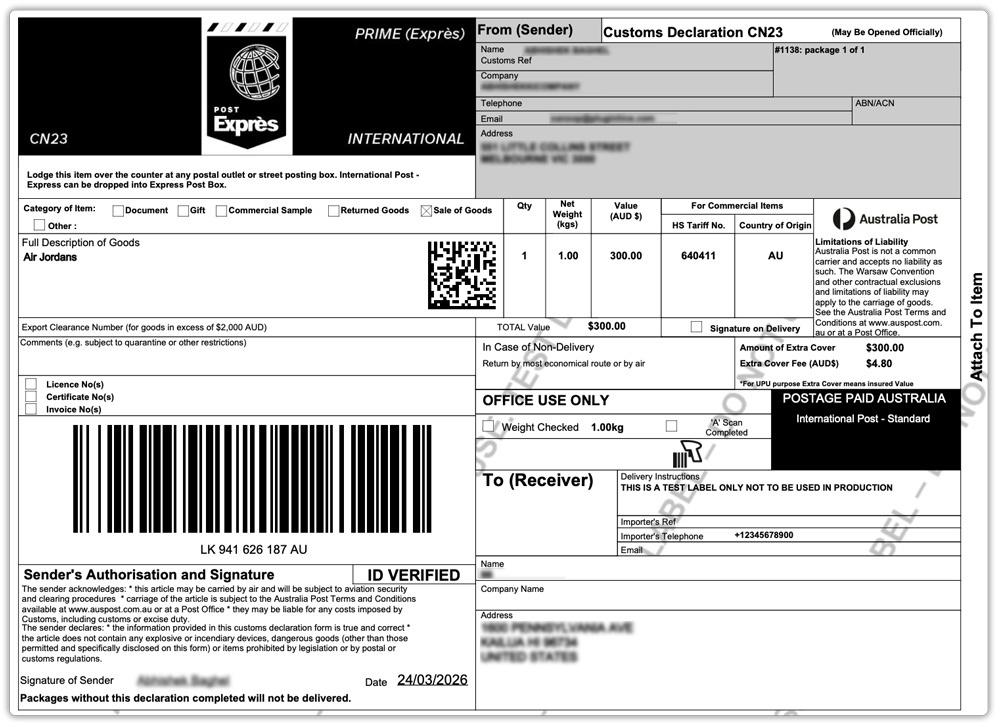
The CN23 contains the following core information:
- Sender’s full name, address, and contact details
- Recipient’s full name, address, and contact details
- Provide a detailed description of the goods you are sending.
- The quantity and weight of each item
- The declared value of each item and the total shipment value
- The HS tariff number for each item
- The country of origin of the goods
- The category of the shipment (gift, sale, commercial sample, returned goods, or documents)
- Whether the contents are subject to quarantine or other restrictions
How to Complete the CN23 with Australia Post
Australia Post gives you three options to complete your customs form: online before you lodge your parcel, through your MyPost Business account, where you can pay and print your label in one step, or in person at the Post Office counter, where a staff member will enter your details.
HS Tariff Codes in Shopify: What They Are and How to Find Them
The HS tariff code is one of the most important fields on your customs declaration, and one of the most commonly mishandled by newer Shopify sellers. The HS (Harmonised System) tariff number classifies international shipments with an internationally recognised code. You enter the HS tariff number on your customs declaration form to help customs authorities assess which taxes, duties, and restrictions may apply to the delivery of your goods.
How Many Digits Does an HS Code Have?
HS tariff numbers are usually six digits. However, some countries, including Japan, Germany, Ireland, and the US, add extra digits for further classification. You need to ensure you’re providing the correct HS tariff number for your destination country when the number is shown with a full stop in the middle (e.g. 8517.12).
How to Find the Right HS Code
- Use the World Customs Organisation’s Harmonised System database
- Use the Australian Border Force trade tariff tool
- Use the lookup tool built into Shopify when you type your product description into the item HS code field in the product settings
- Once you’ve determined the appropriate code for each product, you can enter it in the Shopify Australia Post app’s Product tab under the Customs Information section
What Happens if You Use the Wrong Code?
If an incorrect tariff code is used, the item may incur additional taxes or be returned to the sender. It is your responsibility as the sender to ensure the correct code is used, not Australia Post’s.
Writing Item Descriptions in Shopify for Australia Post Customs Forms
The description of the goods field on your Australia Post CN23 is something many Shopify sellers fill in with minimal detail, and it is one of the most common causes of returns and customs delays.
An insufficient description uses vague details and may cause customs officials to hold your shipment until you provide more information or return it to you as the sender.
The difference between a sufficient and an insufficient description is straightforward:
- Insufficient: Shoes
- Sufficient: Men’s leather shoes, women’s plastic sandals, kids’ fabric shoes
A good description on your Australia Post customs form clearly explains what the item is, what it is made of, and how people use it. Each item in the parcel needs its own description; you cannot group multiple different Shopify products under a single vague line item.
How to Manage Australia Post Customs Documentation in Shopify
For sellers processing a handful of international orders per week, completing Australia Post customs forms manually is manageable. For Shopify stores with higher international volumes, automating the process is essential.
The best way to handle Australia Post customs documentation directly within Shopify is through the PluginHive Australia Post Shipping app. Instead of jumping between your Shopify dashboard and Australia Post’s website for every international order, the app brings the entire customs and label workflow into one place. Here’s what it lets you do:
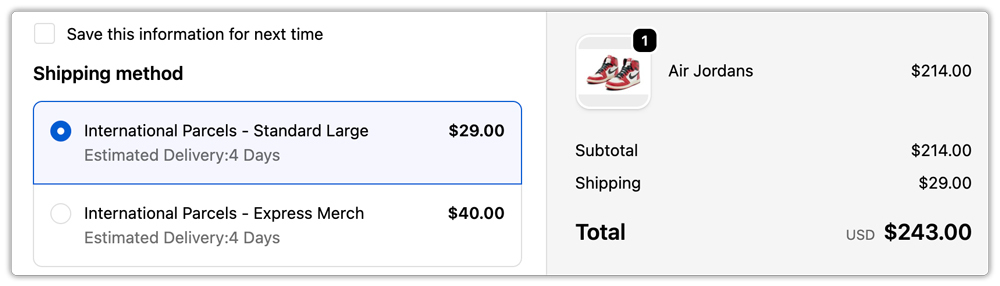
Live Australia Post international shipping rates at checkout:
It displays real-time rates for all available Australia Post international services directly on your Shopify checkout, so customers see accurate costs before they place their order.
Automatic CN23 generation with every Australia Post label:
As soon as you generate a shipping label for an international order, the CN23 customs declaration is printed automatically with all the relevant details pulled directly from the Shopify order, no manual form-filling required.
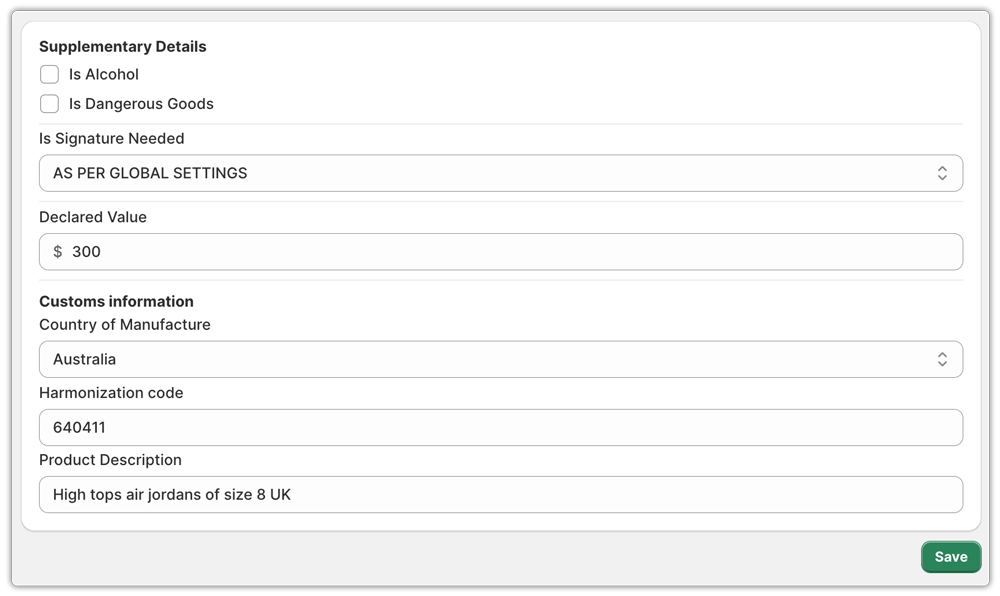
HS code, country of origin, and full customs declaration control at the product level:
Assign an HS tariff code and country of origin to each product in your Shopify store, and configure key declaration fields like item descriptions, declared value, insurance details, and shipment category. When you dispatch an international order through Australia Post, the app automatically fills the customs form.
Australia Post Customs Mistakes Shopify Sellers Should Avoid
- Vague item descriptions: “Clothing” or “gift” are not acceptable on a CN23. Describe the item clearly and state what material it is made from.
- Leaving the HS tariff code blank: Required for all international shipments, including gifts. A missing code will cause a customs delay or rejection.
- Undervaluing orders: Declaring a lower value than the sale price to help customers avoid duties is customs fraud and can result in seized parcels.
- Ignoring country-specific rules: A product that ships freely to one country may be restricted in another. Always check the Australia Post International Post Guide for your destination.
Final Thoughts
Getting Australia Post customs documentation from the start, HS codes, and CN23 forms saves time as your international volume grows. Always verify destination-specific requirements at auspost.com.au before lodging, as rules can change at short notice.
If your Shopify store ships internationally at any meaningful volume, the PluginHive Australia Post Shipping app automates the entire customs documentation process so you can focus on growing your store.
FAQ’s
Q. How do I contact Australian Customs about a parcel?
For parcels entering or leaving Australia, contact the Australian Border Force (ABF) directly at abf.gov.au. For parcels already in the Australia Post network, contact first at auspost.com.au/help. They can advise whether your parcel has been referred to customs and what steps to take next.
Q. Why do customs officials hold my parcel in Australia?
Customs officials usually hold parcels because shippers submit incomplete customs documentation, declare restricted or undeclared items, misstate shipment values, or leave duties and taxes unpaid.
Q. What is the customs clearance process in Australia?
Customs clearance is the process by which the Australian Border Force (ABF) assesses imported goods for compliance with Australian laws. Customs officers verify the declaration, inspect goods for safety or prohibited items, before releasing the parcel for delivery
