


If your WooCommerce store processes dozens of USPS orders every day, printing shipping labels one at a time is a workflow you can’t afford. The PH USPS Shipping Plugin for WooCommerce with Print Label solves this with built-in bulk label printing, letting you generate and download multiple USPS shipping labels in one go, directly from your WooCommerce orders page.
This guide covers everything you need to know about WooCommerce USPS bulk label printing, including why it matters, how to set it up, and how to optimize it for high-volume order fulfillment.
On This Page
- Why Bulk Label Printing Matters in WooCommerce
- Prerequisites for USPS Bulk Label Printing in WooCommerce
- How To Print Multiple USPS Labels in Bulk in WooCommerce
- Real-World Use Case
- Conclusion
- FAQs
Why Bulk Label Printing Matters in WooCommerce
Manual label generation may work for stores handling only a few shipments per week. But once order volume increases, the process becomes difficult to manage efficiently.
High-volume WooCommerce stores often deal with seasonal promotions, subscription shipments, same-day dispatch expectations, and limited warehouse resources. When fulfillment teams generate labels one order at a time, hours are lost repeating the same actions throughout the day.
This also increases the chances of:
- Label mix-ups
- Incorrect tracking updates
- Delayed carrier pickups
- Fulfillment bottlenecks
Bulk label printing with USPS removes these issues by allowing stores to generate multiple shipping labels together in one action. For stores shipping 20, 50, or even 200 USPS orders daily, this creates a more scalable fulfillment workflow without adding extra manual work.
Prerequisites for USPS Bulk Label Printing in WooCommerce
Before using bulk label printing in WooCommerce with USPS, your USPS shipping setup should already be configured properly.
The PH USPS Shipping Plugin for WooCommerce with Print Label allows stores to display USPS live shipping rates at checkout, generate USPS shipping labels, print labels in bulk, and automatically send tracking details to customers.
To use the bulk printing workflow successfully, make sure:
- The USPS plugin is installed and activated
- USPS API credentials are connected
- Live USPS rates are working at checkout
- Your shipper address is configured correctly
- Product weights and dimensions are accurate
Once you configure the USPS plugin, you can print shipping labels in bulk directly from the WooCommerce Orders page.
To configure the USPS plugin in your WooCommerce store, go through this guide: Setting Up USPS Shipping Plugin for WooCommerce .
How To Print Multiple USPS Labels in Bulk in WooCommerce
The PH USPS Shipping Plugin for WooCommerce with Print Label lets fulfillment teams print shipping labels in bulk directly from the native WooCommerce Orders page, eliminating the need to switch between multiple systems.
Select multiple shipments using the checkboxes beside each WooCommerce order. Stores handling large order volumes often process shipments in organized batches, such as domestic and international USPS shipments separately.
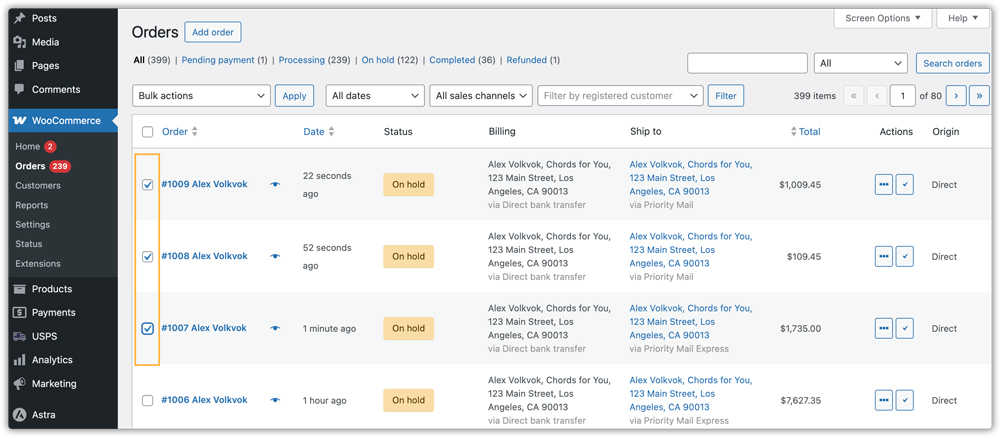
Once the required orders are selected, open the Bulk Actions dropdown at the top of the Orders page. The plugin adds a Create USPS Label option inside this menu. Select it and click Apply to generate shipment requests and assign tracking numbers for all selected orders.

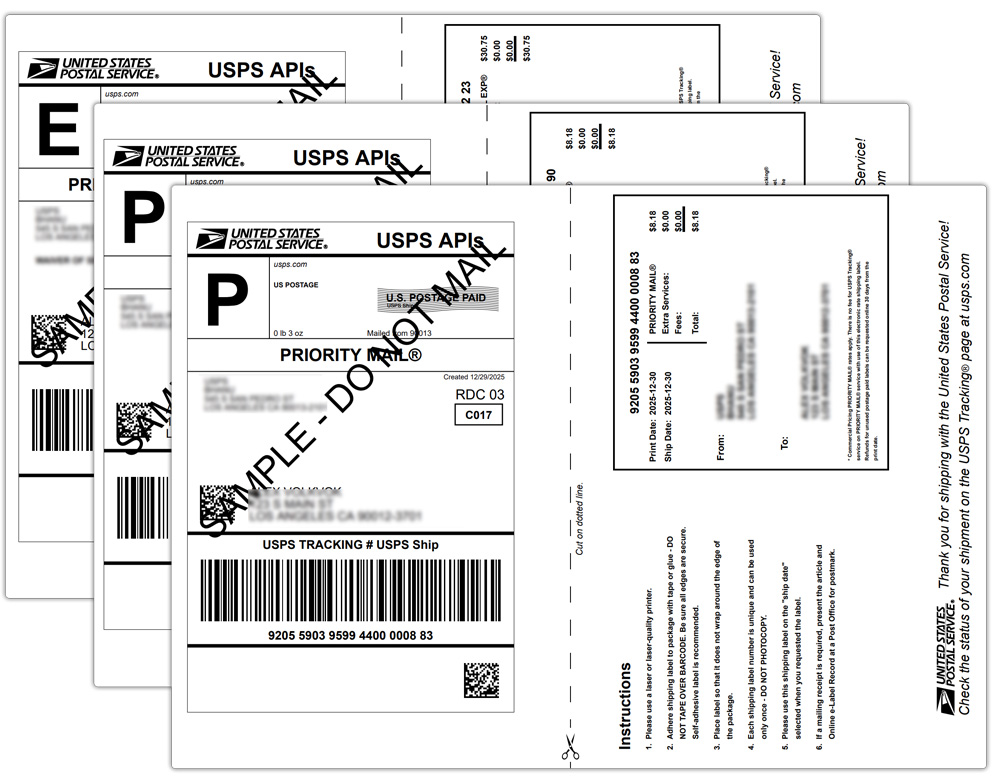
After the labels are created, open the Bulk Actions dropdown again and select Print USPS Label. Click Apply to download all generated USPS labels together as a single PDF file.

The generated PDF contains one USPS shipping label per page, making it easier for warehouse teams to print, sort, and match labels with outgoing packages.
Real-World Use Case: How a WooCommerce Pet Supplies Store Reduced USPS Label Processing Time by 80%
A high-volume WooCommerce pet supplies store in the United States regularly handled more than 200 USPS shipments daily during seasonal promotions and holiday sales. As order volume increased, the fulfillment team struggled to manage USPS label generation efficiently using a manual workflow.
The Problem
Warehouse staff had to open WooCommerce orders individually, generate USPS labels one by one, and print separate PDFs for every shipment. During peak periods, this consumed several hours daily and increased the chances of label mix-ups and tracking mismatches.
The team also found it difficult to prepare shipments before USPS pickup cutoffs, leading to fulfillment delays and increased shipment-related support requests.
The Solution
The store implemented the PH USPS Shipping Plugin for WooCommerce with Print Label and switched to USPS bulk label printing in WooCommerce.
Instead of generating labels individually, the fulfillment team selected multiple Processing orders together and used the Print Labels bulk action to generate all USPS shipping labels in one go.
The plugin automatically:
- Created a combined USPS label PDF
- Updated tracking numbers
- Synced shipment details inside WooCommerce
- Allowed warehouse staff to print, sort, and prepare shipments much faster
After implementing WooCommerce bulk label printing, the store reduced label processing time by more than 80% while improving shipping accuracy and fulfillment speed.
Conclusion
WooCommerce label printing in bulk helps high-volume stores process large USPS shipping batches much faster. Using the USPS Shipping Plugin, merchants can print USPS labels in bulk and streamline fulfillment operations directly inside WooCommerce. If your WooCommerce store is still generating USPS labels one order at a time, switching to bulk label printing can significantly improve your shipping workflow and help your operations scale more efficiently.
FAQs
Q. Can I use the bulk label printing feature without a USPS account in WooCommerce?
No. You need a USPS account with API access enabled because the plugin connects directly to USPS to generate shipping labels and tracking numbers.
Q. Can I generate USPS labels in bulk for multiple carriers inside WooCommerce?
Yes. WooCommerce can support multiple carrier integrations together through the WooCommerce Shipping Services plugin. Along with USPS bulk label printing, stores can also configure UPS, FedEx, and DHL shipping plugins to manage bulk shipping workflows from one dashboard.
Q. Can WooCommerce USPS bulk label printing be used for international shipments?
Yes. The PH USPS Shipping Plugin for WooCommerce supports both domestic and international USPS shipments.
Q. Can multi-vendor WooCommerce stores use USPS bulk label printing?
Yes. With the PH WooCommerce Multi-Vendor Shipping Addon, individual vendors can generate and manage USPS shipping labels independently within the same WooCommerce store.
Q. Can I combine USPS bulk label printing with custom WooCommerce shipping rules?
Yes. The WooCommerce Table Rate Shipping Pro Plugin allows stores to combine USPS live rates with custom shipping rules based on cart total, product category, destination, or package weight.
