


Expanding your WooCommerce store to international markets is an exciting step, but it also brings the challenge of dealing with customs duties and taxes. For many online businesses, these extra charges can become a source of confusion, leading to unexpected costs and unhappy customers if not managed properly.
This is where FedEx makes a difference. With its global shipping network and customs expertise, FedEx takes the complexity out of cross-border shipping by handling duties and taxes on your behalf. When integrated with your WooCommerce store, FedEx ensures your customers enjoy a seamless checkout and delivery experience, without the frustration of hidden fees or delays. In this article, we’ll break down how FedEx manages customs duties and how you can set it up in your WooCommerce store for smoother international sales.
Table of Contents
- Understanding Customs Duties and Taxes
- How FedEx Handles Customs Duties
- Managing Customs Duties in WooCommerce
- Tips for Smooth Customs Management in WooCommerce
- Conclusion
- FAQs
Understanding Customs Duties and Taxes
When selling internationally, your WooCommerce store may encounter customs duties and taxes. These are fees charged by the destination country to regulate imports and collect revenue. Knowing how they work helps you avoid surprises and provide a better experience for your customers.
Importance of Customs Duties for WooCommerce Stores
- Impact on Customer Experience: Unexpected fees at delivery can frustrate customers.
- Shipping Delays: Incorrect or missing documentation can hold packages at customs.
- Business Reputation: Poor handling of duties may lead to complaints or lost sales.
Now that we understand what customs duties and taxes are, let’s take a closer look at how FedEx handles them to make international shipping easier for your WooCommerce store.
How FedEx Handles Customs Duties
FedEx plays a key role in international shipping by not only transporting packages but also managing customs clearance. For every international order, FedEx ensures that the required documentation is prepared, duties are calculated correctly, and shipments comply with local regulations.
When it comes to paying customs duties, FedEx provides two main options:
- DDP (Delivered Duty Paid): The seller pays all customs duties and taxes upfront, so customers receive their orders without any surprise fees.
- DDU (Delivered Duty Unpaid): The customer pays duties at delivery, which may reduce your upfront costs but can result in unexpected charges or delays for the buyer.
FedEx’s documentation support and flexible duty options make international shipping smooth and predictable. To simplify this process in WooCommerce, the PH WooCommerce FedEx Shipping Plugin automates shipping labels, commercial invoices, and duty settings, ensuring your shipments are customs-ready without extra effort.
Managing Customs Duties in WooCommerce
Note: To get started, first configure the FedEx Shipping Plugin for your store. This connects your WooCommerce store with FedEx, enabling live shipping rates, automatic label printing, commercial invoice generation, and shipment tracking for international orders.
Once the plugin is ready, here are the things you need to review to handle customs smoothly and avoid unexpected charges for your customers.
1. Customs Duties Payer
When shipping internationally, your orders are subject to duties and taxes set by the destination country’s customs. In WooCommerce, using the FedEx plugin, you can choose who pays these duties:
- Sender: You, the store owner, pay the duty tax.
- Recipient: The customer pays the duty tax upon delivery.
- Third Party (Broker): A third-party account pays the duty. For this, you need to enter details like account number, contact person, company, phone, email, and address in the plugin settings.
- Third Party: Charges are billed to another FedEx account holder who is neither the sender nor the recipient.

Setting this correctly ensures your shipments are processed smoothly and avoids surprise charges for your customers.
If you selected Third Party (Broker) as the duties payer, you’ll need to set up a FedEx broker account. This means FedEx will coordinate customs clearance through a licensed broker on your behalf. To learn how to configure this in the plugin, refer to the guide Using a Broker with FedEx for Customs Clearance.
2. Commercial Invoice
A commercial invoice is mandatory for all international shipments. It declares the product value to customs and ensures duties are calculated correctly. With the FedEx Shipping Plugin for WooCommerce, these invoices are automatically generated for each order, saving time and preventing errors.

You can choose how the value appears: discounted price, original price, or declared custom value.

3. Terms of Sale
The plugin allows you to define the Terms of Sale (like DDP, DDU, FOB, ExWorks, etc.). This setting decides when the seller’s responsibility ends and when the buyer takes over. This is important for customs compliance.

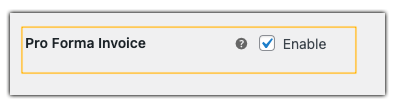
4. Pro Forma Invoice
For non-commercial shipments or sample products, you can enable the Pro Forma Invoice. This preliminary invoice helps prepare customs paperwork in advance, ensuring smoother processing.
5. USMCA Certificate
If you’re shipping between the US, Mexico, and Canada, the plugin can generate a USMCA Certificate. This helps qualify your shipments for reduced or zero duties and speeds up customs clearance.

6. Electronic Trade Documents (ETD)
Enable ETD to send your customs paperwork electronically to FedEx. This means you don’t have to print or attach multiple documents manually. ETD reduces border delays and helps your shipments move faster, making your international shipping process more professional and efficient.

7. Generate Labels and Documents Together
In addition to ETD, the plugin lets you generate shipping labels, commercial invoices, and other necessary documents all at once. This ensures that every shipment is ready for dispatch without extra steps, minimising errors and saving you time.

By managing customs duties properly in WooCommerce, you can reduce delays, prevent customer surprises, and streamline international shipping for your store.
Tips for Smooth Customs Management in WooCommerce
Handling customs duties efficiently is key to providing a seamless international shopping experience. Here are some practical tips for WooCommerce store owners:
- Be transparent about duties: Clearly communicate who is responsible for paying customs charges (seller or customer) to avoid confusion.
- Declare accurate product values: Correctly declare product prices on commercial invoices to prevent delays or fines at customs.
- Choose the right duty payment option: Decide between DDP (Delivered Duty Paid) or DDU (Delivered Duty Unpaid) based on your business model and customer expectations.
- Package and label carefully: Proper packaging and labelling help reduce customs inspection issues and ensure faster clearance.
By following these tips, WooCommerce store owners can simplify international shipping, avoid delays, and improve customer satisfaction, making cross-border sales smooth and predictable.
Conclusion
Handling customs duties doesn’t have to be complicated. With FedEx’s global expertise and automated customs clearance, WooCommerce store owners can ship internationally without worrying about unexpected costs or delivery delays. Whether you choose DDU to keep upfront costs lower or DDP to provide customers with a complete landed price, FedEx gives you the flexibility to manage duties the way that works best for your business.
The FedEx Shipping Plugin for WooCommerce brings all of these features together – displaying shipping rates at checkout that include all duties and taxes, automatically generating customs paperwork, and making cross-border fulfilment truly seamless. Need help setting it up? The PluginHive support team is always ready to guide you, ensuring smooth international shipping every step of the way.
FAQs
1. Can I manage customs duties in WooCommerce when shipping with FedEx?
Yes. By using accurate product descriptions, declared values, and the FedEx Shipping Plugin for WooCommerce with Print Label, you can automate documents and simplify customs clearance.
2. Do international shipments always incur customs duties and taxes?
Yes. Most international shipments have import duties, VAT/GST, excise duties for certain goods, or processing fees. These depend on the product type and destination country.
3. Will my shipment be delayed if the customs documentation is incomplete?
Yes. Missing or incorrect invoices, inaccurate product values, or improper packaging can lead to customs delays.
4. Can WooCommerce display duties and taxes at checkout with FedEx?
Yes. If you configure Shipping Quote Type to “Total Net Shipping Cost With Duties and Taxes” using the FedEx Shipping Plugin for WooCommerce, the shipping rates displayed at checkout will include all applicable duties and taxes. This ensures customers see the full landed cost upfront and won’t face hidden charges later.
