


Last-mile delivery is the most expensive leg of the shipping journey, and for WooCommerce stores, it’s also where things most often go wrong. Failed delivery attempts, redeliveries, and package returns quietly drain shipping budgets and frustrate customers. UPS Access Points offer a practical fix. This article explains what UPS Access Points are, how they reduce last-mile costs, and how to enable them in your WooCommerce store.
On This Page
- Why Last-Mile Delivery Is So Costly in WooCommerce
- How UPS Access Points in WooCommerce Reduce Last-Mile Costs
- Types of UPS Access Point Locations
- How To Display UPS Access Points in WooCommerce Checkout
- Real-World Use Case
- Conclusion
- FAQs
Why Last-Mile Delivery Is So Costly
Last-mile delivery, the final step from a local hub to the customer’s door, accounts for a disproportionately large share of total shipping costs. For e-commerce stores, several factors make it expensive:
- Failed first-attempt deliveries: When no one is home, UPS makes a second or third attempt, each adding cost.
- Return-to-sender fees: Packages that can’t be delivered are returned, generating reverse logistics costs on top of the original shipment.
- Residential surcharges: UPS applies additional fees for residential deliveries compared to commercial addresses.
- Redelivery scheduling: Missed deliveries often require manual coordination, adding time and operational overhead.
For stores shipping moderate to high volumes, these costs compound quickly — and they’re largely avoidable. Let’s see how UPS Access Points can help!
How UPS Access Points Reduce Last-Mile Costs
UPS Access Points are secure, third-party pickup locations — such as retail shops, UPS Stores, self-service lockers, and authorized partner outlets — where customers can collect their parcels instead of receiving them at home. Routing shipments to Access Points directly addresses each of the cost drivers above:
- Eliminates redelivery attempts: Packages go to a fixed pickup location on the first attempt. There’s no second or third trip to a residential address, which means fewer carrier charges per shipment.
- Reduces residential surcharges: UPS Access Point deliveries are treated as commercial-equivalent stops, which can reduce or eliminate the residential delivery surcharge that applies to home deliveries.
- Cuts return rates: Because packages are held for several days at a secure location, customers have a realistic window to collect them, unlike home delivery, where a missed parcel might be taken back to the depot the same day.
- Lowers return shipping costs: Fewer failed deliveries mean fewer return-to-sender shipments, which directly reduces reverse logistics spend.
- Improves delivery density: UPS can drop multiple parcels at a single Access Point in one stop, making the route more efficient — a cost benefit that carriers pass along through competitive rates.
Types of UPS Access Point Locations
UPS collaborates with a wide range of businesses to serve as Access Points. Customers can choose from:
- The UPS Store: Full-service retail outlets for shipping, receiving, and packaging.
- UPS Customer Centers: Official UPS facilities with extended service options.
- UPS Access Point Lockers: Self-service, 24/7 automated lockers for flexible pickup.
- UPS Drop Boxes: Secure drop-off points, typically available around the clock for smaller packages.
- Authorized Shipping Outlets: Partner retail locations certified to receive and hold UPS shipments.
- Alliance Partners: Locations such as grocery stores and pharmacies that handle package storage on behalf of UPS.
This variety means customers can find a location that fits their schedule, whether they prefer picking up during business hours or need 24/7 access via a locker.
How To Display UPS Access Points in WooCommerce Checkout
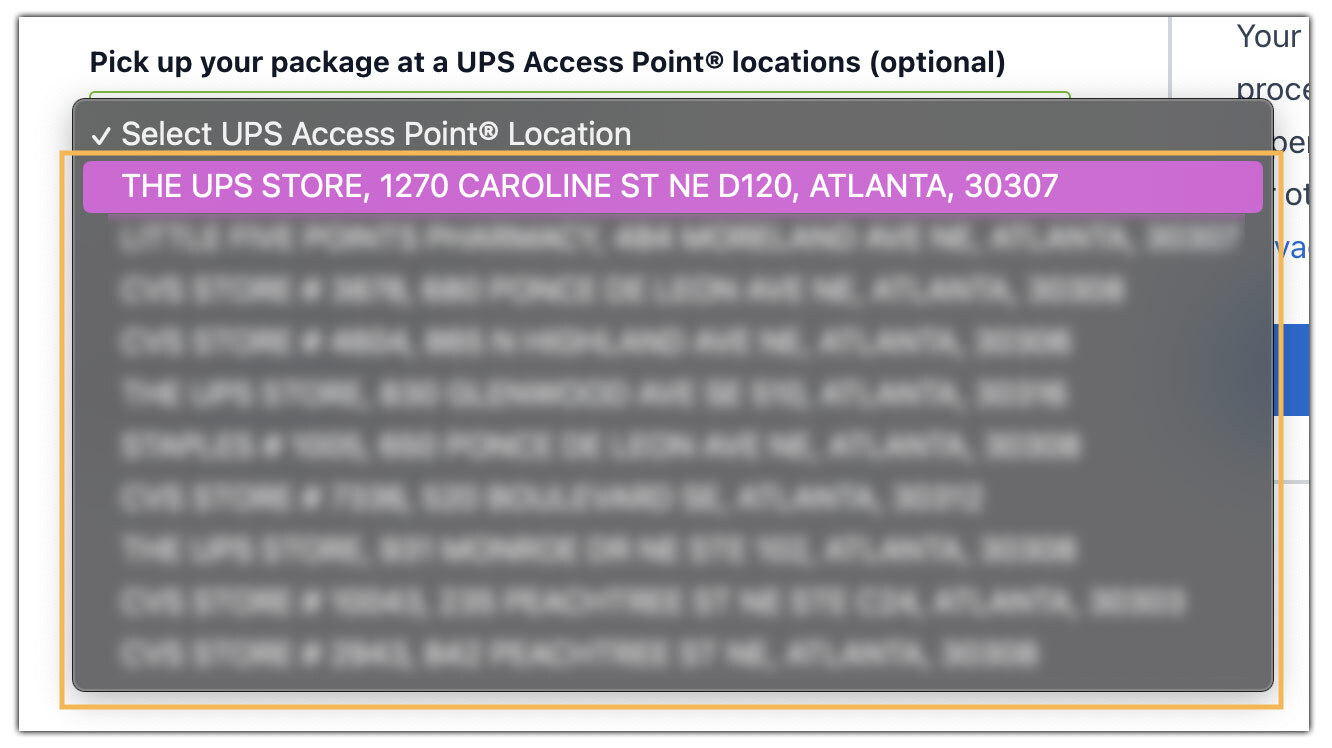
WooCommerce stores can offer UPS Access Point pickup locations at checkout using the WooCommerce UPS Shipping Plugin with Print Label. Instead of home delivery, customers can choose a nearby UPS pickup point that fits their schedule.
For complete setup instructions and configuration steps, check out the detailed guide: How to Enable UPS Access Points in WooCommerce.
Once configured, shoppers can select from available UPS Access Point locations near their delivery address during checkout, as shown in the image.
For full plugin configuration instructions, visit the UPS Shipping Plugin Setup Guide .
Real-World Use Case: WooCommerce Office Supplies Store
A WooCommerce store specializing in office supplies and corporate essentials — laptops, monitors, ergonomic chairs, and productivity accessories — primarily served working professionals and corporate buyers. Most customers placed orders to their home addresses, but were unavailable during standard delivery hours due to full-time office schedules. This led to:
- Frequent missed deliveries
- Multiple reattempts by carriers
- Higher shipping costs due to residential surcharges
- An increase in return-to-sender shipments
Customer frustration grew as missed deliveries disrupted their schedules, and support teams handled repeated queries about rescheduling and tracking shipments.
The Solution
To address this, the store enabled the UPS Access Point® Locator using the WooCommerce UPS Shipping Plugin with Print Label. At checkout, customers could select from nearby UPS Access Points — typically located near their homes and office areas, business districts, and transit hubs.
Key changes after rollout:
- Corporate customers chose pickup points near their workplaces for convenient access.
- First-attempt delivery success rates improved significantly.
- Residential surcharges decreased as more shipments shifted to Access Point delivery.
- Support tickets related to missed deliveries dropped noticeably.
The store reduced overall shipping costs by minimizing failed delivery attempts, and at the same time, customer satisfaction improved as working professionals gained the flexibility to collect orders at convenient locations.
Conclusion
Last-mile shipping costs are one of the hardest expenses to control in e-commerce, but UPS Access Points give WooCommerce merchants a concrete tool to reduce them. The WooCommerce UPS Shipping Plugin makes the integration straightforward, with Access Point selection appearing natively at checkout automatically. For stores looking to tighten shipping margins without sacrificing the customer experience, it’s one of the more impactful changes available.
For help setting up UPS Access Points in your WooCommerce store, reach out to PluginHive Support.
FAQs
Q. Do UPS Access Points cost extra for customers?
No. Selecting a UPS Access Point as a WooCommerce delivery destination is free for customers. In some cases, it may even result in lower shipping costs compared to residential delivery.
Q. How long does UPS hold a package at an Access Point?
UPS typically holds packages for 5–7 business days. If uncollected within this window, the parcel is returned to the sender.
Q. Are UPS Access Points available outside the United States?
Yes. The UPS Access Point network operates in many international markets, though availability varies by country. To learn about global shipping with UPS, visit UPS international shipping.
Q. What does a customer need to collect a package from an Access Point?
A valid government-issued photo ID and the UPS tracking number are required at pickup. Some locations may also accept a UPS InfoNotice left by the driver.
