


Offering flexible delivery options can significantly enhance the shopping experience for your WooCommerce customers. UPS Access Point/ UPS Hold at Location services allow customers to pick up their packages at convenient UPS locations instead of waiting for home delivery. This not only increases delivery success rates but also improves customer satisfaction by providing more control over where and when orders are received.
By integrating UPS Access Point® options into your WooCommerce checkout, you can provide a seamless shipping experience while reducing missed deliveries and returns.
On This Page
- What are UPS Access Points / Hold at Location?
- Benefits of UPS Access Points in WooCommerce
- How UPS Access Points Work in WooCommerce
- UPS Access Points at WooCommerce Checkout
- Best Practices for Using UPS Access Points
- Real-World Example
- Conclusion
- FAQs
What Are UPS Access Points / Hold at Location?
UPS Access Points are secure, third-party locations where customers can pick up or drop off their UPS shipments. This service offers flexibility for both senders and recipients, ensuring packages are safe and accessible even if no one is available at the delivery address.
This allows recipients to choose a UPS Access Point as their delivery destination. This ensures that packages are held securely at a convenient location for pickup.
Variety of UPS Access Point Locations
UPS collaborates with a diverse range of businesses to serve as Access Points, providing customers with multiple options for package pickup and drop-off:
- UPS Customer Centers: Full-service UPS facilities offering a range of shipping and receiving services.
- The UPS Store: Retail outlets providing shipping, packaging, and other related services.
- UPS Drop Boxes: Secure, self-service drop-off points for smaller packages, available 24/7.
- Authorized Shipping Outlets: Partner locations authorized to handle UPS shipments.
- Mail Boxes: Franchise locations offering shipping and mailbox services.
- UPS Alliance & Authorized Service Providers: Certified partner locations equipped to manage UPS shipments.
- UPS Access Point Lockers: Self-service lockers available 24/7 for secure package pickup.
These diverse locations ensure that customers have convenient options for receiving their packages, tailored to their schedules and preferences.
Benefits of UPS Access Points in WooCommerce
Offering UPS Access Points as a delivery option in your WooCommerce store brings several advantages for both merchants and customers:
- Reduced Failed Deliveries: Packages are delivered to secure locations, minimizing missed deliveries and returns.
- Convenience for Customers: Shoppers can choose a pickup point near their home, workplace, or a location of their choice, making it easier to collect packages at a convenient time.
- Enhanced Security: Packages are held safely at UPS Access Points, reducing the risk of theft or damage.
- Improved Customer Satisfaction: Providing flexible delivery options shows that your store values convenience, helping build trust and loyalty.
- Cost-Effective Shipping: Depending on your UPS setup, Access Point deliveries can sometimes reduce shipping costs compared to repeated home delivery attempts.
By enabling UPS Access Points, WooCommerce stores can offer a smarter and more flexible delivery experience that benefits both the business and its customers.
How UPS Access Points Work in WooCommerce
UPS Access Points, which allow customers to choose convenient pickup locations instead of standard home delivery in your WooCommerce store, work in a simple process.
- Once an order is placed in your WooCommerce store with an Access Point selected, UPS receives the pickup location information along with the shipment details.
- The package is routed directly to the chosen UPS Access Point instead of the customer’s home.
- Customers receive tracking updates from UPS, including confirmation when the package is delivered to the Access Point.
- The recipient can then go to the chosen UPS Access Point, show a valid ID and tracking number, and collect the package at their convenience.
- Packages are usually held for a few days, depending on UPS policy, before being returned if unclaimed.
Now, let’s see how you can enable this option in your WooCommerce store so customers can view and select UPS Access Points directly at checkout.
UPS Access Points at WooCommerce Checkout
To offer UPS Access Points in your WooCommerce store, install and activate the WooCommerce UPS Shipping Plugin.
For detailed instructions on setting up and configuring the plugin, check out the UPS Shipping Guide for WooCommerce.
Before customers can select an Access Point, make sure the Access Point Locator option is enabled in the plugin settings.
With the plugin, you can:
- Enable the UPS Access Point® Locator from the Advanced Settings.
- Select the Location Type and set the Max Location Options, which defines the maximum number of UPS Access Point® locations displayed to customers at checkout.
- Choose which types of locations to show.

Once enabled, the customer can view and select nearby Access Points directly on the WooCommerce checkout pages.

The shipping address is automatically updated from the customer’s home address to the selected Access Point.
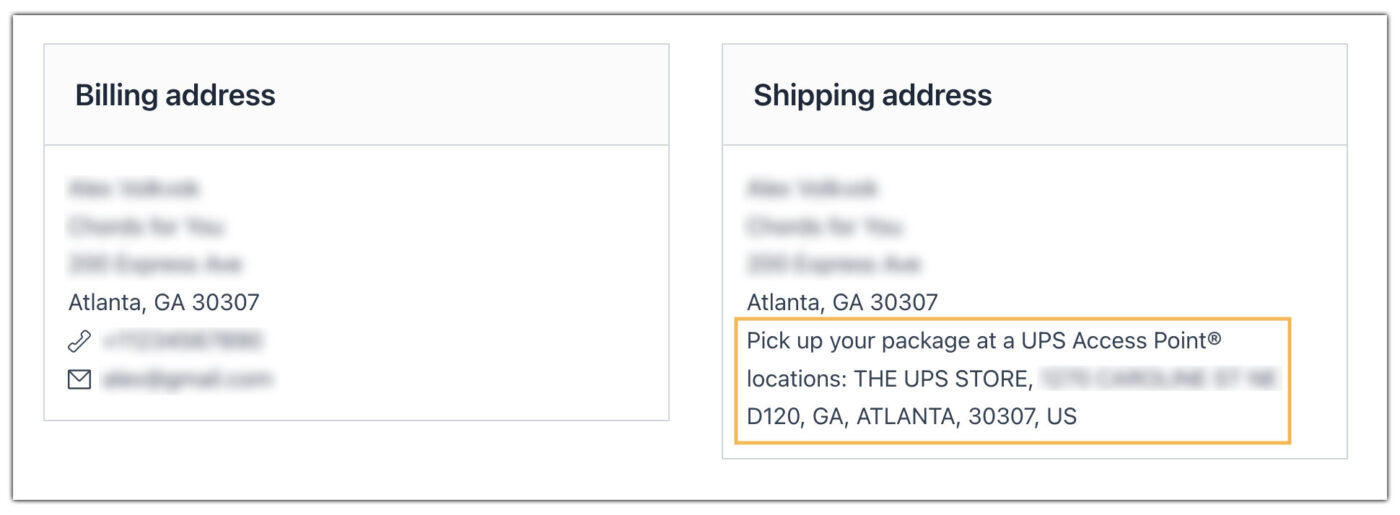
The selected Access Point details are reflected in the WooCommerce orders page, allowing the store owner to track where each order will be picked up.
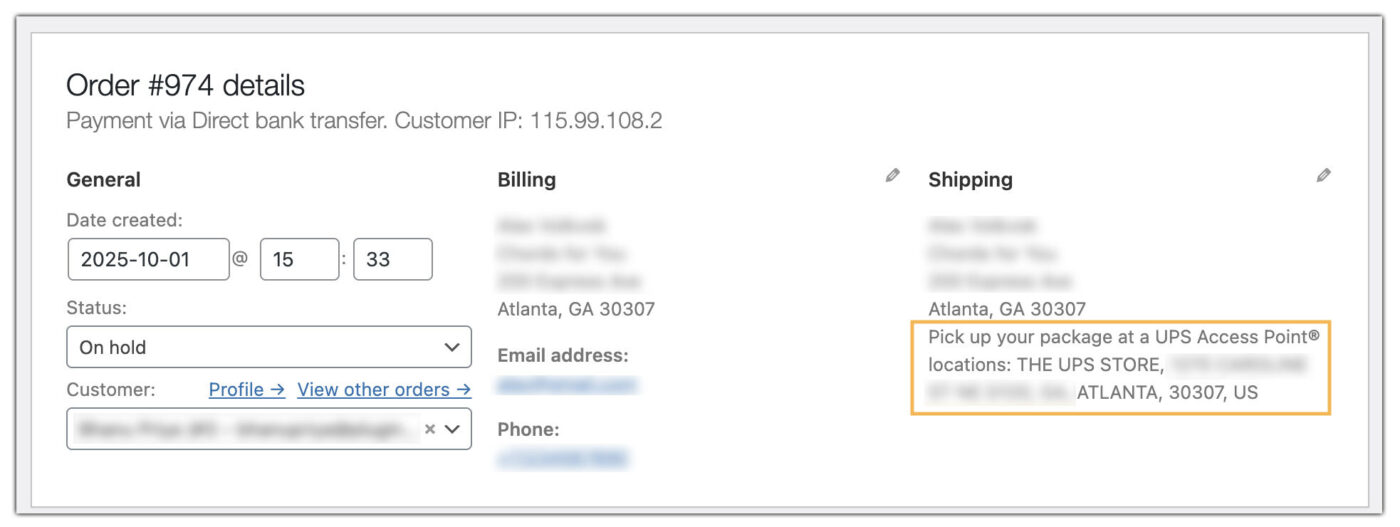
Additionally, store owners can generate and print UPS shipping labels for these orders directly from WooCommerce. For a detailed guide, check out How to Print Shipping Labels in WooCommerce.
Customers receive tracking updates from UPS, including confirmation when the package is delivered to the Access Point, and as soon as it arrives, they can collect it using the UPS tracking number.
Best Practices for Using UPS Access Points in WooCommerce
To make UPS Access Points work effectively in your WooCommerce store, follow these best practices:
- Highlight the Option at Checkout: Clearly display UPS Access Point delivery. A short note like “Pick up from a nearby UPS location” helps set expectations.
- Show Limited but Relevant Locations: Don’t overwhelm customers with too many choices. Set a maximum of 5–10 nearby Access Points to keep the selection simple and user-friendly.
- Offer Location Variety: Include different types such as UPS Stores, lockers, and authorized outlets. This ensures customers find a location that matches their working hours or proximity needs.
- Keep Customers Updated: Enable UPS notifications so customers get real-time tracking updates and alerts when the package is ready for pickup.
- Remind About ID and Pickup Rules: Inform customers that they’ll need a valid ID and tracking number at pickup, and that packages are usually held for 5–7 days.
- Test the Workflow Regularly: Place test orders to confirm that the Access Point selection, order details, and tracking updates are working smoothly.
By following these practices, you ensure UPS Access Points provide a secure and customer-friendly delivery option in your WooCommerce store.
Real-World Scenario: WooCommerce Store Using UPS Access Points
A WooCommerce fashion and lifestyle store serving customers in busy metropolitan areas was experiencing common delivery challenges:
- Missed deliveries when customers were not home during working hours.
- Higher costs due to repeated delivery attempts and returns.
- Customer frustration from having to reschedule deliveries or wait at home.
Solution:
The store integrated the WooCommerce UPS Shipping Plugin and enabled the UPS Access Point® option at checkout. This allowed them to:
- Display nearby UPS Access Points and lockers directly on the checkout page.
- Let customers select a preferred pickup location near their home, office, or gym.
- Automatically update WooCommerce orders with the chosen Access Point details.
- Ensure customers receive real-time tracking updates and pickup notifications from UPS.
- Reduce returns by ensuring packages are held securely at pickup points for several days.
The store significantly cut down on failed delivery attempts and reduced shipping costs from repeated trips, and customers also gained the flexibility to collect their packages at a convenient time.
Conclusion
Offering UPS Access Points in your WooCommerce store is a smart way to enhance the delivery experience for your customers. Integrating this option also helps streamline your shipping workflow, making order management easier for store owners. Whether your customers prefer home delivery or picking up packages at a nearby UPS location, giving them a choice adds convenience and builds trust in your store.
For further assistance or support with UPS shipping in WooCommerce, you can reach out to PluginHive Support.
FAQs
- How long will UPS hold my package at an Access Point?
Packages are typically held for 5-7 days, depending on UPS policies. Customers must pick up the package within this period before it is returned.
- Can I display multiple types of UPS Access Points at checkout?
Yes. You can enable different location types, including UPS Stores, lockers, and authorized partner outlets, to give customers flexible options.
- Can customers pick up packages on weekends?
Many UPS Access Points, including lockers and certain retail locations, are open 7 days a week, but hours may vary. Customers should check the specific location’s schedule when selecting a pickup point.
- Are Access Points available for UPS international shipping?
Yes. UPS Access Points are available in many countries, but availability may vary depending on the region and UPS partnerships.
- Can high-value or sensitive packages be delivered to Access Points?
Yes. Access Points are secure, and packages are protected until pickup, making them a reliable option for valuable items.
