


Adding multiple shipping carriers to WooCommerce is one of the most effective ways to reduce cart abandonment, control shipping costs, and give customers a better checkout experience. Yet most WooCommerce stores start with a single carrier and stay there, not because it works well, but because setting up more seems complicated.
It doesn’t have to be. This guide walks you through why single-carrier shipping limits your store, what you gain by adding more carriers, and exactly how to set it up without custom development or complex configuration.
Table of Contents
- Why Relying on a Single Shipping Carrier Limits Your WooCommerce Store
- Business Benefits of Offering Multiple Shipping Options in WooCommerce
- How to Add Multiple Shipping Carriers to WooCommerce
- Real-World Example
- Best Practices for Managing Multiple Shipping Carriers in WooCommerce
- Conclusion
- FAQs
Why Relying on a Single Shipping Carrier Limits Your WooCommerce Store
Relying on one shipping carrier may seem efficient, but it quietly restricts how your store operates and grows. These limits often show up as lost flexibility, higher costs, and preventable customer issues.
- Zero leverage against rate hikes: Major carriers like UPS and FedEx apply annual General Rate Increases, often around 5 – 6%. With only one carrier, you have no fallback. You either absorb the cost or raise shipping prices and risk losing customers.
- Delays hurt your store’s reputation, not the carrier’s: When a shipment arrives late, customers blame the store. With only one carrier, you have no way to reroute orders when that carrier experiences slowdowns or outages.
- One carrier rarely serves every order well: Local deliveries, heavy shipments, and international orders each have different costs and service requirements. A single carrier rarely handles all of these efficiently.
- Growth becomes harder to manage: Expanding into new regions or offering faster delivery options becomes difficult when you’re tied to one shipping provider.
- Peak seasons increase risk: During holidays or sales events, relying on one carrier increases the chances of delays, failed deliveries, and unhappy customers.
When shipping depends on one provider, your store becomes less flexible and more vulnerable. Multiple carriers give you options, stability, and better control as your WooCommerce store grows.
Business Benefits of Offering Multiple Shipping Options in WooCommerce
Offering more than one shipping option isn’t about adding complexity. It’s about giving your store flexibility that directly improves revenue, customer satisfaction, and long-term stability.
- Higher conversion rates: A Convey study found 74% of consumers prefer retailers with multiple delivery options, and customers who see their preferred carrier complete purchases at significantly higher rates than those who don’t.
- Lower cart abandonment: Research consistently shows that inflexible shipping costs are a leading cause of abandoned carts in 2026. Multiple shipping options let customers control the final price, which directly reduces last-minute drop-offs.
- Better cost control: No carrier is the cheapest for every destination or package type. With multiple options, you can route orders through the most cost-effective carrier instead of overpaying on every shipment.
- Increased Average Order Value: Many customers willingly pay more for faster or premium delivery, and offering express and upgraded shipping options gives you a way to increase revenue without changing product prices.
- Improved resilience during disruptions: When one carrier experiences delays, rate hikes, or capacity issues, you can switch to another without interrupting order fulfillment.
Multiple shipping options turn shipping from a limitation into a competitive advantage. They help your WooCommerce store grow while protecting margins and customer satisfaction.
So far, we’ve covered why single carriers hold you back and how multiple options benefit your business. Next, we’ll show you how to actually add multiple carriers to WooCommerce. It’s simpler than you think.
How to Add Multiple Shipping Carriers to WooCommerce
Adding multiple shipping carriers to WooCommerce doesn’t require custom development or complex setup. With the right approach, you can offer more shipping options while keeping things simple to manage.
- Use a dedicated multi-carrier shipping solution: WooCommerce doesn’t support real-time rates from multiple carriers out of the box. A solution like the Multi-Carrier Shipping Plugin for WooCommerce bridges this gap by bringing multiple carriers into one place.
Note: If you want to see how this works in practice, watch the short video below for a quick walkthrough.
- Connect the carriers you already use: Instead of switching systems, you connect existing carrier accounts such as UPS, USPS, FedEx, or DHL. This lets you keep your current shipping workflow while expanding customer options.

- Decide what customers should see at checkout: You control which shipping options appear, such as cheapest, fastest, or specific services. This keeps checkout clean while still offering meaningful choice.
- Apply simple rules for different scenarios: You can show different carriers based on location, order size, or product type. For example, one carrier for local deliveries and another for long-distance or international orders.
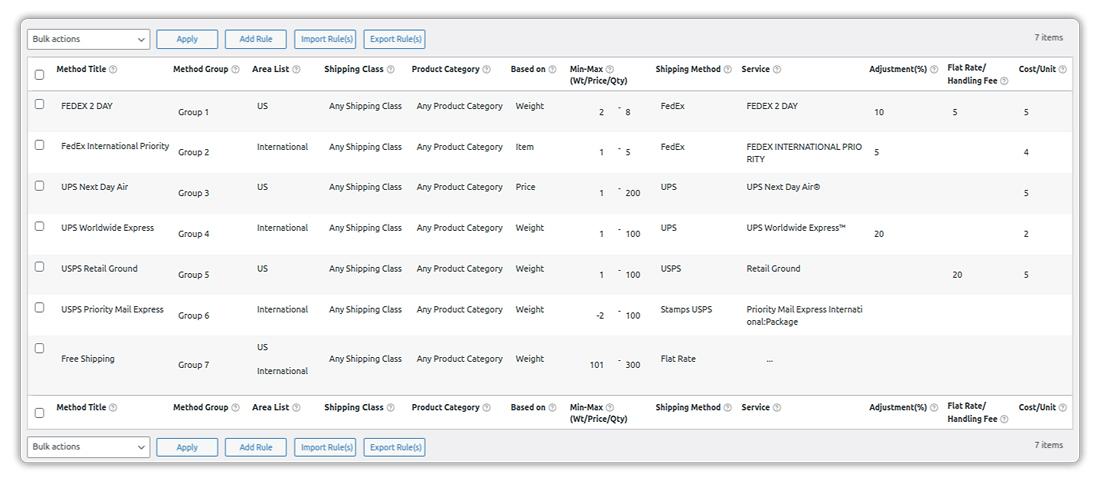
Once this is set up, customers see multiple shipping options directly at checkout.
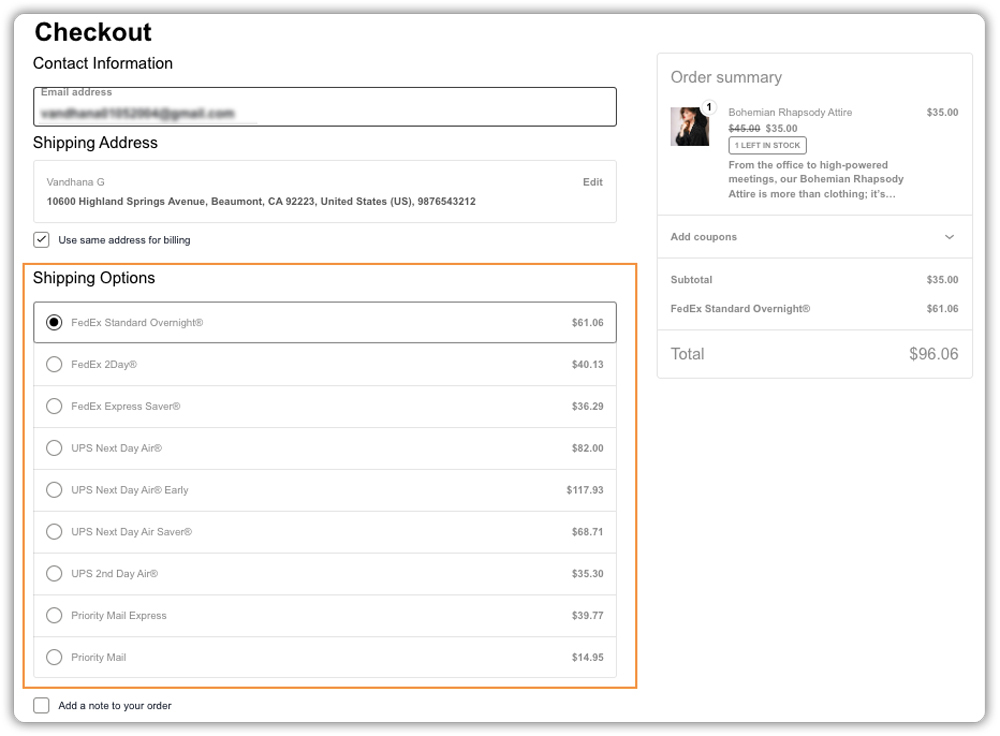
Next, let’s look at a real-world example of how this change improves conversions.
Real-World Scenario: What Changes When You Add Multiple Shipping Carriers
If you run a WooCommerce store that ships nationwide, this scenario will likely sound familiar, especially if you sell products with different sizes or weights.
Before adding multiple carriers, stores commonly run into these problems:
- Orders default to one carrier, which often makes shipping costs feel high or inflexible at checkout.
- Cart abandonment stays elevated because customers don’t see a shipping option that fits their needs.
- Peak-season delays cause problems with no easy backup carrier.
- Bulky or heavy products become harder to sell due to inefficient shipping costs.
After setting up multiple shipping carriers, these changes usually follow:
- Customers see several shipping options and choose instead of leaving checkout.
- Shipping costs feel more transparent, which reduces last-minute drop-offs.
- Smaller items ship through lower-cost carriers, while larger items use services better suited to them.
- Orders continue shipping even when one carrier slows down.
- Customers feel more confident adding items because shipping no longer feels unpredictable.
What improves isn’t just shipping rates. Checkout becomes smoother, problems during busy periods decrease, and your store gains flexibility as order volume grows.
Best Practices for Managing Multiple Shipping Carriers in WooCommerce
- Keep checkout choices focused. Three to four options is the sweet spot. Too many choices create decision fatigue and slow down checkout.
- Set a fallback rate. Configure a flat fallback rate that activates if a carrier API fails. This ensures customers always see a shipping option, even during a temporary outage.
- Use USPS for lightweight domestic packages. For packages under 5 lbs, USPS is consistently cheaper than UPS or FedEx for domestic US shipments. Build a rule to route these automatically.
- Review carrier rules seasonally. Peak periods often bring surcharges and capacity limits. Revisit your shipping rules two to three times per year to keep them accurate and cost-effective.
- Manage labels without leaving WooCommerce. Once carriers are configured for rates, you can handle label printing and tracking from within WooCommerce using WooCommerce Shipping Services, which supports over 30 carriers in one dashboard.
Conclusion
Adding multiple shipping carriers to WooCommerce gives your store the flexibility to offer lower shipping costs, fewer abandoned carts, and a checkout experience that works for more customers. Relying on a single carrier forces you to accept its rates, its delays, and its limitations. Multiple carriers put you back in control.
The Multi-Carrier Shipping Plugin for WooCommerce makes it straightforward to connect your existing carrier accounts, set rules, and display the right options at checkout, all without switching between separate tools or carrier portals. If you need help getting set up, contact the PluginHive team for hands-on support.
FAQs
1. How do I add different shipping carriers in WooCommerce?
WooCommerce doesn’t support multiple real-time shipping carriers by default. To add different carriers, you need a multi-carrier shipping solution that connects services like USPS, UPS, FedEx, or DHL and shows their rates automatically at checkout.
2. Do I need separate carrier accounts for WooCommerce shipping?
Yes, each carrier requires its own account, but most carriers allow free account creation for businesses. Using multiple carrier accounts gives you more flexibility and helps you compare rates as your order volume grows.
3. How much does it cost to implement multiple carrier shipping in WooCommerce?
Multi-carrier shipping plugins charge an annual fee. The Multi-Carrier Shipping Plugin for WooCommerce costs $99 per year.
4. Is there a WooCommerce solution that generates shipping labels along with rates for multiple carriers?
Yes. WooCommerce shipping services by PluginHive allow you to generate and print shipping labels for multiple carriers directly from your store. This lets you manage shipping rates, labels, and fulfillment from one place instead of switching between carrier websites.
