


Shipping can quietly take away a big part of your profit if it’s not set up the right way. Many UK WooCommerce store owners struggle to keep shipping costs low while still offering a smooth delivery experience. Customers also expect clear prices and reliable delivery, so getting your Royal Mail shipping right really matters.
If you’re using Royal Mail for your orders, even small setup mistakes can increase your costs over time. The PH Royal Mail Shipping with Tracking helps you stay in control by showing accurate shipping rates and improving how you pack items. In this guide, you’ll learn simple and practical ways to reduce your Royal Mail shipping costs in your WooCommerce store.
Table of Contents
- Common Royal Mail Shipping Mistakes WooCommerce Stores Make
- Smart Ways to Reduce Royal Mail Shipping Costs in WooCommerce
- Real-World Use Case
- Conclusion
- FAQs
Common Royal Mail Shipping Mistakes WooCommerce Stores Make
Most Royal Mail shipping cost problems don’t come from one big mistake. They come from small habits that feel fine at first but cost you money on every order. Here are the most common ones:
- Using flat shipping rates: A fixed rate might feel simple to manage, but it means you’re either overcharging customers and losing the sale or undercharging and losing money. Royal Mail costs vary by weight, size, and destination; a flat rate rarely reflects the real cost accurately.
- Packages tipping into higher weight bands: Royal Mail pricing jumps at specific weight thresholds. If your packages regularly fall just over a band limit, you’re paying the next tier price on every single order, often without realising it.
- Offering premium services for every order: Sending all orders via Royal Mail 1st Class or Tracked 24 when most customers would be happy with a cheaper option increases your shipping bill without adding real value.
These are all fixable. The next section shows exactly how.
Smart Ways to Reduce Royal Mail Shipping Costs in WooCommerce
These aren’t complicated fixes. They are straightforward changes you can make directly inside WooCommerce using the PH Royal Mail Shipping with Tracking plugin by PluginHive.
Show Royal Mail rates at checkout
The plugin connects to Royal Mail and displays rates based on the actual weight, dimensions, and delivery destination of each order. Customers see the real cost, not a guessed flat rate, which means fewer abandoned carts and no surprise losses on your end.
Learn more about how accurate Royal Mail rates at checkout can improve conversions.
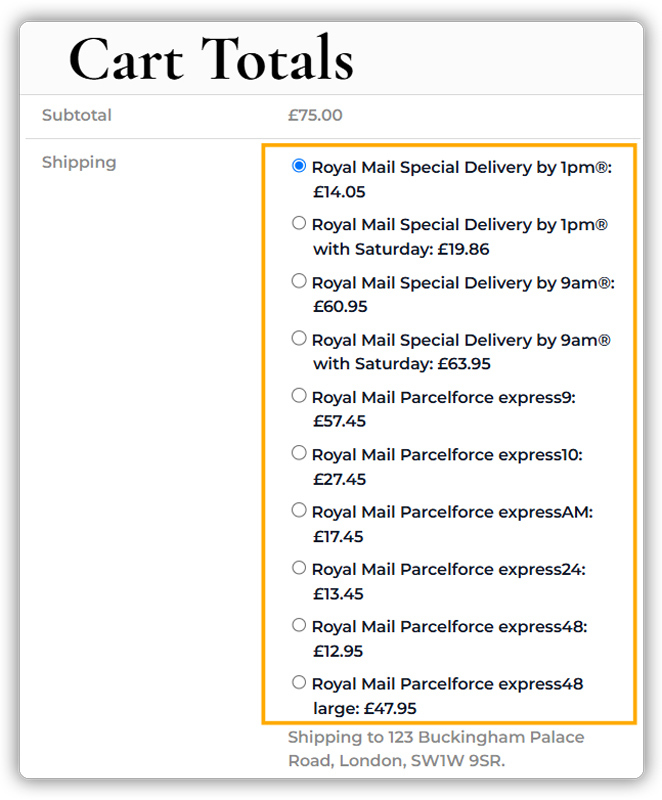
Enable only the services your customers actually need:
Instead of displaying all available services, enable only the ones relevant to your store.
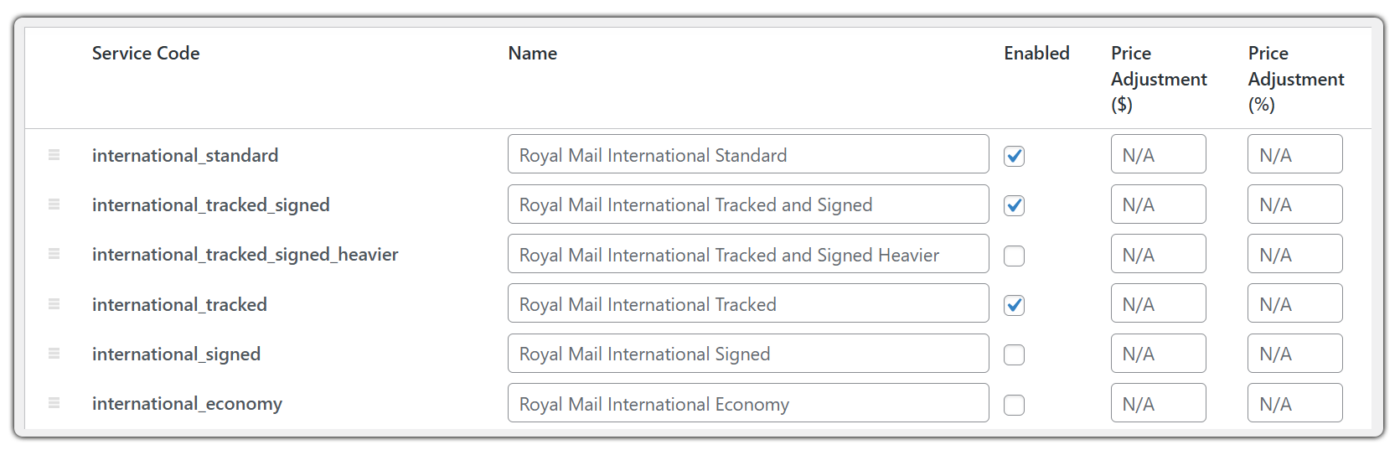
Only the selected services will appear at checkout, and they will be shown only if they are available for the customer’s delivery destination. This keeps your checkout clean and avoids unnecessary high-cost options.

For a full overview of available services, see Royal Mail WooCommerce shipping options for local and international orders.
Use price adjustments to protect your margins
The plugin lets you add or subtract a fixed amount or percentage from any Royal Mail service rate. You can use a negative adjustment to offer a small shipping discount that reduces cart abandonment, or a positive one to cover your packaging and handling costs. This keeps your pricing flexible without manual changes every time Royal Mail updates its rates.

Choose the right packing method to avoid overpaying for weight
The plugin offers three packing options: pack items individually, pack into custom boxes, or use weight-based packing. Weight-based packing is usually the most cost-effective choice, especially if you sell a range of products. Setting accurate product weights in WooCommerce is essential, as wrong weights produce wrong rates.

Lower Royal Mail shipping costs come from accurate rates, smart packing, and removing manual work, not from cutting corners on service. With the PH Royal Mail Shipping with Tracking plugin, all of these improvements work together inside your WooCommerce dashboard.
Real-World Use Case: How a UK WooCommerce Store Reduced Royal Mail Shipping Costs
A UK-based WooCommerce store sells home goods and gifts, shipping orders across England, Scotland, and Wales. The store processes around 15–25 orders per day, and Royal Mail is the primary carrier for all domestic shipments.
As order volume grows, shipping costs become harder to predict and more expensive than expected.
The Challenges:
- Flat shipping rates are used across the board, regardless of actual Royal Mail costs
- Tracked 24 is enabled for every order, even when customers don’t need urgent delivery
- Some packages regularly tip into higher Royal Mail weight bands due to inaccurate product weights
- Small, low-value orders are shipped with no minimum order threshold in place
- Customers regularly contact support asking for delivery updates
The Solution:
The store installs the PH Royal Mail Shipping with Tracking plugin by PluginHive and makes a few targeted changes:
- Accurate Royal Mail rates replace flat rates at checkout
- Royal Mail 48 is set as the default service, with Tracked 24 available for customers who need it
- Weight-based packing is enabled, and all product weights are updated in WooCommerce
- A minimum order amount is set, so small orders no longer ship at a loss
The Results:
Royal Mail shipping costs become more predictable across every order. Fewer shipments tip into higher weight bands, customers are no longer defaulted into expensive services they don’t need, and support requests about delivery drop significantly. The team also spends far less time on manual shipping tasks, freeing them up to focus on the business.
Conclusion
Reducing Royal Mail shipping costs in WooCommerce isn’t about finding shortcuts; it’s about replacing guesswork with accuracy and manual work with automation. Showing accurate rates, choosing the right services, and packing smarter are all changes that individually save small amounts but together make a real difference to your margins across hundreds of orders.
The PH Royal Mail Shipping with Tracking plugin by PluginHive gives UK WooCommerce store owners the tools to make all of these changes directly inside their store, without needing any external systems or complicated setup. If you need help setting up this in your WooCommerce store, the PluginHive support team is ready to assist you with configuration and guidance.
FAQs
- What is the cheapest way to send a parcel in the UK?
The cheapest way is to use Royal Mail and choose a low-cost service like Royal Mail 48. It works well for non-urgent deliveries and helps you keep shipping costs low. - How much does it cost to ship a parcel with Royal Mail?
Royal Mail costs vary depending on the size, weight, and destination of your parcel. The PH Royal Mail Shipping with Tracking plugin displays accurate Royal Mail rates at your WooCommerce checkout based on the actual order details, so you and your customers always see the real cost - What is the cheapest way to send a parcel with Royal Mail?
Keeping your parcel within the lowest weight band and smallest size category will always get you the cheapest rate. Royal Mail 2nd Class and Royal Mail 48 are the most budget-friendly services for standard UK shipments.
