



Customizable T-shirts have become a top-selling product in e-commerce because customers love having unique, personalized options. From adding names and quotes to uploading custom designs, these products let customers express their personality and make their purchases more memorable. Offering POD T-shirts is a proven way for online stores to attract more customers, increase engagement, and stand out in a competitive market.
This guide explores how WooCommerce store owners can offer customizable T-shirts using PH Product Add-Ons for WooCommerce plugin, highlighting options like custom text, image uploads, colour choices, and additional product features. By understanding these capabilities, you can enhance your store’s product offerings, provide a more engaging shopping experience, and give customers the flexibility to create T-shirts that reflect their style.
Table of Contents
- Challenges in Offering Customizable T-Shirts in WooCommerce
- Simplifying T-Shirt Customization with Product Add-Ons for WooCommerce
- Real-World Example
- Best Practices to Maximize Sales with Custom T-Shirts
- Conclusion
- FAQs
Challenges in Offering Customizable T-Shirts in WooCommerce
Selling custom POD T-shirts in WooCommerce comes with a few challenges:
- Limited Default Product Options: WooCommerce natively supports only basic variations like size and colour, making it difficult to offer advanced customization such as text input or image uploads.
- Managing Additional Costs: Customizations often come with extra charges for printing, embroidery, or special materials, which can be tricky to calculate and apply correctly.
- Providing a Smooth Customer Experience: Customers need an intuitive way to select personalization options, and a cluttered or confusing product page can lead to abandoned carts.
- Handling Unique Orders and Fulfillment: Each customized T-shirt may have unique specifications, and without a proper system, errors during production or delivery are common.
- Maintaining Store Efficiency: Tracking custom orders alongside standard products can be challenging, requiring organized workflows to ensure timely delivery and customer satisfaction.
By recognizing these challenges, WooCommerce store owners can plan better solutions and improve the overall shopping experience for customers interested in personalized T-shirts.
Simplifying T-Shirt Customization with Product Add-Ons for WooCommerce
Offering customizable T-shirts in WooCommerce becomes much easier with the PH Product Add-Ons for WooCommerce plugin. This plugin allows store owners to provide a range of personalization options without complex coding or technical setup.
Before you begin, ensure that the PH Product Add-Ons for WooCommerce plugin is installed, activated, and properly configured. You can follow the detailed setup guide here: Set up Product Add-Ons for WooCommerce .
With this plugin, you can transform a simple T-shirt listing into an engaging customization tool by adding various input fields, such as:
- Text Fields: For custom names, quotes, or numbers.

File Uploads: For customers to submit logos or design images for POD printing.

- Dropdowns and radio buttons: Offer colour, size, or style options.

- Checkboxes: Include optional extras like gift wrapping or bundles.
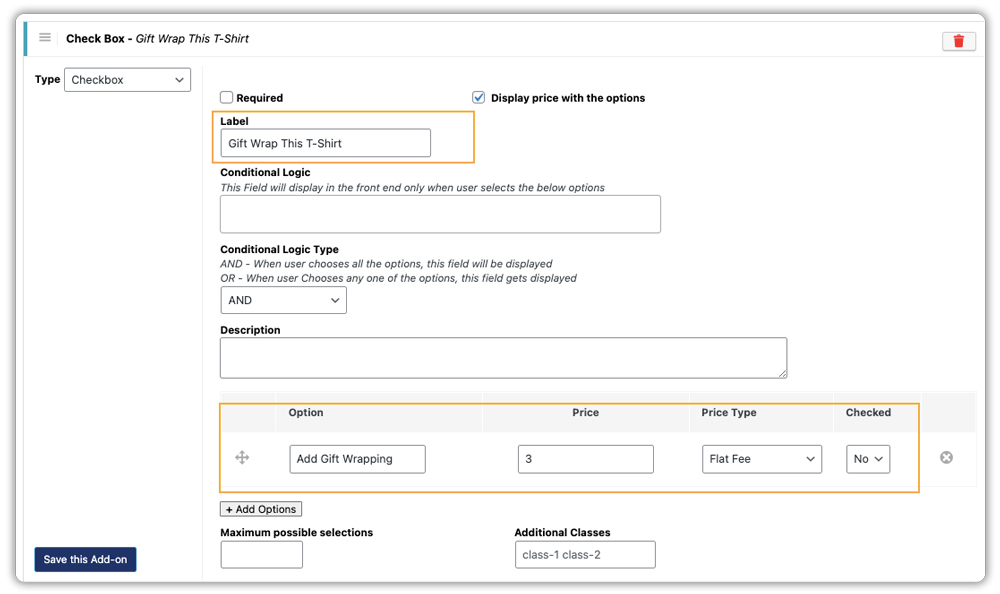
You can even use conditional logic to show certain options only when they are relevant.
For example: Display the “Choose Font Style” dropdown field only if the customer checks the box for “Add Custom Text.”

You can also easily assign additional costs for each add-on, such as a setup fee for file uploads, a per-character charge for names, or an extra fee for selecting a specialized print finish like glitter or foil.

Based on your configuration in the plugin settings, the T-shirt customization options will appear intuitively on your product page.

Personalization options are displayed clearly on the product page, so customers can make their selections confidently, reducing confusion and abandoned carts.

All custom inputs are recorded directly in the WooCommerce Orders page and linked to the specific T-shirt line item. This allows store owners to quickly see exactly what needs to be printed or added.

By using the PH Product Add-ons for WooCommerce, T-shirt stores can dramatically increase sales and drive higher average order values. Customers get the personalized, creative shopping experience they crave, and you get simpler product management and a smoother workflow for every unique order.
Real-World Example: WooCommerce Store Selling Customizable T-Shirts
Let’s say you run a WooCommerce store selling T-shirts and you want to offer customers the ability to personalize their shirts with text, images, or colour options.
The Challenges You Will Face:
- Limited default product variations in WooCommerce make advanced customization difficult.
- Managing additional costs for custom printing or materials.
- Ensuring a smooth and clear customer experience so customers understand all available options.
- Keeping track of custom orders and their specific requirements for fulfillment.
How It Can Be Solved:
With PH Product Add-ons for WooCommerce, you can easily provide various personalization options directly on the product page, without overwhelming customers or creating multiple product variations.
Using PH Product Add-ons for WooCommerce, your store can:
- Allow customers to add custom text, such as names, quotes, or messages.
- Let customers upload images or logos to be printed on their T-shirts.
- Offer colour, size, and style selections with clear choices.
- Include optional extras, like gift wrapping or special packaging.
- Automatically calculate additional costs for each customization and capture all details in the WooCommerce Orders page for easy fulfillment.
This setup ensures a smooth, personalized shopping experience for customers while helping store owners manage custom orders efficiently and reduce errors during production.
Best Practices to Boost Sales for Custom T-Shirts
Selling customizable T-shirts successfully goes beyond offering personalization options. Here are some actionable strategies that can help WooCommerce store owners increase sales and improve the shopping experience:
- Encourage Upsells and Bundles: Offer related products like gift wrapping, matching accessories, or bundle deals. Personalised products often increase the average order value when relevant add-ons are suggested.
- Highlight Bestsellers and Trending Designs: Showcase popular or trending customizations on your store to guide undecided customers and encourage them to try proven designs.
- Offer Pre-Set Templates: Not every customer wants to design from scratch. Provide starter templates for popular themes (e.g., “Bachelorette Party,” “Gym Logo,” “Holiday Family Shirt”) and use the plugin’s image options to display these templates directly to customers.
- Set Clear Production Timelines: Personalized products often take longer to produce. Clearly communicate estimated production times to manage customer expectations and reduce complaints.
- Integrate Reliable Shipping Solutions: Use PluginHive’s WooCommerce shipping plugins to provide real-time shipping rates, multiple carrier options, and automated tracking. You can also print shipping labels directly from your dashboard, making order fulfillment faster and easier for your store.
- Encourage Reviews and Social Sharing: Personalized T-shirts are highly shareable. Encourage customers to leave reviews with images of their creations or share them on social media. This builds social proof and promotes your store organically.
Implementing these practices helps store owners increase conversions, enhance customer satisfaction, and grow their WooCommerce store effectively.
Conclusion
Customizable T-shirts are a powerful way for WooCommerce store owners to attract customers, increase engagement, and boost sales. By offering personalized options such as custom text, image uploads, pre-set templates, and optional add-ons, you can create a unique shopping experience that keeps buyers coming back.
Using PH Product Add-ons for WooCommerce makes managing these customizations easy, reduces errors, and ensures a smooth order process. Combined with best practices like showcasing popular designs, offering discounts, and integrating reliable shipping solutions, store owners can maximize conversions and grow their online T-shirt business effectively. If you have any questions or need help with the plugin, you can contact PluginHive support here for assistance.
FAQs
1. How to add custom t-shirt design options in WooCommerce?
To enable custom t-shirt design options in WooCommerce, you can utilize a plugin like the PH Product Add-ons for WooCommerce. This plugin allows you to add fields for custom text, image uploads, and colour selections, providing customers with a personalized shopping experience.
2. How to manage custom t-shirt orders efficiently in WooCommerce?
To streamline the management of custom t-shirt orders, ensure you use the PH Product Add-ons for WooCommerce. This integration allows you to view specific requirements, such as custom text or uploaded images, directly within the order details, simplifying the fulfillment process.
3. Is it possible to set pricing rules for custom t-shirt add-ons in WooCommerce?
Absolutely. With PH Product Addons for WooCommerce, you can set pricing rules for each customization option. For instance, you can charge a fixed fee for custom text, a percentage for image uploads, or offer discounts for bulk orders, providing flexibility in your pricing strategy.
4. How to handle shipping for custom t-shirt orders?
Integrating WooCommerce with shipping plugins like PluginHive’s Shipping Solution allows you to provide real-time shipping rates, multiple carrier options, and automated tracking. Additionally, many of these plugins support printing shipping labels directly from your WooCommerce dashboard, streamlining the order fulfillment process.
