


Selling internationally is one of the fastest ways to grow your WooCommerce store. But the moment a customer in the UK or Canada hits your checkout and sees a flat rate that’s clearly a guess, they leave. USPS has strong international coverage, and with the right plugin, all of it can show up as live rates at checkout automatically.
This guide covers the USPS international services available for WooCommerce stores, and how to get them configured quickly using the PH USPS Shipping Plugin for WooCommerce with Print Label.
On This Page
- USPS International Shipping Services for WooCommerce
- How to Set Up USPS International Shipping in WooCommerce
- Advanced Tips for WooCommerce International Shipping with USPS
- Real-World Use Case
- Conclusion
- FAQs
USPS International Shipping Services for WooCommerce
USPS covers 180+ countries and offers four main international services, each suited to a different shipping need:
First-Class Package International Service
The most affordable USPS international option, best for small, lightweight packages under 4 lbs. The service does not guarantee a delivery date but provides tracking to many destinations. Merchants often choose it for accessories, small goods, and products where cost matters more than speed.
Priority Mail International
Delivers to 180+ countries in 6 to 10 business days. Available in weight-based and flat-rate options. Includes tracking and up to $200 in insurance. The go-to service for most WooCommerce stores shipping mid-weight products internationally.
Priority Mail Express International
USPS’s fastest international service — 3 to 5 business days to select countries, with a money-back guarantee. Includes tracking and insurance. Best for time-sensitive or high-value international shipments.
Global Express Guaranteed (GXG)
Delivered in 1 to 3 business days to select countries through a partnership with FedEx. The premium option for urgent international orders where speed is the priority.
How to Set Up USPS International Shipping in WooCommerce
To offer USPS international shipping services in WooCommerce, install and activate the PH USPS Shipping Plugin for WooCommerce with Print Label, and connect your USPS account with the plugin.
Once the USPS API is connected, the plugin can automatically fetch live international shipping rates from USPS based on the customer’s destination, package weight, and selected shipping service.
To configure the plugin in your WooCommerce store, refer to the setup guide for WooCommerce USPS shipping.
After configuring the plugin, enable the required USPS International Services inside the plugin settings.

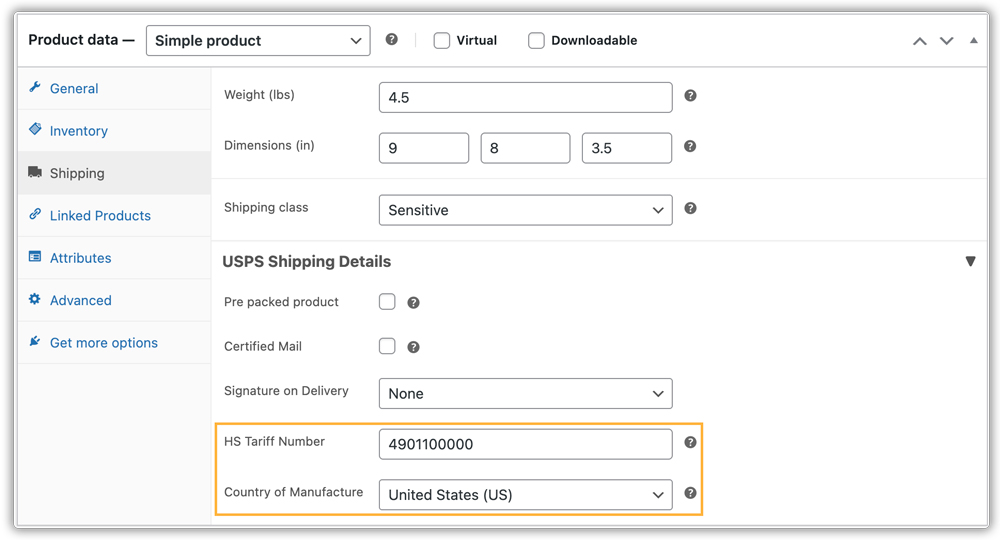
International shipments require customs declarations and shipment documentation. Inside the plugin’s custom settings, you can configure the required custom details for international shipments. The plugin automatically uses this information to generate customs forms, eliminating the need to enter the details manually each time.
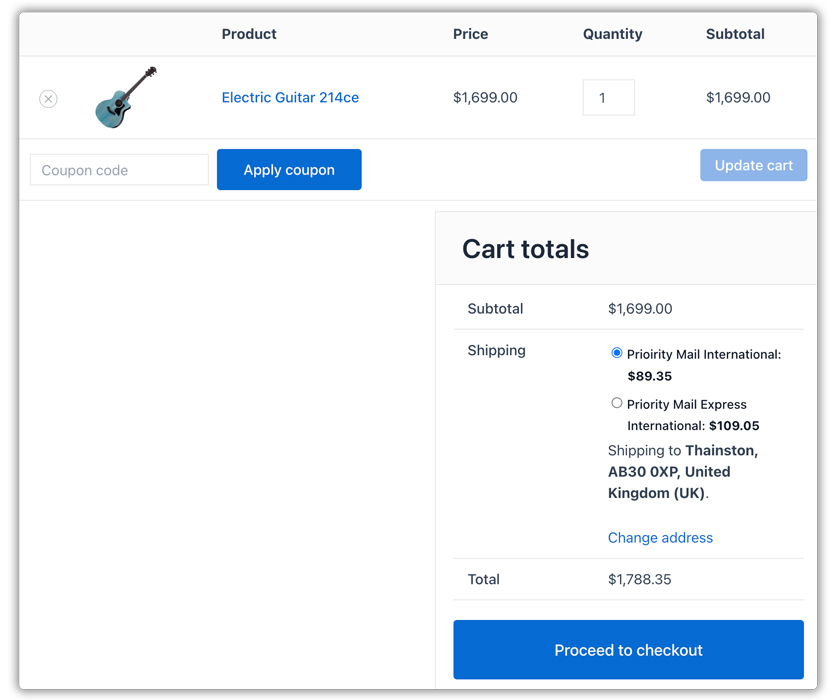
Once configured, USPS international shipping rates automatically appear on the WooCommerce cart and checkout pages. Customers can view real-time USPS international shipping costs and choose their preferred service.
After a customer places an international order, merchants can generate and print USPS international shipping labels along with customs forms such as CN22 or CP72 directly from the WooCommerce order page using the plugin.

Tips and Useful Plugins for USPS International Shipping
- Use flat-rate boxes for heavy products: Priority Mail International flat-rate boxes let you charge a consistent shipping cost regardless of weight, as long as the products fit inside the box. Merchants often use flat-rate options for dense or heavy products because weight-based international rates can become expensive, while flat-rate pricing gives customers a more predictable shipping cost.
- Compare USPS international rates with other carriers at checkout: If you want customers to see and compare rates from USPS alongside DHL, FedEx, or UPS at checkout, the Multi-Carrier Shipping Plugin for WooCommerce lets you show live rates from multiple carriers side by side.
- Hide international shipping methods based on cart or product rules: If you want to restrict certain USPS international services, for example, hiding Priority Mail Express International for low-value orders, the PH Hide Shipping Methods & Rate Adjustment for WooCommerce lets you set rules to show or hide specific services based on cart value, destination, or product type.
- Combine USPS international rates with flat-rate rules: For stores that want to mix live USPS international rates with flat-rate shipping thresholds or free shipping above a certain order value, the PH Table Rate Shipping Pro Plugin for WooCommerce handles conditional shipping rules on top of your live USPS rates.
- Running a marketplace? Calculate USPS rates per vendor: For WooCommerce marketplace stores with multiple vendors shipping from different locations, the PH Multi-Vendor Shipping Plugin for WooCommerce calculates USPS international rates separately per vendor based on each vendor’s origin address.
Real-World Use Case
A WooCommerce store selling handmade leather accessories started receiving orders from the UK, Canada, and Australia, but the store owner still charged customers a flat $25 international shipping rate that they had set years earlier. Small orders to Canada were overcharged, and customers pushed back. Large orders to Australia were badly undercharged, and the store absorbed the difference. International cart abandonment was high, and the few orders that did go through regularly caused shipping cost disputes.
How the Plugin Helped
The store installed the PH USPS Shipping Plugin for WooCommerce with Print Label and connected their USPS account. They enabled real-time rates and International services to be displayed in the cart and checkout for customers.
- Live USPS rates appeared at checkout straight away.
- Customers in Canada saw accurate First-Class rates for small orders.
- Customers in Australia saw real Priority Mail International rates based on actual weight.
- The flat-rate guessing was gone, and customs forms printed automatically with every international label — no manual paperwork.
The Result
- International cart abandonment dropped as customers saw real carrier-calculated rates at checkout.
- Shipping margin became predictable — no longer absorbing undercharged postage on Australian orders.
- The store confidently expanded to additional markets, knowing rates would be accurate from day one.
Conclusion
USPS offers WooCommerce stores solid international coverage at competitive rates, but store owners need to configure it properly to get the best results. With the PH USPS Shipping Plugin for WooCommerce with Print Label, live international rates appear at checkout automatically, and customs forms are handled without manual input. Whether you’re just opening up to international orders or looking to replace a flat-rate setup that isn’t working, this is the cleaner way to do it.
Need help with your USPS international setup? Reach out to the PluginHive support team.
FAQs
Q. Can I offer both USPS domestic and international shipping together in WooCommerce?
Yes. The USPS plugin supports both domestic and international USPS services and automatically displays all eligible shipping options at checkout.
Q. Can I offer USPS flat-rate boxes for international shipping?
Yes. Priority Mail International flat-rate options are supported and can be configured under the Package Settings tab. Flat-rate boxes work well for heavier products where weight-based international rates would be significantly higher.
Q. Does USPS international shipping support PO Box delivery?
Yes. USPS can deliver to PO Box addresses in many international destinations where private carriers may not support PO Box delivery.
