


Selling custom services on WooCommerce can be challenging. While the platform handles physical products well, it lacks flexibility for consulting, design, or appointment-based services. Store owners often struggle to capture client details such as preferred dates, briefs, or service preferences, leading to manual follow-ups, incomplete information, and missed revenue opportunities. This inefficiency can frustrate both customers and store owners.
The PH Product Addons for WooCommerce plugin provides a simple solution. It turns static product pages into dynamic service configurators, letting store owners collect client details, offer tiered or conditional pricing, and add optional extras. In this article, we’ll show how WooCommerce Product Addons can capture essential inputs, enable flexible pricing, and provide practical examples to help service-based businesses increase sales.
Table of Contents
- Common Challenges Service-Based Stores Face on WooCommerce
- Service-Based Businesses That Can Benefit from WooCommerce Product Addon
- Enhance Your Services with WooCommerce Product Addons
- Best Practices for Using WooCommerce Product Addons to Boost Your Services
- Conclusion
- FAQs
Common Challenges Service-Based Stores Face on WooCommerce
Running a service-based business on WooCommerce isn’t always simple. The platform is great for physical products, but lacks flexibility for custom or on-demand services. Without proper on-page customization, store owners often deal with missing client details, pricing limitations, and unnecessary manual work.
Key Challenges for Service-Based Stores:
- Incomplete client data: Standard product pages can’t collect key details like requirements, preferences, or files upfront.
- Constant back-and-forth: You end up chasing clients for information through emails or messages, wasting valuable hours.
- Static pricing: WooCommerce doesn’t easily support tiered or scope-based pricing, making it hard to adjust costs dynamically.
- No upsell window: You miss the chance to offer upgrades or add-ons right when the client is ready to buy.
- Frustrated clients: Multiple off-platform steps create a poor user experience and may discourage repeat bookings.
That’s where the PH Product Addons for WooCommerce plugin helps. It turns basic product pages into interactive service forms that collect client inputs, apply flexible pricing, and display add-on options all in one smooth flow. The result: fewer follow-ups, fewer errors, and a better customer experience.
Next, let’s look at the types of service-based businesses that can benefit most from using WooCommerce Product Addons.
Service-Based Businesses That Can Benefit from WooCommerce Product Addons
Nearly any WooCommerce service that requires client input can benefit from Product Addons. Here are some real-world examples:
- Custom Design Services: Collect client files, logos, and project briefs directly at the product page using File Upload and Text Area fields to streamline project initiation.
- Photography & Media Services: Enable clients to choose deliverables like digital galleries, prints, or video editing options using Dropdown menus and Checkboxes, creating personalized package bundles.
- Consulting & Coaching Services: Offer clients the option to add preliminary questionnaires or topic preferences via Text Area fields and select preferred communication methods, such as phone or video calls, with Checkbox options.
- Event Planning & Party Services: Include choices for decoration themes, catering styles, and entertainment options using Conditional Logic paired with Dropdowns and Multi-select Checkboxes for fully customized events.
- Printing & Custom Merchandise: Capture artwork, logos, or custom text via File Upload and Text Input fields, ensuring accurate, production-ready submissions.
- Home Services & Maintenance: Allow clients to select the types of services needed (e.g., landscaping, plumbing), specify frequency (one-time or recurring), and provide access instructions via Dropdowns, check boxes, and Text Input fields.
PH Product Addons for WooCommerce plugin enables service-based businesses to capture client details, offer flexible options, and provide tiered pricing, all directly on the product page. Combined with the WooCommerce Booking and Appointments plugin for scheduling-intensive services, these tools streamline operations, enhance client satisfaction, and help increase sales.
Enhance Your Services with WooCommerce Product Addons
Product Addons allows WooCommerce service-based businesses to turn standard product pages into fully customizable service offerings. Here’s how you can enhance your services:
Note: To start offering personalized services on your WooCommerce store, check out the PH WooCommerce Product Addons plugin and follow the setup guide to get started quickly.
- Identify Key Service Options: Begin by listing the customizations, extras, or upgrades your clients might want. This could include advanced consultation options, premium support, or optional service enhancements. Knowing what to offer helps you set up relevant add-ons efficiently.
- Add Custom Input Fields: Add text boxes, text areas, checkboxes, dropdowns, or file uploads to your service product pages. These fields let clients provide all necessary information upfront, reducing manual follow-ups and ensuring clarity.
- Set Up Pricing for Add-Ons: Assign prices to each add-on based on value, service scope, or complexity. You can use flat fees, per-item charges, or percentage-based pricing to increase average order value while keeping pricing transparent for clients.
- Test Your Add-Ons: Preview how add-ons appear on product pages, in the cart, and at checkout. Make sure the process is smooth, fields are clearly labelled, and pricing works correctly. Testing ensures a seamless client experience.
Example: Consider a photography or media service where clients need to share preferences before the shoot. On the product page, they can upload reference images, select editing styles, and add special requests through custom fields.
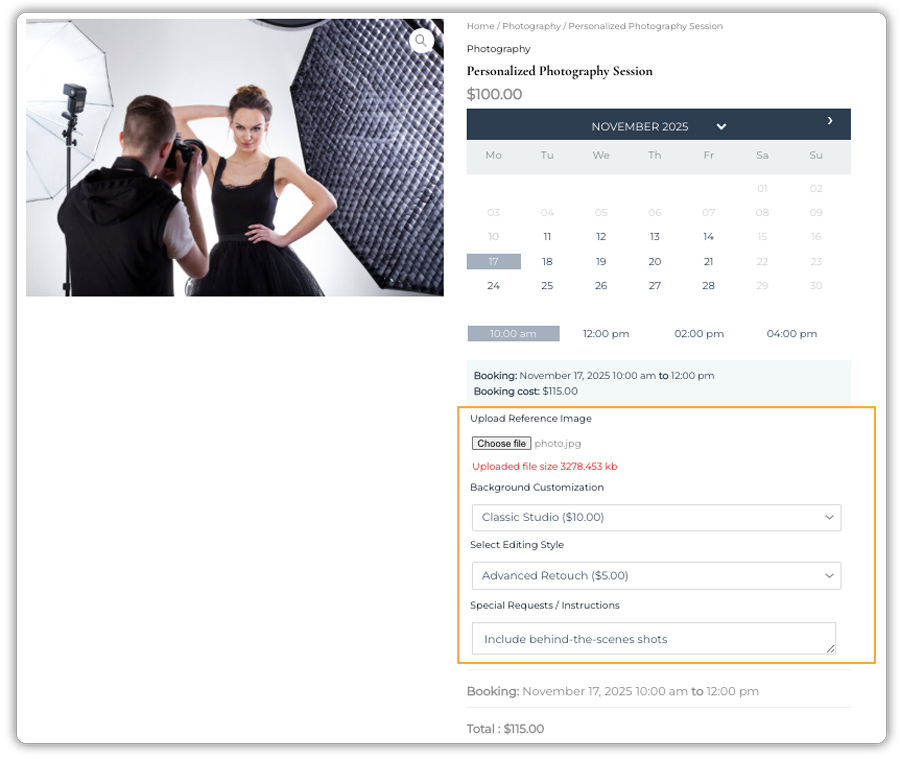
Once the booking is confirmed, all the details, including uploads and notes, appear on the WooCommerce Orders page, allowing the photographer to prepare in advance
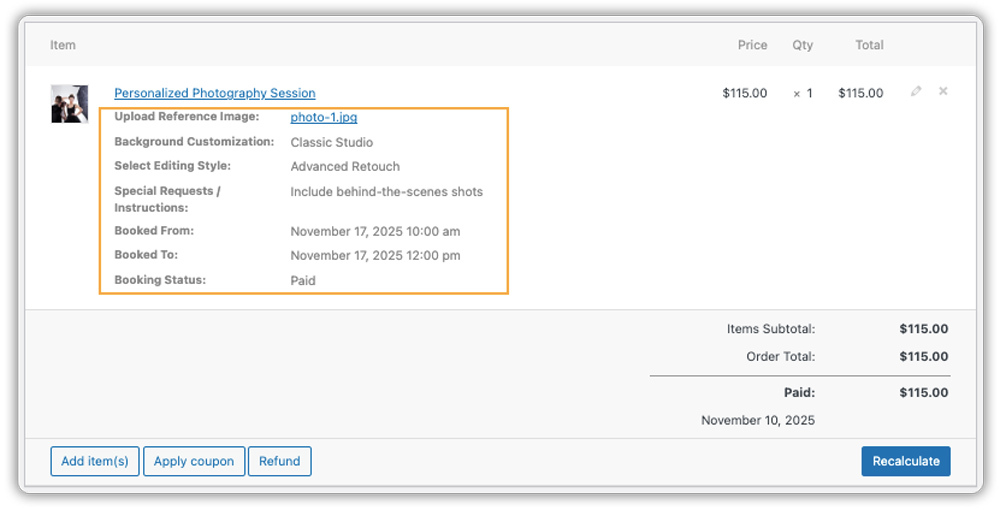
The Booking plugin handles the date and time, while Product Addons captures everything else needed to deliver a smooth, personalized service.
Best Practices for Using WooCommerce Product Addons to Boost Your Services
Using the PH Product Addons for WooCommerce plugin effectively means more than just adding random fields; it’s about designing a smooth, personalized buying journey that meets client needs and drives revenue. Here are some best practices with clearer, practical examples:
1. Collect Essential Information Upfront: Make key fields mandatory to avoid missing important details. For example, a custom logo design service can require clients to upload their logo files and provide brand colors before checkout. If clients are starting from scratch, you can also recommend a VistaCreate logo maker to help them create an initial logo concept before submitting their design brief. Alternatively, they can use an AI logo maker to quickly explore different design ideas and branding styles before finalizing their concept. This ensures the project starts without delays or back-and-forth emails.
2. Simplify Service Selection with Conditional Logic: Use conditional logic to display only the most relevant options as clients make their choices. This keeps the form clean and intuitive, prevents confusion, and encourages clients to pick meaningful upgrades, making it easier to boost sales without overwhelming them.
3. Offer Recurring Services with Ease: For businesses offering repeat sessions like coaching or consulting, the WooCommerce Bookings and Appointments plugin, along with the PH Recurring Bookings Add-on, is the perfect combination. These plugins work seamlessly with Product Addons, allowing you to manage recurring appointments while still capturing all client preferences upfront.
4. Simplify Virtual Sessions: If you host online meetings, connect your store with the Zoom for WooCommerce plugin. It automatically generates meeting links after booking, ensuring clients get their session details instantly while you receive all uploaded files and notes in one place.
When used thoughtfully, WooCommerce Product Addons can do more than collect client inputs; they can transform how you sell your services. By keeping your forms simple, strategic, and focused on client needs, you’ll save time, improve accuracy, and create upselling opportunities that directly boost your revenue.
Conclusion
The PH Product Addons for WooCommerce plugin gives service-based businesses the flexibility that standard WooCommerce often lacks. By allowing clients to customize their services, share essential details, and choose add-ons directly on the product page, store owners can eliminate manual quoting, reduce follow-ups, and create a smoother purchasing process. Beyond efficiency, smart use of addons such as upsells, tiered options, and personalized inputs helps increase average order value and turns every booking into a more profitable transaction.
Adopting these tools is the next logical step for any WooCommerce store looking to scale service operations effectively. Whether you’re setting up custom service fields, managing bookings, or integrating additional features, PluginHive’s team is here to help. If you need guidance or support with setup, visit PluginHive Support for expert assistance.
FAQs
Q1: What’s the difference between using WooCommerce Product Addons and standard WooCommerce product variations for services?
Product variations work best for fixed options like size or color. WooCommerce Product Addons, on the other hand, let you add custom fields, uploads, dynamic pricing, and extras perfect for personalized or service-based offerings.
Q2: Does the WooCommerce Product Addons plugin work with all product types, such as Simple, Virtual, or Service products?
Yes. The plugin works smoothly with Simple, Virtual, and other product types. You can add custom fields to a virtual consultation or a downloadable service just as easily as to a physical product.
Q3: How do I ensure clients fill out the required information when using WooCommerce Product Addons?
You can make specific fields mandatory in your add-on setup to ensure clients provide all necessary details before checkout. This prevents missing information and reduces manual follow-up after an order is placed.
Q4: How is client information from WooCommerce Product Addons delivered to me after an order is placed?
All client inputs, uploaded files, and add-on selections appear in your WooCommerce order details and confirmation emails. Everything you need is organized in one place right after payment.
Q5: Are WooCommerce Product Addons compatible with booking or appointment plugins?
Yes. WooCommerce Product Addons work perfectly with the WooCommerce Bookings and Appointments plugin. You can collect client details like uploaded files or special notes while managing schedules and availability seamlessly.
