


Customers who walk into a store wanting something specific – a t-shirt in a particular colour, a gift box with a custom message, a pizza with exactly the right toppings expect that same control when they shop online. But out-of-the-box WooCommerce product pages don’t give you a way to collect those preferences. You end up either creating dozens of product variations or losing the sale entirely.
The PH Product Add-ons for WooCommerce plugin changes that. This article walks you through how to set up a build-your-own product experience so customers can configure exactly what they want – right on the product page.
On This Page
- What “Build Your Own Product” Actually Means in WooCommerce
- Why Offer Build Your Own Products in Your WooCommerce Store?
- Popular Build Your Own Product Examples in WooCommerce
- How to Offer a Build-Your-Own Product Experience in WooCommerce
- Example Scenario
- Tips for Creating Successful Build-Your-Own Products in WooCommerce
- Conclusion
- FAQs
What “Build Your Own Product” Actually Means in WooCommerce
A build-your-own product experience lets customers configure a product to their specifications on the product page before adding it to the cart. They’re not just picking a size or a colour from a dropdown. They’re making multiple choices, entering details, or uploading files that shape what they actually receive.
This is distinct from WooCommerce product variations, which are predefined combinations you set up in advance. A build-your-own setup is open-ended – the customer drives the configuration, and their choices are captured directly in the order.
With the PH Product Add-ons for WooCommerce plugin, you can add input fields like dropdowns, checkboxes, text inputs, file uploads, and date pickers to any product. The plugin captures all of that information at the time of purchase, so the order arrives complete and ready to fulfill.
Why Offer Build Your Own Products in Your WooCommerce Store?
Most stores that move toward product customization do it because customers start asking for it, and that’s a good signal. Here’s why it’s worth acting on:
- Fewer incomplete orders: when customers input their requirements on the product page, you’re not chasing details via email after the fact
- Higher-order value: add-ons with attached pricing (premium materials, extras, engraving) naturally push the average order total up
- Reduced returns: customers who build exactly what they want are less likely to be disappointed when it arrives
- Wider product range without extra SKUs: instead of creating 40 product variations, one configurable product handles the full spread of options
- A shopping experience that feels personal: customers remember stores that let them have a say in what they buy
And this isn’t limited to one or two product types; it works across a wider range of niches than most store owners expect. Here are some real examples of what a build-your-own experience looks like in practice.
Popular Build Your Own Product Examples in WooCommerce
The build-your-own model fits more product types than you’d think. Here are some common ones:
- Custom apparel: T-shirts, hoodies, or hats where customers choose size, colour, sleeve style, and upload a logo or add text to be printed.
- Personalized gifts: Mugs, frames, or keychains where customers add a name, a date, or a short message.
- Build your own bundle: A gift hamper or subscription box where customers pick the items they want included.
- Custom tech accessories: Phone cases, laptop skins, or gaming peripherals where customers choose colours, upload artwork, or add engravings.
- Food and beverage: Custom cake orders, build-your-own snack boxes, or specialty coffee blends where customers select ingredients or flavours.
- Event and service products: Photography packages, tutoring plans, or party decorations where customers pick what’s included and provide event-specific details.
In each case, the base product stays the same, and what changes is the detail the customer brings to it.
How to Offer a Build-Your-Own Product Experience in WooCommerce
Setting up a build-your-own product experience in WooCommerce is simple with the PH Product Add-ons for WooCommerce plugin. It lets you add customization fields directly to your product pages – no coding needed.
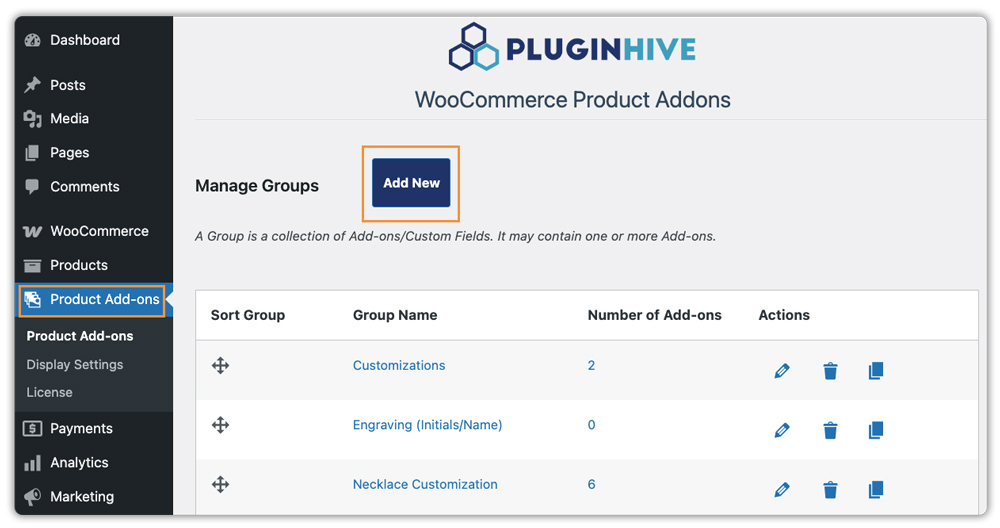
Once activated, go to Product Add-Ons → Add New to create an add-on group, a collection of fields you want customers to fill in.
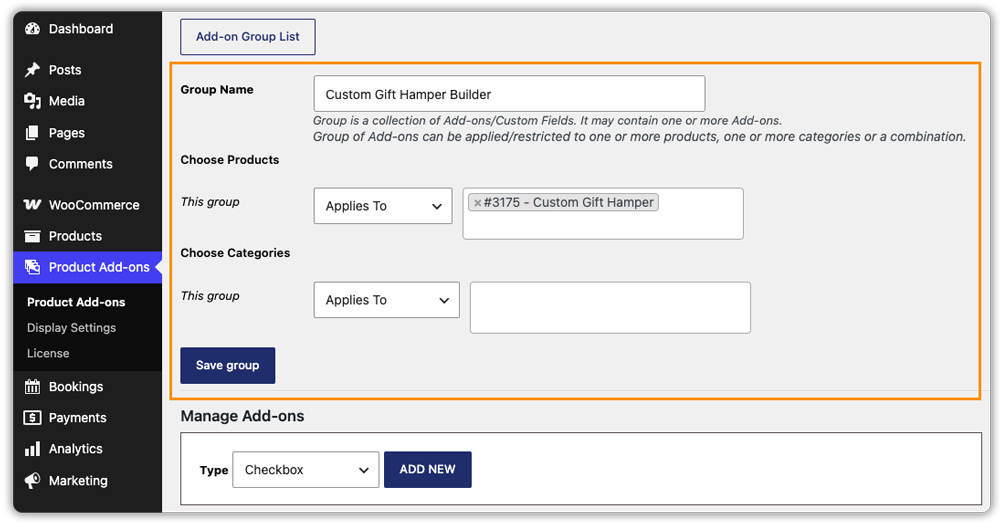
Name it after the product it’s for, something like “Custom Gift Hamper” or “Pet ID Tag Builder.” Then assign the group to the relevant product or category, and the fields will automatically appear on the product page.
From there, you can add fields like:
- Text Fields – for personalized messages, engraving details, or special instructions
- Dropdowns or Radio Buttons – for selections like size, material, or flavour
- Checkboxes – for picking multiple items like bundle contents or toppings
- File Upload – for customers to submit logos, artwork, or reference images
- Date Picker – for delivery dates, pickup slots, or event dates
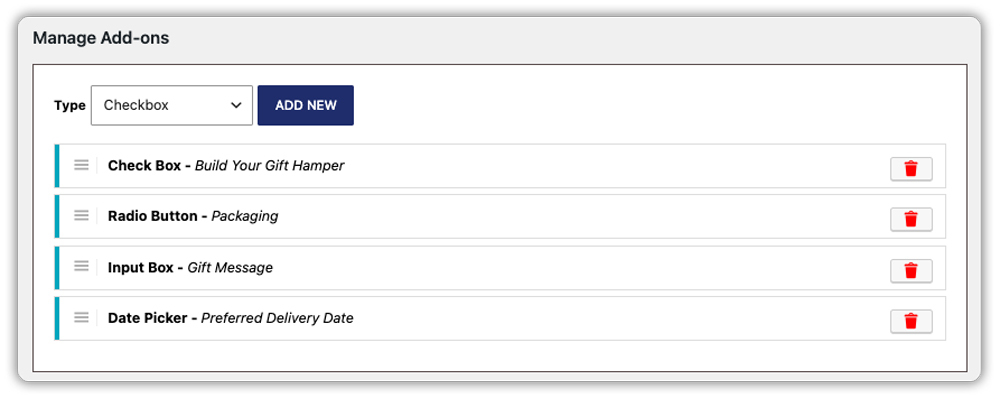
The plugin supports many more field types beyond these – check out How to Add Extra Product Options to WooCommerce to explore the full range.
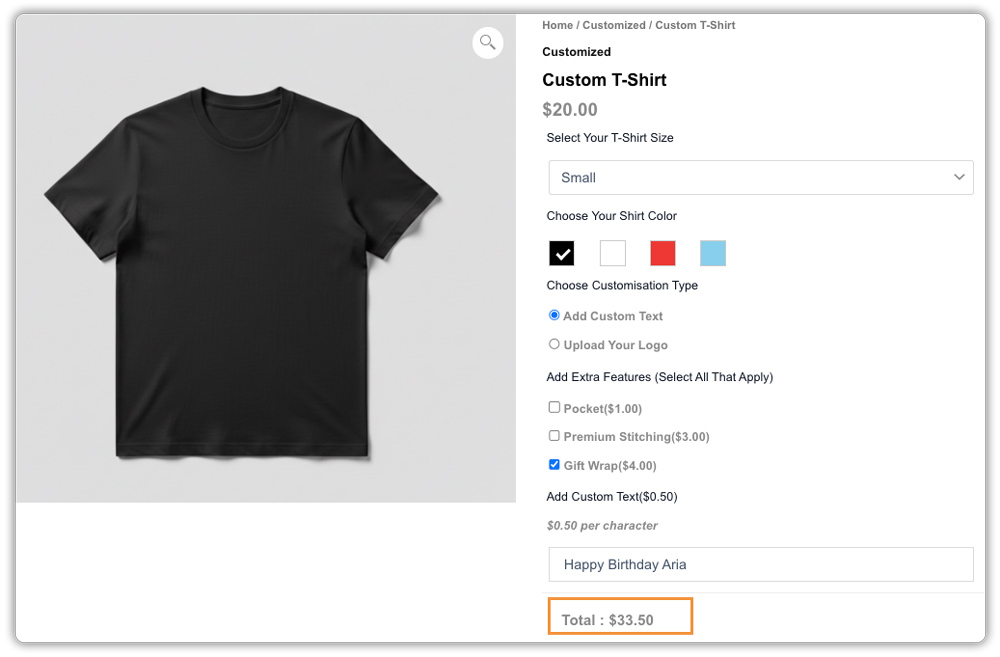
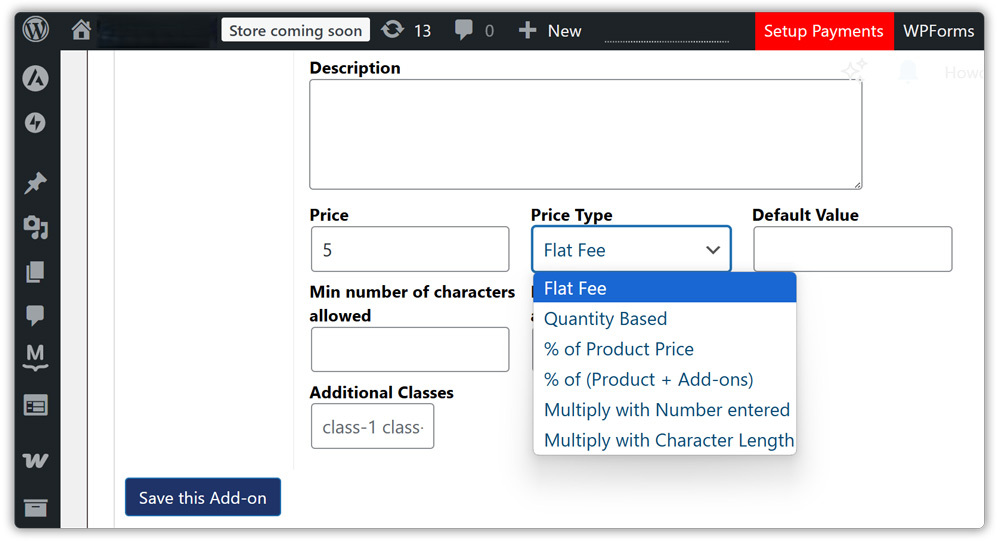
You can also attach a price to any option, and the product total updates live as customers make their selections.
Here’s a quick example of what a Custom Gift Hamper looks like on the product page once it’s set up:
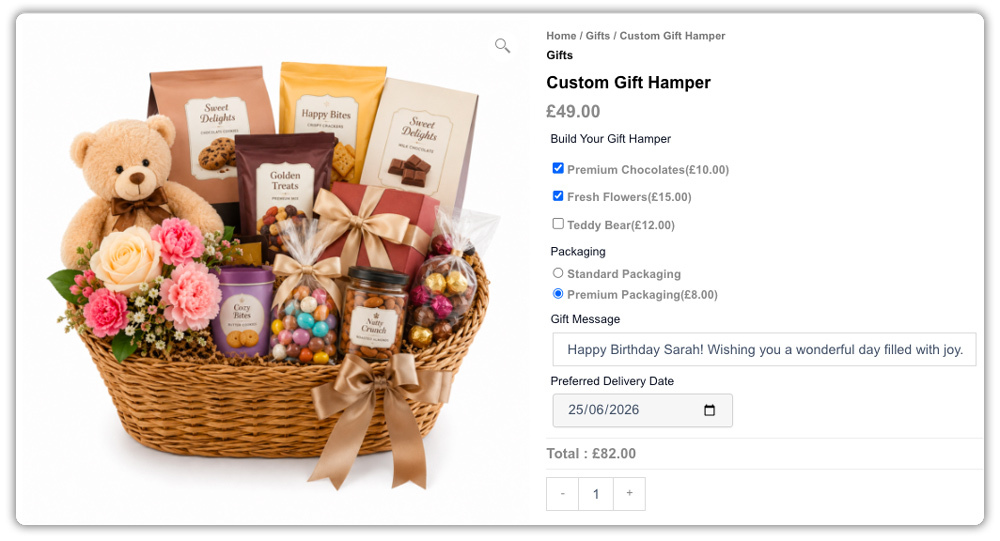
Customers see all their options clearly, fill them in, and add to cart – with everything captured in the order automatically.
Example Scenario: Building a Custom Sneaker Store in WooCommerce
Let’s say you run a WooCommerce store selling customisable sneakers and you want customers to configure their pair before placing an order. Here’s what you’re likely dealing with right now.
Challenges You’re Probably Facing
- Customers order without specifying colour or design, and you end up chasing details before you can fulfil anything
- No way to charge more for premium colourways or custom embroidery through standard product pages
- Customers abandon the page because there’s no clear way to communicate what they want
How the PH Product Add-ons Plugin Solves This
The PH Product Add-ons for WooCommerce plugin lets you build a configuration layer directly onto your product page:
- A colour picker for primary and accent colour selection
- A dropdown for sole type or material
- A text input for custom embroidery, with character restrictions for clean input
- A file upload field for logos or artwork
- A checkbox for optional add-ons like premium packaging, each with its own price
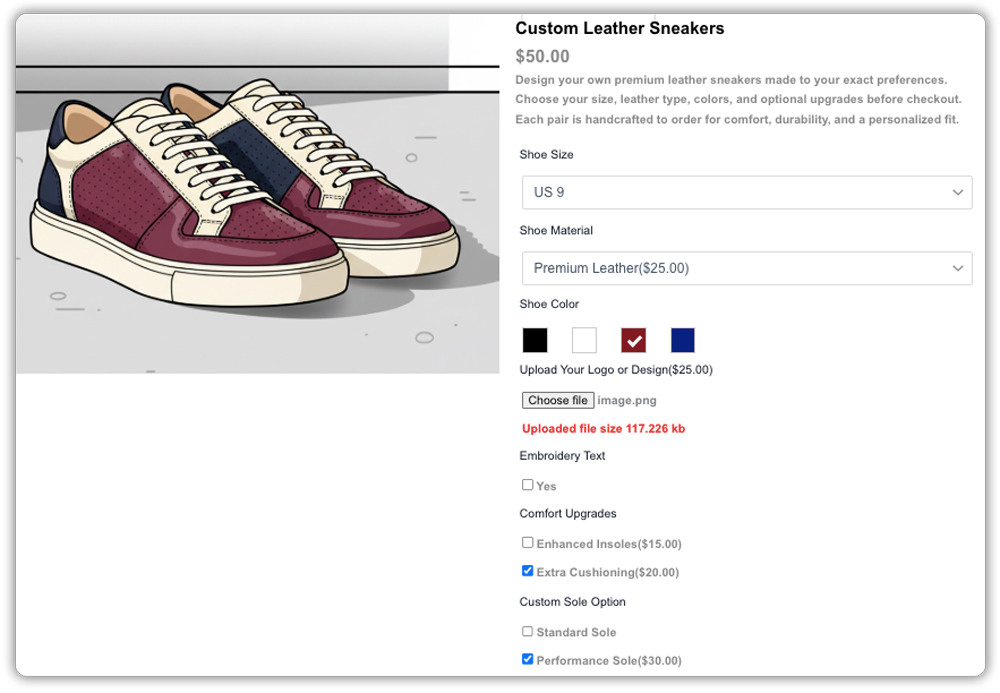
Results
- Orders arrive complete – no follow-up emails needed
- Optional paid add-ons increase order value automatically
- Customers know exactly what they’re ordering before they confirm
Once the PH Product Add-ons for WooCommerce plugin is set up, collecting custom product details is no longer something you manage order by order; it becomes a built-in part of how your WooCommerce store operates.
Tips for Creating Successful Build-Your-Own Products in WooCommerce
Getting the most out of the PH Product Add-ons for WooCommerce plugin comes down to a few setup choices that are easy to overlook. If you’re already using WooCommerce extra product options on your store, these tips will help you get even more from the experience.
- Start with what’s truly variable: Only add fields that are genuinely needed for that product. A product page with ten optional fields is overwhelming. A product page with three well-labelled fields that cover the real choices is frictionless.
- Use conditional logic to keep things clean: If a customer selects “standard packaging”, there’s no need to show a premium packaging colour picker. Set up conditional logic so fields only appear when they’re relevant.
- Charge for what adds real cost: If engraving, custom printing, or premium materials cost you more to fulfil, price them accordingly. The plugin’s flexible pricing options make it easy to apply flat fees or per-character charges without complex setups.
- Mark critical fields as mandatory: Any field you need to fulfil the order, like a personalisation message or file upload, should be required. This prevents incomplete orders from slipping through.
- Reuse addon groups across similar products: If your configuration options are the same across a product range, build the group once and assign it to the whole category. It saves time and keeps your product pages consistent.
These small adjustments can make a noticeable difference in how smoothly your store handles custom orders and how much customers enjoy the process.
Conclusion
A build-your-own product experience isn’t complicated to set up; it just requires the right tool. The PH Product Add-ons for WooCommerce plugin gives you everything you need to turn standard product pages into interactive configurators that capture customer preferences, collect files, apply add-on pricing, and send complete orders every time. If you have questions about setting it up for your specific store, reach out to the PluginHive support team – we’re happy to help.
FAQs
Q1: What plugin do I need for Build Your Own Product in WooCommerce?
You need the PH Product Addons for WooCommerce plugin from PluginHive. It adds custom fields like text input, file uploads, checkboxes, and dropdowns to your product pages.
Q2: Does Build Your Own Product work with print-on-demand services?
Yes. Customers upload their designs via file upload addons, and you can download those files to send to your print-on-demand provider like Printify or Printful.
Q3: How do I view customer customizations after they order?
Custom addon selections appear in the order details in your WordPress admin under WooCommerce → Orders. You’ll see all customer inputs for each order.
