


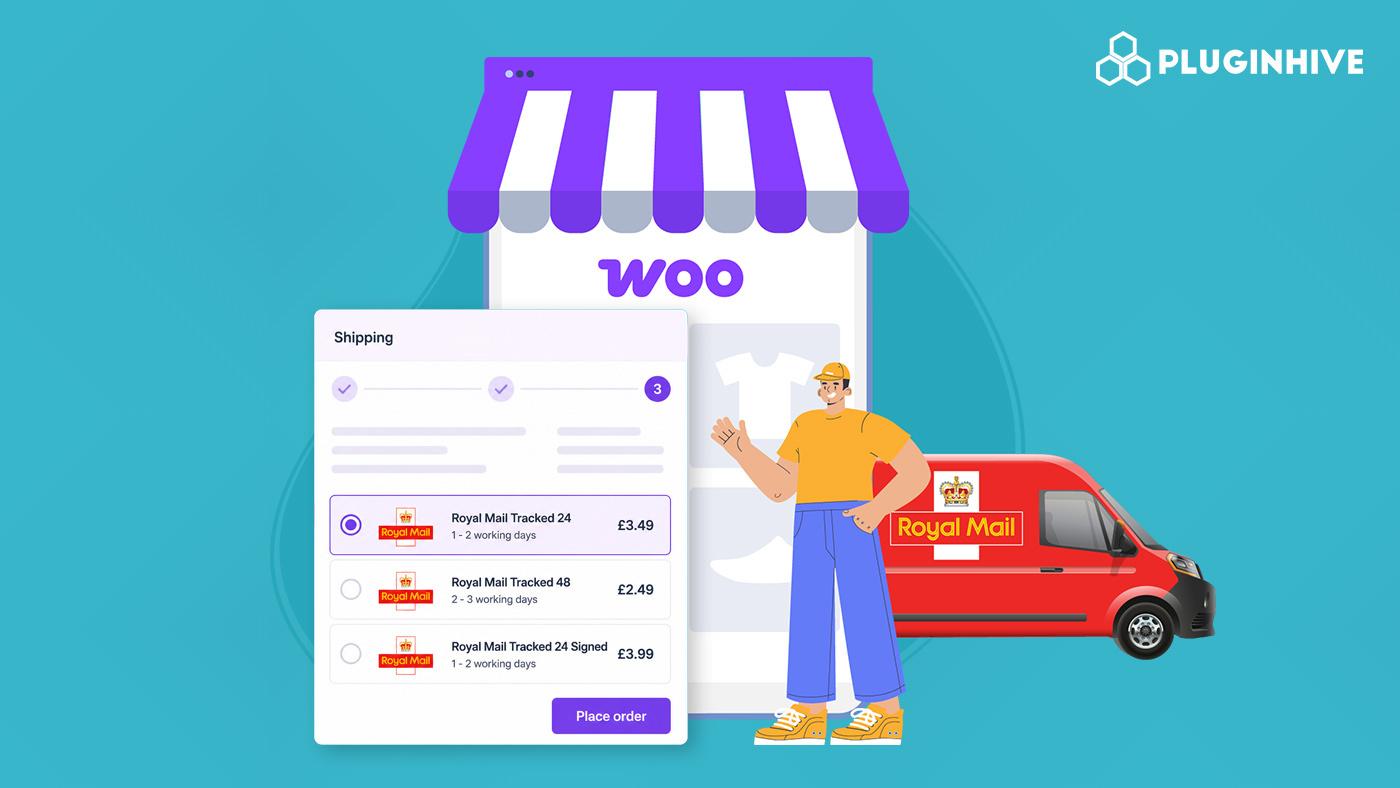
If you run a UK-based WooCommerce store, you’ve probably dealt with customers asking “Where’s my order?” more times than you’d like. Without a proper shipping setup, offering Royal Mail Tracked Services at checkout isn’t straightforward, and customers don’t always get the visibility they expect after placing an order.
The PH Royal Mail Shipping with Tracking for WooCommerce plugin uses Royal Mail’s published rate tables to display shipping costs at checkout, letting you offer Royal Mail Tracked 24, Tracked 48, and other services as selectable options. This article covers what Royal Mail Tracked Services are, why they matter, and how to set them up in WooCommerce.
On This Page
- What Are Royal Mail Tracked Services?
- Challenges of Managing Royal Mail Shipping Manually in WooCommerce
- Why Offer Royal Mail Tracked Services at WooCommerce Checkout?
- How to Offer Royal Mail Tracked Services in WooCommerce
- Example Scenario
- Best Practices for Using Royal Mail Tracked Services in WooCommerce
- Conclusion
- FAQs
What Are Royal Mail Tracked Services?
Royal Mail Tracked Services are domestic delivery options that give you and your customers full visibility over a parcel’s journey from collection to delivery. Unlike standard Royal Mail services, Tracked services include barcode scans at key transit stages, delivery confirmation, and proof of delivery if anything goes wrong.
Royal Mail Tracked 24 and Tracked 48
- Royal Mail Tracked 24: Aims for next-day delivery within the UK. Includes full tracking, photo on delivery, and up to £150 compensation cover.
- Royal Mail Tracked 48: Aims for delivery within two business days. More economical for non-urgent shipments, with the same tracking and compensation benefits.
Giving customers both options at checkout lets them choose the speed and price that suit them. For a detailed breakdown including pricing, refer to this guide on Royal Mail Tracked 24 and Tracked 48.
Challenges of Managing Royal Mail Shipping Manually in WooCommerce
WooCommerce has no built-in support for Royal Mail rates or tracking, leaving store owners to rely on manually entered flat rates -which creates ongoing problems:
- Rates go stale: Royal Mail updates pricing periodically, making manually set rates inaccurate over time
- No service-level choice at checkout: flat-rate shipping can’t separate Tracked 24 and Tracked 48 as distinct options for customers
- No delivery confirmation: when a parcel goes missing, there’s no evidence of dispatch or proof of delivery to refer to
- Ongoing admin overhead: every order needs manual attention before it’s properly closed out
This is the gap that the PH Royal Mail Shipping with Tracking plugin fills – automating rate display and service options at checkout so none of that needs to be managed by hand.
Why Offer Royal Mail Tracked Services at WooCommerce Checkout?
If customers can’t track their order after purchasing, that gap creates anxiety and often a support ticket or refund request. Displaying Royal Mail Tracked Services at checkout directly addresses this:
- Fewer “Where’s my order?” queries: customers track their parcels themselves
- Customer choice at checkout: Tracked 24 for urgency, Tracked 48 for value
- Stronger checkout confidence: a familiar, trusted carrier name at checkout reduces drop-off
- Easier dispute resolution: every tracked shipment includes delivery confirmation and photo proof
For a deeper look at how Royal Mail shipping impacts WooCommerce conversions, read this article on boosting WooCommerce conversions with Royal Mail.
How to Offer Royal Mail Tracked Services in WooCommerce
The PH Royal Mail Shipping with Tracking for WooCommerce plugin is the recommended way to display Royal Mail Tracked 24 and Tracked 48 at your WooCommerce checkout. Here’s how to get it configured.
1. Enable Royal Mail Rates
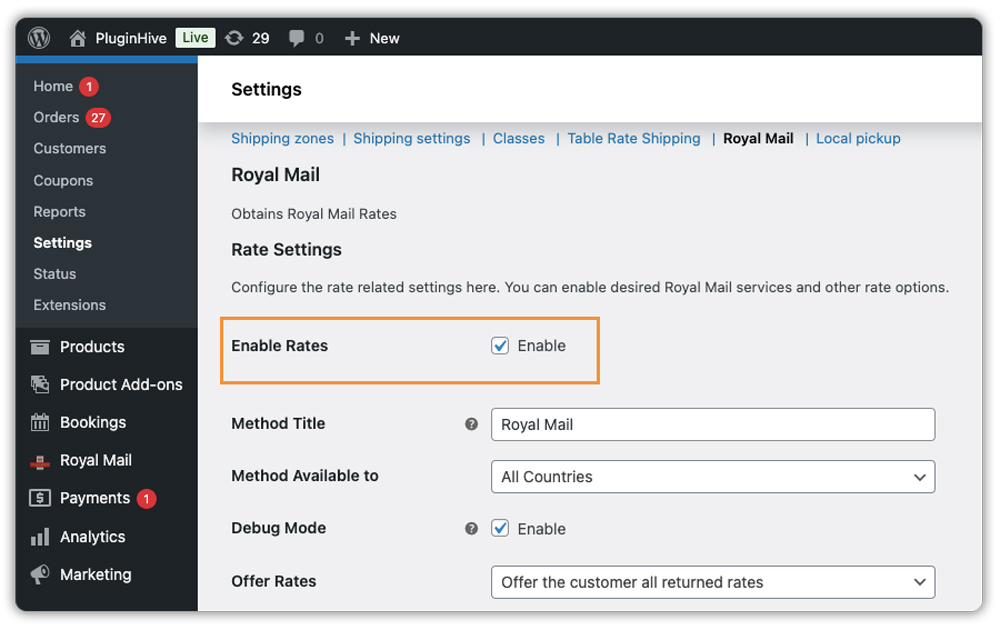
Go to WooCommerce → Settings → Shipping → Royal Mail and tick the Enable Rates checkbox. This makes Royal Mail services appear on your cart and checkout page.
2. Configure Packing Settings
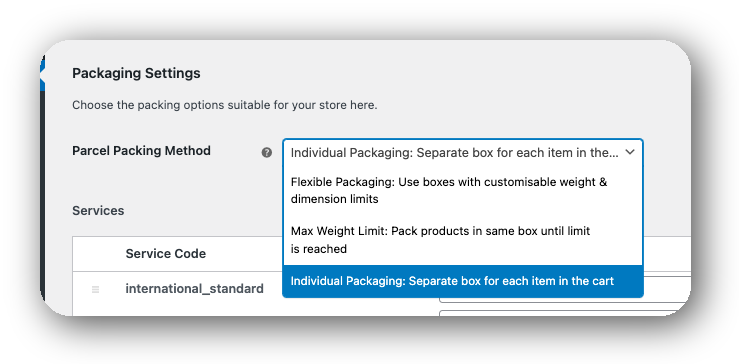
Set the Packing Method based on how you fulfil orders. Make sure your products have accurate weights and dimensions in WooCommerce, so the rates calculate correctly.
3. Select Your Tracked Services
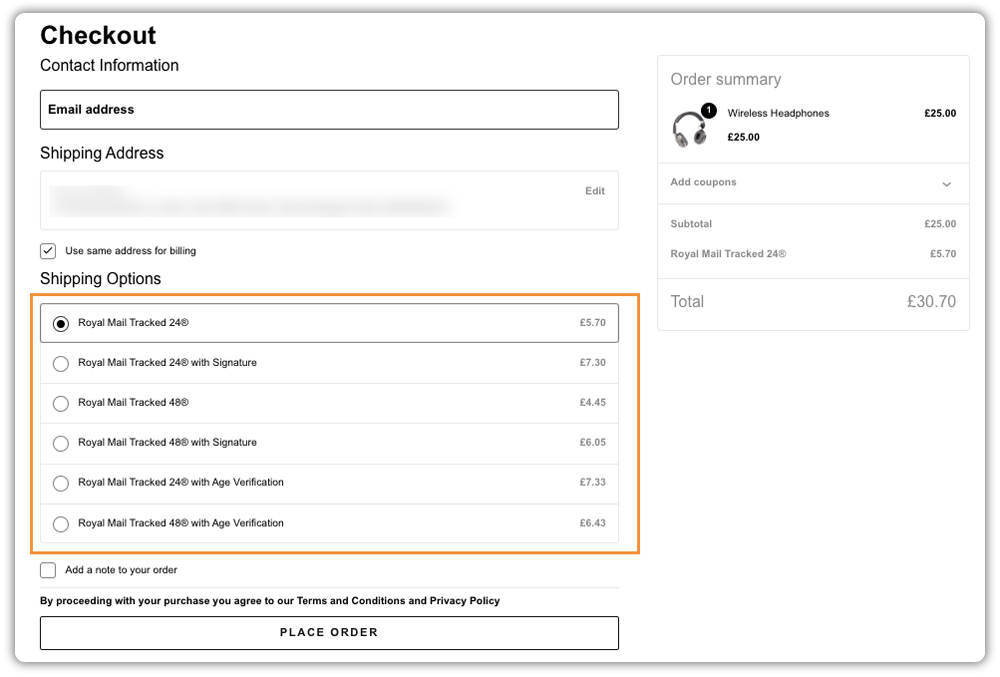
In the services section, enable Tracked 24 and Tracked 48. Only services enabled here will appear at checkout.

Once saved, your customers will see both options listed under shipping at checkout and can choose based on their delivery preference.
4. Enable Shipment Tracking
Turn on the Tracking Pin option. After dispatch, add the Royal Mail tracking number to the order in WooCommerce – the tracking details will then be included in the customer’s order completion email.

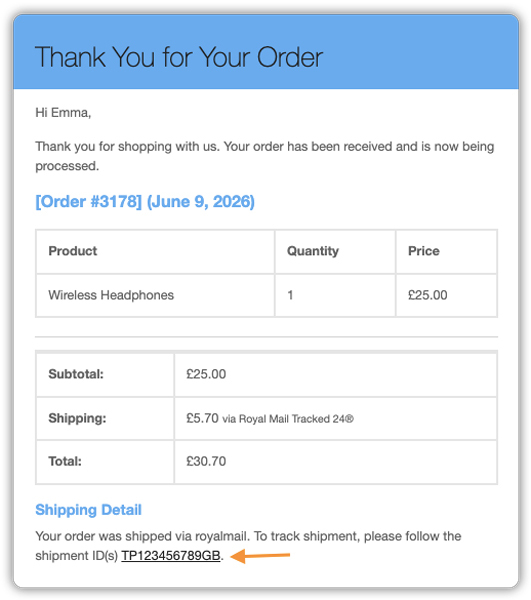
Example Scenario: WooCommerce Store Switching to Royal Mail Tracked Shipping
A WooCommerce store selling personalised stationery is running flat-rate shipping with no tracked options. Here’s the typical situation:
- Flat rates don’t match actual Royal Mail charges – overcharging some customers, absorbing losses on others
- No way for customers to select faster delivery – everyone gets the same option regardless of urgency
- No delivery confirmation to fall back on when parcels go missing
- Inbound delivery queries pile up with no tracking information to direct customers to
After installing the PH Royal Mail Shipping with Tracking for WooCommerce and enabling Tracked 24 and Tracked 48, both services appear at checkout with accurate rates. Customers choose based on their own priorities. Once dispatched and the tracking number is added in WooCommerce, customers receive their delivery details in the order email.
What changes:
- Rates reflect actual Royal Mail pricing based on cart weight and delivery address
- Customers self-serve their delivery queries using the tracking number provided
- Delivery confirmation is available for every shipment, making disputes straightforward to resolve
Best Practices for Using Royal Mail Tracked Services in WooCommerce
Getting your Royal Mail tracked setup right from the start saves you from common issues that only surface once orders start coming in. Here are the habits worth building early.
- Always enter accurate product weights and dimensions: The plugin pulls these figures to calculate Royal Mail rates at checkout. A product missing its weight or carrying a rough estimate will either show incorrect rates or nothing at all. Update product data before enabling live rates.
- Enable both Tracked 24 and Tracked 48: Restricting to one service means you’re deciding for every customer. Someone who needs next-day delivery and is happy to pay for it won’t have that option. Someone price-conscious won’t see a slower, cheaper alternative. Both services together cover the full range of what your customers need.
- Add tracking numbers promptly after dispatch: The sooner the customer has a tracking number, the fewer delivery queries come in. If you’re managing a high volume of orders, the Shipment Tracking Pro plugin can help – it supports 80+ carriers, including Royal Mail and lets you manage tracking updates from a single place, with a branded tracking page customers can use to look up their order status.
- Add handling fees carefully: The plugin lets you add a fixed or percentage-based amount on top of Royal Mail’s rates. Keep this modest – customers compare shipping costs across stores, and a noticeable markup on a Tracked 24 rate will stand out.
- Test checkout before going live. Go through the purchase flow yourself to confirm Tracked 24 and Tracked 48 appear correctly with accurate rates before real orders start coming in.
Conclusion
Royal Mail Tracked Services give UK shoppers the delivery visibility they expect, and offering them directly at WooCommerce checkout removes one of the most common friction points in the post-purchase experience. The PH Royal Mail Shipping with Tracking plugin handles rate display and service selection at checkout, while adding tracking details to orders keeps customers informed after dispatch. If you need help getting it configured for your store, contact PluginHive support, and the team will walk you through it.
FAQs
Q: How long does Tracked 24 take with Royal Mail?
Royal Mail Tracked 24 aims to deliver within 24 hours of dispatch across the UK. It’s not a guaranteed next-day service like Special Delivery, but the vast majority of parcels arrive the next working day. Delivery times may vary during peak periods.
Q: What is the difference between Tracked 24 and Tracked 48?
Both include end-to-end tracking, photo proof of delivery, and up to £150 compensation. The difference is speed – Tracked 24 targets next-day delivery, Tracked 48 targets two working days. Tracked 48 is the more economical option for non-urgent orders.
Q: Is Tracked 24 the same as Special Delivery?
No. Special Delivery Guaranteed offers a time-specific next-day delivery (by 9 am or 1 pm) with higher compensation coverage. Tracked 24 aims for next day but carries no delivery guarantee. Special Delivery is the better choice for high-value or time-critical shipments.
Q: Is Royal Mail Tracked 24 delivered on a Saturday?
Yes. Tracked 24 includes Saturday delivery at no extra cost. Parcels dispatched on a Friday can arrive on Saturday under this service.
