


Most Australian WooCommerce stores default to Australia Post and never question it. But if a growing share of your orders are coming from customers nearby, local delivery starts to make real sense, with faster turnaround, lower cost per order, and a better customer experience for people who live around the corner. So which one actually works better? Depends on who you’re shipping to and how your business is set up.
This guide breaks down how the two approaches compare for WooCommerce sellers, and when each one makes sense for your store.
On This Page
- What Is Local Delivery for WooCommerce Sellers?
- What Is Australia Post MyPost Business for WooCommerce?
- Local Delivery vs Australia Post: Key Differences for WooCommerce
- How to Set Up Australia Post MyPost Business in WooCommerce
- Real-World WooCommerce Use Case
- Conclusion
- FAQs
What Is Local Delivery for WooCommerce Sellers?
Local delivery in WooCommerce means fulfilling orders yourself — or through a local courier or same-day delivery service — rather than handing parcels to a carrier like Australia Post. It covers a few different setups:
- Your own vehicle — you or a staff member delivers directly to nearby customers
- A contracted local courier or last-mile delivery partner operating in your area
- A same-day delivery platform that picks up from your premises and drops off within a defined radius
WooCommerce has a built-in Local Delivery shipping method you can enable within a shipping zone. Local delivery works best for stores with a physical base and a concentrated local customer base — think food producers, florists, artisan makers, health and beauty stores, or any business where speed and proximity are part of the value proposition.
What Is Australia Post MyPost Business for WooCommerce?
Australia Post MyPost Business is Australia Post’s shipping program for businesses, offering discounted shipping rates based on your weekly sending volume.
Key benefits include:
- Up to 40% savings on domestic shipping
- Up to 35% savings on international shipping
- Discounts start from as little as $50 in weekly shipping spend
- Fixed nationwide rates for parcels up to 5kg
- Zone-based pricing for parcels over 5kg
- Charges are based on actual weight or cubic (volumetric) weight, whichever is higher
- Access to services such as Parcel Post, Express Post, Signature on Delivery, Extra Cover (insurance), and international shipping to 190+ countries
The PH Australia Post MyPost Business Shipping for WooCommerce plugin connects your WooCommerce store directly to your MyPost Business account and automatically displays your discounted MyPost Business rates at checkout. It also lets you generate shipping labels, track shipments, and manage Australia Post shipping without leaving your WooCommerce dashboard.
Local Delivery vs Australia Post: Key Differences for WooCommerce
| Feature | Local Delivery | Australia Post |
|---|---|---|
| Coverage | Limited to the postcode, suburb, or delivery radius you define (typically 10–30 km). | Delivers to every address in Australia, including regional and remote locations. |
| Cost | Often the cheapest option for nearby deliveries, especially when using your own vehicle. Costs increase as distance and delivery volume grow. | Competitive for wider coverage. MyPost Business discounts can significantly reduce shipping costs as volume increases. |
| Speed | Can offer same-day or next-day delivery within your local service area. | Express Post offers next-business-day delivery to most metro areas, but same-day delivery is not a standard service. |
| Scalability | Requires additional drivers, vehicles, or courier resources as order volume increases. | Easily scales with business growth without additional delivery infrastructure. |
| Tracking & Reliability | Tracking capabilities depend on your delivery process or third-party delivery platform. | Includes end-to-end tracking, Signature on Delivery, and Extra Cover (insurance) options through MyPost Business. |
How to Set Up Australia Post MyPost Business in WooCommerce
Install and activate the PH Australia Post MyPost Business Shipping for WooCommerce plugin and connect your MyPost Business account using the API credentials. This allows the plugin to fetch your contracted MyPost Business rates directly from Australia Post.
By default, you can configure Australia Post MyPost Business services in the plugin settings, making these shipping rates available to customers across your store.
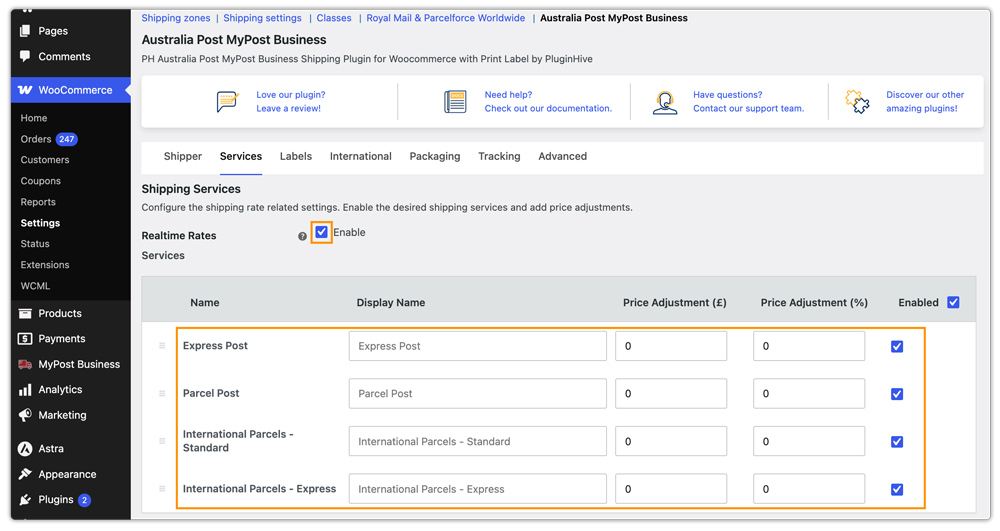
If you also want to offer Local Delivery for nearby customers, create a dedicated WooCommerce Shipping Zone for your local postcodes or suburbs and add the Local Delivery method to that zone.

You can then configure Australia Post MyPost Business for the remaining shipping zones or the Rest of the World zone.
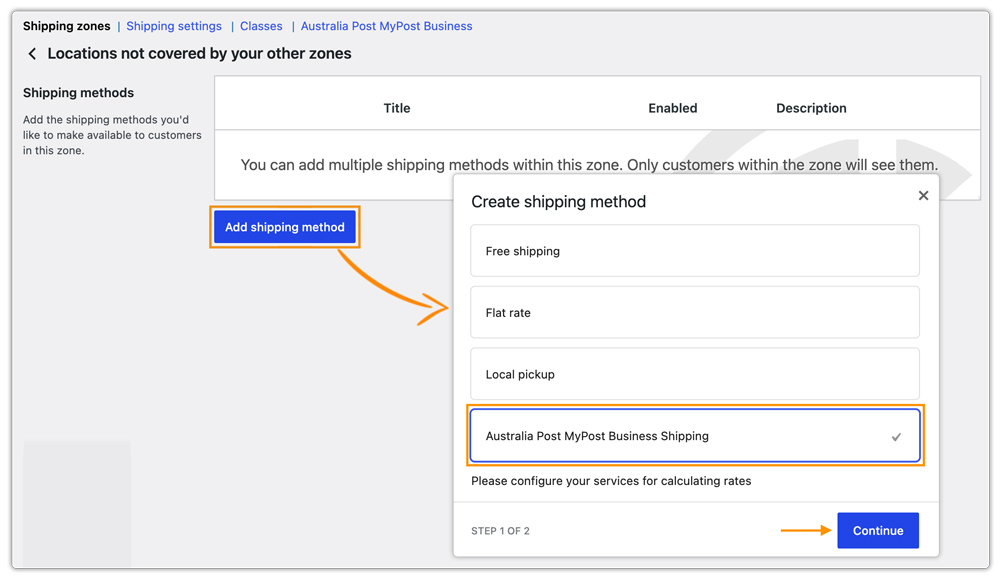
Then you can simply select the specific Australia Post MyPost Business shipping services you want to display under that, as shown in the image.

This way, customers within your local delivery area will see the Local Delivery option at checkout, and customers outside your local delivery zone will see the Australia Post services available for their region.

You can also create additional Australia Post shipping zones as needed to control which services are offered in different areas.
Real-World WooCommerce Use Case
A Melbourne-based WooCommerce store selling handmade soy candles and home fragrance products used Australia Post for every order. Local customers were paying $10–$14 in shipping even when they lived just a few suburbs away, leading to complaints and fewer repeat purchases. At the same time, larger interstate orders were often undercharged because the store wasn’t accounting for Australia Post’s cubic-weight pricing.
How the Plugin Helped
The store implemented the PH Australia Post MyPost Business Shipping for WooCommerce, configured live Australia Post rates for national orders, and created a local delivery zone for nearby Melbourne postcodes. They also added accurate product weights and dimensions so Australia Post could return correct rates at checkout.
The Result
- Local customers could choose a faster, lower-cost delivery option.
- National orders displayed accurate Australia Post rates based on actual shipping requirements.
- Shipping margins improved by eliminating undercharged interstate orders.
- Label printing and shipment management were handled directly from WooCommerce, reducing fulfillment time.
Conclusion
Local delivery and Australia Post aren’t competing choices for WooCommerce sellers; they’re complementary. Local delivery works for nearby customers who want speed and lower cost. Australia Post covers everyone else across the country. The stores that get the most out of both are the ones running them together from the same WooCommerce checkout. The PH Australia Post MyPost Business Shipping for WooCommerce handles the Australia Post side all from your WooCommerce dashboard.
Need help with the setup? The PluginHive support team is here.
FAQs
Q. Can I hide Australia Post Express Post for low-value WooCommerce orders?
Yes. The PH Hide Shipping Methods & Rate Adjustment for WooCommerce lets you show or hide specific Australia Post services based on cart value, weight, destination, or product type, for example, hiding Express Post for orders below a set value.
Q. Can I combine live Australia Post rates with free shipping thresholds in WooCommerce?
Yes. The PH Table Rate Shipping Pro Plugin for WooCommerce lets you layer conditional rules on top of live Australia Post rates, free shipping above a certain cart value, flat-rate for smaller orders, or location-based pricing rules.
Q. Can WooCommerce show delivery date estimates for Australia Post and local delivery?
Yes. The Estimated Delivery Date Plugin for WooCommerce displays delivery estimates per shipping method, configurable so local delivery shows a same-day or next-day estimate, and Australia Post shows the appropriate Parcel Post or Express Post transit window.
Q. Can WooCommerce marketplaces calculate Australia Post rates per vendor?
Yes. The PH Multi-Vendor Shipping Plugin for WooCommerce calculates Australia Post rates separately per vendor based on each vendor’s origin postcode, so customers see accurate per-vendor shipping costs at checkout.
