


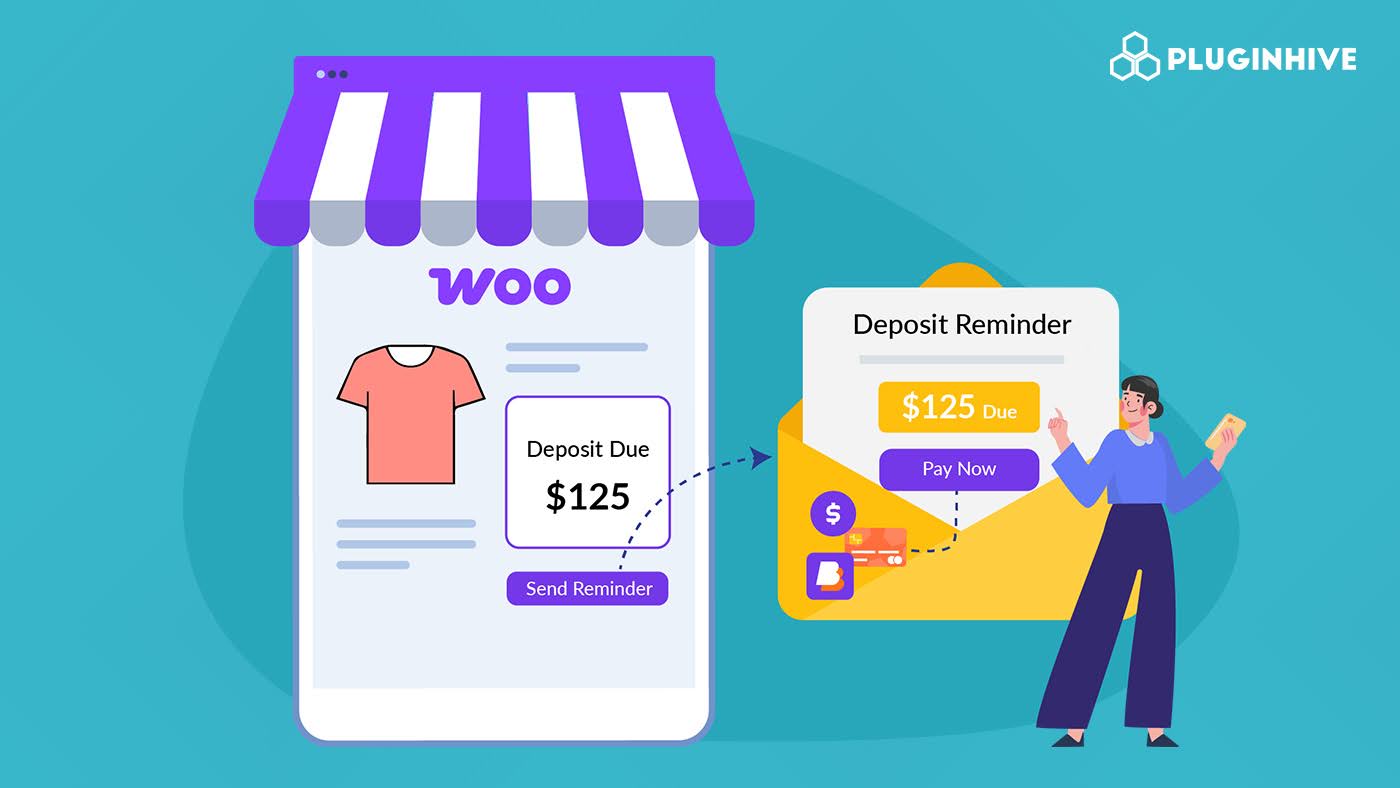
When you run a WooCommerce store that accepts deposits, collecting the remaining balance is often the hardest part. You send a payment reminder email, your customer reads it, but then they have to log in, find their order, and figure out where to pay. That extra friction is enough to delay payments or lose them entirely.
With PH Deposits for WooCommerce by PluginHive, you can include a direct payment link inside your deposit reminder emails so customers can pay in one click. In this article, you will learn what WooCommerce deposits are, why payment links in reminder emails matter, and exactly how to set this up in your store.
Table of Contents
- What Are WooCommerce Deposits and When Should You Use Them?
- Benefits of Adding Payment Links to WooCommerce Deposit Reminder Emails
- How to Add Payment Links to WooCommerce Deposit Reminder Emails
- Real-World Example: Collecting Balance Payments via Email in WooCommerce
- Best Practices for Managing WooCommerce Deposit Payments
- Conclusion
- FAQs
What Are WooCommerce Deposits and When Should You Use Them?
A WooCommerce deposit is a partial payment collected upfront at checkout, with the remaining balance paid at a later date. Instead of requiring the full amount upfront, you collect a fixed amount or a percentage and handle the rest through a scheduled balance payment.
WooCommerce does not include deposits by default. PH Deposits for WooCommerce fills that gap, letting you accept partial payments, create custom payment plans, and automatically manage balance collection from your dashboard.
Here is when deposits make the most sense for your store:
- High-value products: A deposit lowers the upfront barrier and makes it easier for customers to commit.
- Made-to-order items: You need financial commitment before starting work, but customers prefer not to pay in full before delivery.
- Service-based bookings: Deposits confirm customer intent and reduce no-shows and last-minute cancellations.
- Instalment-friendly purchases: Payment plans give customers flexibility while you still get paid on schedule.
Once a deposit is collected, the plugin tracks the remaining balance and triggers reminder emails automatically when payment is due.
Benefits of Adding Payment Links to WooCommerce Deposit Reminder Emails
Most stores already send balance reminder emails, but without a payment link, customers still have to do all the work. Sending a payment via email with a direct link makes it far easier for customers to complete their WooCommerce payment on time. Here is why adding one makes a real difference:
- Faster payments: A one-click link removes every unnecessary step between your customer and completing the payment.
- Fewer abandoned balances: Customers who have to log in and search for their order tend to put it off. A direct link removes that excuse.
- Less manual follow-up: Customers often email asking where to pay. A payment link answers that before they ask.
- Better customer experience: A professional email with a clear payment button shows your store is organised and easy to deal with.
- Improved cash flow: Shorter payment cycles mean outstanding balances get cleared faster.
One of the easiest ways to improve balance collection is by adding a payment link to reminder emails, which complements the broader benefits of using WooCommerce deposits.
How to Add Payment Links to WooCommerce Deposit Reminder Emails
PH Deposits for WooCommerce lets you send balance reminder emails that include a direct payment link. Here is how to get it running in your store.
Configure Your Deposit Settings
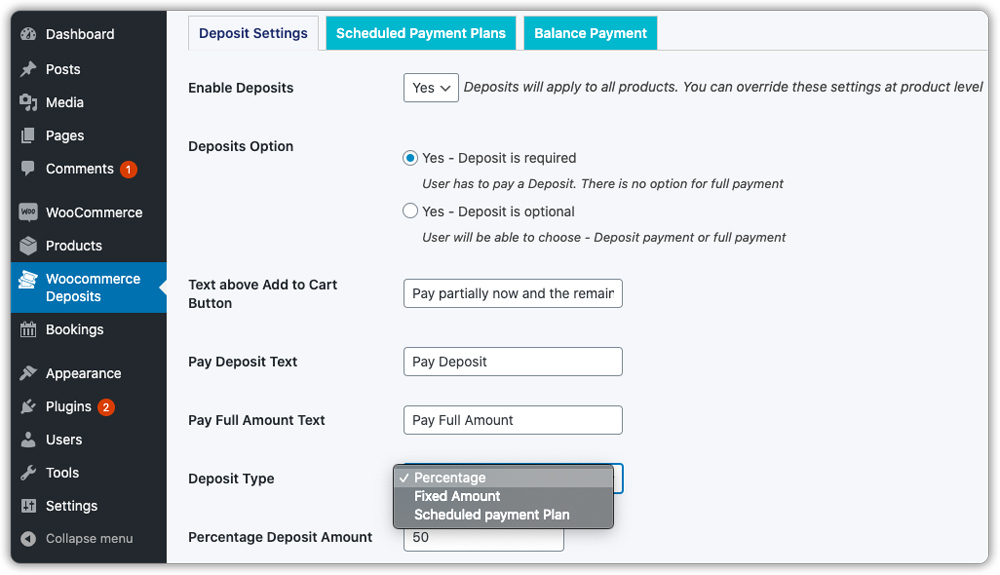
Go to the WooCommerce Deposits plugin in your WordPress dashboard and enable deposits for your store. Choose whether deposits should be required or optional, then select the deposit type, such as a percentage or a scheduled payment plan, and enter the deposit value.
Not sure whether deposits or payment plans suit your store better? This guide on WooCommerce Deposits vs Payment Plans breaks down the key differences.
You can apply these settings store-wide or customise them for individual products.
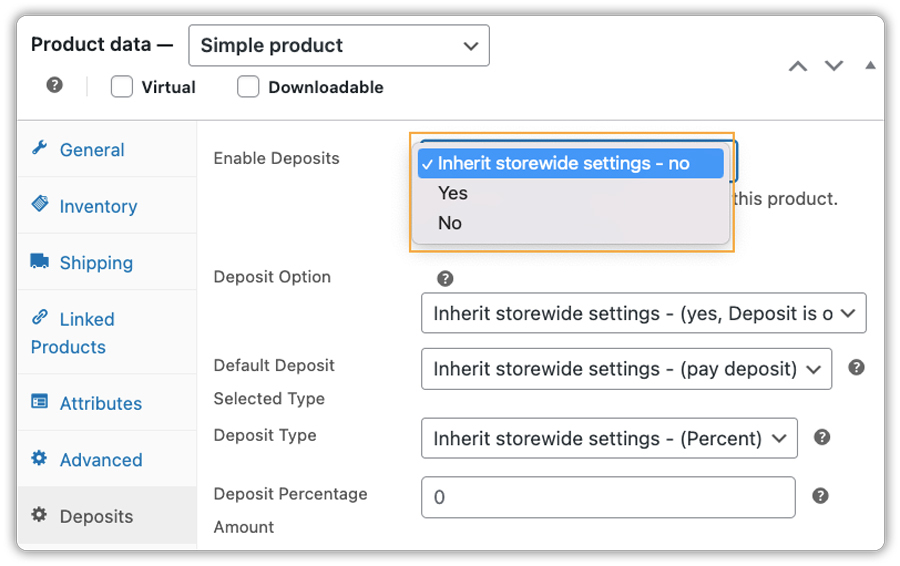
You can also set the default payment selection and customise the deposit and full payment button text shown on product pages to match your store’s messaging.

Set Up Balance Payment Order Creation
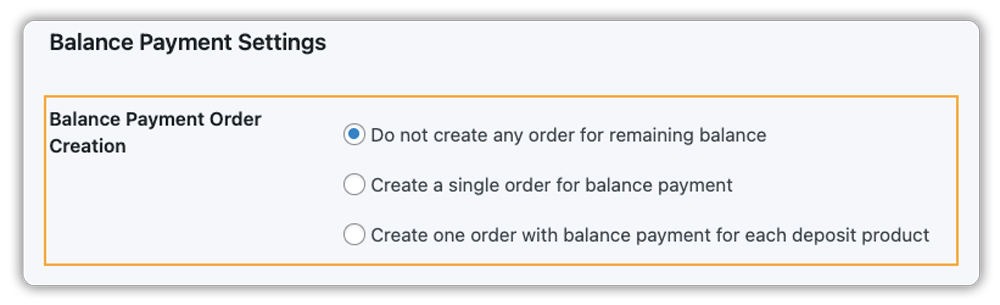
In the Balance Payment settings, choose how the remaining balance order should be created after a customer pays the deposit. This helps you manage pending payments and supports the WooCommerce payment reminder process.
- No balance order: The deposit order is the only one created. You generate the balance order manually when needed.
- Single balance order: The plugin automatically creates two orders: one for the deposit, one for the balance.
- One order per deposit product: The plugin creates a separate balance order for each deposit item. Best when products have different deposit terms.
Turn On the Reminder Email
How the payment link is sent depends on the deposit type you are using.
Fixed or percentage deposits: Once the balance order is created, WooCommerce automatically includes a Pay link in the order email. Customers can click this link and complete the remaining payment immediately, so no additional reminder email setup is required.
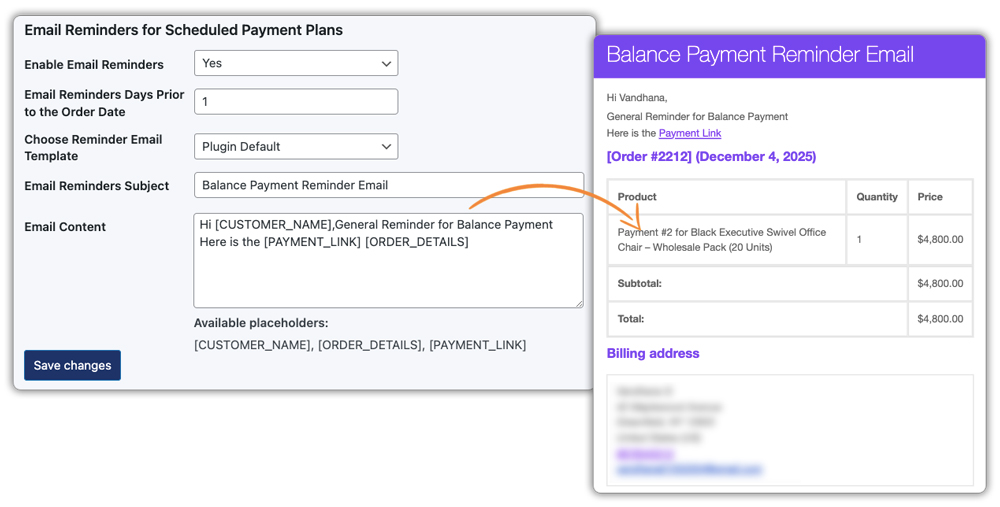
Scheduled payment plans: Go to the plugin’s reminder email settings and enable email reminders. Then choose how many days in advance each reminder should be sent and select an email template that matches your store’s branding.
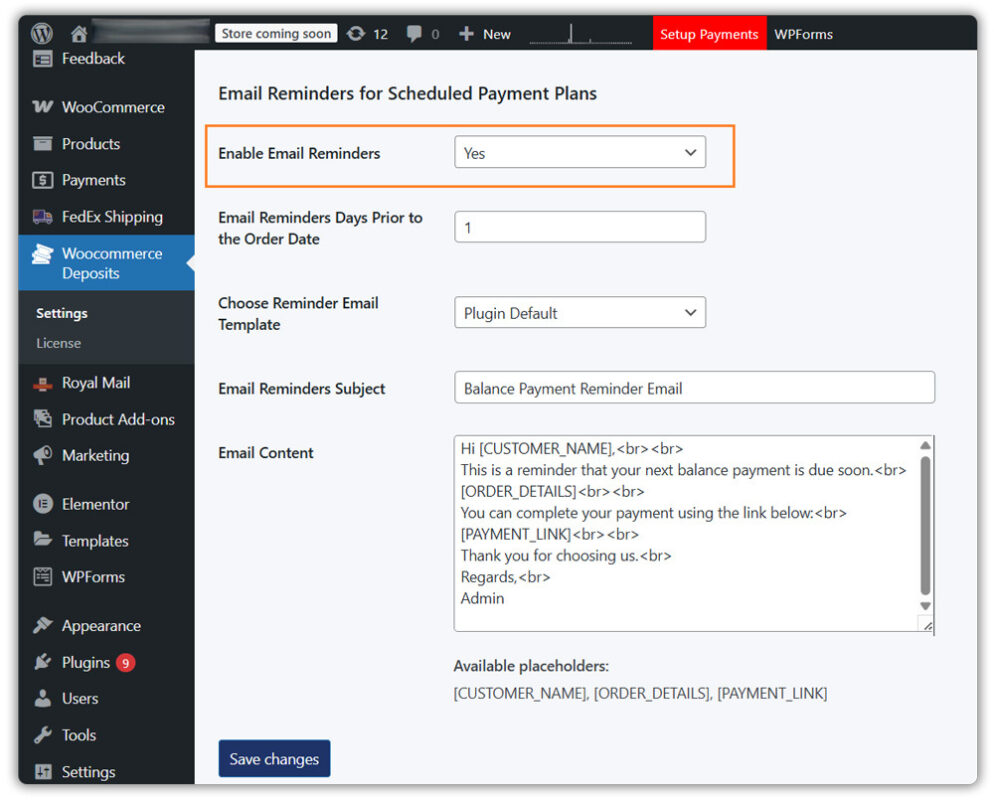
While editing the email content, you can use placeholders such as [CUSTOMER_NAME] to personalise the message, [ORDER_DETAILS] to show a quick order summary, and [PAYMENT_LINK] to insert a direct payment link for each scheduled instalment.
Once configured, customers with pending balances will automatically receive reminder emails that help them complete their WooCommerce payment without any manual follow-up from your end.
Real-World Example: Collecting Balance Payments via Email in WooCommerce
Say you run a WooCommerce store selling custom furniture, with orders ranging from $400 to $800 per piece.
The Challenges
- Customers hesitate to pay in full upfront for made-to-order items.
- You cannot start production without confirmed payment, but materials cost money before delivery.
- Manually tracking outstanding balances and following up with each customer takes significant time every week.
How PH Deposits for WooCommerce Solves It
- You set a 30% deposit on all products. A customer ordering a $600 sofa pays $180 upfront to confirm the order.
- When the balance is due, you can create a balance order for the remaining $420, and the plugin automatically includes a payment link in the order email.
- The email includes a direct payment link that the customer clicks, pays, and the order is marked as settled in under a minute.
- No login required, no searching for the order, no back-and-forth emails.
The result is a cleaner payment process that saves you time and keeps your cash flow on track.
Best Practices for Managing WooCommerce Deposit Payments
Managing deposit payments properly helps you avoid delays and keep order fulfilment on track. While the plugin automates balance tracking and reminder emails, a few simple practices can improve payment completion.
- Be Transparent: Clearly state in your product description if a deposit is non-refundable. This prevents disputes later on.
- Set practical payment timelines: Give customers enough time to complete the balance payment without feeling rushed.
- Use reminder emails effectively: Automated emails with a direct payment link make it easier for customers to pay on time.
- Monitor pending balances: Regularly check unpaid balance orders from your WooCommerce dashboard.
- Keep communication simple: Clear and consistent payment updates help build trust and reduce confusion.
Clear deposit policies and timely reminders help you collect balance payments faster and manage orders smoothly.
Conclusion
Adding a payment link to your WooCommerce deposit reminder emails removes the friction from balance collection. Customers get a one-click path to pay, and you get paid faster without manual follow-ups. With the PH Deposits for WooCommerce plugin, the full process from deposit to reminder to final payment runs automatically while you focus on your store.
Whether you sell custom products, offer services, or run instalment-friendly purchases, this setup makes your WooCommerce payment process more reliable for both you and your customers. If you need help setting up this in your WooCommerce store, the PluginHive support team is ready to assist you with configuration and guidance.
FAQs
1. Does WooCommerce support deposit payments and reminder emails by default?
No. WooCommerce does not provide built-in support for deposits or balance payment reminders. You need a plugin like PH Deposits for WooCommerce to collect partial payments and send reminder emails.
2. How can I send a payment link for the remaining deposit balance in WooCommerce?
After a customer pays the initial deposit, the plugin creates a balance payment order and sends reminder emails with a direct payment link to complete the remaining amount.
3. Can deposit payment reminder emails be automated in WooCommerce?
Yes. You can schedule automated WooCommerce payment reminder emails for pending deposit balances so customers are notified before the payment due date.
