


If you sell products that vary in weight from small accessories to bulky kits, a flat shipping rate will either eat into your margins or push customers away at checkout. WooCommerce doesn’t offer a built-in way to charge by weight tiers, which means you need the right tool to do it properly.
This guide covers how weight-based shipping works in WooCommerce, the problems it solves, and how to set it up using the PH Table Rate Shipping Pro Plugin for WooCommerce.
On This Page
- What Is WooCommerce Weight-Based Shipping?
- The Limits of WooCommerce’s Default Shipping Options
- How to Implement Weight-Based Shipping in WooCommerce
- Real-World WooCommerce Weight-Based Shipping Examples
- Best Practices for WooCommerce Weight-Based Shipping
- Conclusion
- FAQs
What Is WooCommerce Weight-Based Shipping?
Weight-based shipping ties the cost of delivery directly to how much a customer’s order weighs. The heavier the cart, the higher the shipping rate and lighter orders cost less. It’s the same logic most carriers use when they quote you a price at the counter.
In WooCommerce, every product has a weight field on its product page. When a customer checks out, WooCommerce adds up the weight of everything in their cart and uses that total to determine which shipping rate applies.
Why Weight-Based Shipping Matters for WooCommerce Stores
Most carriers – Royal Mail, Canada Post, FedEx, UPS base their pricing on weight. If your WooCommerce store charges a flat rate while your carrier charges by weight, the gap between what customers pay and what you actually spend on shipping will vary with every order. Weight-based shipping closes that gap.
It also makes checkout fairer. A customer buying a single 200g item shouldn’t pay the same shipping as someone ordering 8kg of products. When rates reflect actual weight, customers buying lighter items see lower costs – which reduces friction and abandoned carts.
The Limits of WooCommerce’s Default Shipping Options
WooCommerce’s built-in shipping options are intentionally simple – flat rate, free shipping, and local pickup. That works fine for stores selling one type of product at a consistent weight, but the moment your catalogue varies in weight, those defaults create real problems.
- Flat rates hurt both sides – You set a rate that covers your average order, but lighter orders end up overpriced and heavier ones cost you money.
- Workarounds don’t scale – Using multiple shipping zones to approximate weight logic gets messy fast and breaks easily.
- Manual reviews aren’t sustainable – Checking order weights individually and chasing customers for extra shipping costs is not something you can keep doing as your store grows.
The moment you want to offer free shipping above a threshold while still charging by weight below it, WooCommerce’s defaults simply can’t handle it.
How to Implement Weight-Based Shipping in WooCommerce
The PH Table Rate Shipping Pro Plugin for WooCommerce lets you build weight-based shipping rules directly inside WooCommerce – no custom code needed. Over 7,000 stores use it to handle everything from simple weight tiers to complex multi-zone setups.
Before you begin: Install and activate the PH Table Rate Shipping Pro Plugin for WooCommerce, then go to WooCommerce → Settings → Shipping to access the plugin settings. For a full walkthrough, refer to the WooCommerce Shipping Pro Chapter 1: Setting Up the Plugin.
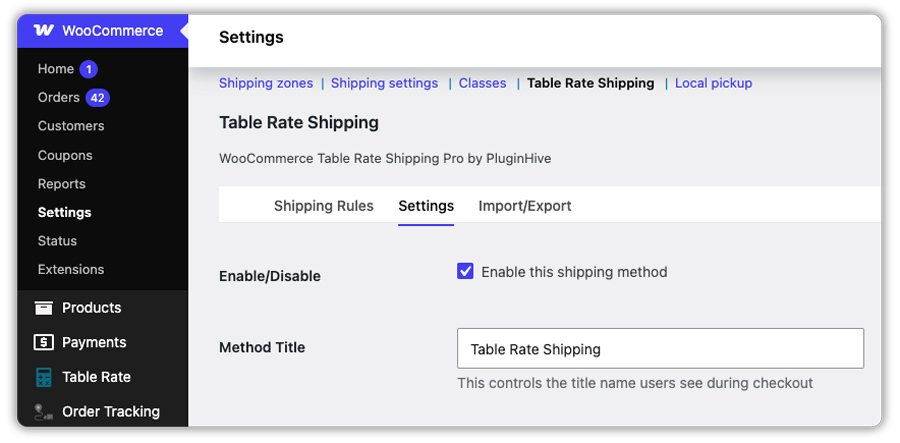
Here’s how to get it set up:
- Make sure every product has a weight entered: Go to each product in WooCommerce and fill in the weight field under the Shipping tab. This is the foundation – if any product is missing a weight, the rate won’t calculate correctly.

If you’re managing a large catalogue, you can also use WooCommerce’s built-in CSV import/export tools to update product weights in bulk.
- Choose what you want to base the rate on: In the plugin’s settings, select Weight as the basis for your shipping rules. You’ll also pick a method title here – this is the label customers see at checkout, so keep it clear (for example, “Standard Delivery” or “Economy Shipping”).

- Create your weight-based rules: In the rate matrix, define your weight ranges and the shipping cost for each range. Here’s a simple example you can use to test this in your store:
| Weight Range | Shipping Cost |
|---|---|
| 0 – 0.5 kg | $3.50 |
| 0.5 – 2 kg | $5.00 |
| 2 – 5 kg | $8.00 |
| 5 – 10 kg | $14.00 |
| 10 kg and above | $22.00 |

Each range is a separate row in the matrix. When a customer’s cart weight falls within a certain range, that rate automatically appears in the cart and checkout as shown below.


Combine Weight with Other Shipping Conditions
Weight can work on its own or alongside other factors like zone-based rates for domestic vs. international orders, shipping class surcharges for bulky or fragile products, or a free shipping threshold that activates once the cart total crosses a set amount.
For Example, you can create different rates for the same weight range based on the shipping destination.

In this example, orders weighing between 0.5 kg and 2 kg are charged $5 for domestic shipping.
The same weight range is charged $15 for international shipping, reflecting the higher delivery cost.

For a detailed look at how the rate matrix works with real business scenarios, see WooCommerce Shipping Pro Chapter 2: Solving Business Cases.
Need to charge more as the weight increases within a slab?
Some stores don’t just want a flat rate per weight range – they want a base charge plus an additional cost for every kg beyond that. The plugin handles this too, using the Base Cost + Cost Per Unit combination.
Here’s a simple example:

So, for an order weighing 5kg, the customer pays $5.00 base + (3 × $1.50) = $9.50 total.

The base cost covers the minimum charge, and the per-unit cost adds up for every extra kg beyond the slab minimum. This is useful when you want lighter orders to pay a flat fee but heavier orders to scale proportionally.
For a detailed walkthrough of this setup, see the Setting Weight-Based Shipping Rates Guide.
Real-World WooCommerce Weight-Based Shipping Examples
Weight-based shipping looks different depending on what you sell and where you ship. Here’s how the plugin handles the most common scenarios store owners run into:
| Store Type | Weight Challenge | How the Plugin Handles It |
|---|---|---|
| Pet supplies store | Products range from small treats to large food bags | Weight tiers ensure light orders stay affordable and heavy orders cover their actual shipping cost |
| Craft store | Ships letters, small parcels, and medium parcels at different carrier rates | Weight slabs map directly to carrier weight bands – what the store charges matches what the store pays |
| Wholesale store | Needs different rate structures for domestic and international orders | Zone-based weight tables apply one rule set for domestic and a separate one for international – both managed from one place |
| Home goods store | Mix of lightweight and heavy products in one cart | Cart weight is totalled across all items before the rate applies – no manual splitting needed |
| Health & beauty store | Wants free shipping above a threshold but weight-based rates below it | Free shipping rule activates above the threshold; weight-based rates apply to everything below – both run at the same time |
| Clothing store | Ships domestically at standard rates but needs surcharges for oversized items | Shipping classes separate standard products from oversized ones – surcharge applies only where needed |
The PH Table Rate Shipping Pro Plugin for WooCommerce handles all of these from a single rate matrix – you build the rules once, and they apply automatically on every order.
Best Practices for WooCommerce Weight-Based Shipping
Getting the most out of weight-based shipping comes down to a few setup choices that are easy to overlook. The WooCommerce Shipping Pro setup guide covers the full configuration in detail.
- Account for packaging weight: A 500g product will likely ship at 600–650g once packaged. Build a small buffer into product weights or add a flat handling charge using the plugin’s base cost field.
- Name shipping methods clearly: “Standard Delivery” and “Freight / Heavy Shipping” mean something at checkout. Generic labels don’t build confidence.
- Use rounding for edge cases: If you want 1.7 kg charged at the 2 kg rate, the plugin’s round setting handles this cleanly.
- Use CSV import for large setups: If you have many rates to add, you can create them in a spreadsheet and import them using a CSV file. You can also export and update them easily later.
- Test before going live: Add products of different weights to a test cart and confirm the right rate appears at checkout. Ten minutes of testing prevents customer complaints later.
These small adjustments make the difference between weight-based shipping that works reliably and one that occasionally produces unexpected results.
Conclusion
Weight-based shipping is the most accurate way to price delivery when your products vary in weight. Flat rates are a compromise, and the compromise usually costs you in one direction or another. The PH Table Rate Shipping Pro Plugin for WooCommerce gives you the control to set up weight tiers, combine them with zone or category rules, and keep everything manageable as your store grows. If you need help configuring your setup, PluginHive support is available to assist.
FAQs
Q: What is weight-based shipping?
Weight-based shipping calculates the shipping cost based on the total weight of a customer’s cart. The heavier the order, the higher the shipping rate and lighter orders cost less. Most carriers price shipments this way, so it keeps your store rates aligned with what you actually pay.
Q: Does WooCommerce support weight-based shipping by default?
No. WooCommerce’s built-in options are limited to flat rate, free shipping, and local pickup. To charge by weight tiers, you need a plugin like the PH Table Rate Shipping Pro Plugin for WooCommerce.
Q: How to add weight-based shipping in WooCommerce?
Install the PH Table Rate Shipping Pro Plugin for WooCommerce, add weights to your products, and set up weight ranges with the corresponding cost in the rate matrix. Refer to WooCommerce Shipping Pro Chapter 1: Setting Up the Plugin for a full walkthrough.
