


Running online workshops and webinars can be rewarding, but managing registrations, reminders, and Zoom links manually is time-consuming and stressful. For coaches, trainers, and online educators using WooCommerce, juggling these tasks can take focus away from delivering high-quality sessions.
By using the WooCommerce Bookings and Appointments plugin with the Zoom add-on, you can automate bookings, generate Zoom links instantly, and manage your events efficiently, all while providing a professional experience for your participants and boosting engagement and revenue. In this article, we’ll show how to leverage this integration to streamline your online events, enhance attendee experience, and grow your audience.
Table of Contents
- Benefits of Integrating Zoom with WooCommerce for Webinars and Workshops
- Host Webinars and Workshops Using WooCommerce Zoom
- Real-World Example
- Tips to Boost Engagement and Sales for Your WooCommerce Webinars & Workshops
- Conclusion
- FAQs
Benefits of Integrating Zoom with WooCommerce for Webinars and Workshops
Integrating Zoom with WooCommerce brings multiple advantages for coaches, trainers, and online educators, making it easier to manage webinars and workshops while providing a smooth experience for attendees:
- Automated Booking and Zoom Meetings: Every booking through WooCommerce automatically creates a Zoom meeting link, removing the need for manual scheduling.
- Simplified Attendee Management: Track registrations, manage cancellations, and send automatic reminders directly from WooCommerce.
- Professional Experience for Participants: Attendees receive all details automatically, ensuring a seamless and reliable experience.
- Boost Revenue Opportunities: Charge for workshops, offer discounts, or upsell additional resources easily through your WooCommerce store.
Now that you understand how integrating Zoom with WooCommerce streamlines bookings, manages attendees, and saves time, let’s take a closer look at how you can use these tools to host smooth, professional workshops and webinars directly from your store.
Host Webinars and Workshops Using WooCommerce Zoom
Combining WooCommerce with Zoom allows you to manage bookings, generate meeting links automatically, and deliver a smooth participant experience, all in one system.
Requirements for Hosting Online Workshops and Webinars
Before you get started, make sure you have the following in place:
- WooCommerce Store Setup: Your store should list your workshops or webinar sessions as bookable products, with payment options configured so participants can register and pay effortlessly.
- WooCommerce Booking and Appointments Plugin: This plugin enables you to create bookable workshop sessions, set available dates and times, and manage attendee limits.
- Zoom Account: A Zoom account is required to host your online sessions, and a Pro plan is recommended for longer workshops or interactive sessions to ensure a smooth experience.
- Zoom for WooCommerce plugin: PluginHive’s Zoom integration automatically generates Zoom meetings for each booking and sends the meeting link directly to participants.
Note: If you haven’t set up these plugins yet, you can check out the WooCommerce Bookings and Zoom setup guides for detailed instructions.
- Connecting Zoom with WooCommerce
Once the plugins are installed, linking your Zoom account with WooCommerce is quick and straightforward. After the connection, each time a participant registers for your workshop or webinar, a Zoom meeting is automatically created. The meeting link is sent to them instantly, eliminating any manual scheduling or follow-ups.

- Managing Your Workshops and Webinars
With this integration, managing your online events becomes effortless. You can set hosts and co-hosts, define session durations, and configure settings such as recordings, meeting start time, and audio/video options to maintain a professional experience.

These settings can be applied to all sessions by default or customized for specific workshops, allowing you to tailor each session according to its format, whether it’s an interactive hands-on workshop, a lecture-style webinar, or a Q&A session.
- How Participants Book and Join Workshops
The booking process is simple and user-friendly. Participants select the workshop or webinar they want to attend, choose a date and time, and complete the payment through your WooCommerce store.

Once the booking is confirmed, a Zoom meeting is automatically created, and the participant receives the link via email. At the scheduled time, they can join the session with a single click.
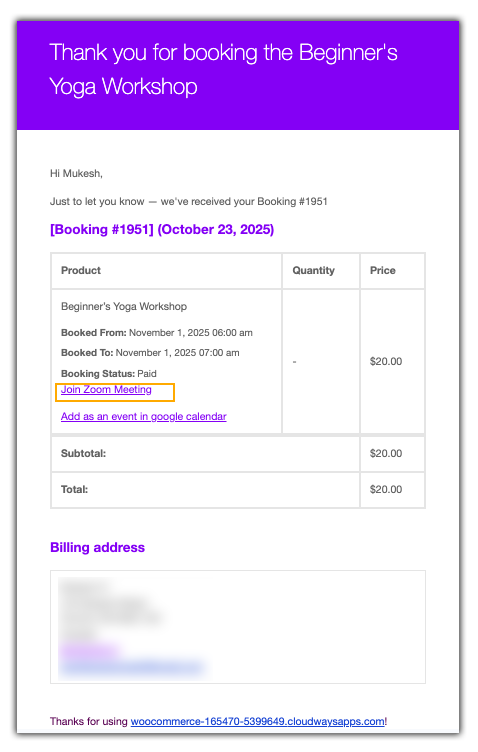
You can track all upcoming sessions directly from your WooCommerce dashboard, view details, start sessions, and manage cancellations whenever needed.

By integrating WooCommerce with Zoom, hosting and managing online workshops and webinars becomes seamless. You can focus on delivering engaging, high-quality content while the system handles scheduling, meeting creation, and notifications automatically.
Real-World Use Case: How WooCommerce Zoom Integration Works in Action
Let’s say you run an online fitness coaching business on WooCommerce, hosting live workout workshops and wellness webinars. Your goal is to provide participants with a seamless experience where they can easily register, pay, and join sessions without you manually managing each booking.
Common Challenges
Without automation, managing online workshops can quickly become overwhelming:
- Manual Scheduling: Sending Zoom links individually increases the risk of errors or missed emails.
- Payment Tracking: Monitoring payments, refunds, or failed transactions can be time-consuming.
- Cancellations and Rescheduling: Handling participant changes for multiple sessions manually is chaotic.
- Maintaining Professionalism: Ensuring consistent, polished sessions is difficult without automation.
How WooCommerce Zoom Integration Solves These Challenges
Using the WooCommerce Bookings and Appointments plugin with the Zoom Integration, you can streamline the entire process:
- Automated Zoom Meetings: Each booking generates a unique Zoom link sent to participants automatically.
- Integrated Payments: Participants pay directly through WooCommerce, reducing manual tracking.
- Automatic Reminders: Email notifications help reduce no-shows and keep attendees informed.
- Customizable Session Settings: Control session duration, participant limits, and features like recordings, chat, or audio/video options.
With this setup, you can focus entirely on delivering engaging, high-quality workshops, while the plugins handle scheduling, payments, and notifications. The result is a professional experience for participants, fewer errors, and more time to grow your business.
Tips to Boost Engagement and Sales for Your WooCommerce Webinars and Workshops
To make your online workshops and webinars more successful, it’s important to focus not just on delivering content but also on engaging participants and optimizing for conversions. Here are some practical tips:
- Promote Workshops Across Channels: Use email marketing, social media, and your website to promote your sessions. Clear, compelling messaging about the value of your workshop will attract more participants.
- Engage Participants During Sessions: Use interactive tools such as polls, Q&A sessions, and chat features in Zoom to make your webinars more engaging. Active participation increases satisfaction and retention.
- Upsell Additional Resources: Offer supplementary materials like eBooks, templates, or follow-up sessions during or after the workshop. This boosts revenue and provides more value to participants.
- Collect Feedback: Ask participants for feedback at the end of the session. This helps you improve future workshops and builds trust and loyalty with your audience.
- Use Professional Branding: Make your Zoom sessions look polished by using branded backgrounds, consistent visual elements, and professional presentation materials. A professional look builds trust and engagement.
By implementing these strategies, you can enhance participant engagement, boost registrations, and increase revenue for your online workshops and webinars.
Conclusion
Hosting online workshops and webinars doesn’t have to be stressful. Integrating Zoom with WooCommerce automates bookings, manages sessions efficiently, and delivers a seamless experience for participants.
The WooCommerce Booking plugin and Zoom Integration for WooCommerce make managing registrations, reminders, and multiple sessions effortless. Whether you’re a coach, trainer, or educator, this setup helps you run professional and organized workshops and webinars while saving time. If you need any help setting up the plugins, the PluginHive support team is ready to assist you.
FAQs
1. Is a WooCommerce Bookings plugin required to sell Zoom webinars?
You can manually set up a standard WooCommerce product (virtual or downloadable), but we recommend using the WooCommerce Bookings plugin with Zoom integration. It helps you manage time slots, assign hosts, control group limits, and send automated reminders efficiently.
2. Will the Zoom meeting link be sent automatically to the customer after they purchase through WooCommerce?
Yes. Once you set up the integration, WooCommerce automatically generates a unique Zoom link and includes it in the Order or Booking Confirmation email, so customers don’t need to register separately.
3. What happens if a customer needs to cancel or reschedule their paid Zoom webinar in WooCommerce?
Yes. Canceling or rescheduling a booking in WooCommerce automatically updates the Zoom meeting, keeping your schedule accurate and avoiding confusion.
4. Is it possible to handle group sessions with WooCommerce and Zoom?
With the WooCommerce Booking and Zoom Integration plugin, you can set a maximum number of participants per booking. This feature helps you manage group sessions effectively and keep your Zoom meetings organized and within capacity.
