


Boat booking have become a go-to activity for tourists, weekend travelers, and local adventurers alike. With demand rising, rental businesses need a fast and reliable way to manage hourly or daily bookings, avoid double bookings, and offer extras like fuel or guided tours all online.
WooCommerce offers a solid base for running your rental store. With the Bookings and Appointments for WooCommerce, you can turn that store into a complete, automated booking system built to manage schedules, extras, and payments with ease. In this article, we’ll show you how to streamline your boat rental operations, offer a better customer experience, and increase bookings all within WooCommerce.
Table of Contents
- Common Challenges Faced by Boat Rental Businesses
- Transform Your Boat Rental Workflow with WooCommerce
- Real-World Case Study
- Profit-Boosting Tips for Boat Rentals
- Conclusion
- FAQs
Common Challenges Faced by Boat Rental Businesses
Running a boat rental business sounds exciting, but behind the scenes, it comes with its fair share of challenges.
- Double bookings and scheduling issues are common when using spreadsheets or basic tools.
- Real-time availability is often unclear to customers, leading to confusion and missed bookings.
- There’s usually no way to upsell extras like life jackets, fuel, or Fishing gear during booking.
- Manual processes, such as confirming reservations and sending reminders, consume a significant amount of time.
- Tourists often drop off when there’s no language support or a mobile-friendly interface.
These problems waste time, reduce revenue and frustrate customers. You don’t need a full rebuild. With the right tools in WooCommerce, you can simplify bookings and grow your boat rental business faster.
Transform Your Boat Rental Workflow with WooCommerce
WooCommerce is a flexible eCommerce platform, and with the Bookings and Appointments for WooCommerce, it becomes a powerful booking engine tailored for rental businesses. You can set up hourly or daily rentals, assign boats as bookable resources, and offer add-ons like fuel or life jackets, all from your existing store.
The entire process from selecting time slots to confirming payments and syncing calendars runs automatically in the background. Whether you’re managing two boats or twenty, this setup simplifies daily operations, reduces booking errors, and gives customers a seamless experience from start to finish.
To get started with bookings in your WooCommerce store, ensure the Bookings and Appointments for WooCommerce is installed, activated, and properly configured. Follow this quick setup guide to begin.
Frontend Booking Experience for Customers
From the customer’s point of view, the booking experience should be simple, clear, and mobile-friendly. And here’s how the Bookings and Appointments for WooCommerce helps streamline your bookings.
- Customers select boats, choose a date and time, and view real-time availability via a responsive calendar.
- Optional add-ons, such as fuel, life jackets, or Fishing gear, can be selected with automatic pricing updates.
- Customers can also choose the number of participants and assign a captain if needed (handled via booking assets)

The booking process works seamlessly across all devices, whether desktop, tablet, or mobile, ensuring accessibility on the go.
To offer similar options on your site — such as booking costs, allowing customers to choose the number of participants, adding extras (like fuel or life jackets), or assigning captains — follow these step-by-step guides: Booking Costs, Booking Participants, Booking Resources, and Assets.
Customers receive automated emails for confirmations and cancellations. After booking, they can view or manage their reservations through their account page.


Learn more about setting up email notifications and reminders: WooCommerce Bookings Email Notifications & Reminders .
The overall experience feels fast, reliable, and professional, just what modern travelers expect when booking a service online.
Backend Booking Management for Admins
Handling boat rental booking operations no longer requires juggling calendars, phone calls, or spreadsheets. With Bookings and Appointments for WooCommerce plugin, all administrative tasks are managed efficiently from one dashboard.
Admins can easily block off boats for maintenance, holidays, or staff time with a few clicks. Example: Block “Speed Boat A” from July 15–17 for servicing.
Learn how to set availability rules.

View upcoming bookings by date on a clean calendar interface, giving you a clear overview of your rental schedule. Filter bookings by product and status, such as Paid, Unpaid, Cancelled, Requires Confirmation, or Partially Paid, to find what you need quickly.
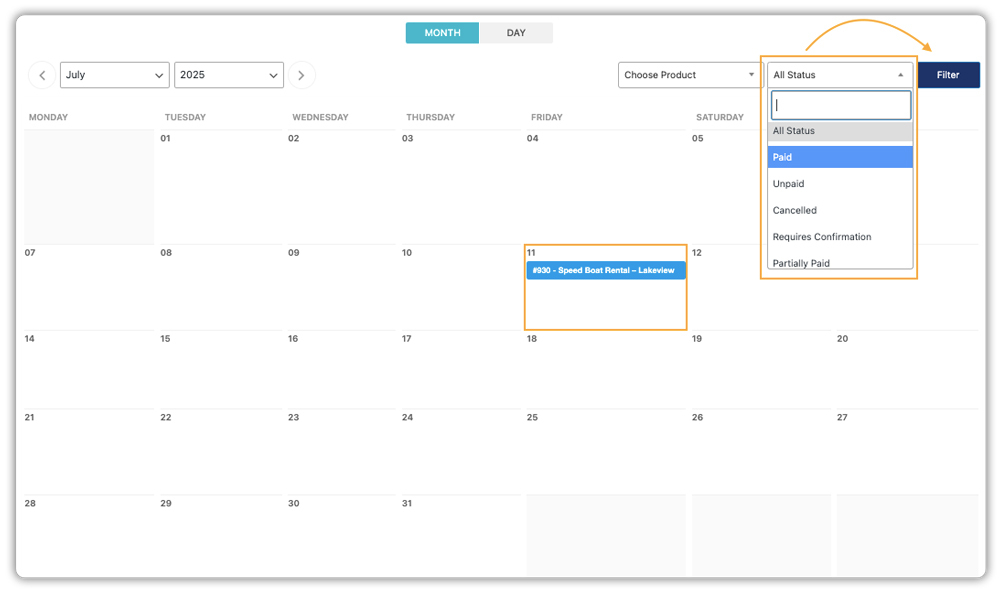
Clicking on the booking takes you directly to the order page, where you can view detailed customer information, selected extras, and payment details.

The plugin provides automated email alerts for new bookings, keeping you fully informed at every step.

Bookings sync seamlessly with your Google Calendar, ensuring your entire team stays aligned.

Prefer another calendar tool? You can also sync bookings with Microsoft Outlook or export them to iCalendar for broader compatibility.
This admin interface gives you complete oversight and control, enabling you to manage resources, schedules, and finances from within your WooCommerce store.
Now that your operations are running smoothly, let’s look at how to maximize profits from each booking.
Real-World Case Study: Managing Daily Boat Rentals in Ottawa, Canada
Let’s say you operate a boat rental business in Ottawa, Canada, offering half-day and full-day rentals for kayaks, pontoon boats, and guided river cruises. During peak season, you receive up to 30 bookings per day, both online and via phone.
The Challenges You Will Face
- Double bookings often occur when phone reservations aren’t synced with online availability.
- Customers frequently call to check real-time availability or ask about add-ons like life jackets or fishing gear.
- You have no way to assign captains automatically for boats that require them.
- Staff must manually confirm every booking, send emails, and update spreadsheets, which consumes hours each day.
- Many tourists abandon bookings because your site doesn’t support multiple languages or a mobile-friendly checkout.
How It Can Be Solved
With the Bookings and Appointments for WooCommerce plugin, these operational bottlenecks are eliminated:
- Customers can view real-time availability and book directly from your website – no double bookings, no manual updates.
- Set up optional add-ons like fuel, coolers, or fishing gear with dynamic pricing.
- Use the Booking Assets feature to assign captains automatically to boats that require them.
- Booking confirmation, reminders, and cancellation emails are automatically sent, saving your team hours of admin work.
- Your booking flow works seamlessly on mobile and supports WPML integration for multilingual tourists.
The Bookings and Appointments for WooCommerce plugin transforms your store into a full-featured booking engine, cutting down your manual workload and maximizing your rental revenue, even in high season.
Profit-Boosting Tips for Boat Rentals
Once your booking system is in place, there are simple ways to increase revenue without adding more boats or overhead. These strategies help you boost the value of each booking, reduce drop-offs, and improve long-term customer loyalty.
1. Offer Smart Discounts Based on Timing: Encourage early and off-peak bookings with automated discounts. Set up early bird offers or weekday pricing directly within the bookings plugin.
2. Boost Revenue with Optional Extras: Upsell add-ons like fuel, life jackets, or guided tours. Add them as optional upgrades in the product setup to raise order value with minimal effort.
3. Streamline Checkout Experience: Reduce drop-offs with flexible payment options like deposits using the PH Deposits for WooCommerce plugin. Support multiple languages via WPML and ensure your site is mobile-friendly.
4. Recover Abandoned Bookings: Use cart recovery tools and exit popups to bring back customers who didn’t complete bookings. A simple reminder can save the sale.
5. Build Loyalty and Drive Referrals: Reward repeat customers with discounts or early access. Launch referral offers and display reviews to build trust and grow through word-of-mouth.
Conclusion
Running a successful boat booking business doesn’t have to be manual or messy. With the Bookings and Appointments for WooCommerce plugin, you get a robust, automated system that scales with your growth.
From handling real-time availability to managing extras, deposits, and reminders, everything works from one place. Your customers enjoy a smooth, mobile-friendly experience. You enjoy more bookings, less admin work, and increased revenue.
Need help getting started? Reach out to PluginHive’s support team; they’re ready to assist you every step of the way.
FAQ’s
- How do I handle bookings on closed days or during maintenance?
Use the plugin’s “Booking Availability“ settings to block bookings on specific dates like holidays, weekends, or maintenance days. - Does WooCommerce support syncing boat rental bookings with Google Calendar out of the box?
No, Native WooCommerce doesn’t support this directly. You need the Bookings and Appointments for WooCommerce to enable Google Calendar sync. - Can I manage both hourly and daily boat rentals under one booking product in WooCommerce?
No, Bookings and Appointments for WooCommerce typically support one booking duration type per product. You would need to create separate products for hourly and daily rentals. - Does WooCommerce allow multilingual booking pages for boat rentals?
Yes, by using WPML with Bookings and Appointments for WooCommerce, you can offer fully multilingual booking pages. - Can I automate confirmation and reminder emails for boat rentals in WooCommerce?
Yes, Automated emails for confirmations, reminders, cancellations, and updates are built into the Bookings and Appointments for WooCommerce.
