


Not every customer who lands on your WooCommerce store is comfortable paying online. Some are first-time buyers who haven’t yet built trust with your brand. Others simply prefer to pay when the package is in their hands, and if you don’t offer that option, they’ll leave without buying.
Canada Post already offers a solution for this. It’s called Collect on Delivery (COD). Customers can pay the delivery person at the door instead of entering card details at checkout. For WooCommerce store owners shipping within Canada, it’s a practical way to recover sales from buyers who’d otherwise abandon their cart at the payment step. This article covers exactly how it works, what it costs, whether it’s the right fit for your store, and the best way to manage it day-to-day.
On This Page
- How Canada Post COD Works for WooCommerce Orders
- Canada Post COD Costs and Limits
- Enabling Canada Post COD in WooCommerce
- Is Canada Post COD Right for Your WooCommerce Store
- Best Practices for Using Canada Post COD in WooCommerce
- Conclusion
- FAQs
How Canada Post COD Works for WooCommerce Orders
Before enabling COD in your store, it helps to understand exactly what happens from the moment a customer places an order to when the payment reaches you.
- Customer places an order – they select a Canada Post parcel service at checkout and choose COD as the payment method
- You prepare and label the shipment – you pack the order and generate a Canada Post shipping label with the COD amount printed on it
- Canada Post delivers and collects – the delivery person collects payment from the customer before handing over the package
- Canada Post sends the payment to you – the collected amount is transferred back to you by Canada Post
A few things to know about how the service is structured:
- Available on all domestic Canada Post parcel services – Regular Parcel, Expedited Parcel, Xpresspost, and Priority
For a full comparison of these services, see Canada Post Services Compared for WooCommerce
- Domestic only – COD applies to shipments within Canada; it cannot be used for US or international orders
- Not available on Lettermail – COD requires a tracked parcel service to function
If the customer isn’t home, Canada Post will attempt redelivery. If payment cannot be collected after delivery attempts, the package is returned to you, and return shipping costs are your responsibility. This risk is worth keeping in mind when deciding which products to offer COD on, which the next sections cover in detail.
Canada Post COD Costs and Limits
Canada Post charges a flat surcharge of $7.25 per COD shipment, in addition to your regular parcel shipping cost. The fee stays the same regardless of which parcel service you choose.
| Payment Method | Maximum COD Amount |
|---|---|
| Credit Card | Up to $100 |
| Cash | Up to $1,000 |
| Debit Card | Up to $5,000 |
| Certified Cheque | Up to $5,000 |
| Bank Draft | Up to $5,000 |
| Money Order | Up to $5,000 |
The $7.25 fee is charged to you as the shipper. How you handle it is your call; you can absorb it, build it into your product pricing, or pass it on as a handling charge at checkout. What matters is making that decision before you go live, so it doesn’t quietly cut into your margins on every COD order.
Note: The COD surcharge is not refunded if a shipment is undeliverable or refused by the customer.
Enabling Canada Post COD in WooCommerce
To offer Canada Post COD in your WooCommerce store, you need the Canada Post Shipping Plugin for WooCommerce with Print Label. The setup is straightforward. Here’s what you need to do.
Step 1 – Confirm You Have a Canada Post Contract Account
Canada Post only supports COD label generation through a Contract account. If you currently use a non-contract account, create a commercial agreement with Canada Post before enabling this feature.
Step 2 – Enable COD in the Plugin
Once you connect your Contract account, go to your Canada Post plugin settings and look for Additional Options section under Rates & Services. Enable Collect on Delivery there.

That’s what tells the plugin to print the COD amount on your shipping label when a domestic customer pays via COD.
Step 3 – Set Up Your Shipping Zones
This step ensures COD only appears for domestic customers at checkout and not international ones.
Go to WooCommerce > Settings > Shipping > Shipping Zones, add a new zone for Canada, and assign Canada Post as the shipping method.

Click Edit on the Canada Post method and select only the domestic parcel services – Regular Parcel, Expedited Parcel, Xpresspost, and Priority.

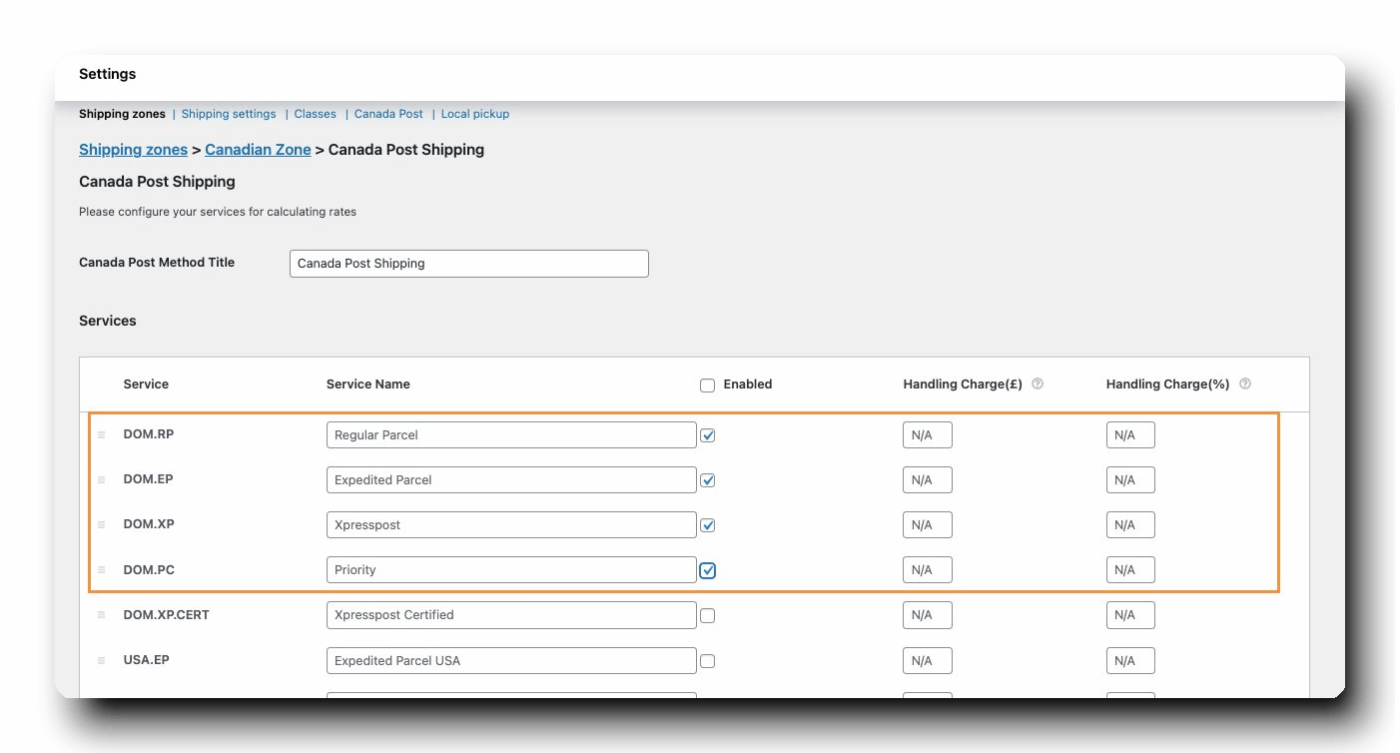
For a detailed walkthrough, refer to the WooCommerce Shipping Zones Ultimate Guide and the Canada Post Shipping Zone Setup Guide.
Step 4 – Restrict COD to Domestic Orders Only
Here’s something important: Canada Post only collects COD payments for domestic shipments. If an international customer selects COD and you ship the order, you won’t receive payment.
To avoid this issue, open your WooCommerce Cash on Delivery payment settings and limit COD to the domestic Canada Post parcel services you configured earlier.
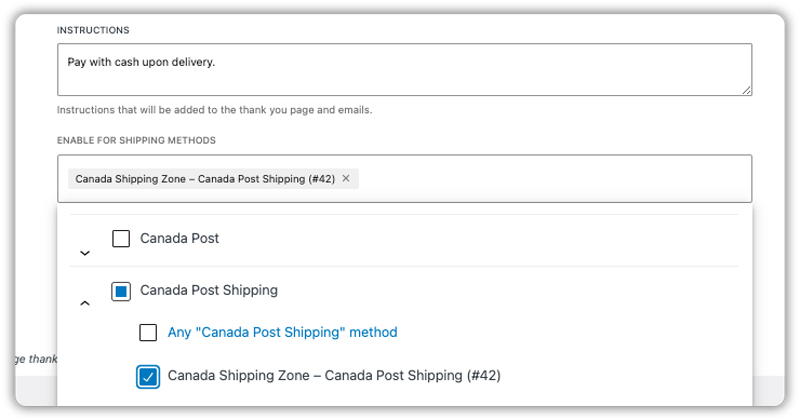
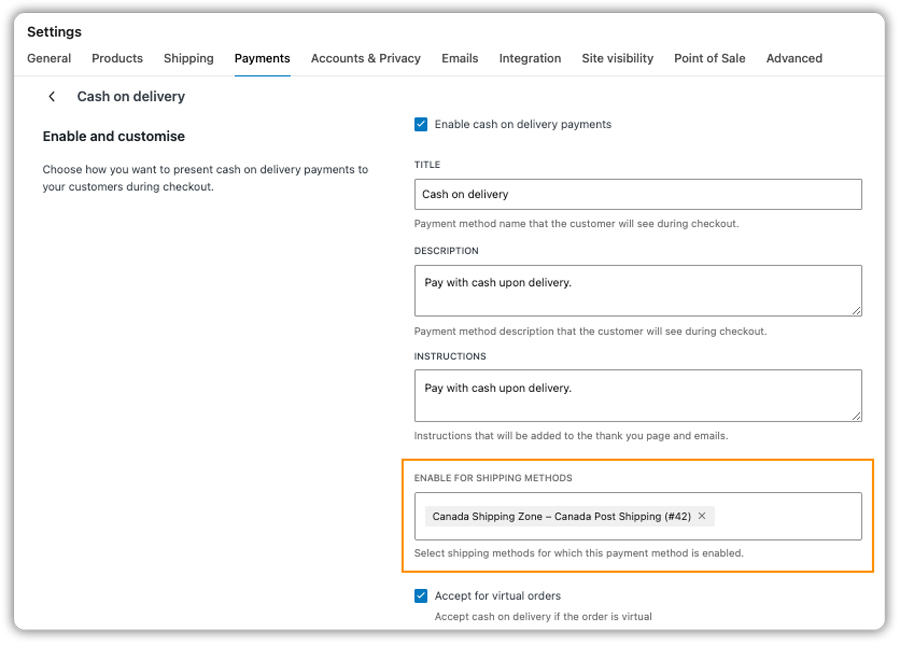
After you save the changes, WooCommerce automatically hides COD from international customers.
Step 5 – You’re Ready to Ship COD Orders
From this point, everything runs through your normal order workflow. When a COD order comes in, open it from your WooCommerce orders page and generate the shipping label as you normally would.
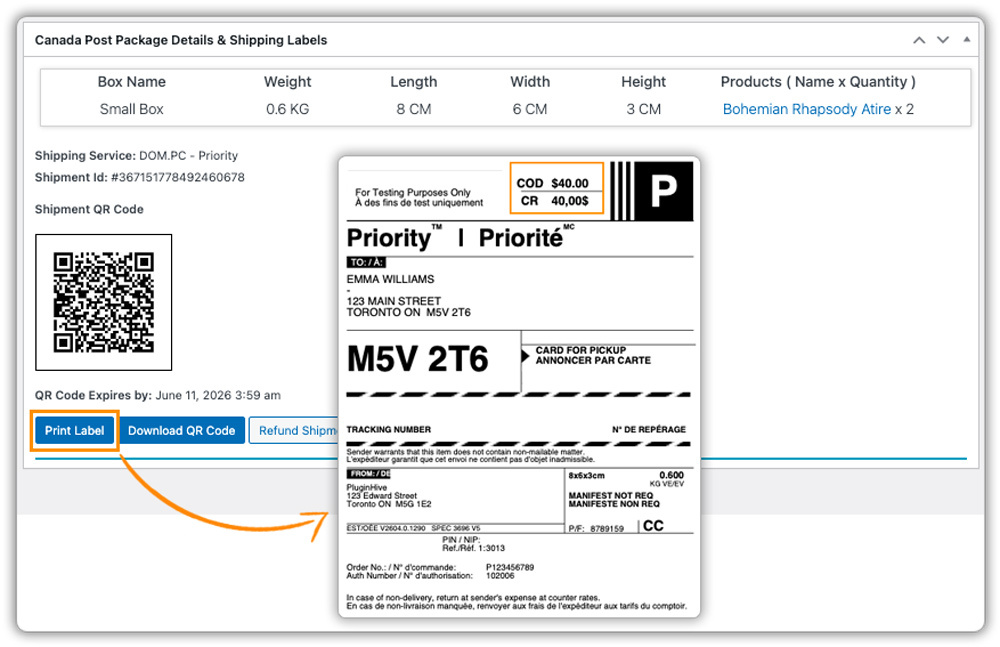
The COD amount will be printed on the label automatically – Canada Post handles the payment collection at the door and transfers it back to you.
For full settings and configuration of the plugin, refer to the WooCommerce Canada Post Shipping Setup Guide.
Is Canada Post COD Right for Your WooCommerce Store
COD works well in specific situations and creates unnecessary risk in others. Here’s an honest look at both sides before you decide.
When Canada Post COD Is a Good Fit
- Selling to customers in rural or smaller communities: Online payment hesitation is higher outside major cities. For buyers in smaller towns, paying at the door is familiar and trusted and offering it can be the difference between a completed order and an abandoned cart.
- Running a newer WooCommerce store: First-time buyers are cautious about paying upfront to a brand they don’t recognise yet. COD lowers that barrier without requiring any extra trust-building on your end.
- Selling higher-value items: When the order total is significant, some buyers want the product in hand before committing payment. COD keeps that sale on the table. For high-value shipments, pairing COD with Canada Post insurance is also worth considering to protect against loss or damage in transit.
- Serving repeat customers: With an established customer base, the risk of a refused delivery is much lower. COD works best where there’s already a level of trust between you and your buyers.
When to Think Twice
- Non-returnable or customised products: A refused delivery on a personalised or opened item comes back to you with no clean resolution – it’s a direct loss.
- Low-margin products: The $7.25 surcharge plus potential return shipping can quietly outweigh the benefit of a few extra sales.
- Fragile or perishable goods: A refused shipment that comes back damaged or expired is simply unsellable.
- No internal process for COD orders: Without a clear workflow separating COD from prepaid orders, fulfilment gets messy fast.
Ask yourself: what does it cost me if this order comes back? If that number is acceptable, test COD on one lower-risk product category first, not your entire catalogue.
Best Practices for Using Canada Post COD in WooCommerce
Getting COD live is only half the job- how you manage it day-to-day determines whether it actually works in your store’s favour. Here are a few practices worth following.
- Offer COD Alongside Other Payment Methods: Don’t replace your existing payment options with COD. Keep card and other methods available so customers have a choice at checkout – COD is an addition, not a replacement.
- Set Clear Expectations at Checkout: Use the WooCommerce COD payment method description field to explain that the Canada Post delivery person will collect payment at the door and that both card and cash are accepted. A customer who knows what to expect is far less likely to refuse delivery.
- Use Shipment Tracking for Every COD Order: Since payment is only collected at delivery, knowing where every COD package is matters more than usual. The Shipment Tracking Pro for WooCommerce automates tracking updates to customers, reducing missed deliveries and refused shipments.
- Communicate Your Refund Policy Clearly for COD Orders: Make sure your store’s refund and return policy covers what happens if a COD shipment is refused – who covers return shipping and how refunds are handled.
Conclusion
Canada Post COD gives your WooCommerce store a way to reach buyers who aren’t ready to pay online without building any complex payment infrastructure. It works best when you’re clear about which products and customers it suits, and when your fulfilment process accounts for the small but real risk of refused deliveries. The Canada Post Shipping Plugin for WooCommerce with Print Label supports COD label generation directly, keeping it part of your normal order workflow rather than a separate process. If you need help getting it configured for your store, reach out to PluginHive Support.
FAQs
Q: What does “Collect on Delivery” mean in Canada Post?
Collect on Delivery is a Canada Post service where the customer pays for their order at the door when the package is delivered, instead of paying online at checkout. Canada Post’s delivery person collects the payment and transfers it back to you as the store owner.
Q: How much is the COD fee for Canada Post?
Canada Post charges a flat surcharge of $7.25 per COD shipment, added on top of your regular parcel shipping cost. This fee applies regardless of which domestic parcel service you use and is charged to you as the shipper.
Q: How does Canada Post COD work?
You generate a shipping label with the COD amount printed on it. Canada Post delivers the package, collects payment from the customer at the door, and transfers it back to you. Accepted payment methods include cash, debit, credit card, certified cheque, bank draft, and money order.
