


Shipping food from your WooCommerce store involves more than just printing a label. Whether you sell baked goods, fresh produce, specialty meats, or perishable gift boxes, every order needs to arrive fresh, compliant, and on time. FedEx is one of the most dependable carriers for WooCommerce food shipping, offering express services, perishable handling support, and international reach.
This guide covers FedEx food shipping rules, perishable shipping rates, packaging requirements, and how to set everything up inside WooCommerce.
On This Page
- FedEx Food Shipping Rules WooCommerce Merchants Must Know
- Best FedEx Services for WooCommerce Food Shipping
- WooCommerce FedEx Food Packaging Best Practices
- How to Set Up FedEx for Food Shipping in WooCommerce
- Conclusion
- FAQs
FedEx Food Shipping Rules WooCommerce Merchants Must Know
FedEx accepts a wide range of food products, but perishable shipments carry specific compliance requirements every WooCommerce merchant must follow.
- Use express services only for perishable food: For best results, plan for a maximum transit time of 30 hours. FedEx Next Day Air is recommended, though 2nd Day shipping may be suitable for foods requiring minimal temperature control. Ground shipping is not appropriate for perishable WooCommerce food orders.
- Ship Monday through Wednesday only: Ship early enough in the week so that your package will not sit over a weekend. Thursday or Friday dispatches risk sitting in a depot with no active refrigeration.
- Use the correct refrigerant: FedEx recommends dry ice for frozen items and gel packs for chilled items like fresh produce or dairy. Wet ice is not suitable — it leaks and compromises package integrity.
- Dry ice is regulated as a hazardous material: The maximum dry ice per package for standard air shipments is 5.5 lbs. Packages must be clearly labeled with the dry ice amount and hazard warnings, and must allow ventilation for CO2 gas to escape safely.
- UN 1845 labeling is mandatory for dry ice shipments: Required markings include “Dry Ice” or “Carbon Dioxide Solid,” the UN number UN 1845, and the net quantity of dry ice in kilograms, affixed directly to the package.
Best FedEx Services for WooCommerce Food Shipping
Domestic Services
- FedEx First Overnight: Delivery by 8:00–9:00 AM next business day. Best for highly perishable WooCommerce orders like fresh seafood or raw meat.
- FedEx Priority Overnight: Delivery by 10:30 AM next business day. The most widely used WooCommerce food shipping service — fast and widely available.
- FedEx Standard Overnight: Delivery by 3:00 PM next business day. A cost-effective overnight option for WooCommerce food products with slightly more temperature tolerance.
- FedEx 2Day A.M.: Delivery by 10:30 AM on the second business day. Works for WooCommerce food orders with adequate insulation lasting 48 hours.
- FedEx 2Day: End-of-day second-business-day delivery. Suitable for non-frozen perishables like cured meats or hard cheeses.
- FedEx Express Saver: Three-business-day delivery. Only appropriate for non-perishable or minimally perishable WooCommerce food items.
International Services
- FedEx International Priority: 1–3 business days to most international destinations. Standard choice for WooCommerce stores shipping perishable food internationally.
- FedEx International First: Next-business-day early morning delivery to select countries. Best for the most time-critical WooCommerce international food orders.
WooCommerce FedEx Food Packaging Best Practices
- Use insulated EPS foam containers inside corrugated outer boxes. The foam maintains temperature; the cardboard protects against handling damage.
- Match your coolant to your food type. Use dry ice for frozen items and gel packs for chilled products. Plan for 5–10 pounds of dry ice per 24 hours of shipping time for frozen items.
- Allow ventilation for dry ice shipments. Never seal the outer box airtight; CO2 must be able to escape during transit.
- Line the interior with a waterproof poly liner to contain moisture from melting ice or condensation.
- Seal all seams completely. Always use a new, sturdy corrugated box and seal all seams on top and bottom with pressure-sensitive tape.
- Label correctly. Mark “Perishable” on the exterior and add the UN 1845 hazmat label with dry ice weight in kilograms where applicable.
How to Set Up FedEx Food Shipping in WooCommerce
WooCommerce has no native support for perishable food configurations or FedEx compliance. The FedEx Shipping Plugin for WooCommerce with Print Label handles all of it. Install and connect the plugin to your FedEx account using the FedEx Plugin Setup Guide.
Once you’ve configured the plugin in your store, all you need to do is:
Enable the Dry Ice option in the plugin settings under Special Services.

For each food product, open the product in WooCommerce and under Product Data → Shipping, enable the dry ice option and specify the total weight (Actual Weight + Dry Ice Weight) in kilograms.

The plugin also lets you generate compliant FedEx shipping labels directly from your WooCommerce store. Labels will display the Dry Ice indicator along with two weight values — the ACTWGT (actual weight) and the Dry Ice weight in KG.
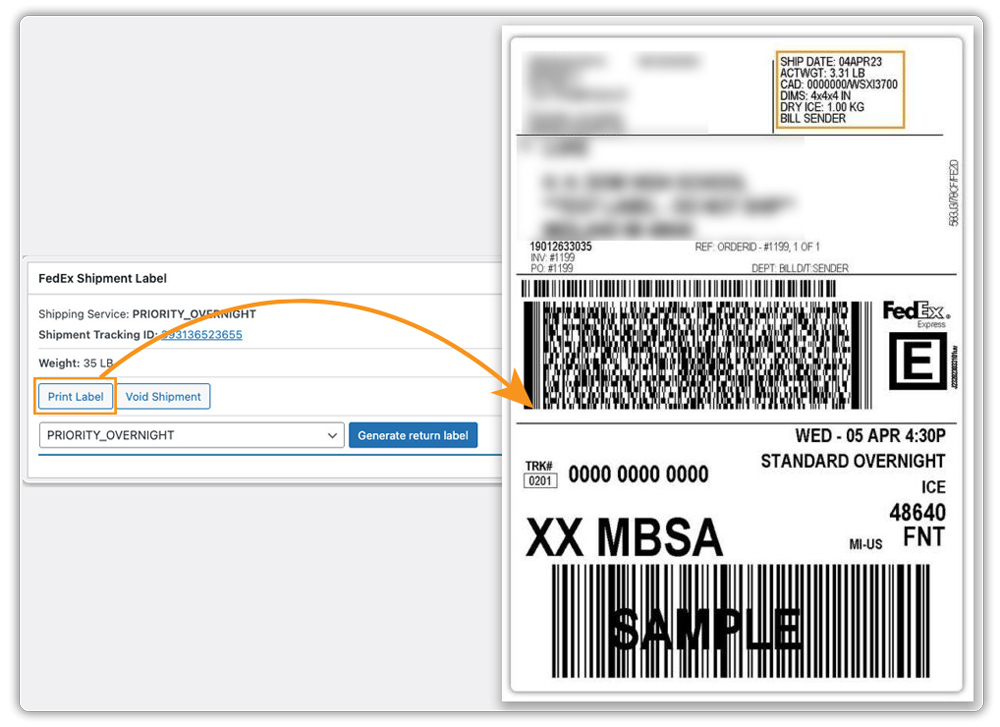
You can also schedule FedEx pickups directly from your WooCommerce dashboard, quickly, easily, and without switching to the FedEx portal.
Conclusion
FedEx gives WooCommerce food merchants a reliable, compliant path to shipping perishable products domestically and internationally. Select the right express service for your food type, meet FedEx’s packaging and labeling requirements, and let the FedEx Shipping Plugin for WooCommerce with Print Label automate rates, labels, and compliance. Your WooCommerce food orders arrive fresh every time.
For setup help, visit PluginHive Support.
FAQs
Q. Can I ship food internationally with FedEx from my WooCommerce store?
Yes. FedEx International Priority and International First both support food shipments. International perishable orders must comply with IATA Packing Instruction 954 for dry ice and the destination country’s food safety regulations.
Q. Can customers track their perishable food orders in real time after shipping?
Yes. The FedEx Shipping Plugin for WooCommerce automatically adds tracking numbers to orders and notifies customers. For more flexibility and support across multiple carriers, the WooCommerce Shipment Tracking Pro plugin automatically shares real-time tracking updates with customers via email and their My Account page.
Q. Can I set custom FedEx shipping rules for different food product types in WooCommerce?
Yes. If your store sells a mix of perishable and non-perishable food products, you can use the WooCommerce Table Rate Shipping Pro plugin to define custom shipping rules based on product weight, shipping class, cart total, or destination.
Q. Can multiple vendors in my WooCommerce store each ship their own food products via FedEx?
Yes. With the WooCommerce Multi-Vendor Shipping Addon, each vendor can manage their own FedEx food shipments independently using their own carrier account. This is especially useful for food marketplaces where different vendors ship different perishable categories; each vendor gets their own rates, labels, and tracking workflows without interfering with others.
