


Pre-orders are a powerful way for WooCommerce store owners to generate early sales, test demand, and manage inventory efficiently. By allowing customers to reserve products before they are officially available, you can create buzz around new launches, secure revenue in advance, and plan your stock based on actual demand. However, many store owners face a common challenge: customers are often hesitant to pay the full amount upfront, especially for high-value products.
This is where partial payments or deposits come into play. Accepting a fraction of the total product price upfront makes it easier for customers to commit to a pre-order while keeping the remaining balance flexible. In this article, we’ll guide you through how WooCommerce store owners can simplify pre-orders by accepting down payments, improve cash flow, and provide a seamless shopping experience for customers, all without relying on complex workarounds.
Table of Contents
- Understanding WooCommerce Deposits for Pre-Orders
- Accept Down Payments for Pre-Orders on Your WooCommerce Store
- Real-World Example: Pre-Orders with Partial Payments in Action
- Tips for Managing Pre-Orders with WooCommerce Deposits
- Conclusion
- FAQs
Understanding WooCommerce Deposits for Pre-Orders
WooCommerce deposits are partial payments that customers can make upfront when purchasing a product, instead of paying the full price immediately. This payment model allows store owners to secure a portion of the order value while giving customers the flexibility to pay the remaining balance later. Deposits can be set as a fixed amount or a percentage of the product price, and store owners can even offer scheduled payment plans with daily, weekly, or monthly installments.
The Importance of Deposits for WooCommerce Pre-Orders
Deposits are particularly important for pre-orders because they reduce the upfront financial commitment for customers. By allowing them to pay a deposit, you can:
- Increase pre-order conversions by lowering the barrier to purchase.
- Improve cash flow by collecting partial payments in advance.
- Enhance customer trust and satisfaction by offering flexible payment options.
- Automate balance payments with reminders, reducing manual follow-ups for store owners.
Understanding the value of deposits shows why offering partial payments can be a big advantage for you. It makes pre-ordering easier and more attractive for customers, while helping the store run smoothly. Next, we’ll explore how you can offer down payments for pre-orders on your WooCommerce store. The goal is to keep the process simple, convenient, and easy for everyone involved.
Accept Down Payments for Pre‑Orders on Your WooCommerce Store
Offering down payments for pre‑orders gives your customers more flexibility and helps you secure early commitments without asking them to pay the full amount upfront. Here’s how you can incorporate this payment style into your WooCommerce store effectively:
Note: Before we begin, make sure the PH WooCommerce Deposits plugin is installed, activated, and configured correctly. You can follow the setup guide.
- Enable Deposits: First, decide whether to require a deposit for pre-orders or simply offer it as an option. You might choose to make deposit payments mandatory for certain high‑value items, or optional for products with lower costs, so customers can choose full payment.

- Choose the Type of Deposit: You can set the deposit as a fixed amount (for example, $2000 upfront) or a percentage of the total product price (say, 30%).

- Schedule the Balance Payment (If Needed): For products that will be released later, you might allow part payment upfront and then collect the remaining amount at a fixed interval, weekly, monthly, or when the product becomes available. This structured approach helps manage cash flow and keeps the pre‑order process clear to the customer.

- Send Payment Reminders: You can automatically send emails to remind customers about their remaining balance. Set how many days before the due date the email goes out, and customize the message. This helps customers remember to pay without you having to follow up manually.

- Offer Pre‑Orders and Down Payments for Specific Products: If you don’t want this option for all products, you can apply it selectively. For example, only for limited‑edition items or items with longer lead times. That way, you keep deposit options aligned with your business strategy and inventory.

Example: You’re selling Limited Edition Wireless Headphones as a pre-order in your WooCommerce store. The product will be ready in 30 days, and customers can reserve it by paying a 20% deposit instead of the full price. This makes pre-ordering easier for customers and helps you secure early sales.
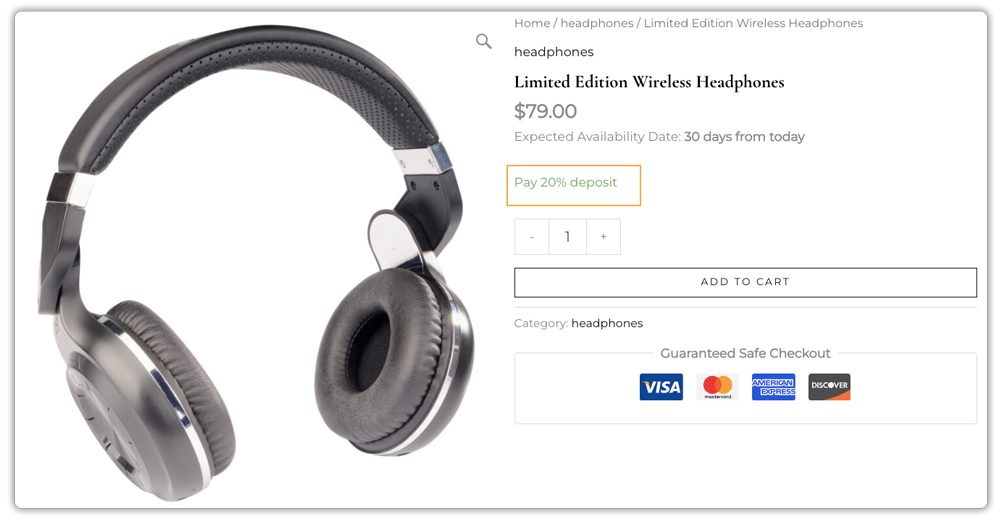
By offering down-payment options for pre-orders, you create a win-win. Customers face less upfront cost, so they’re more likely to commit. As a store owner, you gain early revenue, better forecasting, and smoother fulfilment planning.
Real-World Example: Pre-Orders with Partial Payments in Action
Let’s say you run a WooCommerce store that sells high-end cycling gear. You’re launching a new product, a custom carbon fibre road bike, and want to offer it as a pre-order. Your customers love the product but might hesitate to pay the full amount upfront.
The Challenges You’ll Face (Without Deposits)
If you rely on the standard WooCommerce pre-order method (full payment upfront or pay later), you might face:
- High Cart Abandonment: Asking for the full payment right away may discourage many potential customers.
- Unreliable Forecasting: Customers choosing “pay later” might not follow through, making it hard to plan inventory accurately.
- Lost Sales: Competitors offering a smaller deposit option may attract customers who prefer a lower initial commitment.
How It Can Be Solved (With Partial Payments)
By using WooCommerce Deposits, you can turn this into a low-risk, high-conversion pre-order opportunity:
- Set a Strategic Deposit: Require a partial payment upfront to reserve the bike, ensuring genuine commitment.
- Lower the Barrier: Customers are more likely to pay a smaller deposit to secure their order than the full price, widening your pool of customers.
- Guaranteed Revenue: Collecting deposits early provides immediate cash flow and helps manage inventory or production.
- Automated Final Payment: When the bike is ready, customers can pay the remaining balance easily, without you having to chase them manually.
By offering partial payments, you create a low-risk, high-conversion pre-order system that benefits both your store and your customers.
Tips for Managing Pre-Orders with WooCommerce Deposits
Managing pre-orders effectively means ensuring a clear and organized process from start to finish. Here are some practical tips to make the process easier and more reliable:
- Set Realistic Pre-Order Timelines: Make sure your estimated delivery or availability dates are realistic. Overpromising can lead to frustrated customers, while clear timelines build trust and encourage repeat business.
- Display Clear Delivery Dates: Customers appreciate knowing when their pre-orders will arrive. The Estimated Delivery Date Plugin lets you show expected delivery timelines directly on the product page, building trust and reducing customer inquiries.
- Collect Custom Details in Advance: For made-to-order or customizable products, use the PH WooCommerce Product Addons Plugin to capture all personalization details upfront. This minimizes back-and-forth communication and ensures smoother fulfillment once the product is ready.
- Use a Reliable Shipping Plugin: Streamline your post-launch process with a WooCommerce Shipping Solution. It helps you print labels, track shipments in real time, and ensure your pre-ordered products are delivered safely and on time.
A well-managed pre-order system builds trust, reduces confusion, and helps you deliver a better buying experience. With WooCommerce Deposits and the right supporting plugins, you can create an efficient, transparent process that keeps customers informed and satisfied.
Conclusion
Offering pre-orders with partial payments is a smart way to grow your WooCommerce store. It helps you secure committed customers early, maintain steady cash flow, and reduce last-minute cancellations. By using the PH WooCommerce Deposits plugin for WooCommerce, you make the pre-order process easier for both you and your customers, creating a smoother buying journey from start to finish.
If you’re ready to simplify pre-orders and start accepting deposits on your WooCommerce store, the PluginHive team is here to help. You can reach out to our support team anytime to get expert assistance and set it up with confidence.
Frequently Asked Questions (FAQ)
Q1: Can I let customers place pre-orders in WooCommerce by paying only a part of the amount?
Yes. With the PH WooCommerce Deposits plugin, you can let customers pay a partial amount upfront for their pre-orders instead of the full payment.
Q2: How do I decide whether to take a fixed amount or a percentage deposit in WooCommerce?
You choose the model that suits your product and pricing strategy. A percentage deposit scales with the price (useful for high-value items), while a fixed amount may work better for products with similar price points. Clarity helps your customers understand and commit to the pre-order.
Q3: Do I need extra custom coding to accept deposits for pre-orders in WooCommerce?
Not necessarily. Many store owners use the PH WooCommerce Deposits plugin to handle this functionality in WooCommerce without heavy customization.
Q4: Can I set different deposit amounts for different products in WooCommerce pre-orders?
Yes, you can offer a percentage-based deposit for one product and a fixed amount for another, depending on price or type. This gives flexibility and helps match payment options with product value and customer expectations.
Q5: What if the customer doesn’t pay the remaining balance after the deposit?
Set clear rules, send reminders, give a payment deadline, and explain what happens if it’s missed (like order cancellation or deposit loss).
