


How to reduce the WooCommerce cart abandonment rate is one of the biggest challenges for WooCommerce store owners. Customers who add products to their cart and leave without buying can cost your business significant revenue, even when your products attract plenty of interest.
This article breaks down where abandonment happens at each stage of the buying journey and shows practical ways to reduce the WooCommerce cart abandonment rate by improving delivery information, pricing, shipping, and checkout.
On This Page
- What Is WooCommerce Cart Abandonment?
- Abandonment at the WooCommerce Product Page – Fix Delivery Uncertainty
- Abandonment at the WooCommerce Cart – Fix Pricing Friction
- Abandonment at WooCommerce Checkout – Fix Shipping Confusion
- Abandonment Due to Shipping Costs – Fix with Live Rates
- WooCommerce Best Practices for Long-Term Conversion Growth
- Conclusion
- FAQs
What Is WooCommerce Cart Abandonment?
Cart abandonment happens when a customer adds a product to their cart but leaves without completing the purchase. It’s one of the most common problems for WooCommerce stores – and also one of the most fixable.
Customers don’t always leave because they changed their mind. Most of the time, something in the experience stopped them – a missing delivery date, a price that felt too high, or a checkout that felt unclear.
How Much Revenue Are You Actually Losing?
The Baymard Institute puts the average cart abandonment rate at just under 70%. That means for every 10 customers who add something to their cart, roughly 7 leave without buying.
For most WooCommerce stores, a large chunk of that is recoverable. The drop-offs aren’t happening because customers don’t want the product; they’re happening because something in the journey got in the way.
Abandonment at the WooCommerce Product Page – Fix Delivery Uncertainty
Customers form their buying decision on the product page – long before they reach checkout. If there’s no delivery date visible, many won’t bother adding to the cart at all.
The first fix is simple: if your products have predictable lead times, say so on the product page. Even a general range like “usually ships in 2–3 business days” gives customers something to go on.
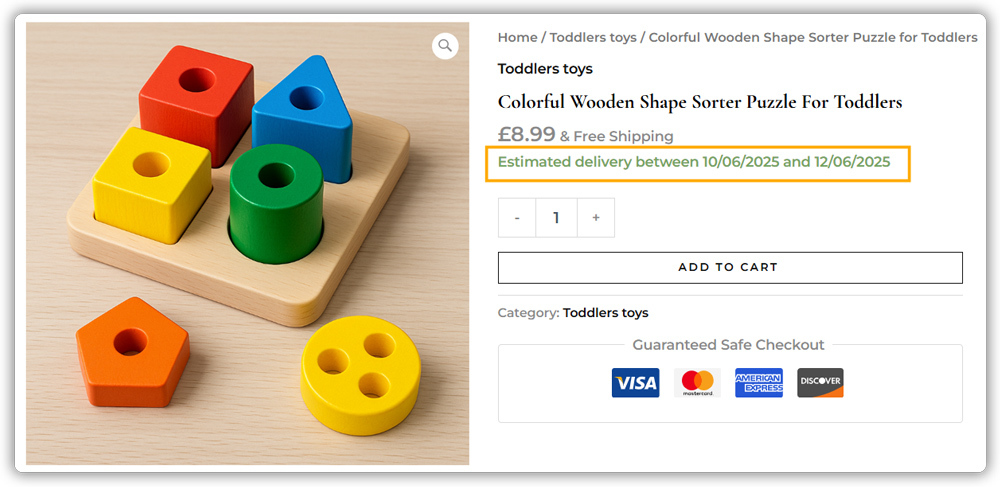
For stores that need something more precise, factoring in processing time, cut-off times, or shipping class, the Estimated Delivery Date Plugin for WooCommerce handles this automatically. Instead of a static line of text you update manually, the plugin calculates the date based on your actual fulfilment setup and displays it on the shop, product page, cart, and checkout.
To get started, refer to the Estimated Delivery Date Plugin setup guide.
Abandonment at the WooCommerce Cart – Fix Pricing Friction
Once a customer has added something to their cart, price is the most common reason they don’t follow through – especially for higher-value products like custom items, furniture, or electronics.
A few things you can do without a plugin:
- Show the value clearly: Make sure your product page explains what the customer is actually getting. Vague descriptions make a high price harder to justify.
- Add trust signals near the cart: A return policy, a satisfaction guarantee, or a secure checkout note reduces hesitation before a big purchase.
- Offer multiple payment methods: Customers abandon when their preferred payment method isn’t available. Supporting options like PayPal, Stripe, and buy now pay later gives them more ways to say yes.
For stores selling expensive products, the PH Deposits for WooCommerce plugin lets customers pay a deposit at checkout and settle the balance later. That smaller upfront number removes the biggest barrier without you discounting anything.

See how deposits are set up in the PH Deposits plugin setup guide.
Abandonment at WooCommerce Checkout – Fix Shipping Confusion
A messy checkout is one of the last things that pushes customers away right before they pay. This can be a long form, too many irrelevant shipping options, or being forced to create an account just to complete a purchase.
A few straightforward fixes:
- Enable guest checkout: WooCommerce lets you turn this on under Settings → Accounts & Privacy. Forcing account creation before purchase adds friction, especially for first-time buyers.
- Reduce form fields: Only ask for information you actually need. Every extra field is a reason to leave.
- Optimise for mobile: A large share of WooCommerce shoppers check out on their phones. If your checkout isn’t easy to navigate on a small screen, you’re losing a significant portion of potential sales.
For the shipping section specifically, too many options, especially ones that don’t apply to the customer, make the decision harder than it needs to be. The PH Hide Shipping Methods & Rate Adjustment for WooCommerce lets you set conditional rules so each customer only sees what’s relevant to them – based on location, cart value, product type, or user role.


As shown above, with both the Estimated Delivery Date and Hide Shipping Methods plugins configured, changing the customer’s address updates the estimated delivery date and adjusts which shipping methods are shown, so the customer only ever sees options and timelines that are actually valid for their location.
Refer to the Hide Shipping Methods setup guide to configure your rules.
Abandonment Due to Shipping Costs – Fix with Live Rates
Flat shipping rates are easy to set up but often feel arbitrary to customers. If the number shown at checkout doesn’t match what they expected to pay, they leave.
The fix is to show customers what shipping actually costs for their specific order. The Multi-Carrier Shipping Plugin for WooCommerce pulls live rates from carriers like UPS, FedEx, DHL, and USPS at checkout – based on the customer’s address, cart weight, and package size. Customers see real options with accurate prices and delivery timelines.
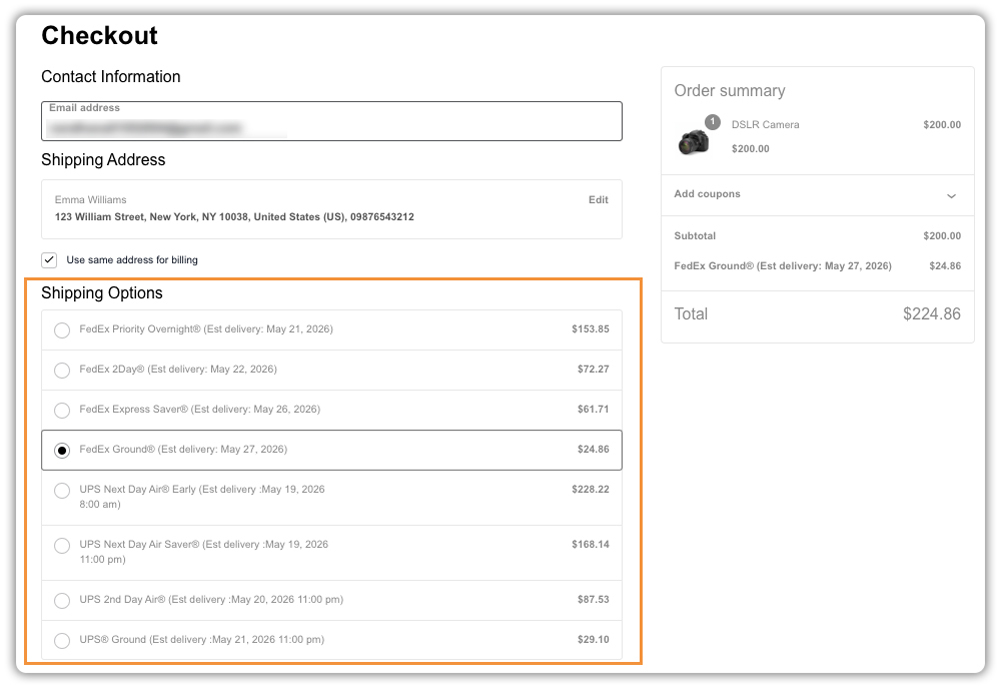
For setup instructions, refer to the Multi-Carrier Shipping Plugin setup guide.
WooCommerce Best Practices for Long-Term Conversion Growth
Fixing the immediate drop-off points gets you so far, but keeping abandonment low over time comes down to a few habits worth building into how you manage your store.
- Review your checkout regularly: Customer expectations change, and so do shipping costs. Walk through your own checkout every few months as a guest to catch anything that feels off – outdated rates, irrelevant shipping methods, or missing information.
- Track where customers are dropping off: Use Google Analytics or WooCommerce’s built-in reports to see at which stage most abandonment happens. That tells you where to focus instead of guessing.
- Keep your product information up to date: Delivery timelines, return policies, and pricing all affect buying confidence. If any of these are outdated or unclear on your product pages, customers will hesitate.
- Test one change at a time: If you make multiple changes at once, you won’t know what’s actually working. Fix one friction point, give it a few weeks, then move to the next.
- Follow up on abandoned carts: A well-timed email reminder, especially one that addresses a common concern like delivery time or return policy, can bring back customers who left without buying.
These aren’t one-time fixes. The stores that keep abandonment low are the ones that treat it as an ongoing part of how they manage WooCommerce, not a problem they solved once.
Conclusion
Cart abandonment in WooCommerce is rarely about one thing. It happens at different stages – and fixing it means addressing each stage on its own. Clear delivery dates, flexible payment options, and an honest checkout experience each remove a specific reason customers leave.
If you need help setting up any of the plugins mentioned here, contact PluginHive Support, and the team will walk you through it.
FAQs
Q: How do you calculate cart abandonment rate?
Divide the number of completed purchases by the number of carts created, subtract from 1, and multiply by 100. For example, if 100 customers added to the cart and 30 completed the purchase, your abandonment rate is 70%. You can track this directly in WooCommerce reports or via Google Analytics.
Q: How to recover an abandoned cart?
You can recover abandoned carts by sending follow-up emails, offering limited-time incentives, and reminding customers about the items left in their cart.
Q: How to reduce abandoned carts on WooCommerce?
Reduce WooCommerce cart abandonment by showing delivery information early, offering accurate shipping rates, simplifying checkout, and providing flexible payment options. These changes help customers complete their purchases with confidence.
