



Customers expect fast delivery when they place an order. Slow or unpredictable shipping often leads to negative reviews. If you ship within Canada or to the US, Canada Post offers reliable, fast options. These range from next-day Priority™ to 1–2 day Xpresspost™. The real question is: are these options visible at checkout?
The Canada Post Shipping Plugin for WooCommerce with Print Label by PluginHive connects your store to Canada Post. It shows real-time rates for all services, including faster ones. It also automates label printing and tracking. In this guide, you’ll learn how to offer faster delivery, when to show these options, and how to use them effectively.
On This Page
- Why Faster Delivery Options Matter in WooCommerce
- Canada Post’s Fast Shipping Services
- How to Offer Faster Delivery with Canada Post in WooCommerce
- Tips to Improve Delivery with Canada Post in WooCommerce
- Example Scenario: Faster Delivery with WooCommerce and Canada Post
- Conclusion
- FAQs
Why Faster Delivery Options Matter in WooCommerce
Customers today don’t want to wait 5–10 business days unless they absolutely have to. If your WooCommerce store doesn’t offer faster shipping at checkout, you’re likely losing buyers to competitors who do.
- Urgent purchases need quick delivery: Gifts, essentials, and last-minute orders can’t wait, and customers will choose a store that delivers on time.
- Faster shipping builds trust: Options like Xpresspost™ and Priority™ reduce hesitation. They make your store look reliable.
- It directly reduces cart abandonment: A WooCommerce checkout with no fast shipping option is one of the most common reasons customers leave before completing their purchase.
- Customers are willing to pay more for speed: When faster options are visible and clearly priced, many buyers will choose them without any persuasion.
Giving customers a choice at checkout is what separates WooCommerce stores that convert from those that lose orders at the last step.
Canada Post’s Fast Shipping Services
Canada Post offers two expedited services that work well for WooCommerce Canada Post shipping. Both include tracking, reliable timelines, and wide coverage across Canada.
- Canada Post Xpresspost – Delivers within 1–2 business days with full tracking and delivery confirmation, ideal for most WooCommerce orders.
- Canada Post Priority – Offers next-day delivery to most destinations. It includes tracking, signature, and an on-time guarantee. This is best for urgent or high-value shipments.
Enabling both services in your WooCommerce store gives customers a clear choice between fast and faster, covering both everyday express orders and time-critical deliveries.
For a full breakdown of all available Canada Post services for WooCommerce, including domestic and international options, refer to the complete services guide.
How to Offer Faster Delivery with Canada Post in WooCommerce
Show faster Canada Post services at checkout
In the plugin’s service settings, enable the services that correspond to faster delivery Xpresspost™ for 1–2 business day delivery and Priority™ for next-day. You can also enable Expedited Parcel™ as a mid-range option for customers who want something faster than standard but aren’t willing to pay for express.
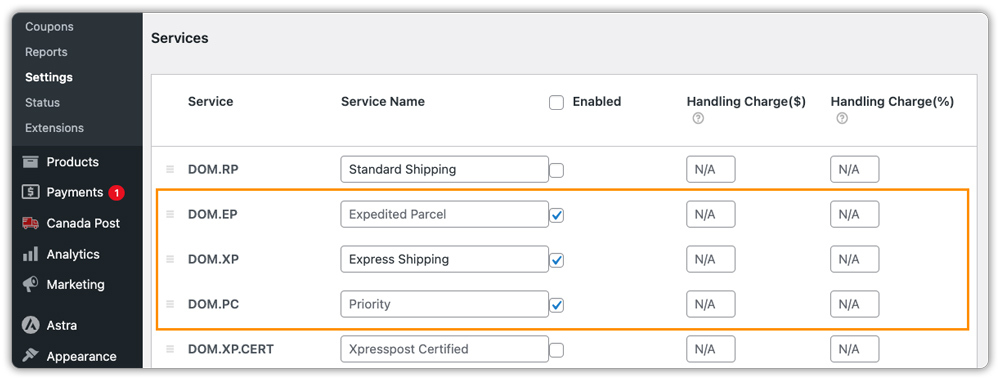
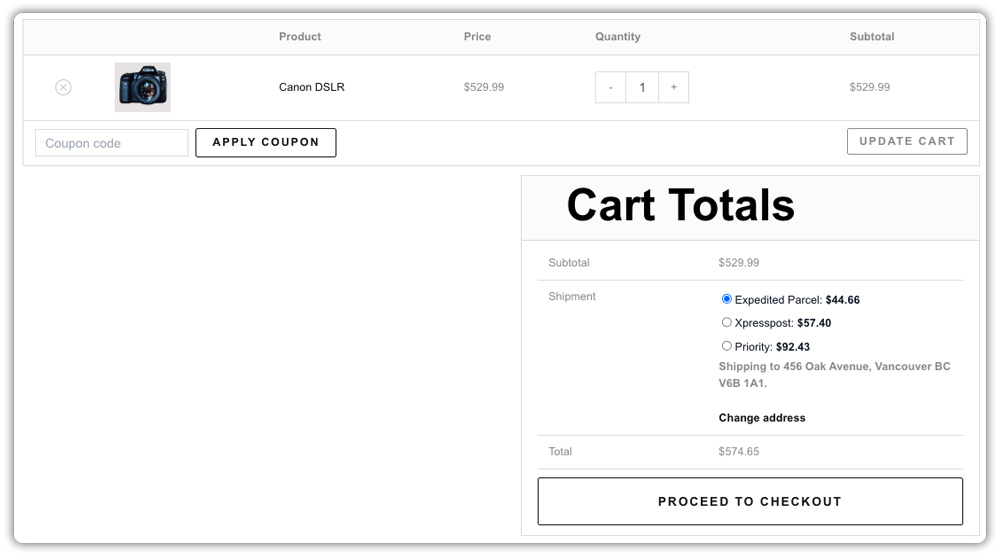
Customers only see the services you enable, so you’re in full control of what appears at checkout. Showing all three side by side with live pricing lets customers self-select based on their urgency. That’s what moves faster services from a cost to a revenue line.
Use contract rates to keep faster delivery competitive
If you have a Canada Post contract account, entering your credentials in the plugin settings lets you display account-specific discounted rates at checkout instead of publicly listed prices.

This is particularly relevant for faster services like Xpresspost™ and Priority™, where list rates can be steep. Discounted rates make it easier for customers to justify choosing a faster option.
Display Estimated Delivery Dates
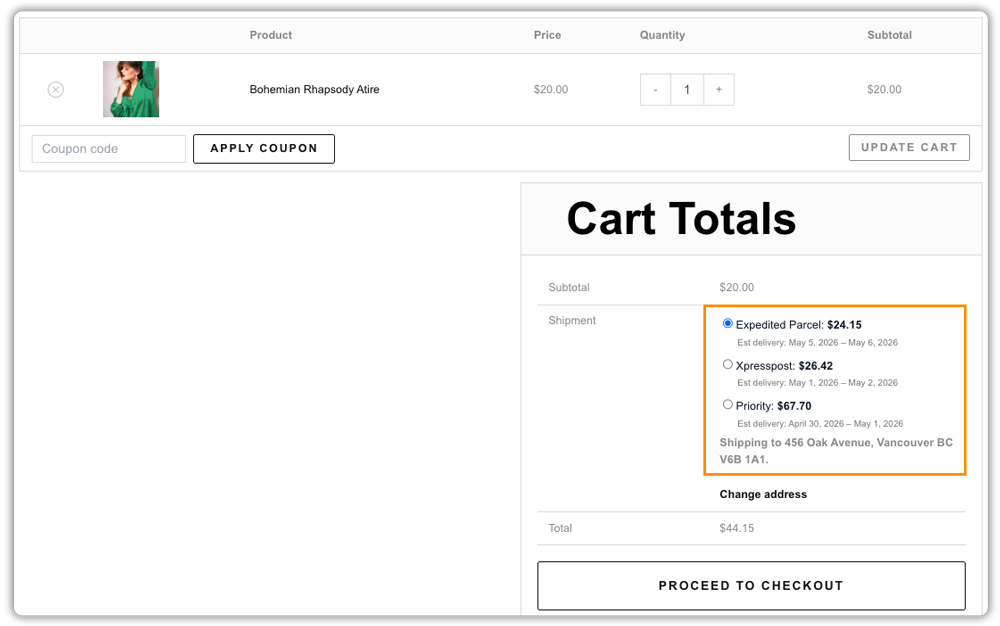
Enable the Display Delivery Date feature in the plugin settings. Seeing “Arrives by tomorrow” is much more persuasive than seeing “Priority Shipping.”
Process orders faster with bulk label printing
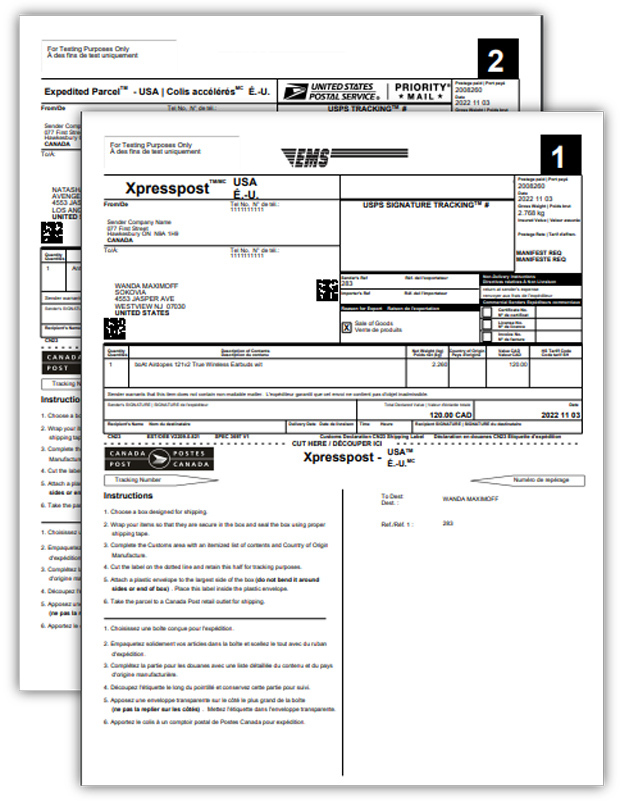
Promising faster delivery only holds if your fulfilment keeps pace. The plugin’s Bulk Label Generation feature lets you select multiple orders and print all labels in one click from the WooCommerce dashboard, with no manual entry, no switching between tabs.

With these settings in place, your store isn’t just connected to Canada Post, it’s actively using Canada Post’s faster services in a way that’s visible, accurate, and easy for customers to act on
Tips to Improve Delivery with Canada Post in WooCommerce
Enabling faster Canada Post services at checkout is the first step; these tips help you keep them running efficiently and profitably.
- Process Orders the Same Day: Set clear cut-off times and dispatch orders the same day to ensure services like Xpresspost™ and Priority™ meet their expected delivery timelines.
- Ship from the Nearest Location: If you have multiple warehouses, use the Canada Post Multi-Warehouse Addon by PluginHive to ship from the closest location and reduce transit time.
- Upgrade Tracking Experience: While the Canada Post Shipping Plugin for WooCommerce sends tracking emails automatically, you can enhance this with Shipment Tracking Pro for WooCommerce by PluginHive to offer branded tracking pages with live updates.
- Monitor and adjust regularly: Regularly review delivery times and costs for different Canada Post services, and adjust your default offerings if you notice delays or frequent customer preferences for faster delivery
Faster delivery depends on both shipping services and how efficiently you process orders. When your fulfillment speed matches the services you offer, delivery becomes more reliable and consistent
Example Scenario: Faster Delivery with WooCommerce and Canada Post
Let’s say you run a WooCommerce store selling pet supplies, and customers are complaining about delivery times, especially those in urban areas, expecting faster service. Here’s what you’re likely dealing with:
Challenges you’re probably facing
- Only one shipping option at checkout. Customers who want faster delivery can’t request it
- Manually entering order details into the Canada Post portal to generate labels, which slows fulfilment
- No automatic tracking updates, so customers email you asking where their order is
- No estimated delivery dates at checkout, leaving time-sensitive buyers uncertain
How the plugin solves this
After connecting your store to Canada Post using the Canada Post Shipping Plugin, your checkout shows Expedited Parcel™, Xpresspost™, and Priority™ side by side, each with live pricing and an estimated delivery date. Labels are generated from within WooCommerce, tracking numbers go out automatically, and bulk printing handles peak days without slowing you down.
What changes
- Customers choose and pay for the speed they want, improving your average order value
- Fulfillment is faster because labels are printed directly from WooCommerce
- Support requests drop because tracking emails go out without any manual effort
- Estimated delivery dates at checkout reduce hesitation on time-sensitive purchases
Once the plugin is set up, offering faster delivery becomes part of how your store operates, not something you manage order by order.
Conclusion
Offering faster delivery with Canada Post in WooCommerce comes down to giving customers the right options at checkout and automating the work behind the scenes. The Canada Post Shipping Plugin for WooCommerce with Print Label handles live rates, label generation, estimated delivery dates, and tracking so your store delivers on its speed promise without extra manual effort. If you need help setting things up, reach out to the PluginHive Support Team.
FAQs
- How can I speed up the delivery process in WooCommerce?
You can speed up delivery by processing orders the same day, setting clear cut-off times, automating label generation, and optimizing your fulfilment workflow so orders are dispatched without delays. - Can I speed up Canada Post delivery?
Yes, if your store runs on WooCommerce, you can enable faster services like Xpresspost™ and Priority™ at checkout using the Canada Post Shipping Plugin for WooCommerce with Print Label by PluginHive, allowing customers to choose quicker delivery options based on urgency. - Which is faster: Canada Post Expedited Parcel™ or Xpresspost™?
Xpresspost™ is faster, offering 1–2 business day delivery, while Expedited Parcel™ takes longer but is more cost-effective.
