


Selling online courses through WooCommerce is a great way to grow your business, but a high upfront course fee can stop potential students in their tracks. Whether it’s a $300 certification program or a $1,000 masterclass, asking learners to pay the full amount at once often leads to abandoned carts and missed enrollments.
The solution? Let students pay in installments. By breaking your online course fee into smaller, manageable payments, you remove the biggest barrier to enrollment without reducing the value of what you offer.
In this article, we’ll walk you through how to offer installment payments for your WooCommerce courses using the PH Deposits for WooCommerce Plugin and why it’s the right move for your course business.
Table of Contents
- Why Offer Installment Payments for Online Courses in WooCommerce
- How PH Deposits for WooCommerce Works
- How to Set Up Installment Payments for Online Courses in WooCommerce
- Best Practices for Offering WooCommerce Installment Payments for Courses
- Conclusion
- FAQs
Why Offer Installment Payments for Online Courses in WooCommerce
Pricing is one of the biggest barriers to enrollment. Even if a student is genuinely interested in your course, a high one-time payment can make them delay or abandon the purchase entirely. Offering installment payments solves this by breaking the online course fee into smaller, manageable chunks.
Here’s why this matters for WooCommerce course sellers:
- Lower the barrier to enrollment: Students who can’t pay $800 upfront may comfortably sign up when they can pay $200 over four months. Installments open your course to a wider audience without you having to discount your pricing.
- Reduce cart abandonment: Payment flexibility at checkout directly reduces the hesitation that causes students to leave without completing a purchase.
- Improve cash flow predictability: With scheduled installments, you receive payments at defined intervals rather than relying on one-time purchases. This makes revenue more consistent and easier to plan around.
- Build trust with new students: Flexible payment options signal that you’re a credible, customer-focused course creator, which can also increase word-of-mouth referrals.
If you’re also looking to manage live sessions alongside your courses, see how WooCommerce Bookings can streamline online course and coaching scheduling for a complete learning business setup.
How PH Deposits for WooCommerce Works
Now that you understand the value of installment payments, the next step is finding the right tool to implement them, and that’s where PH Deposits for WooCommerce comes in.
It is built specifically to offer deposits, partial payments, and structured installment plans directly within your WooCommerce store. For course sellers, the most useful feature is the Scheduled Payment Plan, which lets you define exactly how many installments to collect, how much each one is, and when each payment is due, all without any coding.
Here’s a quick overview of what the plugin lets you do:
- Set installment amounts as a fixed value or a percentage of the total course fee
- Create payment schedules on a daily, weekly, or monthly basis
- Make installment plans mandatory or give students the freedom to choose between paying in full or in installments
- Apply payment plans to specific course products or across your entire store
- Send automated email reminders when the next payment is due
- Let students view and pay their balance directly from their WooCommerce account page
To understand how a scheduled payment plan differs from a simple deposit, this guide on WooCommerce Deposits vs Payment Plans breaks it down clearly.
How to Set Up Installment Payments for Online Courses in WooCommerce
With a clear picture of what the plugin offers, here’s how the setup works in practice, and it’s simpler than you might think.
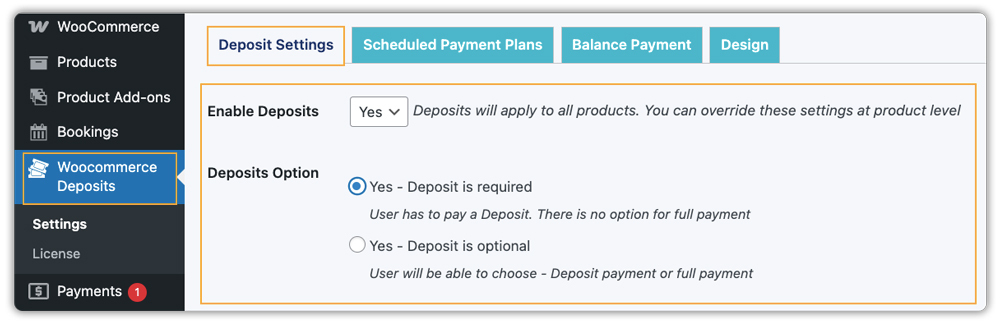
Once you install and activate PH Deposits for WooCommerce, a WooCommerce Deposits tab appears in your WordPress Dashboard. From there, you configure whether installments are optional (students can still pay in full) or mandatory (everyone follows the plan). For most course businesses, keeping it optional works well, as it gives flexibility without removing the full-payment choice for those who prefer it.
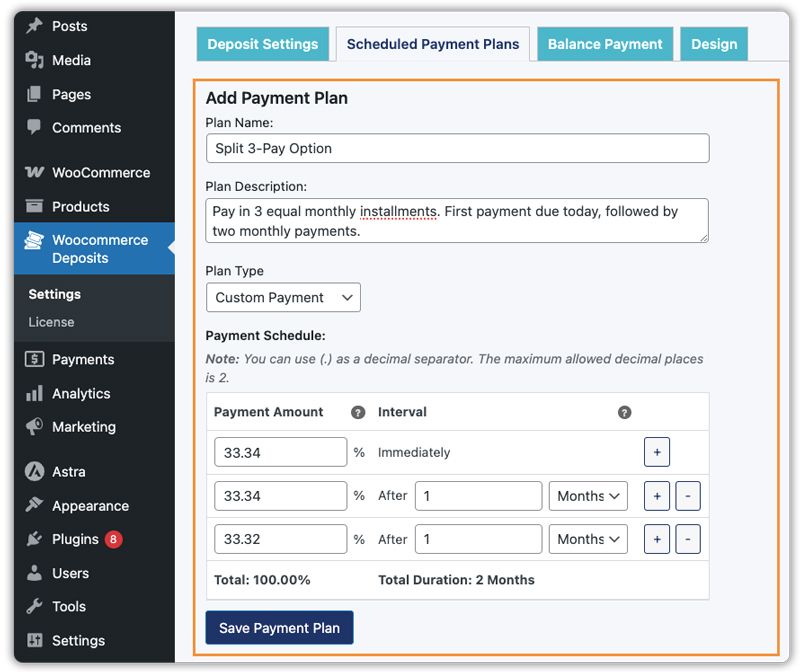
Next, you create your payment plan under WooCommerce Deposits → Scheduled Payment Plans → Add Payment Plan. For example, you can build a plan like “Pay in 3 monthly installments,” with the first payment collected at checkout and the remaining two charged monthly. You can also add a description so students clearly understand the terms before they commit for example: “Pay in 3 equal monthly installments. First payment due today, followed by two monthly payments.”
Once your plan is ready, head to the product page of your course, open the Deposits tab in the Product Data section, and assign the payment plan to that specific course. This keeps your other products completely unaffected.
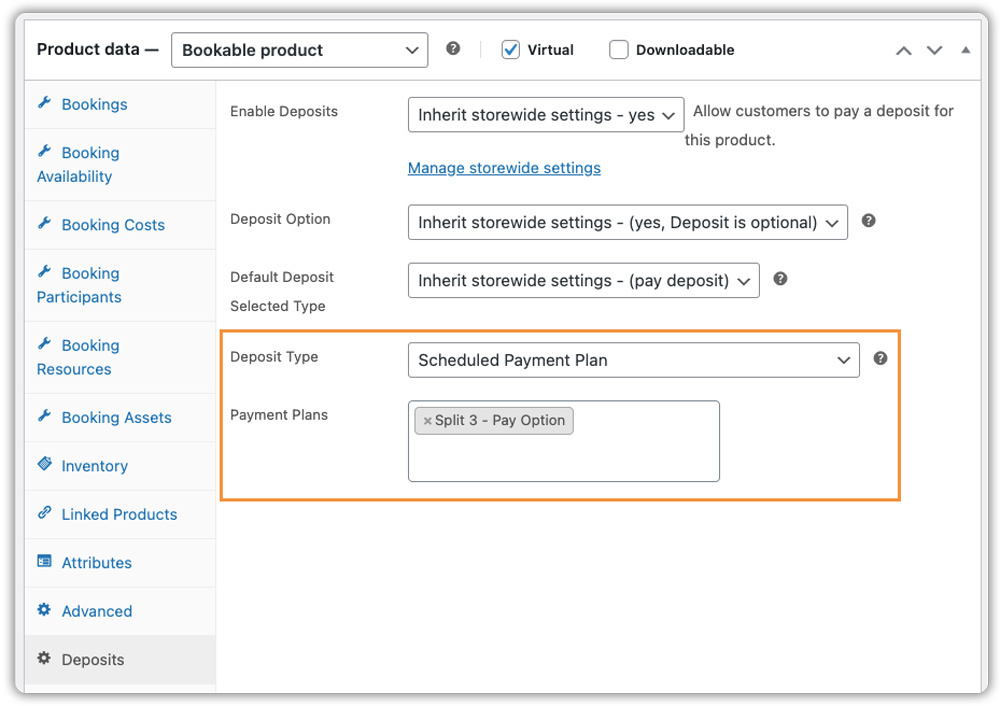
If you want to apply it store-wide, you can do that from the global settings instead.
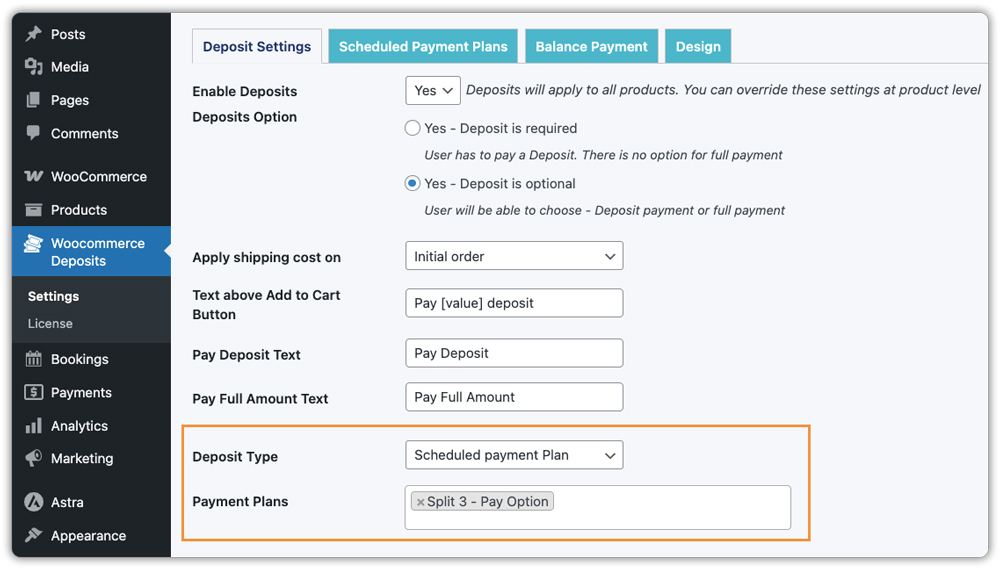
The final piece is setting up automated payment reminders. You can configure how many days before the due date the reminder goes out and customize the email content to match your brand tone. Once this is done, the plugin handles student communication entirely on autopilot.

For a detailed walkthrough, refer to the PH Deposits for WooCommerce setup guide. You can also explore how WooCommerce partial payments work for bookable products if you’re pairing course sessions with a booking setup.
What Students See at WooCommerce Checkout
When a student lands on your course product page, they’ll clearly see two options: Pay in Full or Pay in Installments, along with a complete breakdown of each payment amount and its due date.

After selecting the installment option and completing checkout, they pay only the first installment.

From there, they receive a confirmation email and automated reminders as each upcoming payment approaches.

This level of transparency builds trust and sets clear expectations, both of which matter enormously when you’re asking someone to invest in their education. If you’re running live Zoom-based classes alongside recorded courses, you can also explore how to host and sell Zoom classes through WooCommerce for a fully connected learning experience.
Best Practices for Offering WooCommerce Installment Payments for Courses
Setting up installment payments is just the first step. How you use them strategically is what will make the real difference in your enrollment numbers.
- Keep the structure simple. Two to four payments over a few months is the sweet spot for most online courses. Too many installments can complicate the buying decision and create more follow-up touchpoints to manage.
- Use installments for the right courses. Offer payment plans on higher-ticket programs where price is a genuine barrier. For lower-cost courses, full payment at checkout is usually simpler for everyone. For a broader view of how deposits help boost sales of high-value products on WooCommerce, this guide is worth reading.
- Promote it in your marketing. Highlight the installment option in your course launch emails, landing pages, and social ads. A message like “Enroll today for just $X/month” can significantly improve sign-up rates.
- Monitor and adjust. Track which courses see higher installment adoption and whether payment completion rates are strong. Use that data to refine your plans over time.
Conclusion
Offering installment payments for your online courses is one of the most effective ways to grow enrollments, reduce cart abandonment, and make your programs more accessible, all without changing your pricing.
PH Deposits for WooCommerce makes this straightforward to set up. From creating custom payment plans and enabling them on specific course products to automating reminders and giving students full visibility over their payment schedule, everything you need is built into the plugin.
If you have questions about setting up installment payments for your WooCommerce store, reach out to the PluginHive support team. We’re happy to help.
FAQs
- How can I sell courses with WooCommerce?
To sell courses with WooCommerce, you can use WooCommerce along with the Bookings and Appointments for WooCommerce plugin to manage scheduling and availability, while WooCommerce handles payments, checkout, and orders. - What are WooCommerce partial payments?
WooCommerce partial payments allow customers to pay a portion of the course fee upfront and the remaining amount later, either as a single payment or in installments. - What is the best WooCommerce installment payments plugin?
The PH Deposits for WooCommerce plugin is a reliable option. It supports fixed or percentage deposits, flexible installment plans, and automated reminders, making it ideal for selling online courses. - How do I send payment reminders for installments in WooCommerce?
You can use the PH Deposits for WooCommerce plugin to send automated email reminders before each installment is due, helping ensure timely payments.
