



Shipping an order is only half the job. The other half is making sure your customer knows where it is. WooCommerce doesn’t come with built-in shipment tracking, so most store owners turn to a plugin. Two of the most commonly used options are Shipment Tracking Pro for WooCommerce by PluginHive and WooCommerce Shipment Tracking by Woo. Both add tracking to your orders, but what happens after that is where they part ways.
This article breaks down the differences so you can pick the one that actually fits how your store works.
On This Page
- Overview of Both Plugins
- Core Feature Comparison
- Ease of Setup, User Experience & Workflow Efficiency
- Support, Integrations & Scalability
- Pricing & Overall Value
- Final Verdict
Overview of Both Plugins
Shipment Tracking Pro for WooCommerce by PluginHive
Shipment Tracking Pro for WooCommerce is PluginHive’s dedicated tracking solution for WooCommerce stores. Once an order ships, the plugin takes over, it pulls live status from the carrier, updates the customer automatically at every stage, and keeps everything visible inside your store. As a merchant, you’re not opening orders, copy-pasting tracking numbers, or chasing down delivery updates. It all runs on its own.
For bulk fulfilment, the plugin connects directly to your shipping software. Your warehouse exports a CSV, the plugin picks it up, matches every tracking number to the right order, marks them complete, and moves on without you touching a single order manually. Customers, on their end, get timely email updates as the shipment moves and can check live status on a dedicated tracking page inside your store, not on a carrier website. Supports 80+ carriers with direct API connections to UPS, FedEx, USPS, DHL Express, Canada Post, Australia Post, Aramex, Purolator, and more. Rated 5 out of 5 stars, used by 6,000+ stores.
WooCommerce Shipment Tracking by Woo
WooCommerce Shipment Tracking by Woo handles only the basics. Every order has to be updated manually. You open the order, type in the tracking number, select the carrier, and save. Do that for every single order you ship, every day. There’s no way to import tracking data in bulk, no connection to any carrier, and no automation of any kind.
For customers, the experience is equally limited. They receive one email at the point of dispatch with a tracking link. After that, they hear nothing. If they want to know where their order is, they click the link, leave your store, and figure it out on the carrier’s website themselves. No status updates, no on-site tracking page, no proactive communication. It covers around 16 major carriers out of the box and supports custom tracking links for everything else. Rated 3.1 out of 5 stars on the Woo Marketplace.
Core Feature Comparison: PluginHive vs WooCommerce
| Feature | Shipment Tracking Pro (PluginHive) | WooCommerce Shipment Tracking (Woo) |
|---|---|---|
| Manual Tracking Entry Per Order | Yes | Yes |
| Tracking in Order Completion Email | Yes | Yes |
| Tracking on Customer My Account Page | Yes | Yes |
| Carriers Supported | 80+ | ~16 + custom links |
| Live Carrier API Integration | Yes | No |
| Automated Notifications — In-Transit, Out for Delivery, Delivered | Yes | No |
| Branded Tracking Page Inside Your Store | Yes | No |
| Bulk Import via CSV | Yes | No |
| FTP / SFTP Import | Yes | No |
| Scheduled Automatic Import | Yes | No |
| Auto-Complete Orders on Import | Yes | No |
| Live Tracking Dashboard in WooCommerce Admin | Yes | No |
| Custom Message in Tracking Emails | Yes | No |
| Live Demo Available | Yes | No |
Both plugins get the basics right. But if you look at the table, every feature that actually automates your tracking workflow: live carrier data, milestone notifications, bulk import, and on-site tracking page sits on one side only, and that is Shipment Tracking Pro for WooCommerce by PluginHive. That tells you a lot about which plugin was built to go further.
Ease of Setup, User Experience & Workflow Efficiency
Shipment Tracking Pro for WooCommerce
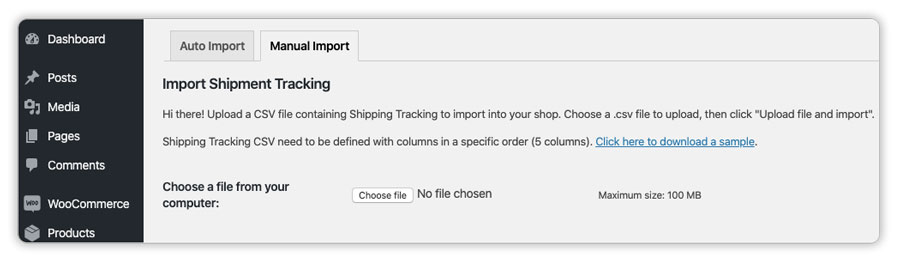
Set up lives inside your WooCommerce dashboard, no external accounts, no third-party platforms to juggle. You choose how tracking data comes in: manually per order, via CSV upload, or through an FTP/SFTP connection to your fulfilment system.

Most shipping software already exports a daily tracking CSV. Point the plugin at that file, set a schedule, and it handles the rest, matching numbers to orders, marking them complete, done.
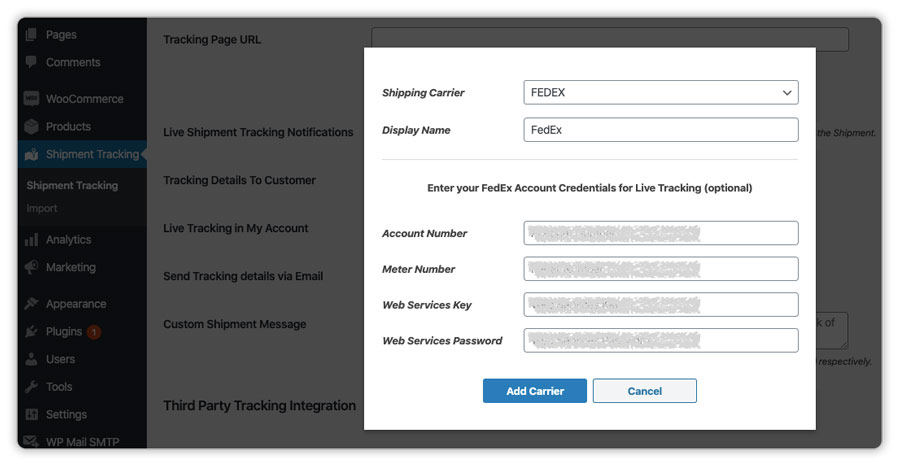
For carriers with API support, you add the credentials once. From that point, the plugin fetches live status automatically and emails customers at each checkpoint.
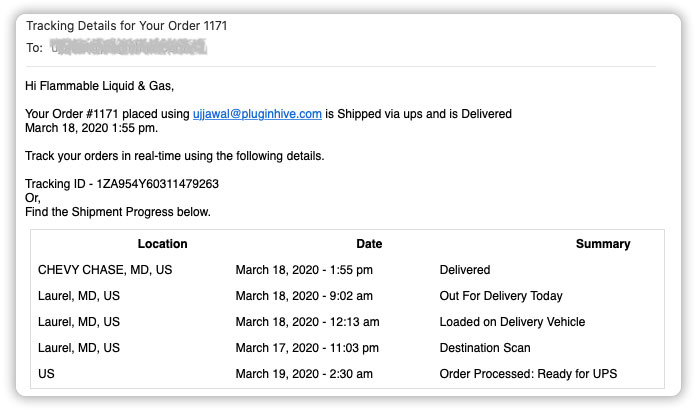
Those emails go out from your own mail server, your store’s email address, in the same format as every other WooCommerce email you send, not from a third-party service with someone else’s branding in the header.
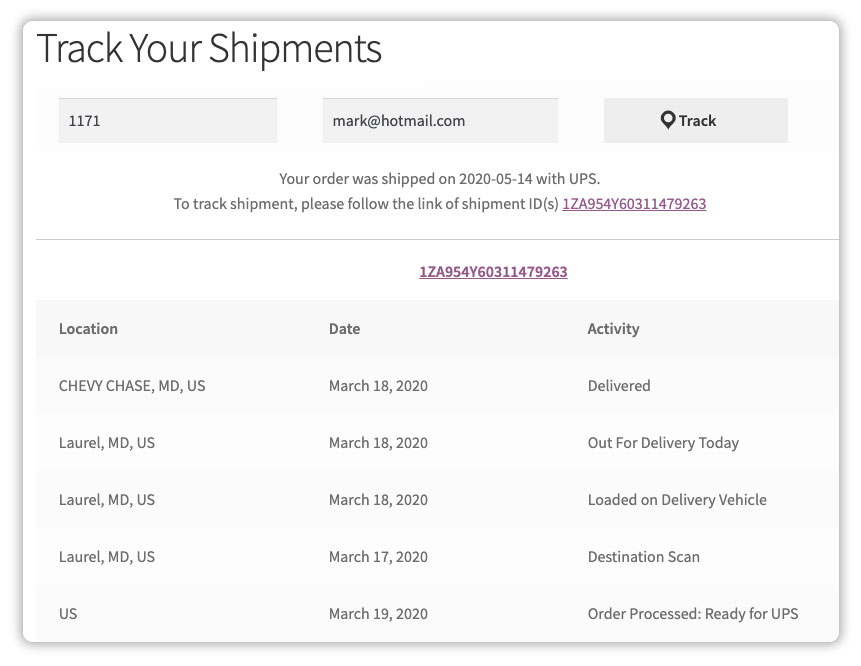
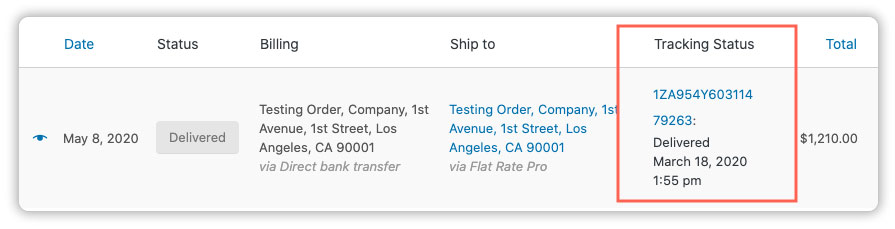
Customers who want to check their order status don’t need to leave your store. The plugin lets you add a Tracking Lookup Page directly to your site, where they can check the live status using their order number.
And from the admin side, a single dashboard shows where every in-transit shipment stands, without opening orders one by one to find out if something is delayed.
WooCommerce Shipment Tracking by Woo
Open an order, scroll to the tracking meta box, type in the number, pick the carrier, hit save. That’s genuinely all there is to it. The tracking link lands in the completion email automatically and shows up in the customer’s account. For a store shipping a handful of orders a day, this is perfectly fine.
The gaps show up when volume increases. Every order still needs to be touched individually — there’s no way to feed in tracking data from a spreadsheet or warehouse system. After the completion, the email goes out, and the plugin is done communicating with the customer. Any follow-up on delivery status means the customer either checks the carrier website themselves or emails you. And when they click the tracking link, they leave your store entirely and land on UPS.com or FedEx.com with no way back.
Support, Integrations & Scalability
Shipment Tracking Pro for WooCommerce
- Support: PluginHive’s team specialises in WooCommerce shipping solutions. Documentation covers every setup path in detail, and for anything more complex, the team jumps on a Zoom call and works through it with you. That hands-on approach is evident across verified reviews and contributes to a 98% customer satisfaction rating.
- Integrations: WPML compatible for multilingual stores. Works with any fulfilment or shipping software that exports CSV tracking data. Live API integrations cover UPS, FedEx, USPS, DHL Express, Canada Post, Australia Post, Aramex, Purolator, Sendle, Delhivery, Blue Dart, and more.
- Scalability: Whether you’re shipping 20 orders a week or 2,000, the workflow doesn’t change. Import runs on schedule, notifications go out automatically, and the admin dashboard keeps you across everything without extra effort.
WooCommerce Shipment Tracking by Woo
- Support: Handled through the WooCommerce ticket system. Recent Marketplace reviews flag difficulty reaching human support and slow response times, which likely contribute to the 3.1 out of 5 rating.
- Integrations: Connects with the WooCommerce Mobile App, a genuine advantage if you manage orders from your phone and just need to drop in a tracking number quickly.
- Scalability: Works well at low volume. There’s nothing in the plugin to help it scale, no import tools, no automation, no bulk actions. The manual process for order number 500 is identical to that of order number 1.
Pricing & Overall Value
| Plugin | Annual Price (Single Site) | Support | What’s Included |
|---|---|---|---|
| Shipment Tracking Pro for WooCommerce | $89/year | Dedicated support + Zoom assistance + 30-day money-back guarantee | Live carrier API, bulk import, automated notifications, branded tracking page, and admin dashboard |
| WooCommerce Shipment Tracking by Woo | $59/year | Woo ticket support + 30-day money-back guarantee | Manual tracking entry, link in completion email, My Account display |
Thirty dollars separates the two. That gap also separates manual-entry-only from live carrier data, automated customer notifications, bulk import, and an on-site tracking page. For a store processing any meaningful volume, the math on that is straightforward.
Final Verdict
The Woo plugin does exactly what it says: it adds a tracking number to an order and puts a link in front of the customer. If that’s all your store needs right now, it’s a clean, low-friction choice.
But if you want tracking data to flow in automatically from your fulfilment setup, customers to hear from you as their shipment moves without you lifting a finger, and the whole experience to stay inside your store, Shipment Tracking Pro for WooCommerce by PluginHive is built for exactly that.
For setup, refer to the Shipment Tracking Pro Setup Guide or reach out to the PluginHive Support team.
