



Party rental businesses often juggle bookings through phone calls, emails, and manual calendars, a setup that leads to missed orders and frustrated clients. Today’s customers expect to book rental items quickly, with clear availability and simple checkout.
With WooCommerce and the Bookings and Appointments for WooCommerce plugin, you can take bookings directly on your website, offer add-ons like setup, and manage everything from one dashboard. In this article, we’ll walk through what your customers expect, where most rental businesses fall short, and how you can deliver a better experience while reducing booking stress.
Table of Contents
- What Customers Expect (But Often Don’t Get)
- Transform Your Party Rental Operations with WooCommerce Bookings
- Real-World Example
- Best Practices for Party Rental Businesses
- Final Thoughts
- FAQ’s
What Customers Expect (But Often Don’t Get)
When someone’s planning an event, they’re looking for speed, clarity, and control. Here’s what they expect from a party rental website:
- Check real-time availability based on their event date
- Select rental duration and schedule delivery or pickup
- Add extras like setup services or decor without making another call
- Get immediate confirmation and clear instructions after booking
But in many rental businesses, the experience is still manual. Customers fill out request forms, wait for callbacks, or send emails that go unanswered for hours. This creates friction and sometimes causes them to book elsewhere.
The Real Difficulties of Manual Bookings
Here’s what typically happens when you handle bookings manually:
- Unclear availability: Customers can’t see what’s available online and need to call for every inquiry.
- Double bookings: Without real-time tracking, overlapping rentals happen due to calendar confusion or human error.
- Delayed responses: Bookings require back-and-forth calls or emails, frustrating clients and causing lost opportunities.
- Unclear pricing: Customers can’t view the full cost while booking and often need to contact you just to understand pricing.
- Missed upsells: Services like setup or decor often go unmentioned, leaving money on the table.
- Operational stress: Tracking all this manually eats up your time with admin work and leaves room for mistakes.
Manual booking methods don’t just slow things down; they lead to real losses in customer trust, time, and revenue.
Transform Your Party Rental Operations with WooCommerce Bookings
The Bookings and Appointments for WooCommerce plugin gives your party rental store everything it needs to handle bookings professionally. From showing real-time availability to customizing rental durations and upselling extras, your entire rental workflow can run directly through your website.
Note: To get started, make sure the Bookings plugin is installed and configured. Follow this guide to set it up properly.
- Configure Booking Durations, Availability & Add Buffer Time
You can allow full-day, multi-day, or custom rental blocks depending on your business model. Add buffer time before or after bookings to account for setup, delivery, or inspection. You can also restrict bookings on specific days, like public holidays or off-days.
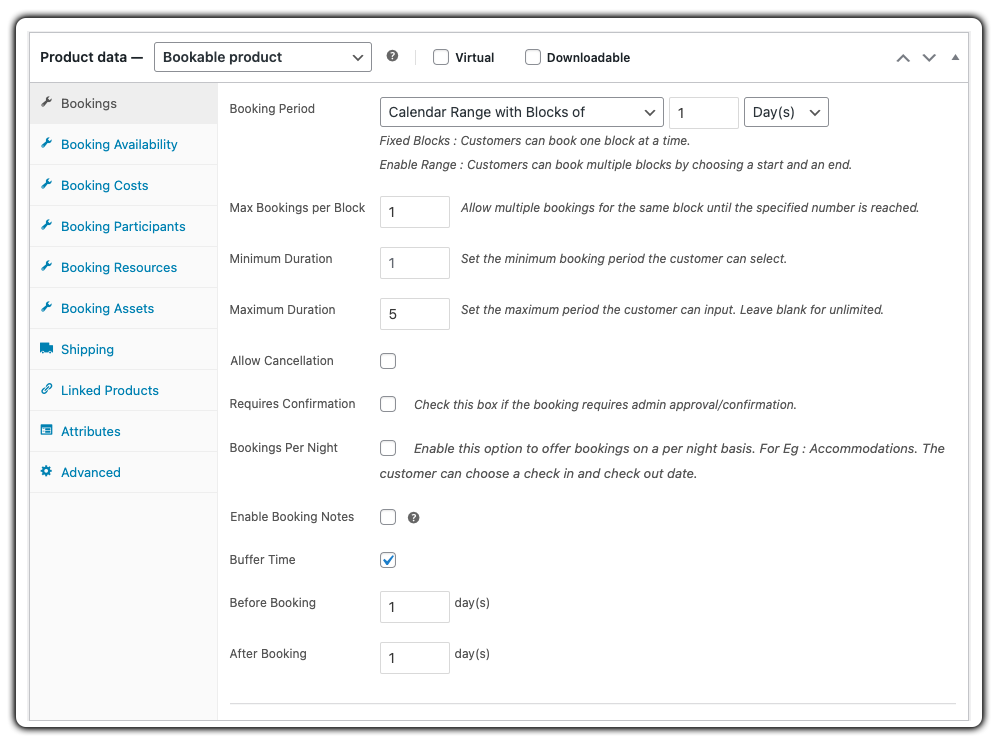
In this example, we take the case of renting a party tent. The rental duration is set with a minimum of 1 day and a maximum of 5 days, allowing flexibility based on event needs. With a 1-day buffer added before and after for preparation and cleanup.
Want to see how to set booking availability and add buffer time? Check out this quick guide on setting booking availability and buffer times.
- Set Booking Costs and Pricing Rules
Define your pricing by total rental days, weekdays vs. weekends, or custom rules. The price updates automatically based on what the customer selects, no need to calculate it manually or send quotes afterward.

In our example, the base price is $150/day, with a 10% discount applied for weekday bookings. The final amount updates in real time as the customer selects their rental dates.
Explore how to set flexible renting pricing using base rates, rental duration, and custom rules
- Add Resources & Upsell Extras
Add optional services like setup, lighting, and decor as resources that customers can include in their order. Once the customers select these extras pricing updates instantly.
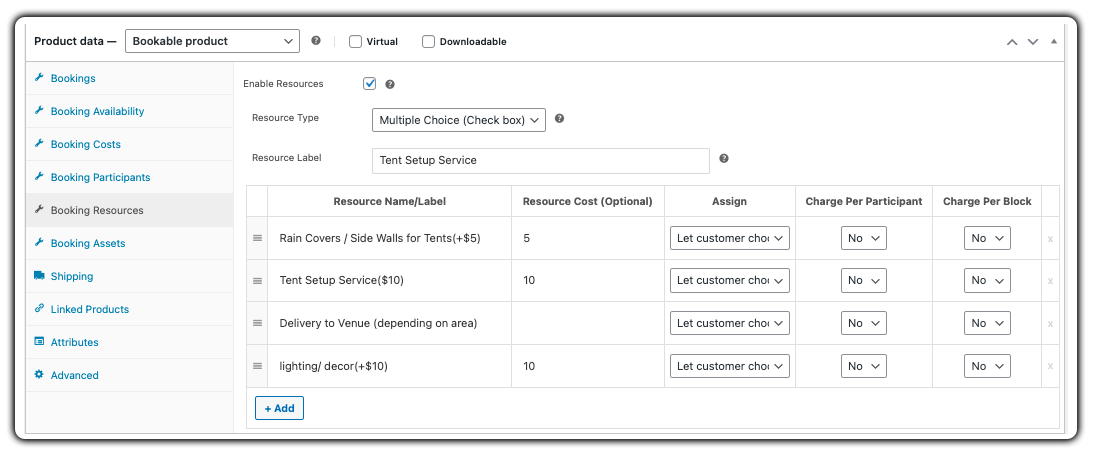
In our example, the customer can add “Tent Setup” for $15 and “Lighting/Decorations” for $10, and the plugin updates pricing instantly.
See how to use booking resources
This is exactly how the party rental booking experience appears on your website’s frontend: customers choose their dates, select extras, see prices update live, and complete their booking in minutes.

- Manage All Bookings from a Central Calendar Dashboard
All bookings appear in a centralized calendar view inside your WooCommerce dashboard. You can easily track customer info, payment status, booked products, and rental booking schedules all in one place.

Real-World Example: Managing Party Equipment Rentals During Peak Season
Let’s say you run a WooCommerce-based party rental business offering tents, chairs, tables, and event add-ons like lighting and sound systems. A customer books a 50-guest setup for a weekend wedding, including delivery and setup.
The Challenges You Will Face
- You rely on phone or email bookings, so availability isn’t visible to customers in real time.
- Weekends get overbooked because there’s no automated system to block dates once items are rented out.
- Delivery and setup are managed through separate spreadsheets, causing confusion and overlap.
- Customers often ask for quotes or updates, leading to frequent back-and-forth and lost time.
- Partial payments and deposits are tracked manually, increasing the chances of missed follow-ups.
How It Can Be Solved
With the Bookings and Appointments for WooCommerce Plugin by PluginHive, these challenges are easily managed:
- Your rental items are displayed as bookable products with real-time availability calendars. Customers can instantly select dates and times.
- Buffer time can be added between bookings for setup and pickup, ensuring enough turnaround between events.
- You can offer optional services like delivery, decor, or audio add-ons as extra resources during booking.
- Pricing updates dynamically based on duration or day of the week, so customers see exact costs upfront.
- Deposits can be collected through the PH Deposits for WooCommerce plugin, and all reservations are tracked in one centralized dashboard.
You stay in control of your inventory, customers get a faster and more transparent booking experience, and your weekends no longer involve scrambling to fix overbookings.
Best Practices for Party Rental Businesses
To get the most out of your online booking system and deliver a smooth customer experience, keep these tips in mind:
- Optimize Your Online Product Listings: Use clear product titles, detailed descriptions, and high-quality images. Let customers know exactly what’s included by clearly listing details like the number of chairs per set, available delivery options, and add-ons.
- Provide Partial Payments for Large Orders: Don’t lose clients over high upfront costs. Use the PH Deposits for WooCommerce plugin to let customers pay a portion now and the rest later, especially useful for large-scale events.
- Offer Popular Combos as Pre-Built Packages: Group commonly rented items like “Tent + 20 Chairs + Lighting” as bundled products. This simplifies the decision-making process for customers and helps increase order value.
- Leverage Data and Feedback: Monitor your most frequently booked items, gather customer reviews, and adjust your inventory or services based on real-world demand to leverage data and feedback effectively.
- Manage Logistics Efficiently: Use WooCommerce Shipping Plugins to simplify delivery, generate shipping labels, and sync with carriers like FedEx, UPS, DHL, or any carrier of your choice
Final Thoughts
Simplifying your party rental bookings is key to running a more efficient and profitable rental business. With the Bookings and Appointments for WooCommerce plugin by PluginHive, you can automate reservations, display real-time availability, upsell extras, and manage logistics seamlessly from your website.
Whether you’re renting out tents, chairs, or complete event packages, this solution helps you reduce manual work, eliminate booking conflicts, and deliver a smooth, professional customer experience every time.
Ready to upgrade your party rental workflow? Contact our support team for personalized assistance.
FAQs
1. Is WooCommerce suitable for running a party rental business online?
Absolutely. Although WooCommerce doesn’t support bookings natively, adding a dedicated rental plugin like Bookings and Appointments for WooCommerce transforms it into a full-featured rental platform with real-time calendars, pricing control, inventory tracking, and booking automation.
2. How can I prevent rentals from overlapping?
Set buffer time in the booking plugin, e.g., 1 day before and after the rental, to avoid schedule conflicts. This ensures setups and take-downs don’t overlap across days.
3. Can different pricing be applied for weekdays, weekends, or special dates?
Yes. The Bookings and Appointments for WooCommerce plugin allows you to set base rates, as well as cost blocks and conditional rules based on day of the week, date ranges, and resources such as setup services.
4. Can I rent out chairs or tables with quantity options on WooCommerce?
Yes. By using participants in the Bookings and Appointments for WooCommerce plugin, you can let customers choose how many items (e.g., 50 white chairs) during booking.
5. Can the Bookings and Appointments for WooCommerce plugin automatically prevent double bookings?
Absolutely. This Bookings plugin by pluginHive automatically blocks out dates once reserved and enforces buffer zones, effectively eliminating double-booking risk.
6. Can customers pay a deposit instead of the full rental cost upfront?
Yes. You can integrate the PH Deposits for WooCommerce plugin, letting customers pay a portion now and the balance later, ideal for larger bookings or high-ticket rentals.
