


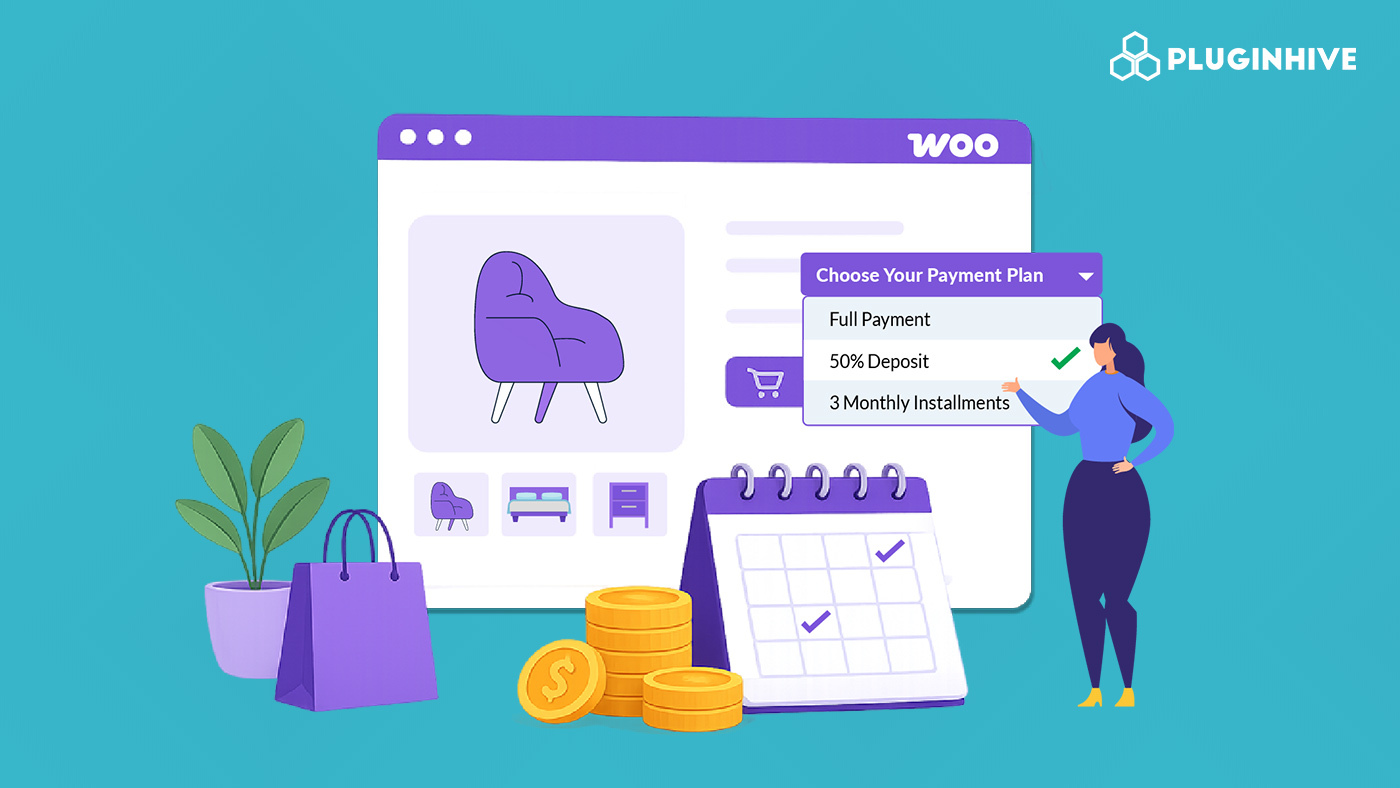
Many customers are willing to buy from your WooCommerce store, but hesitate when the full price has to be paid at once. A WooCommerce payment plan solves this by splitting the total order amount into multiple scheduled installments – weekly, monthly, or on a custom interval until the full amount is paid.
In this article, you will learn when payment plans make sense for your WooCommerce store, how to offer them, and the best practices to follow so they work well for both you and your customers.
Table of Contents
- What Is a WooCommerce Payment Plan?
- When Should You Offer WooCommerce Payment Plans?
- How to Offer Payment Plans in Your WooCommerce Store
- Best Practices for Offering WooCommerce Payment Plans
- Example Scenario
- Conclusion
- FAQs
What Is a WooCommerce Payment Plan?
A WooCommerce payment plan allows customers to pay for a product in multiple scheduled installments rather than paying the full amount at once. The total order value stays the same, only the payment timing changes.
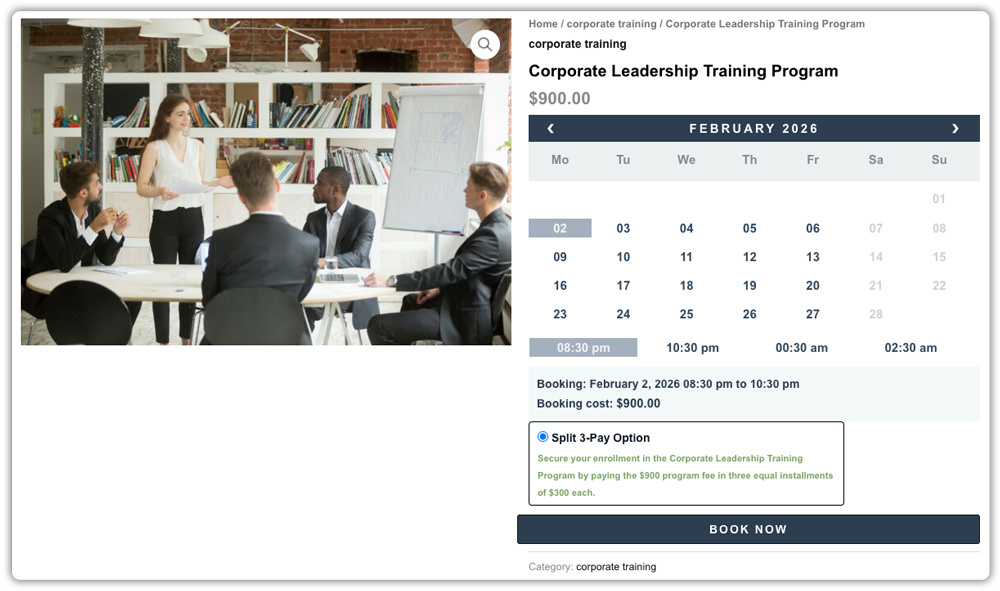
For example, a product/service worth $900 can be split into three monthly payments of $300 each. The customer pays the first installment at checkout and the remaining ones on the scheduled dates.
This is different from a deposit, where a partial amount is paid upfront, and the remaining balance is due later as a single payment. A payment plan divides the full amount across multiple payments over a defined period. If you are unsure which structure fits your business model better, you can explore our guide on WooCommerce Deposits vs. Payment Plans to help you choose.
WooCommerce does not include payment plans by default. The PH Deposits for WooCommerce plugin by PluginHive lets you create custom scheduled payment plans, assign them to specific products, automate payment reminders, and manage all installment orders from your WooCommerce dashboard.
When Should You Offer WooCommerce Payment Plans?
Not every product needs a payment plan. The right place to offer one is where the full price is the main reason customers hesitate. Understanding the top benefits of using deposits, such as improved cash flow and higher conversion rates, can help you decide where to implement them.
WooCommerce payment plans work best for:
- High-value products: Furniture, electronics, or luxury goods where paying the full amount at once feels like a stretch for most customers.
- Made-to-order or custom products: Where customers want to commit but need time to complete the full payment while the order is being prepared.
- Service-based offerings: Coaching programmes, photography packages, or any service delivered over time where staged payments feel natural. Learn more about offering installment payments for online courses.
- Bookings and appointments: Where customers prefer paying in installments tied to their booking timeline. You can learn more in Partial Payments for Your WooCommerce Bookings.
If your WooCommerce store mostly sells lower-priced products that ship immediately, payment plans add more complexity than value. Keep them focused on products where they genuinely remove a barrier to buying.
How to Offer Payment Plans in Your WooCommerce Store
Since WooCommerce does not support payment plans natively, the PH Deposits for WooCommerce plugin makes this possible. One of the biggest advantages is that it allows you to offer payment plans without needing a subscription system, keeping the transaction finite and simple for the customer. Here is how the process works once the plugin is active on your store.
Creating a Payment Plan
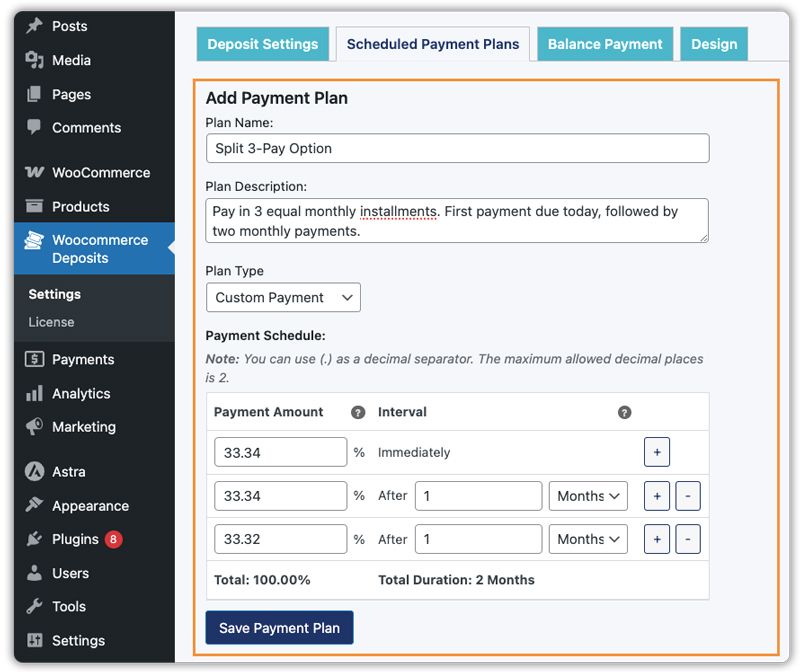
In the plugin settings, visit the Scheduled Payment Plans tab and create a new plan. Give it a name, add a description, and define the installment amounts and intervals – daily, weekly, or monthly. For example, a plan called “3 Monthly Payments” splits the total into three equal monthly installments.
Assigning the Plan to a Product
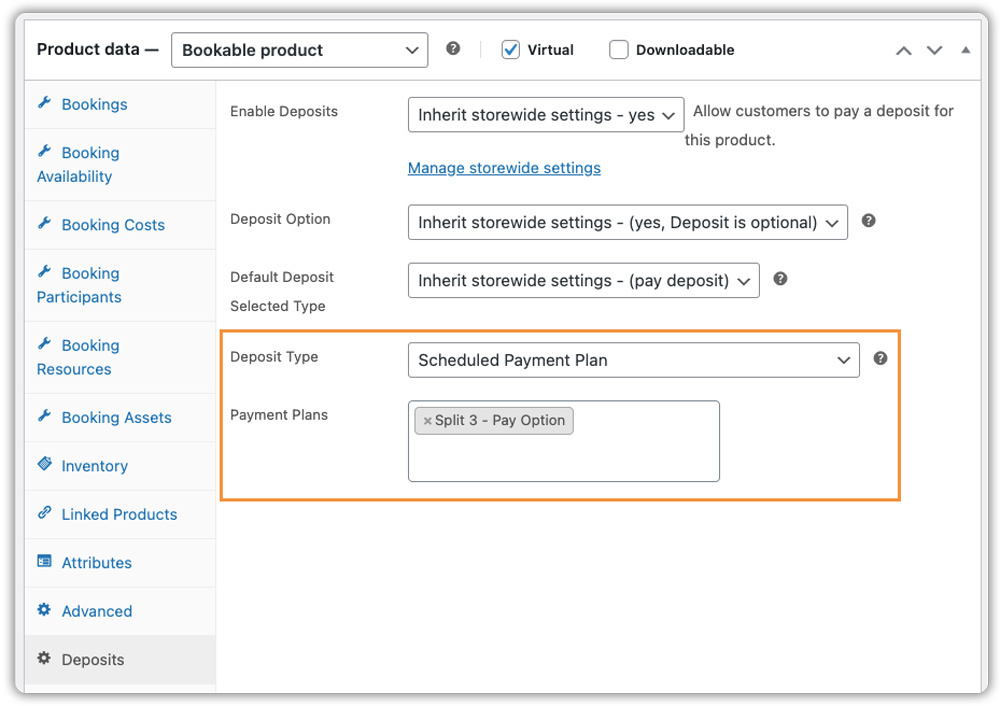
Once the plan is created, assign it to specific products/services from the product edit page. Different products/services in your WooCommerce store can have different payment plans, giving you full control over where installments apply.
What the Customer Sees
Customers see the installment breakdown directly on the product page before adding it to their cart.

At checkout, they complete the first installment and the remaining ones are automatically scheduled.

Managing Installment Orders
After an order is placed, the plugin creates scheduled payment invoices automatically. You can view all scheduled payments from within the order in your WooCommerce dashboard, and customers can manage their upcoming payments from their account page. This structured approach is also highly effective at preventing order cancellations because customers are more committed once they’ve started a payment schedule.
For a full walkthrough, refer to the PH Deposits plugin setup guide.
Best Practices for Offering WooCommerce Payment Plans
Offering a WooCommerce installment plan is straightforward. Making sure it works well for your store and your customers takes a bit more thought. These practices help you get it right.
- Match the schedule to the product price: A $1,200 product split into four monthly payments feels manageable. The same product split into twelve weekly ones can feel hard to keep track of. Match the frequency and number of installments to what actually suits the price point and your typical customer.
- Apply plans to specific products, not your entire store: Customers should only see installment options on products where it makes a real difference, not on everything in your WooCommerce store. Keeping plans targeted makes checkout cleaner and the option more meaningful.
- Always enable automated payment reminders: The plugin lets you schedule reminder emails a set number of days before each installment is due. Include a direct payment link in each one so customers can pay in one click. This is the most effective way to prevent missed payments. Read more in WooCommerce Payment Reminder Emails with Pay Now Link.
- Use clear plan names customers will understand: Name your plans something straightforward, “4 Weekly Payments” or “3 Monthly Installments of $150” is far clearer than a generic label. It builds confidence at checkout and makes the option easier to choose.
- Decide whether the plan is mandatory or optional per product: Optional plans let customers choose between paying in full or in installments – useful as a conversion tool on expensive products. Mandatory plans work better when you need payments on a fixed schedule before fulfillment begins. The plugin supports both at the product level.
- Define your refund and cancellation terms before going live. What happens if a customer completes two out of four payments and then wants to cancel? Have a clear answer and make it visible on the product page before the first plan order goes through.
Example Scenario: Boosting High-Ticket Sales with WooCommerce Payment Plans
Let’s say you run a WooCommerce store selling custom-made furniture priced between $800 and $3,000. Customers show genuine interest but frequently leave at checkout when they see the full price. Payment requests come in by email and are handled differently each time.
Here is what you are likely dealing with:
- High cart abandonment on your most popular products
- No standard process for handling installment requests
- Customers are unclear on what they owe and when
- No automated way to collect scheduled payments
What changes with a structured WooCommerce payment plan:
A four-installment monthly plan is created in the plugin and assigned to high-value products. The full schedule is visible on the product page before the customer adds it to their cart. The first installment is paid at checkout, and the rest are scheduled automatically. Reminder emails with a direct payment link go out before each due date. Every scheduled payment is tracked inside the WooCommerce dashboard – no manual follow-up needed.
Once this is in place, installment collection becomes a standard part of how your WooCommerce store operates, not something handled separately for every order.
Conclusion
WooCommerce payment plans are a practical way to make high-value products more accessible and help customers commit to purchases they might otherwise delay. Structuring them well with the right schedule, clear terms, and automated reminders is what makes them work for your store in the long run.
The PH Deposits for WooCommerce plugin gives you everything needed to offer installment plans properly. The setup guide walks through the full configuration, and the PluginHive Support Team is available if you need help along the way.
FAQs
- What is the difference between a WooCommerce payment plan and a deposit?
A deposit collects a partial amount upfront, with the remaining balance due later as a single payment. A WooCommerce payment plan splits the full order amount into multiple scheduled installments over time until the total is paid. - Do I need a subscription plugin for WooCommerce payment plans
No. You can offer these recurring-style installments without the complexity of a full subscription system using the PH Deposits for WooCommerce plugin. - Do payment gateway fees apply to each installment separately?
Yes. Each installment is processed as an individual transaction, so gateway fees apply every time. Factor this in when deciding which products to enable payment plans on, particularly for items with tighter margins.
