


Offering product customization in WooCommerce is a great way to make your products more personal and relevant to customers, whether you sell engraved items, personalized gifts, custom apparel, build-your-own kits, or custom services. When customers can choose exactly what they want, it creates a stronger connection to the product and often leads to higher conversions. But for customization to work well, the setup behind your product add-ons must be organized, intuitive, and reliable.
Many WooCommerce stores unintentionally make mistakes in their product customization setup. These mistakes often lead to confused customers, abandoned carts, inaccurate pricing, and avoidable support requests. This guide breaks down the most common mistakes store owners make and shows how you can improve your WooCommerce customization workflow to create a smoother, more reliable buying experience.
Table of Contents
- Not Choosing the Right WooCommerce Product Add-ons Plugin
- Poorly Structured WooCommerce Product Options (Too Many or Badly Organized)
- Using the Wrong Field Types for WooCommerce Customizations
- Not Charging Correctly for Customizations
- Not Validating Input Fields of WooCommerce Add-ons
- Conclusion
- FAQs
1. Not Choosing the Right WooCommerce Product Add-ons Plugin
WooCommerce doesn’t offer advanced customization features by default, so the plugin you use becomes the core of your setup. If it’s too limited, you’ll end up with missing fields, confusing layouts, or customers who can’t complete their customization properly.
For instance, let’s say you sell custom T-shirts. A customer wants to pick a size, choose a print style, and upload their artwork. If your plugin can’t handle file uploads or conditional options, the whole process breaks, leading to wrong details, back-and-forth emails, or lost orders.
Solution
Choose a plugin that can scale with your product customization needs. Look for features like:
- A wide range of field types (text, dropdowns, image swatches, uploads, etc.)
- Smooth conditional logic
- Clear, easy-to-manage pricing rules
- Compatibility with major WooCommerce themes
- A clean, user-friendly interface
- Reliable support and regular updates
A flexible plugin ensures customers move through customization smoothly. The PH WooCommerce Product Add-Ons plugin is designed around these essentials, giving store owners powerful features without unnecessary complexity.

2. Poorly Structured WooCommerce Product Options (Too Many or Badly Organized)
Offering customization is great, but when product pages become cluttered or the options are arranged in a confusing order, customers feel overwhelmed. Long forms, scattered fields, and too many choices shown at once can make the customization process tiring instead of enjoyable.
For example, if you sell custom mugs and display every colour, font style, clipart option, text box, and add-on altogether, the page becomes chaotic. Customers don’t know where to begin, and instead of a simple customization flow, the experience feels unclear and uninviting.
Solution
Keep customization simple, structured, and easy to follow. With the PH WooCommerce Product Add-Ons plugin, you can:
- Group related fields together
- Show only relevant options using conditional logic
- Arrange fields in a logical top-to-bottom sequence
- Use short, clear labels so customers know exactly what each choice means

A clean, organized layout helps customers focus, complete their selections confidently, and move through the product page without confusion.
3. Using the Wrong Field Types for WooCommerce Customizations
Not every customization needs the same type of input. When you use the wrong field type, the buying experience becomes confusing, and customers are more likely to make mistakes or leave the page.
For example, if you sell customizable pizzas, letting customers type their toppings in a text box can lead to errors or requests for toppings you don’t offer. Using a dropdown or checkbox selection makes the choices clear and ensures accurate orders. When the field type doesn’t match the requirement, you end up with incorrect details and unnecessary back-and-forth.
Solution
Use field types that actually fit the input you need. With the PH Product Add-Ons for WooCommerce plugin, this becomes easy because it offers all essential field types. You can use:
- Dropdowns or image/color swatches for predefined choices
- Text fields for short custom messages
- Textarea for longer messages or notes
- Radio buttons for single-choice selections
- Checkboxes for optional add-ons
- Multi-select boxes are used when customers need to pick multiple options
- File uploads when customers need to send images or documents
- Color picker when customers need to select a custom color
- Heading fields to organize sections
- Hidden fields for backend-only values or mandatory charges
- Telephone number fields for structured phone inputs
- Date fields for selecting specific dates
- Time fields for selecting appointment or delivery times

Using the right field type keeps customization simple, reduces errors, and helps customers navigate the product page with confidence.
Tip 1: If your customization includes date or time selections for appointments, deliveries, or session bookings, consider pairing PH Product Add-Ons for WooCommerce with the WooCommerce Bookings and Appointments plugin by PluginHive. It handles real-time availability, time slots, and scheduling, ensuring customers pick valid dates and times without conflicts
4. Not Charging Correctly for Customizations
Customizations often add extra time, materials, or effort, so pricing them correctly is important. But many WooCommerce store owners either undercharge, overcharge, or forget to charge for add-ons altogether. This leads to inconsistent pricing, reduced profit margins, and confusion for customers who don’t understand why certain options cost more.
For example, if you offer engraving on a product and don’t clearly show the additional cost upfront, customers may feel surprised at checkout. On the flip side, if every customization is priced the same, even when some require much more work, you end up losing revenue without realizing it.
Solution
Set clear, transparent pricing for every customization. The PH Product Add-Ons for WooCommerce plugin helps you manage this easily with features like:
- Fixed or percentage-based pricing
- Cost adjustments based on customer selections
- Extra charges for premium options
- Automatically updated totals as customers choose add-ons
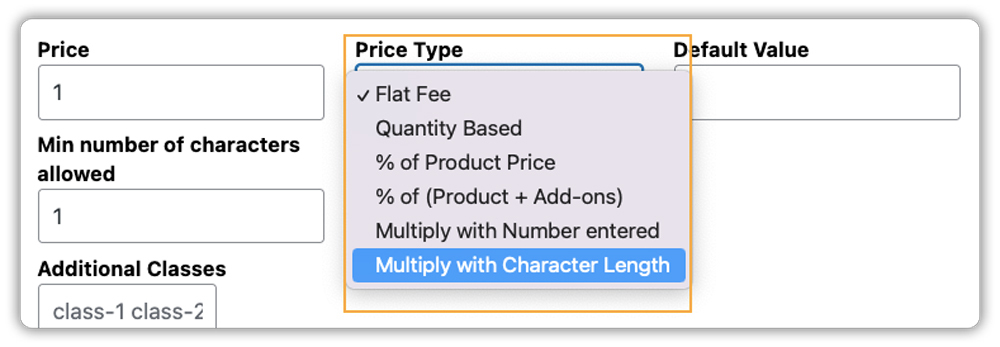
When pricing is accurate and clearly displayed, customers feel more confident in their purchase, and you ensure your store is fairly compensated for every customization offered.

Tip 2: When product customizations affect shipping or extra fees, ensure your shipping cost updates automatically. Plugins like PH Table Rate Shipping Pro for WooCommerce can calculate shipping based on weight, quantity, or product type, keeping checkout accurate.
5. Not Validating Input Fields of WooCommerce Add-ons
When you offer customization fields like text inputs, number fields, dates, or file uploads, it’s important to make sure customers enter the right information. But many WooCommerce store owners skip adding proper validation. As a result, customers submit incomplete, incorrect, or unusable details that delay order processing.
For example, a customer uploads a design for a Print-On-Demand (POD) T-shirt, but the image is too small or low resolution to print clearly. Without upload validation (minimum file size or allowed formats), the order gets submitted with unusable artwork, forcing you to follow up and request a new file.
Solution
Set clear validation rules for each field so customers provide accurate information the first time. The PH Product Add-Ons plugin makes this easy with features like:
- Required/optional field settings
- Character limits for text fields
- Min/max values for number inputs
- File type and size restrictions
- Display inline error messages so customers know what to correct before checkout.

With proper validation, customers submit accurate information, saving you time and reducing mistakes.
Conclusion
Avoiding common mistakes in WooCommerce product customization is essential for creating a smooth, enjoyable shopping experience. From choosing the right plugin to organizing options clearly, using appropriate field types, setting accurate pricing, and validating customer inputs, each step plays a critical role in reducing errors, improving conversions, and keeping customers satisfied. A well-structured customization setup ensures that customers can easily personalize products without confusion or frustration.
With the PH Product Add-Ons for WooCommerce plugin for WooCommerce, you don’t have to worry about these challenges. The PluginHive support team can help you set up your product customizations correctly, provide guidance on optimizing your add-ons, and ensure your store offers a seamless, accurate, and engaging customization experience for your customers.
FAQs
Q1: What Mistakes Should I Avoid While Handling Customized Products in WooCommerce?
One common mistake is overlooking how customized products are shipped. Personalized or add-on items often need careful handling, and without proper tracking, customers may feel uncertain. To avoid this, use WooCommerce Shipment Tracking Pro, which automatically adds tracking and notifications so customers can follow their orders from dispatch to delivery.
Q2: How can I avoid overwhelming customers with too many WooCommerce customization options?
Keep fields grouped, show only relevant options, and use short, clear labels. With PH Product Add-Ons for WooCommerce, you can use conditional logic to display the right options at the right time, keeping the page clean.
Q3: How do I ensure customers enter the correct information in WooCommerce add-on fields?
Always validate input fields by setting required fields, character limits, number ranges, and allowed file types. Inline prompts or error messages can guide customers before checkout.
Q4: Should I charge extra for customizations on WooCommerce?
Yes. Pricing customizations transparently helps customers understand the cost, reduces surprises at checkout, and ensure your store earns fair revenue for additional work or materials.
