


Shipping large or palletised products is challenging for WooCommerce stores. When items exceed UPS parcel limits, they shift to UPS freight, handled through TForce Freight, UPS’s LTL network for heavy and oversized shipments. Since freight involves strict size rules and added fees like liftgate or residential surcharges, WooCommerce stores need accurate rates at checkout.
This guide explains how UPS freight, pallets, oversize rules, and surcharges work, and how to set them up in WooCommerce using TForce Freight integration for efficient large-item shipping.
On This Page
- Understanding UPS Freight & Oversized Shipping in WooCommerce
- Cost Breakdown: Factors Affecting TForce Freight Pricing in WooCommerce
- Setting Up TForce Freight & Oversize Shipping in WooCommerce
- Real-World Scenario
- Conclusion
- FAQs
Understanding UPS Freight & Oversized Shipping in WooCommerce
UPS shipping for large items in WooCommerce falls into two categories: oversized parcel shipments and LTL freight shipments. WooCommerce stores must understand these rules to avoid surcharges, ensure accurate checkout rates, and select the right UPS service for each order.
UPS Oversized Packaging Rules (Parcel Shipments)
UPS parcel services accept packages only within specific weight and size limits. Exceeding these limits leads to surcharges or the shipment being reclassified as freight.
UPS Parcel Limits:
- Maximum weight: 150 lbs
- Maximum length: 108 inches
- Maximum length + girth: 165 inches
Large Package Surcharge Applies When:
- Length + girth exceeds 130 inches, or
- Length exceeds 96 inches
Over Maximum Limit (Must Go Freight):
- Weight over 150 lbs
- Length over 108 inches
- Length + girth over 165 inches
Packaging Requirements:
- No overhanging edges
- Secure internal cushioning
- Heavy-duty boxes for large or heavy items
If a shipment exceeds any of these thresholds, WooCommerce must switch from UPS Standard to TForce Freight.
Shipping Pallets with UPS (TForce Freight)
When shipments exceed parcel limits or must be palletised, they move into UPS LTL Freight, operated through TForce Freight. This service handles heavy, large, or consolidated orders safely and efficiently.
Typical Weight Range:
- Suitable for shipments over 150 lbs and up to several thousand pounds.
Pallet Requirements:
- Items must be stacked evenly with no overhang
- Use shrink wrap or banding for stability
- Add cardboard sheets between layers
- Pallet must be forklift-compatible and structurally stable
Incorrect pallet preparation can result in delays, extra accessorial fees, or rejected shipments. For WooCommerce stores dealing with large or multi-box orders, palletised freight ensures safer handling, fewer damages, and predictable freight costs.
Cost Breakdown: Factors Affecting TForce Freight Pricing in WooCommerce
When WooCommerce store owners use TForce Freight for LTL (less-than-truckload), the total freight cost isn’t just about weight. Several factors combine to determine the final price. Here’s a breakdown:
1. Line Haul Charges (Base Freight Rate)
- This is the fundamental cost component, which depends on:
- Distance / Origin-Destination Zones, i.e., how far the freight travels.
- Weight of the Shipment: More weight → higher line-haul.
- Freight Class / Density: Shipments are rated by NMFC freight class, which considers the density (weight per volume), handling needs, and liability. Lower-density or “bulky but light” freight can be more expensive per pound.
- On TForce’s rate-estimate tool, you must enter the freight class along with dimensions and weight to get an accurate quote.
2. Classification / Tariff Type
- TForce uses different tariff systems: for example, class-based and density-based shipments.
- The freight class (NMFC class) affects which tariff applies and thereby impacts the rate.
- Correct classification/density is essential: using the wrong class can lead to re-rating or accessorial re-charges later.
3. Fuel Surcharge
- TForce applies a fuel surcharge on the line-haul charge.
- For class-based shipments, the current LTL fuel surcharge is 32.3% (as per TForce’s tariff).
- Density-based shipments also have a fuel surcharge, based on their specific tariff definitions.
- This surcharge is dynamic and depends on fuel market conditions; it’s applied on top of line-haul.
4. Accessorial Charges
These are extra services beyond standard pickup/delivery, and they can significantly add to costs:
- Liftgate Service: If a liftgate is needed at pickup or delivery, this incurs a charge.
- Inside Pickup / Delivery: Moving the freight inside a building is costlier than curbside.
- Residential Pickup / Delivery: Home deliveries often cost more because of handling complexity.
- Limited Access / Appointment: If the delivery location has limited access (e.g., no dock) or requires an appointment, an extra cost applies.
- Extreme Length: Very long freight (e.g., long machinery) likely has a surcharge.
- All these options are available in TForce’s rate-estimate tool.
Understanding these pricing factors helps WooCommerce stores avoid unexpected charges and keep heavy-item shipping efficient and profitable.
Setting Up TForce Freight & Oversized Shipping in WooCommerce
The PH TForce Freight Shipping Plugin for WooCommerce makes it easy to ship large or heavy products using reliable LTL freight services.
For detailed setup instructions, visit the PluginHive TForce Freight Setup Guide.
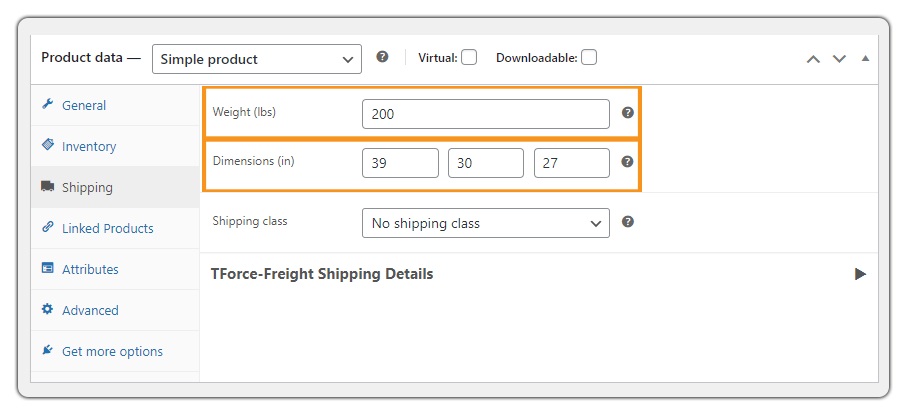
Before enabling freight rates, ensure your products are eligible, typically anything over 150 lbs or with dimensions beyond standard UPS parcel limits.
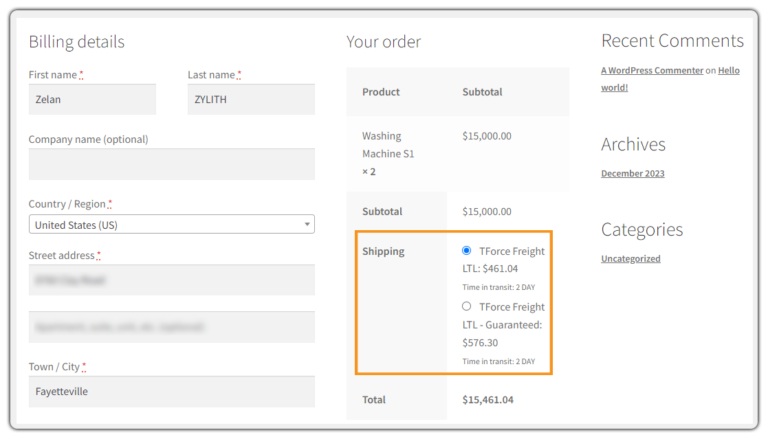
Once the plugin is configured, select the TForce Freight services you want to offer, and these services will appear at checkout for qualifying shipments.

The plugin will fetch real-time TForce Freight rates based on weight, product type, dimensions, freight class, and delivery destination.
You can then generate and print TForce Freight labels directly from the WooCommerce Orders page without leaving your store dashboard.

After generating a label, schedule a TForce pickup through the plugin and provide customers with automated, real-time tracking updates.
Real-World Example: WooCommerce Store Shipping Heavy & Oversized Products
A US-based home-gym equipment retailer ships oversized items such as treadmills, weight racks, and multi-gym machines. Many products exceed UPS parcel limits, and the team previously booked freight manually through the TForce website. They calculated rates separately, emailed customers for surcharges, created labels off-platform, and arranged pickups by phone, all of which caused delays and frequent pricing errors.
After integrating the PH TForce Freight Shipping Plugin for WooCommerce, their workflow became fully automated:
- Accurate TForce Freight rates appear at checkout based on product weight, dimensions, freight class, and delivery location.
- Freight labels are generated directly from the WooCommerce Orders page, with no need to log in to the TForce portal.
- Scheduled pickups can be requested inside WooCommerce immediately after label generation.
- Tracking numbers are automatically added to the order and emailed to customers.
- Accessorial fees (liftgate, residential delivery, limited access) are applied automatically, eliminating manual quoting errors.
With everything managed inside WooCommerce, the store reduced freight processing time by nearly 50%. By automating heavy-item shipping with TForce Freight, the retailer now handles oversized orders as easily as standard parcel shipments.
To learn more about gym equipment shipping, visit: Ship Gym and Fitness Equipment on WooCommerce.
Conclusion
Shipping heavy, oversized, or palletised products in WooCommerce can be challenging, but it becomes manageable when you follow the right freight practices. Understanding carrier limits, using proper packaging or pallets helps prevent delays and unexpected costs. By setting up accurate freight calculations, preparing shipments correctly, stores can offer a smooth and reliable delivery experience, even for large or bulky items.
If you need help configuring freight or oversize shipping in WooCommerce, feel free to reach out: Pluginhive Support.
FAQs
- How can I enable freight, parcel, and international shipping methods together in WooCommerce?
WooCommerce doesn’t support real-time carrier rates natively, so you need a solution that can fetch live charges, handle labels, and automate tracking. You can achieve this using WooCommerce Shipping Services.
- How do I show accurate FedEx freight rates and print labels directly from WooCommerce?
FedEx requires a real-time connection with your FedEx account in WooCommerce to calculate rates based on weight, dimensions. To enable full FedEx automation, you can use the WooCommerce FedEx Shipping Plugin with Print Label.
- Can I offer ODFL LTL freight rates for oversized or palletised items?
Yes, but you need an integration that does. A dedicated solution like the ODFL Shipping Plugin for WooCommerce handles this seamlessly.
- How can I show estimated delivery dates at checkout for different carriers?
Delivery timelines vary based on carrier transit days, holidays, and cut-off times. To calculate these automatically, you need a tool like the Estimated Delivery Date Plugin for WooCommerce, which maps all these rules.
- How do I send customers automatic tracking updates for all shipments?
Manually adding tracking numbers is time-consuming and leads to delays. An automated tracking system ensures customers get updates instantly. You can set this up using WooCommerce Shipment Tracking Pro.
