Managing a successful online business isn’t just about offering great services; it’s also about how smoothly you handle bookings. Whether you manage appointments, rentals, classes, or events, the right WooCommerce bookings plugin can save time, reduce errors, and give your customers a seamless experience. That’s where the Bookings and Appointments for WooCommerce plugin by PluginHive comes in, helping store owners easily schedule and manage bookings.
While most businesses use the basic features, many powerful booking settings often go unnoticed. These hidden features can make a big difference in efficiency and customer satisfaction. In this article, we’ll explore five useful booking features, from booking notes and export booking data to search widgets, email previews, and Google Calendar syncs, that you’re probably not using but definitely should.
Table of Contents
- Mandatory Notes for Bookings
- Export Booking Data
- Booking Search Widget
- Email Preview Before Sending
- Google Calendar Sync
- Conclusion
- FAQs
Before we begin, ensure that the Bookings and Appointments for WooCommerce plugin is installed and properly configured on your store. If you haven’t set it up yet, check out the setup guide to get started.
Once your plugin is ready, let’s explore five powerful booking settings that can simplify scheduling, reduce errors, and create a smoother experience for your customers.
Booking Notes: Small Step, Big Impact
Customers don’t always think to share important details unless you ask, and missing those details can easily confuse them later. That’s where mandatory booking notes come in. With this setting in the Bookings and Appointments for WooCommerce plugin, customers can add special instructions or requirements while booking, making sure you have everything you need to deliver a smooth and personalized experience.

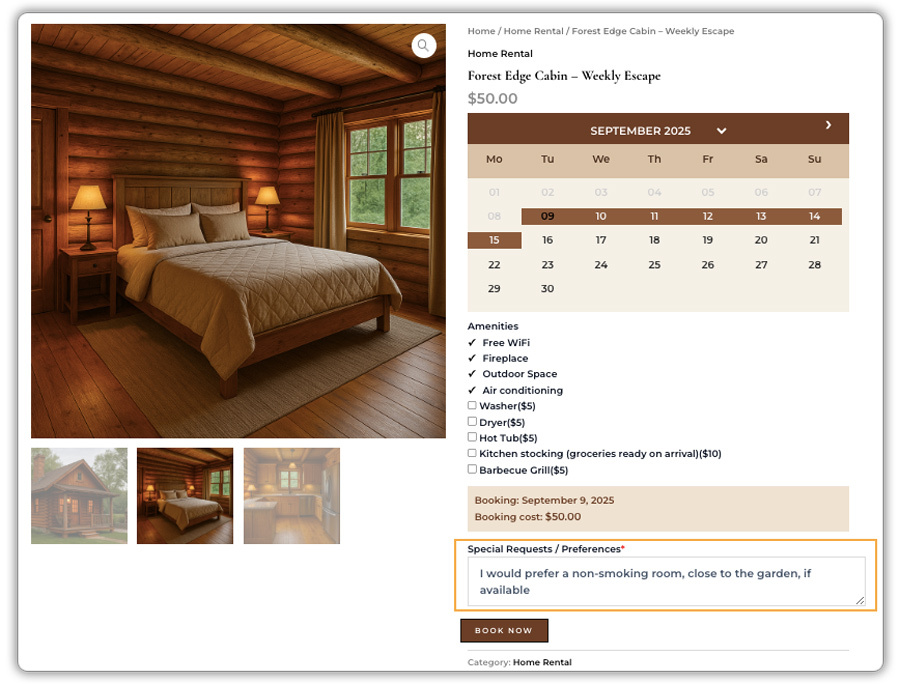
Examples:
- A patient adds medical history notes while booking a clinic appointment.
- A guest mentions room preferences when booking a homestay.
- A pet owner lists special care instructions while booking a grooming session.
- A guest attending an event specifies dietary preferences (vegetarian, vegan, allergies).
Benefits for your business
- Prevents miscommunication by capturing key details in advance.
- Saves time for both staff and customers.
- Improves booking management with complete, accurate information.
- Enhances personalisation, creating a better customer experience.
Tip: If you want to take this further, you can pair booking notes with the PH Product Add-Ons for WooCommerce. It lets you add extra fields like dropdowns, checkboxes, or file uploads, perfect for collecting more detailed information beyond simple notes. Together, these two plugins give you complete control over the booking and personalisation process.
Export Booking Data: Keep Everything Organised
Managing bookings becomes much easier when you have all the details in one place. The Bookings and Appointments for WooCommerce plugin lets you quickly export booking data to a CSV file, so you can review, share, or analyse it whenever needed. Instead of digging through your dashboard every time, you’ll have a simple file with all the information at your fingertips.
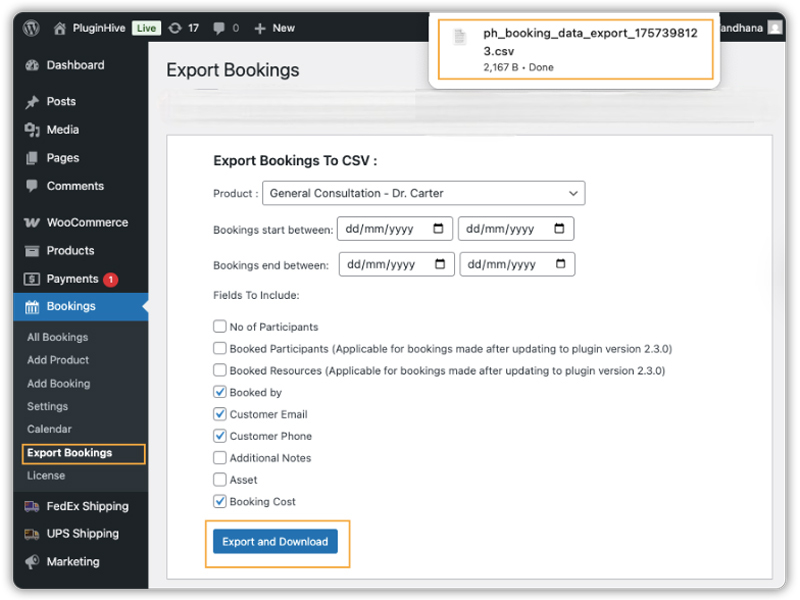
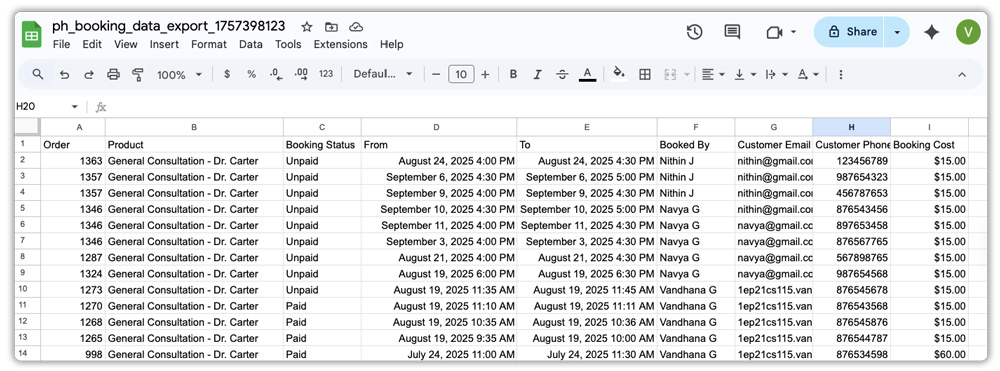
Examples of how businesses use it:
- A clinic exports daily bookings to share the appointment schedule with doctors.
- A fitness centre generates weekly reports to plan class instructors.
- A hotel downloads monthly booking data to analyse occupancy and revenue trends.
- An event organiser keeps a backup of all bookings for record-keeping.
Benefits for your business:
- Saves time by avoiding manual data entry.
- Makes reporting and analysis straightforward.
- Easy to share booking details with staff or partners.
- Helps in better planning and resource management.
You can read the full guide on how to use this feature here: Export WooCommerce Bookings and Appointments to CSV
Booking Search Widget: Smarter Way to Find Availability
Manually checking multiple products or services for availability can be frustrating for customers. The WooCommerce Bookings Search Availability Widget allows them to quickly search for bookable products by selecting “From” and “To” dates and filtering by assets or participants, showing instant results for a faster, smoother booking experience.
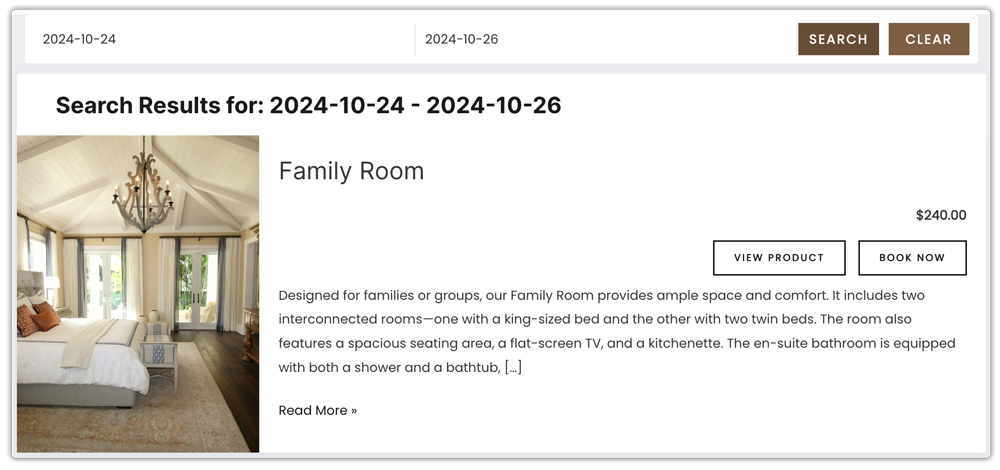
Examples:
- A hotel website lets guests search all rooms available between check-in and check-out dates.
- A fitness centre allows users to search for classes available in a given week.
- An event venue shows available halls filtered by participant capacity.
- A rental business helps customers find equipment available for specific time slots.
Benefits for your business:
- Saves time for customers since they do not need to check each product individually.
- Boosts conversions by allowing customers to book immediately after finding availability.
- Highly customizable with filters for dates, times, participants, or assets.
- Flexible booking flow lets customers either book directly from search results or customise their booking before checkout.
For a complete setup guide, check out the guide on how to display the WooCommerce Bookings Search Availability Widget.
Booking Emails Preview: Ensure Accuracy Before Sending
Professional emails help build customer trust and ensure a smooth booking experience. With the Bookings and Appointments for WooCommerce plugin, you can preview and customise booking-related emails using the Preview E-mails for WooCommerce plugin. This lets you test the layout, style, and placeholders before they reach your customers, giving you full control over the communication.
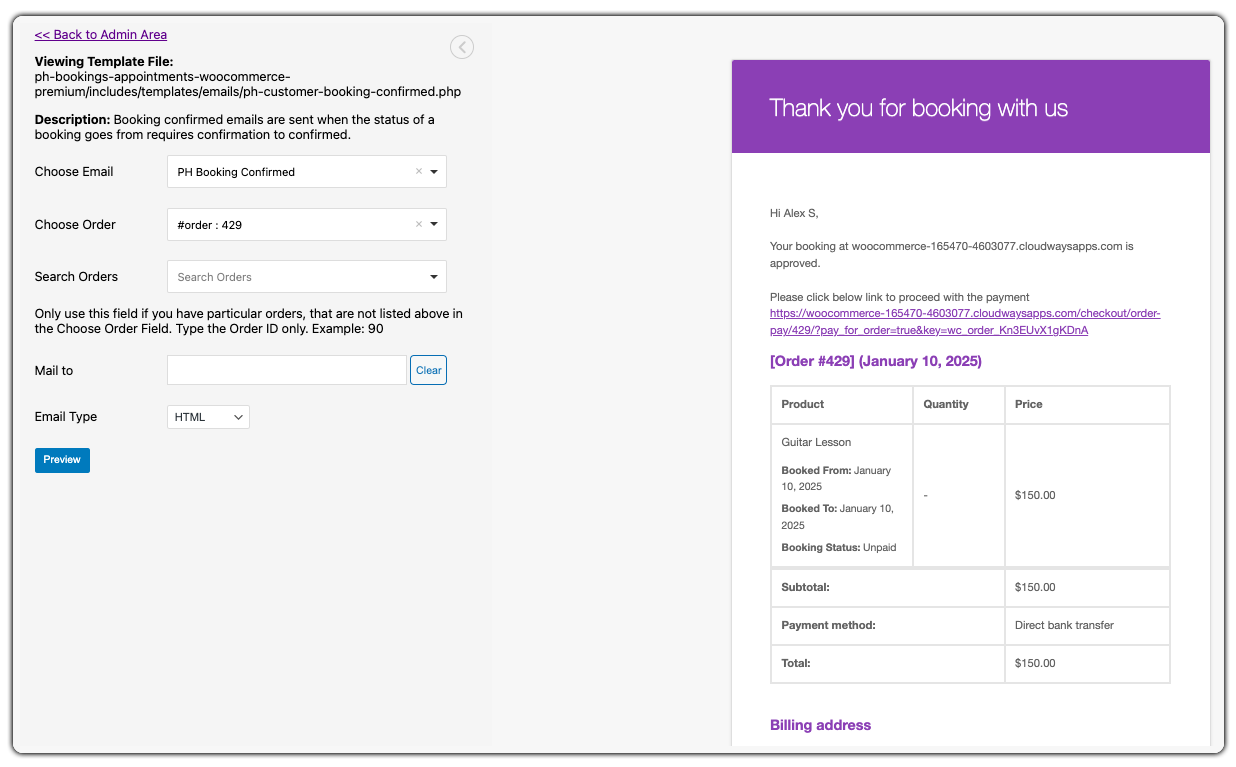
Examples:
- A clinic customises the booking remainder template to include directions to the clinic and previews it for formatting.
- A hotel updates the cancellation email to add refund policies and checks the template before saving.
- A spa personalises thank-you emails with loyalty discount codes and ensures placeholders render properly.
Benefits for your business:
- Consistency in communication by aligning email templates with your brand tone and design.
- Personalised touch uses placeholders like [CUSTOMER_NAME] or [BOOKING_DETAILS] to keep emails customer-specific.
- Error prevention by checking formatting and content before you go live.
- Better customer experience through well-structured bookings reminders, confirmations, and follow-ups that look professional.
Previewing and customising your booking email templates ensures every automated message looks professional, maintains your brand voice, and provides a reliable experience for your customers.
For more details, please refer to the Preview Emails for WooCommerce Plugin
Google Calendar Sync: Keep Your Bookings in One Place
The Bookings and Appointments for WooCommerce plugin allows you to synchronise your bookings with Google Calendar, enabling seamless management of appointments and events. This integration ensures that bookings are updated in real time, helping you stay organised and avoid scheduling conflicts.
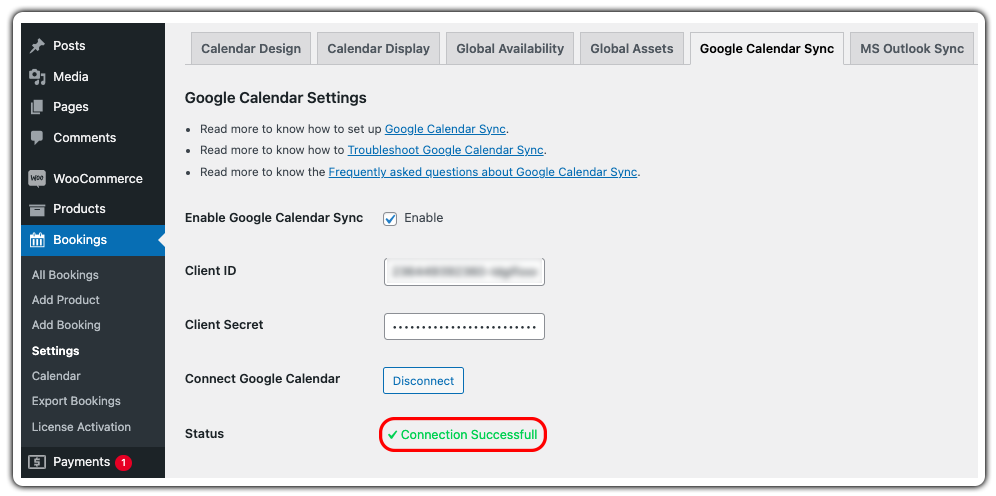
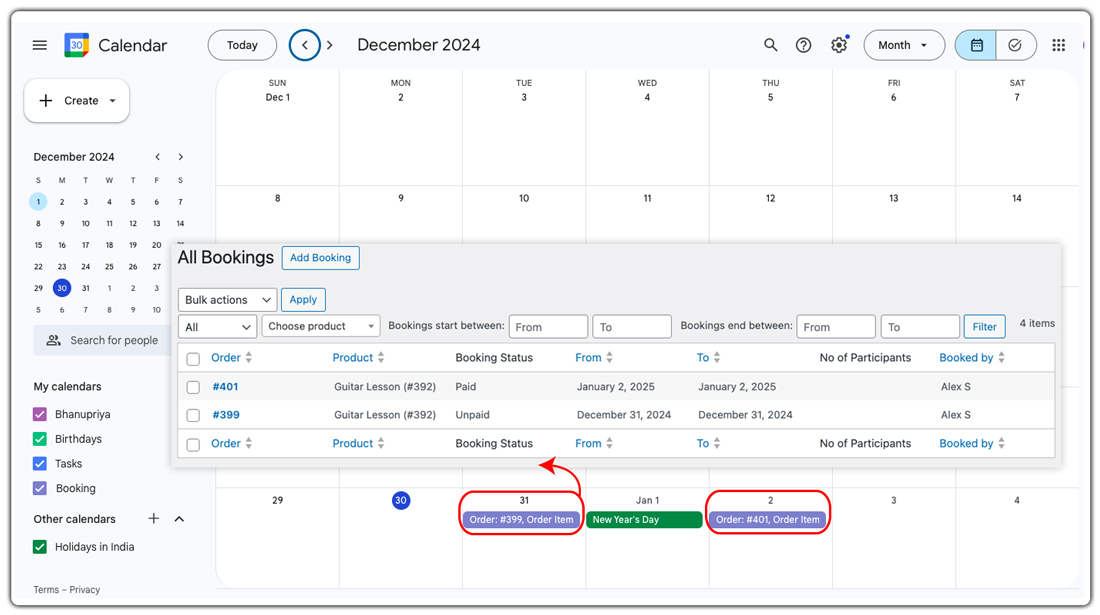
Examples:
- A salon owner syncs client appointments with Google Calendar to track daily schedules on the go.
- A vacation rental manager adds reservations to Google Calendar to monitor occupancy more easily.
- An online coach integrates session bookings with their personal calendar to avoid overlapping events.
Benefits for your business:
- Centralised scheduling by combining personal and customer bookings in one place.
- Avoids double bookings with real-time updates.
- Saves time by reducing manual entry and cross-checking schedules.
- Enhances organisation and planning for your bookings.
- Improves customer experience with accurate, up-to-date booking management.
Syncing bookings with Google Calendar helps you manage your schedule efficiently, reduce errors, and provide a seamless booking experience for your customers.
For a complete setup guide, check out detailed documentation on Sync WooCommerce Bookings with Google Calendar and 2-Way Google Calendar Sync.
Tip: Zoom Integration for Virtual Appointments
You can easily offer virtual appointments by integrating Zoom with your Bookings and Appointments for WooCommerce plugin. When a customer books an online session, a Zoom meeting link is automatically created and shared, streamlining your scheduling and making virtual appointments hassle-free.
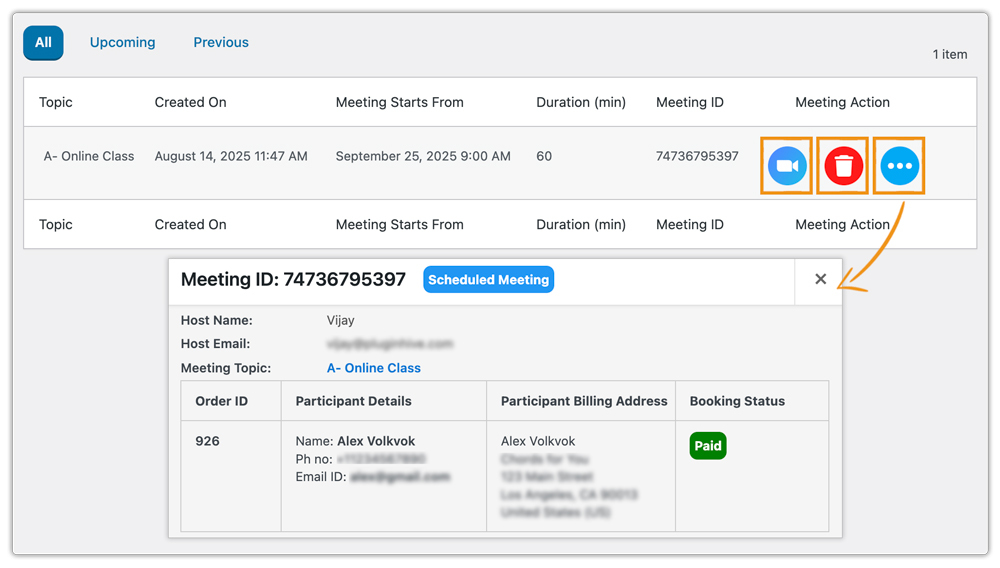
To learn how to set up Zoom integration step-by-step, check out the Zoom Meetings with WooCommerce Bookings Plugin guide.
Conclusion
Efficient booking management is essential for providing a seamless experience to your WooCommerce customers while keeping your operations organised. Features like mandatory booking notes, exporting booking data, the search availability widget, email template customisation, and Google Calendar sync help store owners save time, reduce errors, and improve overall customer satisfaction.
All of these features are available in the Bookings and Appointments for WooCommerce plugin. Need help setting up these features? Reach out to PluginHive Support for expert guidance and support.
Frequently Asked Questions
- Can I sync my WooCommerce bookings with Google Calendar?
Yes, the Bookings and Appointments for WooCommerce plugin supports two-way Google Calendar synchronisation, allowing seamless integration between your store and calendar. - Is it possible to customise email templates before sending them to customers?
Yes, you can preview and customise email templates, including booking confirmations, cancellations, reminders, and follow-ups, before they reach your customers. - Can I use Product Add-Ons alongside mandatory booking notes?
Yes, you can pair booking notes with PH Product Add-Ons for WooCommerce to add dropdowns, checkboxes, or file upload fields, gathering more detailed information from customers. - Can the Bookings Search Availability Widget be customised and styled?
Yes, the widget is highly customizable and can be styled to match your site’s theme, including buttons, filters, and labels. - Can I schedule automated exports of booking data?
Not directly, the plugin supports manual exports only. However, you can use third-party WooCommerce automation tools or integrations to schedule regular exports for reporting purposes.